

A lead fills out a form late in the evening. By the time a salesperson finds the notification the next morning, the prospect may already be speaking with another provider. For teams handling incoming inquiries, the practical challenge is getting each lead to an available person with enough context to send a useful reply.
Mobile CRM apps for instant lead response help teams receive lead alerts, access contact details, and follow up from a phone. The tools below differ in their lead-source connections, messaging options, and pipeline features. Compare the complete workflow from form submission to first response, including assignment, notifications, and any channel-specific setup.
|
TL;DR
|
What is a mobile CRM for instant lead response?
A mobile CRM for lead response puts contact records, alerts, and follow-up actions within reach on a phone. Depending on the product and integrations, incoming leads can trigger notifications and assignments, while calls, texts, email, or WhatsApp provide ways to respond. Test the delay and available actions with your own sources and devices.
This category is used most heavily by real estate agents, insurance brokers, local service businesses, and any sales team buying leads from paid ad platforms, anywhere a lead is likely to keep shopping if they don’t hear back quickly. The tools differ mainly in scope: some, like Follow Up Boss and Lone Wolf Relationships, are built specifically for real estate with deep source integrations. Others, like Bigin, Salesmate, Freshsales, and Kylas, are general-purpose CRMs that happen to do mobile lead alerts well. A few, including Privyr, DripZEN, and Salesgem, are purpose-built around the instant-response moment itself and stay lighter on downstream deal management.
Choose a focused lead-response tool when fast first contact and simple follow-up are your main needs. If your sales process also requires detailed deal stages, forecasting, or industry-specific workflows, compare those capabilities before committing to a platform.
What makes a mobile CRM worth using?
Response speed depends on the whole workflow. Test lead capture, assignment, push notifications, and the reply action together. A fast notification is useful only when an available rep can act on it with the right information.
Messaging support should match your customers’ habits. Check whether calls, SMS, email, or WhatsApp operate inside the CRM or through another app. Confirm what is recorded in the contact history and which features work on mobile.
Follow-up needs clear ownership. Reminders and sequences can help teams revisit unanswered inquiries. Check how a reply stops or changes an automated sequence, and how another rep takes over a conversation.
Language support needs its own check. A translated app interface is different from translating a prospect’s messages, approved reply templates, or sales documents. Check the CRM’s existing language features and add a separate translation workflow where needed.
Mobile CRM comparison
| Tool | Best for | Key messaging channel | Pricing model |
|---|---|---|---|
| Follow Up Boss | Real estate teams needing deep lead-source integration | Call, text, email | Tiered subscription |
| Bigin by Zoho | Small businesses wanting WhatsApp built in | WhatsApp, email, phone | Tiered editions |
| Salesmate | Mid-market teams wanting CRM + calling + marketing | Calling, text, chat | Tiered subscription |
| Privyr | Mobile-first teams needing instant WhatsApp response + automated follow-ups | WhatsApp, SMS, call | Freemium |
| DripZEN | Facebook Lead Ads-driven teams | SMS, call | Free / $29/mo Pro |
| Salesgem | Small teams on Facebook, Instagram, WhatsApp | Free trial / tiered | |
| Kylas Sales CRM | Growing teams wanting flat per-org pricing | WhatsApp, SMS, call, email | Per-organization |
| Freshsales | Teams wanting AI lead scoring | Email, call, chat | Tiered subscription |
| Lone Wolf Relationships | Former LionDesk users in real estate | Call, text, email | Check current product and add-on pricing |
Mobile CRM apps for lead response
Follow Up Boss
Best for: Real estate teams and brokerages that need a centralized system for fast lead follow-up
Follow Up Boss brings real estate leads and contacts into one workspace, with tools for calling, texting, email, lead assignment, and team reporting. Its integrations cover lead sources, websites, and other brokerage tools. Check mobile access and the communication features included in your chosen plan, particularly any calling add-ons.
Pricing: Tiered subscriptions; check included users and calling costs for the selected plan.
Verdict: Consider Follow Up Boss when real estate lead follow-up and team accountability are central requirements.

Bigin by Zoho
Best for: Small businesses wanting pipeline management and WhatsApp communication.
Bigin by Zoho combines contact and pipeline management with activities and supported communication channels, including WhatsApp. Its mobile apps let teams access customer information while away from a desk. Compare edition-specific automation, messaging, and AI features rather than assuming every capability is available in the entry plan.
Pricing: Free and paid editions are available. Check the current regional pricing, user limits, and required messaging features.
Verdict: A strong fit for small teams that want WhatsApp built into the pipeline without enterprise CRM pricing.
Salesmate
Best for: Mid-market teams that want CRM, calling, and marketing automation in one unified platform
Salesmate combines CRM, calling, text messaging, and automation tools. Teams can manage pipelines and follow-up sequences alongside communication records, with mobile access for work away from a desk. Check which AI features are included and budget separately for any phone, SMS, or AI usage charges.
Pricing: Tiered subscriptions with a 15-day free trial. Calling, messaging, and AI usage may add to the subscription.
Verdict: A solid pick for teams that want to consolidate multiple sales tools into one subscription.
Privyr
Best for: Mobile-first sales teams and individual agents who need to respond to leads within seconds of them arriving
Privyr is built around one job: getting a new lead onto a salesperson’s phone the instant it arrives, then making it fast to respond over WhatsApp, SMS, or a call with an auto-personalized message. Leads flowing in from Facebook, TikTok, LinkedIn, Google Ads, or a website form get assigned automatically, tracked through an activity timeline, and can be bulk re-engaged in multi-step sequences when a pipeline goes cold. Dashboards break down response time and performance by rep, so a sales manager can see exactly how quickly leads are actually being contacted.
Notable strength: Instant mobile lead alerts paired with native WhatsApp Business automations like follow-up sequences
Known limitation: Built for lead response and engagement rather than full deal or pipeline management further down the sales cycle
Scale: Used by businesses across 125 countries for lead engagement
Pricing: Freemium, with paid tiers for teams that need bulk re-engagement and advanced reporting
Verdict: The fastest way to send new leads an initial response and automated follow-ups, especially for salespeople working leads over WhatsApp.
DripZEN
Best for: Facebook Lead Ads-driven teams that want leads synced instantly with zero manual entry
DripZEN connects Facebook Lead Ads with a mobile lead-management workflow, including push notifications, assignments, templates, and a visual pipeline. It also supports importing existing leads from CSV. It is worth testing when Facebook forms supply most of your incoming inquiries and you want a phone-based follow-up process.
Pricing: Free plan available; Pro is listed at $29 per month. Confirm the current limits before subscribing.
Verdict: A lean, purpose-built option for teams whose leads come almost entirely from Facebook forms.
Prepare replies your leads can understand
Use Lara Translate to translate approved follow-up templates and sales information, then review the wording before sending it through your CRM or messaging app.
Salesgem
Best for: Small teams capturing leads from Facebook, Instagram, and WhatsApp that want a lightweight shared pipeline
Salesgem brings leads from supported Meta and website channels into a shared pipeline, with WhatsApp messaging, tasks, and reporting. Its workflow helps teams assign ownership and track follow-up. Test the mobile experience, notification settings, and WhatsApp setup with your own lead sources before rollout.
Pricing: A 14-day free trial is available without a credit card. Check the current paid plans and included messaging capabilities.
Verdict: A lightweight option when a team just needs leads captured and messaged fast, without a heavier CRM underneath.
Kylas Sales CRM
Best for: Growing businesses that want unlimited users on a flat, per-organization price
Kylas Sales CRM offers contact, lead, and deal management with unlimited-user plans. Its communication and integration options support teams coordinating follow-up across a growing organization. Confirm the included channels, mobile functionality, record limits, and add-ons for your chosen plan.
Pricing: Free and paid per-organization plans are available, including unlimited users. The Elevate plan offers a 7-day trial; limits and add-ons vary by plan.
Verdict: Worth a look for a growing team that wants to avoid CRM costs scaling directly with headcount.
Freshsales
Best for: Teams that want AI-assisted lead prioritization inside a broader Freshworks toolset
Freshsales combines contact and deal management with communication tools and mobile access. Freddy AI capabilities vary by plan and can support tasks such as scoring, insights, and content assistance. Compare the standalone CRM with Freshsales Suite if you also need marketing functionality.
Pricing: Tiered plans with a 21-day trial. Check the selected plan’s AI features and any additional usage charges.
Verdict: A capable choice for teams that want AI lead scoring without leaving a familiar, general-purpose CRM.

Lone Wolf Relationships
Best for: Real estate teams that already use Lone Wolf’s back-office tools and want a connected CRM
Lone Wolf Relationships offers contact management and follow-up tools for real estate professionals within the Lone Wolf ecosystem. It also provides a migration path for LionDesk contacts. Confirm current mobile access, notification behavior, and communication options directly; texting is offered through an EZ Texting integration add-on.
Pricing: Confirm current subscription and add-on pricing with Lone Wolf rather than relying on historical LionDesk rates.
Verdict: Consider Lone Wolf Relationships when its real estate ecosystem fits your business, after checking mobile lead alerts and the features you need.
How to choose a mobile CRM
Map your lead sources first. A tool built around Facebook Lead Ads sync won’t help much if most of your leads come from a website form or a phone line. Match the CRM to where your leads actually originate.
Decide how much CRM you actually need beyond response. If your sales cycle is short, a lean, purpose-built tool may be all you need. If deals move through several stages over weeks, look at platforms with fuller pipeline and reporting features.
Check messaging channels against where your leads reply. Verify mobile support, conversation history, channel setup, and usage costs for the channels your team uses.
Compare pricing against expected team size and usage. Per-seat plans scale with licensed users, while organization-level plans may include unlimited users but still have record, feature, or usage limits.
Plan for language as well as channel. Check existing translation features, then prepare reviewed reply templates and documents for the languages your leads use.
Connecting a mobile CRM workflow with Lara Translate
Lara Translate can support multilingual follow-up by translating selected messages, approved reply templates, and sales documents. For a simple workflow, copy the text into Lara Translate, review the translation, and send it through your usual CRM or messaging app.
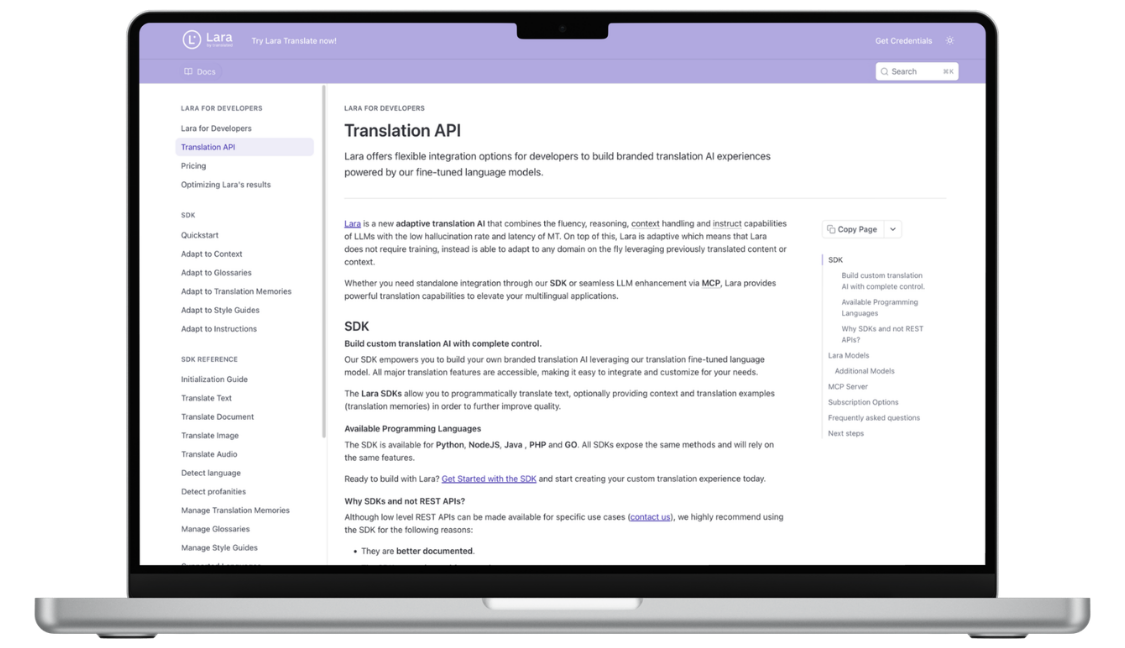
Teams building a custom connection can use the Lara Translate API where the CRM or automation system supports suitable APIs. Use glossaries for consistent product terminology, preserve contact details and placeholders, and keep the original message available. This requires setup and does not imply a native integration or automatic translation inside WhatsApp, SMS, or the CRMs listed here.
Keep multilingual follow-up clear and consistent
Prepare templates and supporting documents with Lara Translate across 200+ languages, with a review step before your team sends them to prospects.
Conclusion
The right mobile CRM for instant lead response comes down to how specialized your pipeline is and how far past that first reply you need the tool to go. Match it to your lead sources and messaging channels first, then layer in language support if your leads don’t all speak the same one.
Have a valuable tool, resource, or insight that could enhance one of our articles?
Send us an email at press@laratranslate.com
We’ll be happy to review it and consider it for inclusion to enrich our content for our readers! ✍️
Frequently asked questions
What should a mobile CRM for lead response include?
Look for reliable lead-source connections, mobile notifications, clear assignment, contact history, and convenient follow-up actions. Test the complete path from form submission to reply on the phones your team uses.
How quickly should a sales team respond to a new lead?
Respond as promptly as your staffing and customer expectations allow, with a useful reply rather than only an acknowledgement. Set a response target, measure actual performance by source and time of day, and define who handles inquiries outside normal hours.
Do I need WhatsApp integration in my CRM?
You need it when WhatsApp is an important channel for your prospects and team. Check whether the integration provides shared history, templates, automation, and mobile access, or simply opens WhatsApp from a contact record. Compare setup and usage costs as well.
How do per-seat and per-organization CRM prices differ?
Per-seat pricing charges for each licensed user. Organization-level pricing may include a larger or unlimited team, but records, messaging, automation, or add-ons can still affect the total. Compare both models using your expected headcount and activity.
Can a lead-response CRM manage a longer sales cycle?
It can if its deal stages, tasks, reporting, and collaboration features cover your process. A tool optimized for first contact may need to connect to a fuller sales system. Test the handoff from initial reply to later stages before choosing.
How can sales teams respond to leads in different languages?
Check the language and translation features already available in the CRM. Where needed, translate selected messages, templates, and documents separately, review the result, and send it through the usual channel. A localized app interface alone does not translate conversations.
This article is about
- Matching mobile CRM tools to lead sources and response workflows.
- Testing notifications, assignment, and mobile follow-up actions together.
- Choosing messaging features that fit how prospects communicate.
- Balancing fast first contact with longer-term pipeline management.
- Comparing user, organization, and communication usage costs.
- Preparing reviewed multilingual replies and sales documents.
Useful links
- Best AI-Native CRM Platforms in 2026
- AI Translation for Customer Support: A Practical Workflow Guide
- Lara Translate document translation
- Lara Translate API
This article was produced by the Lara Translate content team. Lara Translate is an AI translation platform built by Translated, with more than 25 years of professional translation experience. Sales teams can use Lara Translate to translate follow-up templates, messages, and supporting documents, across 200+ languages and 60+ file formats.