

Proposal and quote software helps sales teams create, share, track, and sign commercial documents in a structured workflow. Instead of relying only on emailed attachments, teams can use engagement signals, reusable content, and approval controls to manage follow-up and keep offers consistent.
This guide compares proposal and quote software for sales teams in 2026 by document creation, pricing logic, buyer engagement, and team governance. For international deals, it also explains how to add a translation workflow so buyers can review the offer in their preferred language.
|
TL;DR
|
What makes proposal software worth using?
Start with the workflow you need to improve: creating content, configuring prices, managing approvals, or understanding buyer engagement. Platforms differ in how they combine these functions and which features are included in each plan.
Interactive web-page proposals and traditional document builders solve the visibility problem differently. PandaDoc and Proposify build more traditional documents with strong tracking layered on top. Qwilr transforms proposals into dynamic web pages with embedded video and real-time engagement tracking, while GetAccept adds personalized video messaging directly into a shared deal room rather than a standalone document.
Match design flexibility and governance to your workflow. Approval rules and locked content can help teams standardize offers, while smaller teams may prioritize reusable templates and straightforward editing.
Pricing complexity should shape the shortlist. Configure, price, quote (CPQ) tools help manage product configurations, pricing rules, and approvals. Test your actual bundles, discounts, and renewal scenarios before selecting a platform.
Document creation and engagement tracking are separate requirements. If your proposal templates already work well, evaluate whether the missing capability is buyer analytics, approval control, or pricing automation before replacing the entire workflow.
For international deals, plan how translated proposal content will be reviewed and maintained. Check product terminology, amounts, currencies, dates, and scope against the approved source before sending a new language version.
Proposal and quote software compared
| Platform | Best for | Model | Starting price |
|---|---|---|---|
| PandaDoc | Full document operations (proposals, contracts, payments) | Document operations platform | Free plan; Starter $19/seat/month annually |
| Proposify | Governance and standardization for larger sales teams | Traditional builder + approvals | Basic $19; Team $41/user/month annually |
| DealHub | Guided selling and pricing discipline (CPQ-led) | CPQ + proposal platform | Custom, contact sales |
| Better Proposals | Simple, modern proposal creation with e-signature | Lightweight builder | From $13/user/month annually |
| Qwilr | Interactive, web-page-native proposals with strong analytics | Interactive proposal builder | From $35/user/month annually |
| Nusii | Lightweight proposals for freelancers and small agencies | Simple builder | $29-129/month |
| GetAccept | Video-personalized proposals and deal rooms | Interactive + video/deal room | $25/user/month |
| Loopio | Enterprise RFP response automation | RFP-specific automation | Custom, contact sales |
| QuoteWerks | Quote and proposal automation for sales teams | Quote-focused automation | From $45.83/concurrent user/month annually |
| ClientPoint | Digital proposal and presentation for client engagement | Presentation-style proposals | Custom, contact sales |
Prices are in US dollars. Billing periods, minimum seats, document limits, and add-ons affect the total cost.
PandaDoc
Best for: Teams wanting proposals, contracts, and payment collection unified in one document operations workflow
PandaDoc functions as a full document operations platform, covering proposals, quotes, contracts, and NDAs together with e-signature and payment collection in a single editor and approval flow.
Notable strength: Combines document creation, e-signature, approval tools, and payment collection within one platform
Pricing: Free plan includes five created documents per month. Starter is $19 per seat per month and Business is $49 per seat per month, billed annually. Enterprise is custom; some features require add-ons or usage credits.
Evaluation point: Check which plan includes the CRM integrations, approval tools, and automation your workflow requires.
Verdict: Consider PandaDoc when you want one platform to centralize proposals, contracts, and payment collection together.

Proposify
Best for: Larger sales teams wanting governance, standardization, and pipeline visibility
Proposify emphasizes design quality and brand consistency alongside multi-step approval workflows, built for sales orgs that need every proposal to look and read consistently as headcount grows.
Notable strength: Approval workflows and content controls for keeping proposals consistent across a sales team
Pricing: Basic is $19 per user per month billed annually, or $29 monthly. Team is $41 per user per month annually, or $49 billed quarterly. Business is custom-quoted. Confirm send limits and overage terms.
Evaluation point: Confirm the tier needed for approval workflows, permissions, and premium integrations.
Verdict: Consider Proposify when you want to standardize proposal creation and monitor team performance across a larger sales org.
DealHub
Best for: Teams needing guided selling and pricing discipline for complex quoting
DealHub combines CPQ with proposal and deal-room workflows, supporting complex product configurations and pricing rules. Its CRM connectors include Salesforce, Microsoft Dynamics, and HubSpot, with additional integrations available for the sales workflow.
Notable strength: Pricing and configuration rules connected to document generation and the buyer-facing DealRoom
Pricing: Custom, contact sales
Evaluation point: Test representative configurations, discounts, and approval paths to judge the implementation effort.
Verdict: Consider DealHub when pricing complexity, not document design, is the real bottleneck.
Better Proposals
Best for: Teams wanting simple, modern proposal creation with e-signature at a lower cost
Better Proposals combines proposal templates, interactive pricing tables, signatures, payment integrations, and engagement notifications. Higher plans add CRM connections, content locking, and approval controls, so the required tier depends on the workflow.
Notable strength: Reusable proposal content and signing tools, with additional team controls on higher plans
Pricing: Annual plans are $13 per user per month for Starter, $21 for Premium, and $42 for Enterprise. Monthly billing is $19, $29, and $49 respectively.
Known limitation: Starter allows one user and 10 document sends per month. Check send limits and required integrations before choosing a plan.
Verdict: Consider Better Proposals when your proposals already read well and you just need fast, no-frills building and signing.
Qwilr
Best for: Sales teams wanting interactive, web-page-native proposals with strong buyer analytics
Qwilr creates interactive web-based proposals with embedded media, pricing tables, e-signature, payments, and buyer analytics. The web-page format lets teams present an offer as an interactive buying experience, with CRM and automation options varying by plan.
Notable strength: Interactive proposal pages that combine buyer analytics with pricing, acceptance, and payment features
Pricing: Starter begins at $35 per user per month billed annually. Growth begins at $55 with a five-user minimum, and Scale at $75 with a ten-user minimum, both billed annually.
Evaluation point: Test whether your buyers and internal reviewers are comfortable with the web-page workflow and its export options.
Verdict: Consider Qwilr when interactive proposal pages and engagement tracking are central to your sales process.
Make your next proposal easier to review across languages
Translate approved proposal content with Lara Translate, then check terminology, pricing details, and scope before sharing it with the buyer.
Nusii
Best for: Freelancers and small agencies wanting lightweight, no-hassle proposal creation
Nusii focuses on browser-based, drag-and-drop proposal templates without enterprise-grade administrative complexity, aimed at small teams that want to send a polished proposal without a lengthy setup.
Notable strength: Simple, template-driven proposal building with no enterprise configuration overhead
Pricing: Freelancer is $29/month (1 user), Agency is $49/month (3 users), Business is $129/month (5 users)
Known limitation: Plans have active-proposal limits. Agency and Business support additional paid users, so compare both proposal volume and team size.
Verdict: Consider Nusii when you want clean, easy proposals without enterprise overhead.
GetAccept
Best for: Sales teams wanting video-personalized proposals and a shared deal room for multi-stakeholder deals
GetAccept combines video messaging, e-signature, and a branded digital sales room where buyers and sellers collaborate on proposals, mutual action plans, and contract review in one shared space, with AI-assisted content personalization and native CRM integrations for Salesforce and HubSpot.
Notable strength: Video-personalized proposals and a shared, trackable deal room built into the same workflow, not added as a separate tool
Pricing: Starts at $25/user/month (eSign), $49/user/month with a 5-user minimum (Professional), Enterprise custom
Known limitation: Proposal and deal-room content is written and sent in whatever language the sales rep uses. GetAccept’s own multi-language support covers its marketing site, not automatic translation of proposal or deal-room content
Scale: More than 5,000 customers, with a 4.6/5 rating across 1,267+ G2 reviews
Verdict: Consider GetAccept when video personalization and a shared, trackable deal room matter more than a lightweight document builder.
Loopio
Best for: Enterprise teams responding to formal RFPs, security questionnaires, and due-diligence questionnaires at scale
Loopio specializes specifically in RFP response automation, a genuinely different workflow from standard sales proposals, with a searchable content library that surfaces past answers to cut response time on repeat questions.
Notable strength: Content-library search that resurfaces previously written answers instead of rewriting them each time
Pricing: Custom, contact sales
Known limitation: Purpose-built for structured RFP and questionnaire response, not general sales proposals or quotes
Verdict: Consider Loopio when your team responds to formal RFPs regularly.
QuoteWerks
Best for: Sales teams whose proposals are primarily quote-driven
QuoteWerks focuses on quote and proposal automation specifically, suited to sales teams whose documents center primarily on pricing and line items, with concurrent-user licensing that charges only for simultaneous users rather than every named user.
Notable strength: Concurrent-user pricing model, so cost tracks actual simultaneous usage rather than total headcount
Pricing: QuoteWerks Web Essential starts at $45.83 per concurrent user per month billed annually, or $50 with monthly billing.
Known limitation: Built around quoting and CPQ workflows more than narrative proposal design
Verdict: Consider QuoteWerks when your core need is accurate, automated quoting more than narrative proposal design.
ClientPoint
Best for: Teams wanting a presentation-style digital proposal and client engagement platform, from solo operators to enterprise teams
ClientPoint brings proposals, presentations, contracts, meetings, and supporting assets into a branded digital sales room. RelationshipAI adds engagement insights and alerts to help sales teams plan follow-up around buyer activity.
Notable strength: A shared buyer workspace combining proposal content, multimedia, collaboration, and engagement insights
Pricing: Contact sales for a quote based on your requirements.
Evaluation point: Confirm the included proposal, collaboration, analytics, and onboarding capabilities when comparing quotes.
Verdict: Consider ClientPoint when you want a presentation-style client experience alongside standard proposal functionality.

How to choose the right proposal software
Decide whether your gap is building or tracking. Prioritize a platform’s tracking and analytics depth over its design tools if proposals already read well.
Match platform governance to your team size. Smaller teams are well served by Better Proposals or Nusii; larger teams benefit more from Proposify’s or DealHub’s approval workflows.
Confirm the platform handles your actual pricing complexity. A CPQ-led platform like DealHub or a quote-focused tool like QuoteWerks is worth the added structure for complex pricing logic.
Consider whether you need a proposal builder or a full document operations platform. PandaDoc’s broader scope may serve better if contracts and billing need to live alongside proposals, while GetAccept’s deal room suits complex, multi-stakeholder sales.
For international deals, confirm the proposal’s content will be genuinely understood. Document translation tools like Lara Translate can help sales teams translate proposal content accurately for international buyers.
Connecting Lara Translate to your proposal workflow
Lara Translate can help teams prepare translated versions of approved proposal text, quotes, and supporting documents. Export a supported document, translate it with a glossary for product and service terminology, and review the result against the source before adding it back to the proposal or deal-room workflow. Check figures, currencies, dates, scope, and formatting as part of that review.
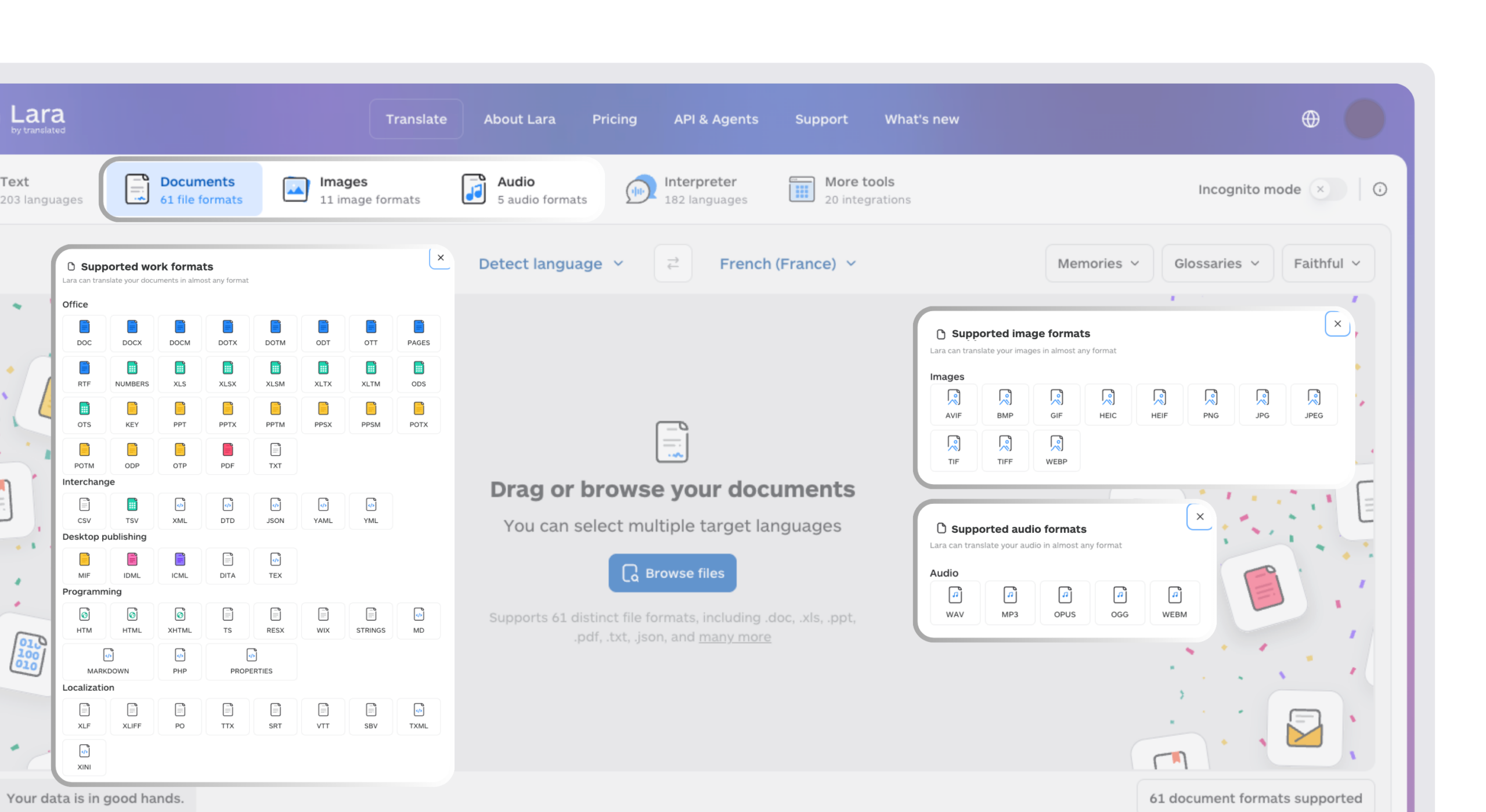
For recurring translations, a technical team can connect the Lara Translate document translation API to a document-generation workflow. This is a custom integration approach; connector availability and export options depend on the proposal platform. Keep the translated document linked to its approved source version so later revisions stay aligned.
Bring consistent terminology to international proposals
Use Lara Translate to prepare multilingual proposal content, with a shared glossary and a review step before it reaches the buyer.
Conclusion
The strongest proposal platform for most sales teams in 2026 is still the one that matches your actual bottleneck: PandaDoc or DealHub for scope and pricing complexity, GetAccept for video personalization and shared deal rooms, Better Proposals or Nusii for simplicity, and Qwilr for visibility and engagement. Whichever platform you pick, the commercial terms only do their job once the buyer fully understands them.
Have a valuable tool, resource, or insight that could enhance one of our articles?
Send us an email at press@laratranslate.com
We’ll be happy to review it and consider it for inclusion to enrich our content for our readers! ✍️
Frequently asked questions
How do I choose proposal and quote software?
Start with the main bottleneck: writing documents, configuring prices, approving terms, or tracking engagement. Test a real proposal from creation through signature and compare the plan needed for your users, integrations, and document volume.
How much does proposal software cost?
Pricing varies by seat, billing period, and feature tier. Some platforms offer a limited free plan, while advanced quoting and enterprise workflows may require a custom quote. Include minimum seats, send limits, add-ons, and implementation costs in the comparison.
What is the difference between proposal software and CPQ?
Proposal software focuses on presenting and sharing an offer, often with tracking and signing. CPQ adds rules for product configuration, pricing, and discount approvals. Teams with complex bundles or pricing may need both capabilities.
What should I check in a proposal tool’s CRM integration?
Check which plan includes the connector and which data moves between systems. Test contact and company details, product line items, deal values, document status, and signed files using a representative opportunity.
What does proposal engagement tracking tell you?
It can show events such as opens, views, time spent on sections, or document activity, depending on the platform. Use these signals to guide follow-up, while confirming buyer intent and understanding through direct conversation.
How should sales teams manage multilingual proposals?
Translate an approved source version, use consistent terminology, and review amounts, dates, scope, and formatting before sending. Track revisions across language versions and confirm which documents the buyer should review and sign.
This article is about
- Choosing proposal software around document creation, tracking, pricing, and governance needs.
- Distinguishing simple pricing tables from rules-based CPQ workflows.
- Comparing billing periods, seat minimums, document limits, and add-on costs.
- Testing CRM connections and buyer collaboration from proposal creation through signature.
- Maintaining reviewed multilingual proposals with consistent terminology and version control.
Useful links
- How to increase sales with business localization
- Best Managed Enterprise AI Agent and Transformation Platforms in 2026
- Lara Translate document translation API
This article was produced by the Lara Translate content team. Lara Translate is an AI translation platform built by Translated, with more than 25 years of professional translation experience. Sales teams can use Lara Translate to translate proposal and quote content for international buyers, across 200+ languages and 60+ file formats.