

Tracking a competitor’s prices, checking supplier stock, or collecting product listings every week can consume hours. The best no-code web scraping tools turn those recurring jobs into visual workflows, while scraper marketplaces and APIs offer more control when requirements grow.
This guide compares ten web scraping and monitoring platforms for 2026. It separates genuinely no-code products from developer APIs and open-source frameworks, so you can choose a tool that fits your skills, target websites, and budget.
|
TL;DR
|
What makes a web scraping tool worth using?
Visual scrapers and scraper marketplaces solve different problems. Visual tools let users select page elements through an interface. Marketplaces offer ready-made scrapers for common targets. APIs and open-source libraries provide more control, but usually require code.
Do not assume a workflow will repair itself after a website changes. AI-assisted extraction can reduce setup work, but selectors and navigation rules may still break. Monitoring also deserves separate scrutiny. Check schedules, change history, notifications, and integrations if the goal is price or stock tracking.
Published prices are not directly comparable. Vendors charge by pages, records, credits, compute, bandwidth, or successful responses. The figures below were checked on September 4, 2026, and may change.
Best web scraping and monitoring tools to compare
| Platform | Best for | Type | Published entry point |
|---|---|---|---|
| Apify | Ready-made scrapers | Marketplace and cloud platform | Free with $5 usage, Starter $19/month plus usage |
| Octoparse | Visual scraping of dynamic pages | No-code desktop and cloud scraper | Free, Standard from $69/month billed annually |
| ParseHub | Small visual tests | Visual desktop and cloud scraper | Free, Standard $189/month |
| Bright Data | High-volume extraction | Scraper APIs and proxy infrastructure | 5,000 records/month free, then $1.50 per 1,000 records |
| Browse AI | Visual extraction and monitoring | No-code scraper and monitor | Free, Personal $48 monthly or $19/month billed annually |
| ScrapeGraphAI | Structured Data for AI Agents | Developer API | 500 credits free, Starter $17/month billed annually |
| Forage AI | Handing the entire pipeline to a managed provider | Fully managed data extraction service | Custom, contact sales |
| Diffbot | Entities and Knowledge Graph data | AI data APIs | 10,000 credits/month free, Startup $299/month |
| Firecrawl | Web content for AI applications | Developer API | 1,000 credits/month free, Hobby $16/month billed annually |
| Zyte | Usage-based scraping infrastructure | API and managed service | $5 trial credit, then usage-based pricing |
| ScrapingBee | Rendering and proxy rotation | Developer API | 1,000 trial credits, Hobby $19/month |
| Crawlee | Full code control | JavaScript and Python library | Free and open source |
| Has Data | Switching freely between no-code scrapers and a full API | No-code scrapers and scraping API | 1,000 free API calls, then from $0.08 per 1,000 requests |
1. Apify
Best for: Teams that want a ready-made tool for a popular website instead of building extraction workflows from scratch.
Instead of being just another data extraction tool, Apify is a marketplace of 50,000 pre-built Actors, ready-made tools for pulling structured data from sites like LinkedIn, Google Maps, Instagram, TikTok, and Amazon. It combines that marketplace with a managed cloud platform (proxies, browsers, anti-blocking, and storage all built in), so you pick an Actor, pass it a URL or search query, and get structured data back. Each Actor has its own pricing model and maintenance history, so inspect the listing before use.
Pricing: Free plan with $5 in monthly platform credit. Paid plans start at $19/month (Starter), with Scale at $199 and Business at $999. Many Actors also use pay-per-result pricing, typically between $0.30 and $5 per 1,000 results.
Verdict: A practical first stop when a suitable Actor already exists. Quality and cost vary by Actor, but the marketplace covers the most popular sites out of the box.

2. Octoparse
Best for: Non-developers collecting structured data from dynamic pages.
Octoparse provides a visual scraper with local extraction on its free plan. Standard adds cloud extraction, scheduling, IP rotation, residential proxies, and automatic CAPTCHA solving. Those features can help with difficult targets, but they cannot guarantee access to every website.
Pricing: Free includes 10 tasks, one device, local extraction, and up to 50,000 exported rows per month. Standard starts at $69 per month and Professional at $249 per month, both prices based on annual billing.
Verdict: A strong visual option when recurring jobs need cloud runs and access features beyond a desktop workflow.
3. ParseHub
Best for: Testing a visual scraping workflow at no cost.
ParseHub combines a desktop application with cloud processing. Its free plan supports 200 pages per run and five public projects. Public projects and limited speed can make it unsuitable for sensitive or larger workloads.
Pricing: Free, Standard costs $189 per month, and Professional costs $599 per month.
Verdict: Useful for prototypes and small public projects. The jump to a paid plan is substantial.
4. Bright Data
Best for: High-volume extraction that needs managed rendering, proxies, and CAPTCHA handling.
Bright Data sells scraper APIs, browser and unlocker APIs, datasets, and proxy infrastructure. Its Web Scraper APIs charge only for successfully delivered records, and the company advertises a residential proxy network with 400M+ IPs.
Pricing: The Web Scraper API free tier includes 5,000 records per month. Pay as you go costs $1.50 per 1,000 records, with lower published rates available at scale.
Verdict: Better suited to demanding, high-volume projects than to a simple visual scraping task.
5. Browse AI
Best for: Non-technical teams that want visual extraction and scheduled monitoring.
Browse AI lets users create reusable robots with a click-and-extract recorder. It supports monitoring, residential proxies, API access, webhooks, and common automation integrations. The company lists SOC 2 Type II and GDPR among its security and compliance credentials.
Pricing: The free plan covers two websites. Personal costs $48 on monthly billing or $19 per month when billed annually. Credit use depends on extracted rows, screenshots, and premium sites.
Verdict: A strong choice for visual setup and recurring monitoring. Run a representative test to measure credit consumption.
Make multilingual web data easier to compare
Translate structured exports into a shared working language while keeping source files available for review.
6. ScrapeGrapgAI
Best for: Developers and AI agent builders wanting structured data for their workflows; it provides extraction with both open-source and managed options..
ScrapeGraphAI extracts structured data from any website or local document (HTML, XML, JSON, Markdown) using a prompt rather than manually built selectors, available as an open-source Python library for teams wanting full self-hosted control, or a managed API for zero-infrastructure production use.
Pricing: Free open-source library; managed API with credit-based pricing
Verdict: A strong choice for developers and AI agent builders wanting clear and structured scraped web data to flow directly into an LLM or agent workflow.
7. Forage AI
Best for: Teams that would rather hand the entire pipeline to a managed extraction partner than operate any tool themselves.
Forage AI, founded in 2017 and headquartered in Eatontown, New Jersey under CEO Aaron Calvo, is a fully managed web data extraction and intelligent document processing service, not a self-serve product. A dedicated team scopes the target sites, builds and maintains the pipeline, and delivers structured data on a schedule, with a feasibility report and confirmed scope provided upfront.
They are known for having high reliability & accuracy with a specialization in “Hard to get data”. In the increasingly complex open web, with numerous access restrictions and compliance gates, a managed partner with strong cross-industry expertise can significantly help teams that don’t want to compromise on data.
Pricing: Custom, contact sales; scoped per project after an initial feasibility assessment.
Verdict: This is the one entry in this comparison that is not no-code, low-code, or a self-hosted library; it is a managed service. Consider Forage AI specifically when the target sites are too messy or lack the real expertise required to produce a reliable data acquisition pipeline for complex, hard-to-get data. Ideal for enterprise teams who want high reliability.
8. Diffbot
Best for: Teams that need extracted entities and queryable Knowledge Graph data.
Diffbot provides extraction, crawling, natural-language processing, search, and Knowledge Graph APIs. It is an API platform rather than a conventional point-and-click scraper.
Pricing: Free includes 10,000 credits per month and five requests per minute. Startup costs $299 per month and Plus costs $899. Different actions consume different amounts of credit.
Verdict: Consider it when entity data and Knowledge Graph queries justify the higher price and technical setup.
9. Firecrawl
Best for: Developers preparing web content for AI applications and agents.
Firecrawl provides scraping, crawling, mapping, monitoring, search, browser interaction, and an Agent endpoint. Standard scraping can return markdown or structured output. Agent remains in preview and uses dynamic pricing.
Pricing: Free includes 1,000 credits per month. Hobby costs $16 per month when billed yearly for 5,000 monthly credits. Scrape, Crawl, Map, and Monitor generally cost one credit per page, while advanced features use different rates.
Verdict: A developer-first choice for AI pipelines, rather than a conventional no-code tool.
10. Zyte
Best for: Technical teams choosing between an API and a managed data service.
Zyte offers an API with automatic proxy rotation, ban handling, browser rendering, session management, and optional extraction. Zyte Data provides fully managed extraction for organizations that want delivery to a specification.
Pricing: The API offers $5 in trial credit with no commitment. Pay-as-you-go rates vary by target complexity and whether the response needs browser rendering, so estimate costs with the vendor’s site calculator.
Verdict: Flexible for organizations that want usage-based infrastructure or a managed path, but the API requires technical integration.
11. ScrapingBee
Best for: Developers who want one API for rendering and proxy rotation.
ScrapingBee handles headless browsers and proxy rotation through an API. It also provides extraction rules, screenshots, geotargeting, and integrations with automation platforms.
Pricing: The trial includes 1,000 credits. Hobby costs $19 per month, Freelance $49, Startup $99, and Business $249, excluding VAT.
Verdict: A clearly priced developer API. Integrations can simplify the workflow, but the core product still requires an API call.
12. Crawlee
Best for: Developers who want an open-source crawling library and full control.
Crawlee is a free, open-source library for JavaScript and Python. It handles crawling, browsers, proxies, queues, and data storage, but users write and maintain code. Its official site also states that it does not currently fix broken selectors automatically.
Pricing: The library is free. Hosting, proxies, storage, and maintenance remain the user’s responsibility.
Verdict: A capable framework for engineering teams, but outside a strict no-code shortlist.
13. HasData
Best for: Teams that want to start no-code and drop into an API without switching vendors.
HasData combines 40 scraping API endpoints with 30 ready-made no-code scrapers on one platform, covering common targets like Google Search, Maps, and major e-commerce sites out of the box. The company bills only for successful requests.
Pricing: 1,000 free API calls with no credit card required; paid usage starts at $0.08 per 1,000 requests.
Verdict: Consider HasData when a no-code scraper covers most of what you need today, but you want a direct path to the API once a target gets more demanding.
How to choose the right web scraping tool
Start by checking whether the target already has a maintained scraper. A suitable Apify Actor can reduce setup time, but review its recent runs, pricing model, support information, and user feedback.
Test the actual pages before committing. Dynamic rendering, login flows, pagination, regional content, CAPTCHAs, and frequent layout changes can affect reliability and cost. For monitoring, compare run frequency, notification channels, saved history, and the number of pages or fields covered by each billing unit.
Finally, calculate a monthly estimate with realistic volumes. Include retries, rendering, proxy usage, storage, and maintenance time. Proxy usage is often the line that surprises people, since a scraper routed through a single proxy server gets rate limited far sooner than one spreading requests across a pool. A free plan is useful for a proof of concept, but it may not represent production costs.
How to translate extracted web data
Web scrapers usually preserve the source page’s language. Lara Translate can translate exported files when an international research workflow needs a shared working language. It supports 200+ languages and 60+ file formats, including CSV, TSV, JSON, XML, XLSX, and plain text. Keep the source URL and original values beside the translated copy so reviewers can trace each result.
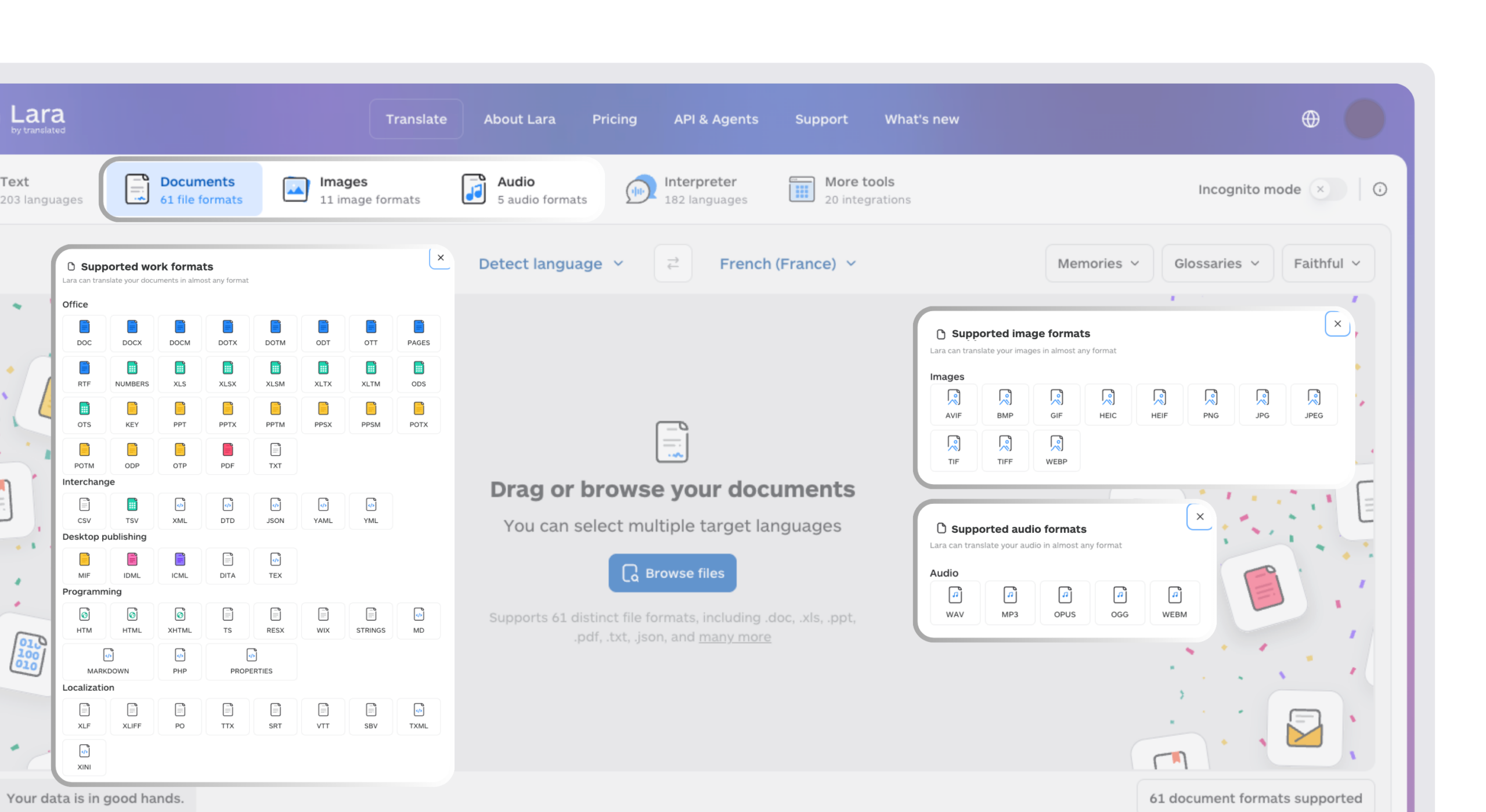
Turn scraped files into multilingual research inputs
Upload common structured formats and translate them for analysis across markets, teams, and languages.
Conclusion
The best choice depends on the target website and the team’s technical capacity. Browse AI, Octoparse, and ParseHub provide visual workflows, Apify can shorten setup through existing Actors, and developer products offer more control. A realistic test run remains the clearest way to compare reliability and total cost.
Have a valuable tool, resource, or insight that could enhance one of our articles?
Send us an email at press@laratranslate.com
We’ll be happy to review it and consider it for inclusion to enrich our content for our readers! ✍️
Frequently asked questions
What is the best no-code web scraping tool in 2026?
Browse AI is a strong option for visual extraction and monitoring. Octoparse suits visual workflows that need cloud execution and access features, while ParseHub is useful for small free tests. Apify can be faster when a maintained Actor already covers the target.
Is web scraping legal?
Web scraping can be lawful, but public access alone does not settle the question. Jurisdiction, access method, collected data, intended use, contracts, copyright, database rights, privacy law, and computer-access rules may all matter. In the United States, the 2022 Ninth Circuit decision in hiQ Labs v. LinkedIn addressed access to public profiles under the Computer Fraud and Abuse Act, but it did not make every form of scraping lawful. In the European Union, processing personal data must comply with the GDPR. Seek legal advice for a specific project.
What is the difference between a no-code scraper and a scraping API?
A no-code scraper uses a visual interface to select data and configure runs. A scraping API is called from software or an automation platform and usually requires technical setup. A managed service builds and maintains the data pipeline for the customer.
How much does web scraping cost in 2026?
Small jobs can fit within free allowances, while paid entry points in this comparison begin at $16 per month when billed annually. Real costs depend on pages, records, credits, rendering, proxy use, and target difficulty, so universal per-page estimates can be misleading.
Does scraped data need translation for international research?
Translation helps when source pages use languages the research team cannot compare directly. Keep the original text and source URL, then translate a copy for analysis to preserve traceability.
Can web scraping tools handle websites that block scrapers?
Some platforms provide residential proxies, browser rendering, IP rotation, and CAPTCHA handling. Results vary by target, location, access rules, and volume. Technical access features do not remove legal or contractual obligations.
This article is about
- Comparing visual no-code scrapers with marketplaces, APIs, and open-source libraries
- Choosing between Browse AI, Octoparse, ParseHub, Apify, and developer-first alternatives
- Understanding current entry prices and incompatible billing units
- Evaluating monitoring, rendering, proxies, CAPTCHA handling, and maintenance
- Translating structured exports for multilingual research
Sources
- Apify pricing
- Octoparse pricing and plan features
- ParseHub pricing
- Bright Data Web Scraper API pricing
- Browse AI pricing and plan features
- Diffbot pricing
- Firecrawl pricing
- Zyte API pricing
- ScrapingBee pricing
- Crawlee official site
- Lara Translate supported languages
- Lara Translate supported file formats
This article was produced by the Lara Translate content team. Lara Translate is an AI translation platform built by Translated, with more than 25 years of professional translation experience. It can translate structured exports from web scraping and monitoring workflows, across 200+ languages and 60+ file formats.