

A strong podcast interview can contain moments worth sharing beyond the original episode. Turning those moments into short videos gives your team material for social feeds and a way to introduce new listeners to the full conversation.
Podcast audiogram and clipping tools exist to turn long-form audio into the short, shareable video moments that actually spread on social platforms. This guide compares tools in 2026, and closes with something most of them don’t fully solve: what happens to the episode titles, captions, and social copy around a clip once it needs to reach an audience that doesn’t read English.
|
TL;DR
|
What makes a podcast audiogram or clipping tool worth using in 2026?
AI moment detection and manual clip selection produce very different amounts of output. Opus Clip’s ClipAnything model uses speech, visuals, and emotional cues to identify highlights. Repurpose.io can create snippets from supplied timestamps and automate their distribution.
Dedicated audiogram tools and full repurposing systems solve different scopes of the same problem. Wavve combines waveform audiograms with AI highlights and scheduling. Recast Studio creates clips and also drafts show notes and blog content from a recording.
Written content and video clips are genuinely separate outputs. Castmagic generates show notes, blog posts, and social captions, and its Studio also includes media clipping and audiogram generation. Check each output separately when comparing repurposing tools.
Brand recognition and platform trust still matter in vendor selection. Headliner has built years of trust with major media companies, which carries real weight even against newer, more automated competitors.
Multi-language support varies by feature. Kapwing supports subtitle translation into 100+ languages. Episode titles, descriptions, and social copy still need their own translation and review, whether you handle them inside a repurposing platform or with a dedicated translation tool.
Best podcast audiogram and clipping tools in 2026
| Tool | Best for | Category | Starting price |
|---|---|---|---|
| Opus Clip | AI-driven virality scoring and highlight detection at scale | AI clip generator | Free: 60 credits/month, watermarked; Starter $15/month billed monthly |
| Wavve | Simple, dedicated audiogram maker | Audiogram tool | Free trial; Starter listed at $7.99/month |
| Recast Studio | Full podcast repurposing including show notes and blog drafts | Podcast repurposing platform | Free trial; Starter $170/year |
| Headliner | Familiar, broadly recognized podcast promotion tool | Audiogram and video creation tool | Free tier (1 unwatermarked audiogram export with unlimited video clips/month); paid plans available |
| Repurpose.io | Automated multi-platform distribution of existing clips | Content distribution automation | From $35/month |
| Castmagic | Turning podcast audio into a full written content ecosystem | AI content generation for podcasts | Hobby $239/year |
| EchoWave | Free editor for waveform videos and clips | Audiogram and video editor | Free editor: up to 60 minutes, 720p with badge; most quick tools export without a watermark |
| Kapwing | Browser-based clipping with built-in multilingual captioning | AI video editor and clip maker | Free tier; Pro $24/member/month or $16 billed annually |
| Riverside | Recording and clipping in a single platform | Podcast recording and editing platform | Free tier; Pro $29/month or $24 billed annually |
| Async (formerly Podcastle) | Recording, cleanup, and clip creation together | Podcast recording and editing platform | Free and paid self-service plans; custom Business pricing |
Opus Clip
Best for: Teams wanting AI-driven virality scoring and highlight detection at high volume.
Opus Clip uses its ClipAnything model to find highlights across any content genre by analyzing speech, visuals, and emotional cues, scoring each clip for viral potential and automatically reframing it for vertical video.
Pricing: Free includes 60 credits per month and watermarked clips, which stop being exportable after three days. Starter costs $15 per month billed monthly; Pro also offers annual billing.
Verdict: Consider Opus Clip when talk-heavy, long-form content needs AI-driven moment discovery at volume, not just manual clip selection.
Wavve
Best for: Podcasters wanting waveform audiograms with highlights and scheduling.
Wavve combines audiogram templates, captions, AI hot spot identification, and a social media scheduler.
Pricing: Starter is listed at $7.99 per month, with 70 upload minutes and 18 video exports per month. A free trial is available.
Verdict: Consider Wavve when a straightforward, dedicated audiogram maker fits better than a more feature-heavy platform.
Recast Studio
Best for: Teams wanting clips, show notes, and blog drafts generated together from one recording.
Recast Studio creates clips from an episode using AI, then writes matching show notes and blog drafts and publishes directly to major platforms, positioning itself as a repeatable repurposing system rather than a one-off clipping tool.
Pricing: A free trial includes 60 one-time upload credits. Starter is displayed at $14 per month with $170 charged annually.
Verdict: Consider Recast Studio when repeatable, end-to-end repurposing across video and written content matters more than a single-purpose clipping tool.
Headliner
Best for: Podcasters and media companies wanting a familiar, broadly trusted promotion tool.
Headliner, founded in 2018 by co-founders Neil Mody and Oliver Wellington after evolving from an earlier product called Sparemin, is used by more than 1.5 million creators and by major media organizations including SiriusXM, The New York Times, CNN, BBC, Business Insider, Viacom, Vox, iHeartMedia, and Audible. The platform offers audiogram creation, AI-powered clipping and captioning, and multi-platform social sharing.
Pricing: Free tier includes 5 unwatermarked video exports per month; paid plans unlock additional exports and features.
Verdict: Consider Headliner when broad platform recognition and years of trust from major media companies matter alongside solid core audiogram and clipping features.
Repurpose.io
Best for: Creators who already have clips and need automated distribution across platforms.
Repurpose.io focuses specifically on automating the distribution of podcast clips once they exist, pushing content across multiple platforms via RSS and automated workflows. It can also generate snippets from timestamps supplied in a description or caption.
Pricing: Starter costs $35 per month billed monthly, or $349 billed annually.
Verdict: Consider Repurpose.io when clip creation is already solved elsewhere and multi-platform distribution automation is the actual bottleneck.
A great clip still needs a caption someone can read
Episode titles, descriptions, and the social copy that accompanies a clip are usually written once, in one language, even when the video itself reaches a global audience. Lara Translate helps podcasters and media teams translate this content accurately across 200+ languages, so a clip’s reach isn’t limited by the words around it.
Castmagic
Best for: Podcasters prioritizing written content alongside clips.
Castmagic generates show notes, blog posts, social captions, timestamps, and highlight quotes. Its Studio also includes media clipping and audiogram generation, so teams can create both written and visual assets.
Pricing: Hobby is listed at $19 per month billed annually, with $239 charged per year. Check the selected billing interval and transcription allowance before subscribing.
Verdict: Consider Castmagic when written content generation matters as much as, or more than, video clip creation.
EchoWave
Best for: Creators wanting a free audiogram and video editor with clear export limits.
EchoWave’s free editor supports videos up to 60 minutes, captions, visualizers, and 720p exports with a small badge. Most standalone free tools export without a watermark; higher-resolution, watermark-free editor exports require a paid plan.
Pricing: Free tier available. Basic costs $19 per editor per month with monthly billing, or $9 per month billed annually.
Verdict: Consider EchoWave when budget constraints matter and a genuinely capable free tier is a priority.
Kapwing
Best for: Creators wanting browser-based clipping with built-in caption translation.
Kapwing automatically detects engaging moments and supports audiogram creation and filler word removal, alongside caption translation into more than 100 languages, all directly in the browser without installing software.
Pricing: Free tier available. Pro costs $24 per member per month billed monthly, or $16 per member per month billed annually.
Verdict: Consider Kapwing when built-in caption translation and a fully browser-based workflow both matter to your process.
Riverside
Best for: Teams wanting recording and clipping combined in a single platform.
Riverside is strong specifically for high-quality remote recording, with clipping and editing features built in, appealing to creators who want fewer tools in their overall workflow.
Pricing: Free tier available. Pro is listed at $29 per month billed monthly, or $24 per month billed annually.
Verdict: Consider Riverside when recording quality and having clipping tools in the same platform outweigh the deepest possible clip-generation features.
Async (formerly Podcastle)
Best for: Creators wanting recording, audio cleanup, and clip creation in one workflow.
Async, formerly Podcastle, combines recording and cleanup tools with video editing and clip creation. It suits creators who want to manage production and promotional assets within one platform.
Pricing: Free and paid self-service plans are available. Business uses custom pricing; check current paid rates and feature allowances for the selected plan.
Verdict: Consider Async when recording quality and cleanup matter as much as the clips generated from the finished episode.
How to choose the right podcast audiogram or clipping tool
Step 1: Decide how much AI moment detection you actually need. Opus Clip and Kapwing both automate highlight discovery; Wavve and Headliner rely more on manual selection within a simpler workflow.
Step 2: Confirm whether you need video clips, written content, or both. Compare written assets and video outputs separately. Castmagic and Recast Studio both support written repurposing alongside visual content.
Step 3: Check whether distribution automation is included or separate. Repurpose.io specializes in distribution once clips exist; several other tools in this comparison include some native publishing but with less distribution depth.
Step 4: Weigh brand trust and track record against newer, more automated competitors. Headliner’s years of use by major media companies carry real weight, even against tools with more advanced AI features.
Step 5: Plan for translating the written content around your clips. A dedicated translation tool can help translate episode titles, descriptions, and social captions accurately, complementing whatever caption translation a platform like Kapwing already offers.
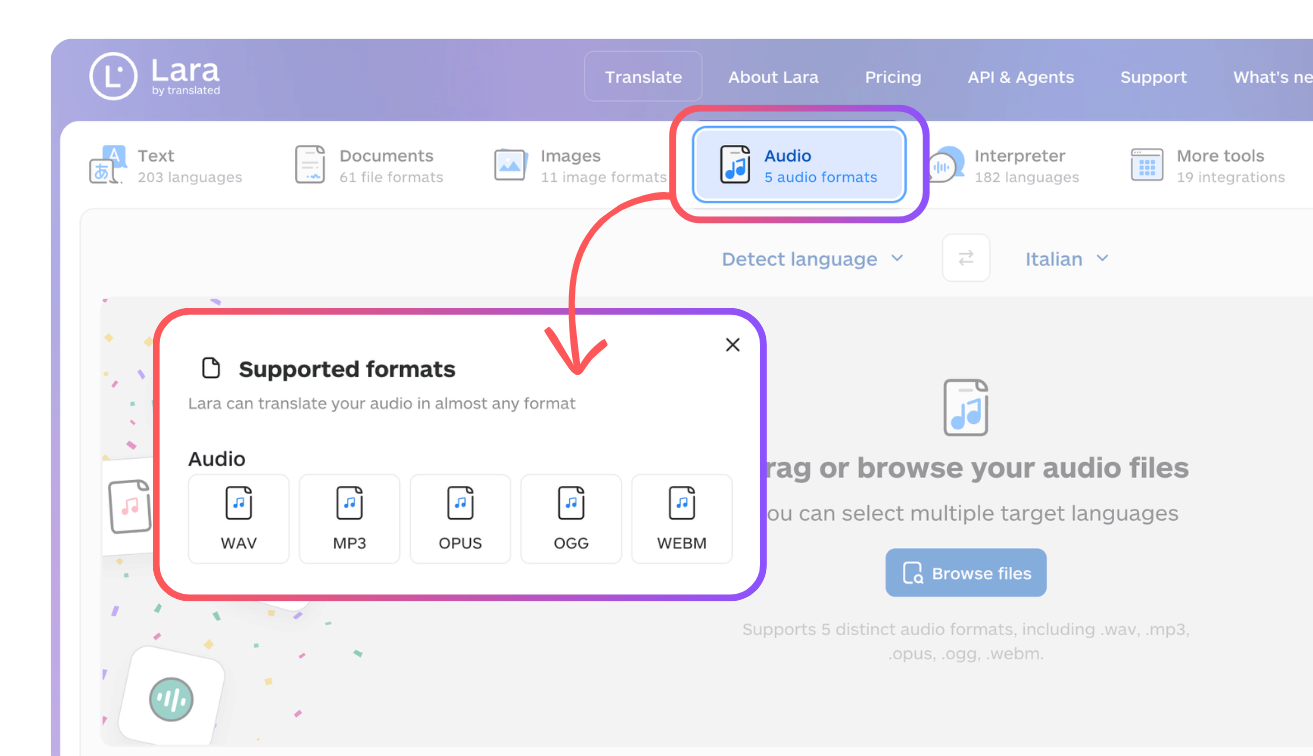
For translated spoken clips, Lara Translate also offers audio-to-audio translation: upload an audio file in the web app and download translated speech. This can complement your clipping workflow for solo podcast excerpts, intros, or narration. The feature is designed for one primary speaker; multi-speaker audio is not currently supported.
Let your best clip travel as far as its own video
Whichever platform above powers your clipping, Lara Translate can help translate episode titles, descriptions, and social copy accurately across 200+ languages.
Conclusion
The right podcast audiogram or clipping tool depends on how much AI-driven automation you want, whether written content matters as much as video, and how much you value brand recognition versus the newest feature set. Whichever tool you choose, a clip’s reach ultimately depends on more than the video itself, it depends on whether the words around it make sense to the person watching.
Have a valuable tool, resource, or insight that could enhance one of our articles?
Send us an email at press@laratranslate.com
We’ll be happy to review it and consider it for inclusion to enrich our content for our readers! ✍️
Frequently asked questions
What is the difference between a podcast audiogram and a video clip?
An audiogram turns an audio excerpt into a video using artwork, an animated waveform, and often captions. A video clip uses footage from the recording. Choose an audiogram when you have audio only, or use recorded video when the speakers and visuals help tell the story.
How do I choose a podcast clipping tool?
Start with the work you need to reduce: selecting highlights, editing captions, creating written content, or publishing across channels. Test the same episode in shortlisted tools and compare the usable results, editing time, export limits, and total subscription cost.
Are free podcast clipping tools enough for regular publishing?
A free plan can be enough for a small publishing schedule if its limits fit your workload. Check watermarks, upload credits, export length, resolution, and how long clips remain available. Distinguish an ongoing free plan from a one-time trial.
Can AI choose the best moments from a podcast?
AI can suggest highlights and help reduce the time spent reviewing a long recording. Treat its suggestions and virality scores as starting points. Check that each clip makes sense on its own, preserves the speaker’s meaning, and has a clear opening and ending.
Should podcast clips include captions?
Captions help viewers follow speech when they watch without sound and improve access for people who cannot hear the audio. Review names, specialist terms, punctuation, timing, and readability before publishing, especially when captions were generated automatically.
What should I translate when sharing podcast clips internationally?
Translate the subtitles, clip title, description, and accompanying social copy for the audience you want to reach. These are separate assets, so translated subtitles alone do not localize the full post. Review terminology, references, and calls to action for each language.
This article is about
- Choosing between audio-based audiograms and recorded video clips
- Comparing AI highlight suggestions with manual editorial selection
- Checking subscription costs, upload credits, watermarks, and export limits
- Combining clips with show notes, blog drafts, and social posts
- Separating clip creation from scheduling and distribution
- Translating captions, titles, descriptions, and social copy for international audiences
Sources
- Audio Translation: Understand Any Recording in Your Language
- Adaptive Translation API for Images and Audio: OCR-Based and Asynchronous
- Lara Translate supported languages
- Lara Translate document formats
This article was produced by the Lara Translate content team. Lara Translate is an AI translation platform built by Translated, with more than 25 years of professional translation experience. Podcasters and media teams use Lara Translate to translate episode titles, descriptions, and social captions accurately, across 200+ languages and 60+ file formats.