

A supplier sends a two-minute voice note in Portuguese. A field team records a site update in Turkish. Half of a client call happened in Japanese, and the recording sits in a shared drive waiting for someone to figure out what was actually said.
Most teams handle this the slow way. Someone finds a colleague who speaks the language, or pays for a transcript, or guesses from context and hopes nothing important was missed. Meanwhile the decision that depended on that audio waits. Lara Translate now does audio-to-audio translation: you upload a recording in one language and get back the same recording in another, spoken out loud. No transcript to read, no manual setup, no specialist on standby.
TL;DR
|
What audio translation actually does
Audio translation takes a recording in one language and returns the same recording spoken in another. You upload a file, pick the target language, and Lara Translate produces a new audio track you can play, share, or drop into an internal library. There’s no transcript to read in between.
It works straight from the web interface. Open the Audio tab, drag in your file, pick the source and target languages, and start the translation. Don’t know the source language? Lara can detect it automatically, which helps when recordings come in from international contacts and nobody labeled them.
Two things make this practical for teams rather than one-off use. You can upload multiple files at once, so a backlog of recordings clears in a single session. And you can translate one file into several languages at the same time, which matters when the same briefing or training clip needs to reach offices in different countries.
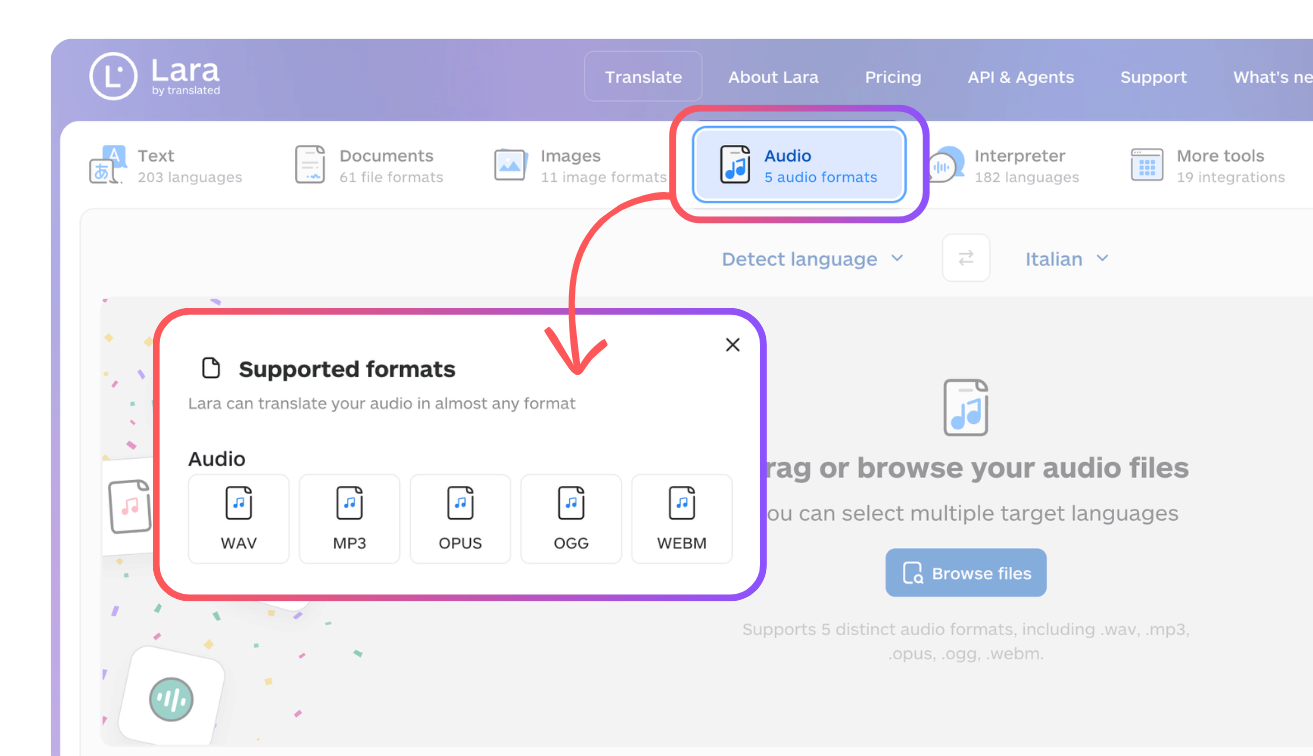
Supported formats cover what people actually record with: .wav, .mp3, .opus, .ogg, and .webm. That includes the files most phones and messaging apps produce, so a voice note usually works without conversion. (Source: Lara Translate, Translate MP3 Audio Files Online.)
Where it helps at work
The clearest wins are the moments where a team needs to understand spoken content, not produce a polished video. A few that come up often:
- Voice notes from partners and clients. Sales, procurement, and support teams get audio messages instead of emails now. Translate them into your working language and you reply the same day instead of chasing a translation.
- Meeting and call recordings. A recorded standup, negotiation, or customer call in another language becomes something the whole team can review, not just the one person who was in the room and speaks the language.
- Training and onboarding material. Record a narrated course or a spoken SOP once, then turn it into several language versions for regional teams, so new hires learn in the language they think in.
- Product and support content. Spoken instructions, IVR scripts, and audio help content get localized for the markets you operate in.
- Internal communications and podcasts. A leadership update or an internal podcast episode reaches non-native staff in a version they follow easily.
The through-line: any recording where the goal is comprehension and reach, and where you have one person speaking.
Try audio translation in your own workflow
Upload a real recording and hear how Lara Translate handles your terminology, context, and target language.
The features that keep it usable
Audio translation ties into the same translation system Lara Translate uses everywhere else, so a few controls carry over.
- Terminology control. If your account has translation memories or glossaries, the audio translation uses them. Product names, technical terms, and preferred wording come out consistent with the rest of your content instead of being reinvented file by file.
- Translation style. Choose how close the translation stays to the original. Faithful keeps the structure and meaning tight, Fluid reads more naturally, and Creative allows a freer adaptation for material that needs to feel engaging.

- Voice options. Set whether the output voice is male or female, so the result fits the speaker or your brand. To be clear, this does not clone the original speaker’s voice. Lara generates the spoken output in the gender you pick; it reproduces what was said in a new language, not the exact vocal identity of the person who said it.
- Incognito Mode. Turn on Incognito and neither the source audio nor its translation is stored on Lara Translate’s systems. That’s the setting you want for confidential calls, legal recordings, or anything sensitive.
- Language range. Audio translation supports 70+ languages, including regional variants like Latin American Spanish and Brazilian Portuguese, so the output matches the market you’re aiming at. (Source: Lara for Developers, Translate Audio.)
What it is not built for
This part matters because using the feature for the wrong job leads to disappointment.
Lara Translate audio translation is designed for a single primary speaker. Think voiceovers, narrations, training material, product walkthroughs, podcasts, and spoken instructions. Audio with several people talking is not supported today. It does not separate speakers, keep a turn-by-turn back-and-forth aligned, or hold each person’s voice consistent across a conversation. A two-person interview or a group call is outside what it does well. (Source: Lara for Developers, Translate Audio.)
It’s also not a video dubbing tool. There’s no lip-sync, and the translation isn’t aligned to timecodes. If you need translated audio to land exactly on the original timing for a video, this isn’t that feature. The strength here is understanding and localizing spoken content, not matching a picture frame by frame.
Knowing these edges is what makes the feature reliable. Use it for single-speaker recordings where the point is to understand and share the content, and it does exactly that.
Clear your recording backlog in one pass
Batch upload voice notes and calls, pick your target languages, and get spoken translations back in a single session.
How to try it
Go to the Audio tab in Lara Translate, upload a recording you’ve been meaning to understand, choose the target language, and listen to the result. A short voice note is a good first test. Once you see how a backlog of recordings clears in one pass, the multi-file and multi-language options are where the time savings show up for a team.
Conclusion
The language barrier on spoken content has quietly been one of the slower problems at work. A recording comes in, and everything waits on one person’s availability. Audio translation removes that bottleneck: the recording arrives, and anyone on the team can understand it. Use it for single-speaker recordings where the goal is comprehension and reach, keep your glossaries and translation memories in play for consistent terminology, and switch on Incognito Mode when the content is sensitive. That’s the whole workflow.
Have a valuable tool, resource, or insight that could enhance one of our articles?
Send us an email at press@laratranslate.com
We’ll be happy to review it and consider it for inclusion to enrich our content for our readers! ✍️
FAQ
Can Lara Translate handle audio with more than one speaker?
Not today. Audio translation is built for a single primary speaker, like a voiceover, narration, or solo podcast. It does not separate speakers or keep a two-way conversation aligned, so interviews and group calls are outside what it does well.
What audio formats does it support?
You can upload .wav, .mp3, .opus, .ogg, and .webm. That covers the files most phones and messaging apps produce, so a voice note usually works without conversion.
How many languages does audio translation support?
70+ languages, including regional variants like Latin American Spanish and Brazilian Portuguese. Lara can also detect the source language automatically if the file isn’t labeled. (Source: Lara for Developers, Translate Audio.)
Does it clone the original speaker’s voice?
No. You choose a male or female output voice, and Lara generates the spoken translation. It reproduces what was said in a new language, not the exact vocal identity of the person who said it.
Is it a video dubbing tool?
No. There’s no lip-sync and the audio isn’t aligned to timecodes. It’s built to understand and localize spoken content, not to match a video frame by frame.
Is my audio kept private?
Turn on Incognito Mode and neither the source audio nor its translation is stored on Lara Translate’s systems, which is the setting to use for confidential or legal recordings.
Audio translation, audio-to-audio translation, Lara Translate, voice note translation, meeting and call recordings, single-speaker audio, supported formats (.wav, .mp3, .opus, .ogg, .webm), 70+ languages, translation memories and glossaries, translation styles (Faithful, Fluid, Creative), voice gender selection, and Incognito Mode.
Useful links
- Translate MP3 audio files online
- Translate Audio (developer docs)
- Supported languages
- Translation styles: Faithful, Fluid, Creative
- How glossaries work in Lara Translate
- Translation modes: Learning vs. Incognito