

A growing business can outgrow its spreadsheet-and-email processes as teams, regions, and approval requirements multiply. No-code business process automation platforms help teams organize that work and adapt routine workflows without commissioning custom development for every change.
This guide compares application building, relational data, governance, automation, and pricing. It also explains how to prepare the notifications, forms, and documentation that employees and customers need in different languages.
|
TL;DR
|
What makes a no-code business process automation platform worth using in 2026?
These platforms help teams build applications and adapt workflows with visual tools. Compare their data models, integration options, governance controls, and limits on users, records, and automation activity.
Single-function specialization and multi-function unification solve genuinely different organizational needs. Kissflow and Quickbase both concentrate on workflow and process automation broadly, while Origami unifies multiple specific business functions, including CRM, HR, and quality management, within a single platform.
Relational capabilities need a practical test. Airtable supports linked records and relational databases as well as a grid interface. Compare relationships, record limits, reporting, permissions, and cross-application workflows on your actual data rather than judging by the interface alone.
Built-in regulatory compliance and general-purpose flexibility trade off industry-specific readiness against broader applicability. Origami (ISO 9001, ISO 27001 and ISO 90003 certified) and Betty Blocks both build in compliance features for regulated industries, while more general-purpose platforms in this comparison leave compliance largely to the customer’s own configuration.
CRM and application building can share a platform. Creatio combines no-code application and process tools with sales, marketing, and service products. Confirm which platform capabilities and business applications are included in the proposed package.
Localization capabilities vary by product and plan. Check whether the platform supports translated labels, forms, notifications, and documents, and identify who supplies and reviews the wording. A dedicated translation workflow can complement built-in localization when content must be prepared in several languages.
No-code business process automation platforms compared
Prices are examples for the stated billing terms and currency. Confirm taxes, minimum commitments, and the plan needed for your automation features.
| Platform | Best for | Model | Pricing |
|---|---|---|---|
| Kissflow | Enterprise workflow automation with strong pre-built templates | No-code process automation and app builder | Request current quote |
| Quickbase | Operational, project, and supply-chain workflows with relational data | No-code business application platform | Team $35/user/month annually; platform minimum applies |
| Airtable | Spreadsheet-database hybrid with a large template ecosystem | No-code database and app-building platform | Free; Team $20/user/month billed annually |
| Origami | Multiple business functions (CRM, HR, QMS, PM) unified in one configurable platform | No-code business process automation platform | Custom, contact sales |
| Caspio | Unlimited users and strict compliance needs (HIPAA, SOC 2, FERPA) | No-code database application platform | From $300/month |
| Betty Blocks | Regulated enterprises needing strong governance and security | Enterprise no-code development platform | Create €1,500/month; Scale €3,500/month |
| Creatio | Teams wanting no-code app building natively tied to CRM | CRM-native no-code process and app platform | Custom, contact sales |
| monday.com | Lighter, highly visual internal tracking apps | Work OS with no-code automation layer | Basic $9/seat/month annually; automations require higher tier |
| Process Street | Workflow automation with built-in AI and document tools | No-code workflow and process documentation platform | Custom, published tiers |
| Power Automate | Organizations standardized on the Microsoft ecosystem | Automation platform within Microsoft 365 | Premium $15/user/month paid yearly |
Kissflow
Best for: Enterprise teams wanting workflow automation with strong pre-built templates.
Kissflow focuses specifically on workflow automation and process optimization, with strong pre-built templates for HR, finance, and procurement, and governance controls designed to prevent uncontrolled tool sprawl across an organization.
Pricing: Request a current quote covering users, applications, integrations, and support. Confirm any minimum commitment and implementation costs.
Verdict: Consider Kissflow when guided workflow automation with strong, ready-made templates fits your team’s needs.

Quickbase
Best for: Teams managing operational, project, and supply-chain workflows with relational data.
Quickbase‘s relationship-based data model, automation pipelines, and governance center are built specifically for people managing projects, field services, and supply chain workflows with genuine relational complexity.
Pricing: Team is listed at $35/user/month and Business at $55/user/month with annual pricing. A platform minimum applies; Enterprise is custom-priced. Confirm the total commitment and included usage.
Verdict: Consider Quickbase when your workflows depend on genuine multi-table relational data rather than simpler, flatter tracking.
Airtable
Best for: Teams wanting a familiar grid interface with linked data and app-building tools.
Airtable combines relational databases, interfaces, automations, and templates. Per-seat charges and limits on records, attachments, API calls, and automation activity vary by plan, so test the expected data volume and workflow.
Pricing: A free plan is available. Team is $20/user/month and Business $45/user/month when billed annually; Enterprise Scale is custom-priced. Confirm which collaborators require paid seats.
Verdict: Consider Airtable when linked data, configurable interfaces, and a familiar grid fit your application and usage requirements.
Origami
Best for: Businesses wanting multiple functions, such as CRM, HR, and quality management, unified in one configurable platform.
Origami provides pre-built, drag-and-drop configurable solutions spanning CRM, HR, quality management (eQMS), project management, manufacturing, real estate, and professional services within a single platform, reducing the integration and data reconciliation costs that come from running separate point solutions for each function. Origami adapts to how each organization already works, so teams build the system around their existing processes instead of changing them to fit the software. The platform is ISO 9001, ISO 27001 (SII) and ISO 90003 certified and supports 21 CFR Part 11 requirements, with a full audit trail, electronic signatures, role-based permissions and MFA. Its QMS module helps manufacturers prepare their EU MDR submission, with the document management and technical file modules centralising everything required for the file. The Origami core and Synergia’s ready-made QMS processes are validated. It includes three governed AI layers: Vision, an AI builder for admins that creates the system’s structure from a conversation; SensAI, an internal AI assistant that works on the organization’s own data and respects each user’s permission group, so what a user can see, change or ask is limited by their role; and AI Workflows, which lets teams run AI on their system data using their own AI provider key, for example to screen CVs, validate records or summarize information into a specific field. Vision and SensAI only take action after the user approves it. Configuration is designed to be handled directly by business users through friendly, drag-and-drop field editing rather than requiring developer involvement for routine changes, and the platform supports automation triggers such as automatically messaging a new lead as soon as it enters the CRM.
Pricing: Custom, contact sales.
Verdict: Consider Origami when unifying multiple business functions in one configurable, no-code platform outweighs assembling several specialized point solutions.
Caspio
Best for: Teams wanting database applications without per-app-user charges.
Caspio provides a visual app builder, relational database, forms, reports, and automation. It lists unlimited app users, while authoring, resources, and security capabilities vary by plan. Confirm the specific compliance configuration and contractual terms required for your use case.
Pricing: Team starts at $300/month on a monthly term or $270/month on an annual term. Business starts at $600/month monthly or $540/month annually; Enterprise is quoted. Unlimited app users do not mean unlimited authors or resources.
Verdict: Consider Caspio when database applications and broad app-user access fit your needs, after checking plan limits and required controls.
Make workflow instructions clear across languages
Use Lara Translate to prepare notifications, form guidance, and training documents for review before adding them to your workflows.
Betty Blocks
Best for: Enterprises needing governed application development.
Betty Blocks offers visual and AI-assisted app building with governance and deployment options. Its plans distinguish app bundles and development features, while enterprise governance and on-premises hosting are listed for the Enterprise tier.
Pricing: Create is €1,500/month, Scale €3,500/month, and Enterprise is custom-priced. Confirm app capacity, hosting, and services in the quote.
Verdict: Consider Betty Blocks when strong governance and compliance for a regulated enterprise justify a higher entry cost.
Creatio
Best for: Teams wanting no-code app building alongside CRM.
Creatio combines no-code visual designers and process capabilities with sales, marketing, and service products. Evaluate the platform and business applications together, and confirm licensing for the users and workflows in scope.
Pricing: Request the current combined price for the platform, CRM products, users, AI usage, and support. Confirm minimum commitments and additional services.
Verdict: Consider Creatio when CRM-native app building and process automation fit your team’s existing sales and service workflows.
monday.com
Best for: Teams wanting visual work management with automations.
monday.com uses configurable boards, templates, integrations, and workflow tools to organize internal processes. Check the plan’s automation allowance, connected-board behavior, permissions, and API limits against the process you want to build.
Pricing: The US page lists Basic at $9/seat/month billed annually. Standard and higher tiers include automation and integration allowances; Basic pricing is not the price of the full automation workflow. Confirm seat minimums, local pricing, and AI credit charges.
Verdict: Consider monday.com when a highly visual, template-driven layer for lighter internal tracking fits better than deep relational data structures.
Process Street
Best for: Teams wanting workflow automation alongside process documentation.
Process Street combines document and policy management, workflow orchestration, forms, and AI capabilities. Compare the package’s approval controls, integrations, reporting, and document-management features with your operating procedures.
Pricing: Request pricing for the required products, users, workflows, and services. Confirm usage allowances and implementation support.
Verdict: Consider Process Street when workflow automation and built-in process documentation together fit your team’s actual workflow.

Power Automate
Best for: Organizations standardized on the Microsoft ecosystem.
Power Automate supports cloud flows and desktop automation, with connectors for Microsoft and third-party services. Compare premium connectors, attended and unattended runs, licensing, and environment governance for your particular workflow.
Pricing: US list prices paid yearly are $15/user/month for Premium, $150/bot/month for Process, and $215/bot/month for Hosted Process. Confirm licensing for unattended runs, premium connectors, and additional capacity.
Verdict: Consider Power Automate when deep integration with an existing Microsoft 365 environment is the primary requirement.
How to choose the right no-code business process automation platform
Decide whether you need to unify multiple business functions or automate one workflow deeply. Origami unifies several functions like CRM, HR, and quality management; Kissflow and Quickbase concentrate more specifically on workflow and process automation.
Test your data model. Map relationships between customers, employees, projects, and transactions, then test permissions, reporting, record limits, and integrations with a realistic sample.
Check whether regulatory compliance is a genuine, built-in requirement. Origami (ISO 9001, ISO 27001 and ISO 90003 certified, supporting 21 CFR Part 11 requirements and EU MDR submission preparation, with a validated core) and Betty Blocks both build in compliance features for regulated industries; more general-purpose platforms leave that largely to your own configuration.
Compare the complete pricing model. Separate app users from builders and administrators. Add automation usage, integrations, storage, implementation, and support to the subscription estimate.
Plan for translating workflow content as your processes reach employees or customers in different languages. A dedicated translation tool can help translate this content accurately, so a correctly configured process is also genuinely understandable wherever it runs.
Connect your workflow content with Lara Translate
Use Lara Translate alongside your automation platform to translate notification templates, form instructions, onboarding documents, and training materials. Copy the content or export a supported file, add context about the process, and return reviewed translations to the platform’s language fields or templates.
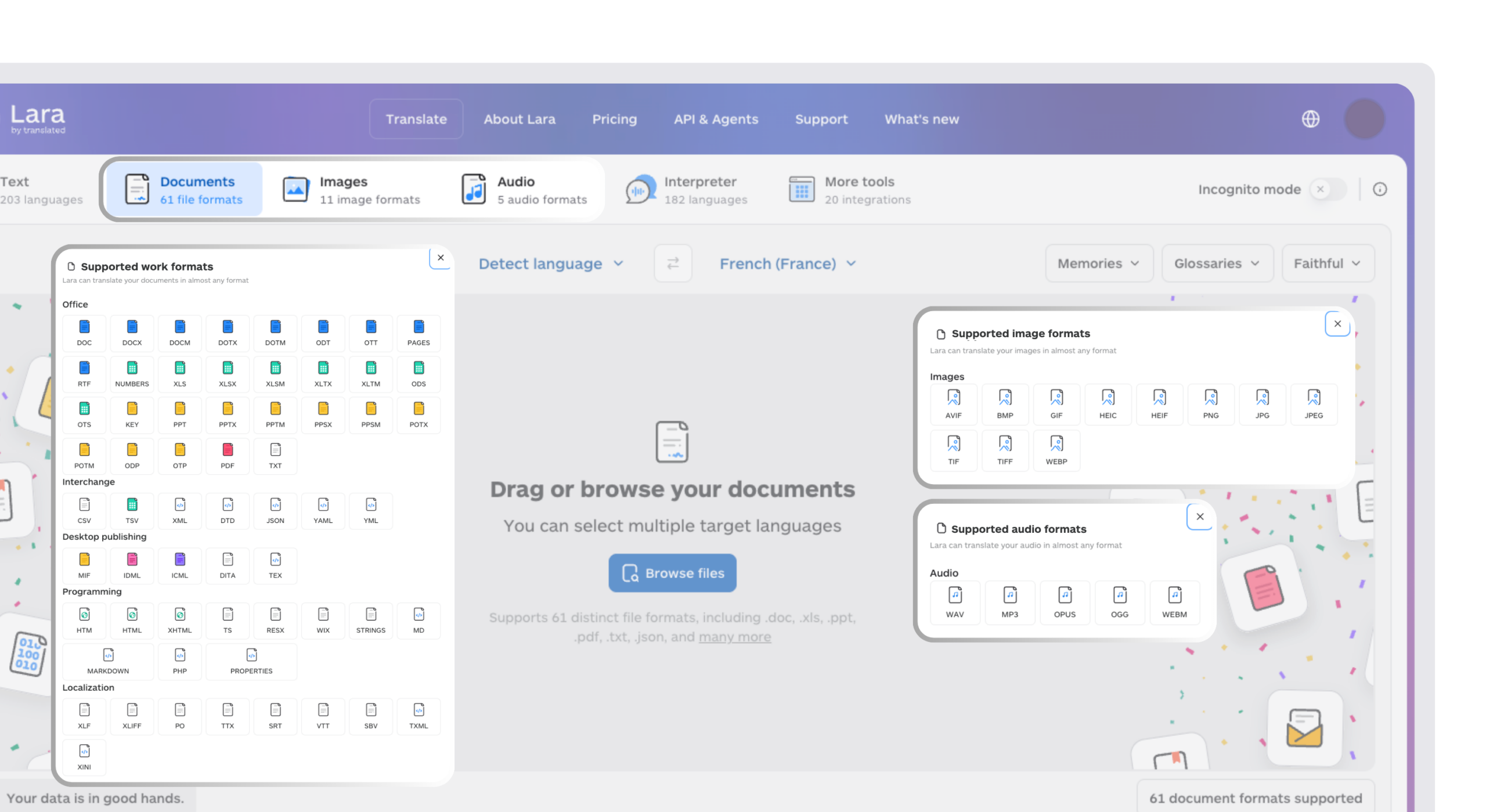
Preserve field IDs, placeholders, links, approval logic, and validation rules. Test each language in a sample workflow before publishing. This content workflow does not assume a native integration; an API-based connection requires a supported connector or a configured integration.
Keep process updates consistent across regions
Translate approved content changes with Lara Translate, then review terminology and test each localized template before rollout.
Conclusion
The right no-code business process automation platform depends on how many business functions you need to unify, how relational your data is, and whether regulatory compliance is a genuine built-in requirement. Whichever platform you choose, a correctly configured process still needs to be understood by the people actually running it.
Have a valuable tool, resource, or insight that could enhance one of our articles?
Send us an email at press@laratranslate.com
We’ll be happy to review it and consider it for inclusion to enrich our content for our readers! ✍️
Frequently asked questions
How do I choose a no-code business process automation platform?
Start with a representative process and its data, approvals, integrations, and reporting needs. Test whether the team can build and maintain it, then compare governance, usage limits, and total cost.
What is the difference between workflow automation and no-code app building?
Workflow automation routes tasks and data through steps such as approvals and notifications. No-code app building also creates the forms, interfaces, and data structures people use. Many platforms provide both, with different levels of flexibility.
How much does no-code business process automation cost?
Costs can be per user, per application, per automation resource, or based on a negotiated platform package. Compare the complete workflow cost, including paid seats, execution limits, integrations, storage, implementation, and support. Check annual commitments and minimum purchases.
Can no-code platforms support regulated workflows?
They can provide controls such as permissions, audit trails, electronic signatures, and document management. Suitability depends on the specific product, configuration, contracts, and validation process. Have the responsible compliance team assess the complete implementation against the applicable requirements.
How do I make automated workflows work across languages?
Check the platform’s localization options, then prepare reviewed translations for form labels, notifications, instructions, and generated documents. Preserve field IDs, variables, links, and business rules. Test each language in the actual interface before publishing.
When should I choose one platform instead of separate specialist tools?
A shared platform can help when processes use the same records and permissions across departments. Specialist tools may suit a deeper functional requirement. Compare integration effort, data ownership, migration options, and the cost of maintaining each approach.
This article is about
- How visual application and workflow tools help teams adapt business processes
- Why data relationships, record limits, permissions, and integrations matter when comparing platforms
- How shared platforms and specialist tools serve different operational needs
- Why regulated workflows require an assessment of controls and implementation
- How app users, paid seats, automation capacity, and services affect total cost
- How translated forms, notifications, and documents support multilingual workflows
Useful links
- Best No-Code Web Scraping and Monitoring Tools in 2026
- Best AI Document Processing and Extraction Platforms in 2026
- Lara Translate: text and document translation
This article was produced by the Lara Translate content team. Lara Translate is an AI translation platform built by Translated, with more than 25 years of professional translation experience. Businesses use Lara Translate to prepare workflow notifications, forms, and training materials for review, across 200+ languages and 60+ file formats.