

A small shop sends its first newsletter to 400 subscribers, then finds the free plan stops sending at 500 emails a month and the automation it needs sits two tiers up. The platform looked cheap on the pricing page and turned out to be a poor fit.
Email marketing platforms let small businesses send campaigns, build automations, and track results from one account. This guide compares platforms in 2026 on what each plan includes, how pricing grows with your list, and how they handle audiences that read in more than one language.
|
TL;DR
|
What makes an email marketing platform worth using in 2026?
Free plans differ more than they look. MailerLite lists a free plan for up to 250 subscribers, Mailchimp lists up to 250 contacts with 500 sends per month, and Klaviyo lists up to 250 active profiles with 500 emails per month. Brevo counts emails sent per day instead of contacts.
Automation limits sit in the plan details. ActiveCampaign limits each automation on its lowest tier, Brevo caps automation contacts on its lower plans, and AWeber limits its Lite plan to three automations.
Pricing models decide the cost of growth. Contact or profile counts affect many subscriptions, while send allowances and add-ons also shape the bill. Brevo prices by email volume, with contact storage limits tied to some tiers. Compare costs at your expected list size and sending frequency.
Ecommerce and channel features are not universal. Omnisend and Klaviyo focus on store-connected workflows. SMS access can depend on location and plan, so check eligibility and message charges separately from email.
Audiences that read in several languages need a plan of their own. Platforms handle languages unevenly: ActiveCampaign sells an AI translations add-on, GetResponse includes an AI assistant that can translate copy, and MailerLite lets you segment subscribers by a language field. Templates, landing pages, and PDF lead magnets still need accurate, consistent translation. A dedicated translation tool can help, a point this guide returns to at the end.
Best email marketing platforms for small businesses in 2026
| Provider | Best for | Model | Pricing |
|---|---|---|---|
| Brevo | Teams that want a free plan with automation | Email, SMS, and CRM suite | Free; from $9/month |
| ActiveCampaign | Teams that want deep automation | Automation and CRM | Paid tiers priced by contacts and features |
| Mailchimp | Teams that want a broad all-in-one suite | Email, landing pages, and CRM | Free; paid tiers priced by contacts |
| MailerLite | Budget-conscious teams that want a full feature set | Email, automation, and websites | Free; from $12/month |
| GetResponse | Teams that want webinars and funnels | Email, funnels, and webinars | Paid tiers; 14-day trial |
| Constant Contact | Teams that want support and event tools | Email, social, and events | From $10.20/month, billed annually |
| Omnisend | Online stores that want ecommerce workflows | Email, SMS, and push for stores | Free; from $16/month |
| Campaign Monitor | Agencies and design-led teams | Email with custom templates | Priced by subscribers |
| AWeber | Creators and small publishers | Email, landing pages, and automation | From $12.49/month, billed annually |
| Klaviyo | Ecommerce brands that segment deeply | Email, SMS, and customer data | Free; priced by profiles |
Brevo
Best for: Small teams that want a free email plan and options to add other channels.
Brevo combines email marketing with automation, transactional email, and additional messaging and sales tools. The Free plan allows 300 emails per day, while SMS requires an add-on. Automation, landing pages, contact allowances, and channel access vary by plan, so check the package against your intended workflow.
Pricing: Free at $0 (300 emails per day); Starter from $9 per month; Standard from $18 per month; Professional from $499 per month; Enterprise on request.
Verdict: Consider Brevo when you want to start free and pay mainly for send volume.

ActiveCampaign
Best for: Teams that want advanced automation and customer data in one platform.
ActiveCampaign combines email marketing, visual automation builders, and segmentation, with CRM capabilities and other features available through add-ons. Starter limits each automation to 5 actions. Its paid AI Translations feature supports 75 languages, allowing teams to prepare language-specific campaigns within the platform.
Pricing: Paid tiers vary by contact count, features, billing period, and add-ons. Use the pricing calculator for your list size; a 14-day trial is available.
Verdict: Consider ActiveCampaign when automation depth matters more than a low entry price.
Mailchimp
Best for: Small businesses that want email, landing pages, and CRM from one familiar brand.
Mailchimp combines email campaigns, templates, landing pages, segmentation, and audience management. Its Free plan allows up to 250 contacts and 500 email sends per month, with a daily limit of 250. Automation and other advanced capabilities depend on the paid tier.
Pricing: Free for up to 250 contacts within the send limits. Essentials, Standard, and Premium pricing varies by contact count and selected package; compare ongoing rates and overage terms as well as introductory offers.
Verdict: Consider Mailchimp when you want one suite for email, pages, and audience tools.
MailerLite
Best for: Small businesses that want a full feature set on every paid plan at a low price.
MailerLite is an email marketing platform with automation, landing pages, and website building. Its features include a drag-and-drop editor, automation workflows, signup forms, and segmentation by custom fields such as language. The Free plan is limited to 250 subscribers, 3 automations, and community support, and the interface is available in English, Spanish, and Polish.
Pricing: Free up to 250 subscribers (2,500 emails per month); Comfort from $12 per month; Power from $25 per month; Enterprise on request for 200K+ subscribers.
Verdict: Consider MailerLite when you want clear plans and a complete toolset without paying for deep CRM features.
GetResponse
Best for: Teams that want email, funnels, and webinars from one vendor.
GetResponse combines email campaigns, automation, landing pages, and sales funnels, with webinars available on Creator and Enterprise. Its AI Assistant can translate copy. Check which automation and content features your selected tier includes before building a campaign around them.
Pricing: Starter, Marketer, and Creator are paid plans with rates that vary by list size and currency; Enterprise uses custom pricing. A 14-day trial is available, and yearly billing offers an 18% discount.
Verdict: Consider GetResponse when webinars and funnels belong in the same account as email.
Prepare campaigns for every language segment
Use Lara Translate to translate approved email copy and supporting documents, then review each version before importing it into your campaign.
Constant Contact
Best for: Small businesses that want phone and chat support alongside email, social, and event tools.
Constant Contact combines email templates, social posting, event marketing, and surveys with phone and chat support. The Lite plan includes a limited automation setup. SMS access depends on location and business eligibility, with support for eligible US and Australian customers.
Pricing: Lite $10.20, Standard $29.75, and Premium $68 per month, billed annually. Prices rise with the number of contacts.
Verdict: Consider Constant Contact when guided support and event tools matter to your team.
Omnisend
Best for: Online stores that want email, SMS, and push in ecommerce workflows.
Omnisend provides store integrations and prebuilt workflows for welcome series, cart abandonment, and other ecommerce messages. For accounts subscribing on or after May 4, 2026, SMS requires Pro plus a separately purchased SMS Credits Subscription. Eligible existing Standard accounts may retain legacy SMS access.
Pricing: Free includes 500 emails per month to up to 250 unique contacts. Standard starts at $16/month and Pro at $59/month, with costs rising by billable contacts. SMS credits are a separate purchase on current Pro plans.
Verdict: Consider Omnisend when your list mainly comes from an online store.
Campaign Monitor
Best for: Agencies and design-led teams that want polished, custom email templates.
Campaign Monitor combines a drag-and-drop builder, custom templates, segmentation, and automation journeys. Marketing Studio adds translation and content-generation tools on eligible plans. Lite allows monthly email sends equal to five times the subscriber count, while Essentials and Premier offer unlimited campaign sends.
Pricing: Lite, Essentials, and Premier are priced by subscriber count. Annual plans receive 10% off; the discount does not apply to agency or multi-team plans.
Verdict: Consider Campaign Monitor when brand-consistent templates and agency workflows are central.
AWeber
Best for: Creators and small publishers who want email with landing pages and simple automation.
AWeber provides a drag-and-drop email editor, landing pages, signup forms, and automation for small businesses and creators. Lite includes one list, three landing pages, and three automations. Plus expands those allowances, with costs increasing as the subscriber count grows.
Pricing: Lite $12.49 per month and Plus $19.99 per month, billed annually. A 14-day trial is available.
Verdict: Consider AWeber when you need a straightforward toolset for a growing audience.

Klaviyo
Best for: Ecommerce brands that want email, SMS, and deep customer segmentation.
Klaviyo is a marketing platform built around customer data. Its features include segmentation by purchase behavior, email and SMS flows, and store integrations. Sending pauses on the Free plan above 250 profiles or 500 emails.
Pricing: Free up to 250 active profiles and 500 emails per month. Paid plans are priced by active profiles and sends.
Verdict: Consider Klaviyo when purchase data should drive segments and flows.
How to choose an email marketing platform
Step 1: Estimate your list in 12 months. Pricing scales with contacts or profiles, so compare plans at the size you expect, not the size you have today.
Step 2: List the automations you need. Welcome series, abandoned carts, and tag-based flows are capped on some lower plans, so check the limit before you pick a tier.
Step 3: Check what the free plan really allows. Look at monthly sends, daily limits, support level, and which features are locked.
Step 4: Match the platform to how you sell. Stores benefit from ecommerce integrations, publishers from landing pages and forms, and service businesses from CRM and event tools.
Step 5: Plan for the languages your audience reads. Decide how templates, landing pages, and PDF lead magnets will be translated, and how you will segment subscribers by language. A dedicated translation tool can help translate the content accurately.
Connect your email workflow with Lara Translate
Use Lara Translate alongside your email marketing platform to translate subject lines, preview text, email copy, landing-page text, and PDF lead magnets. Copy approved content or export a supported file, translate it using a glossary for brand and product terms, then import or paste the reviewed version into the appropriate language campaign.
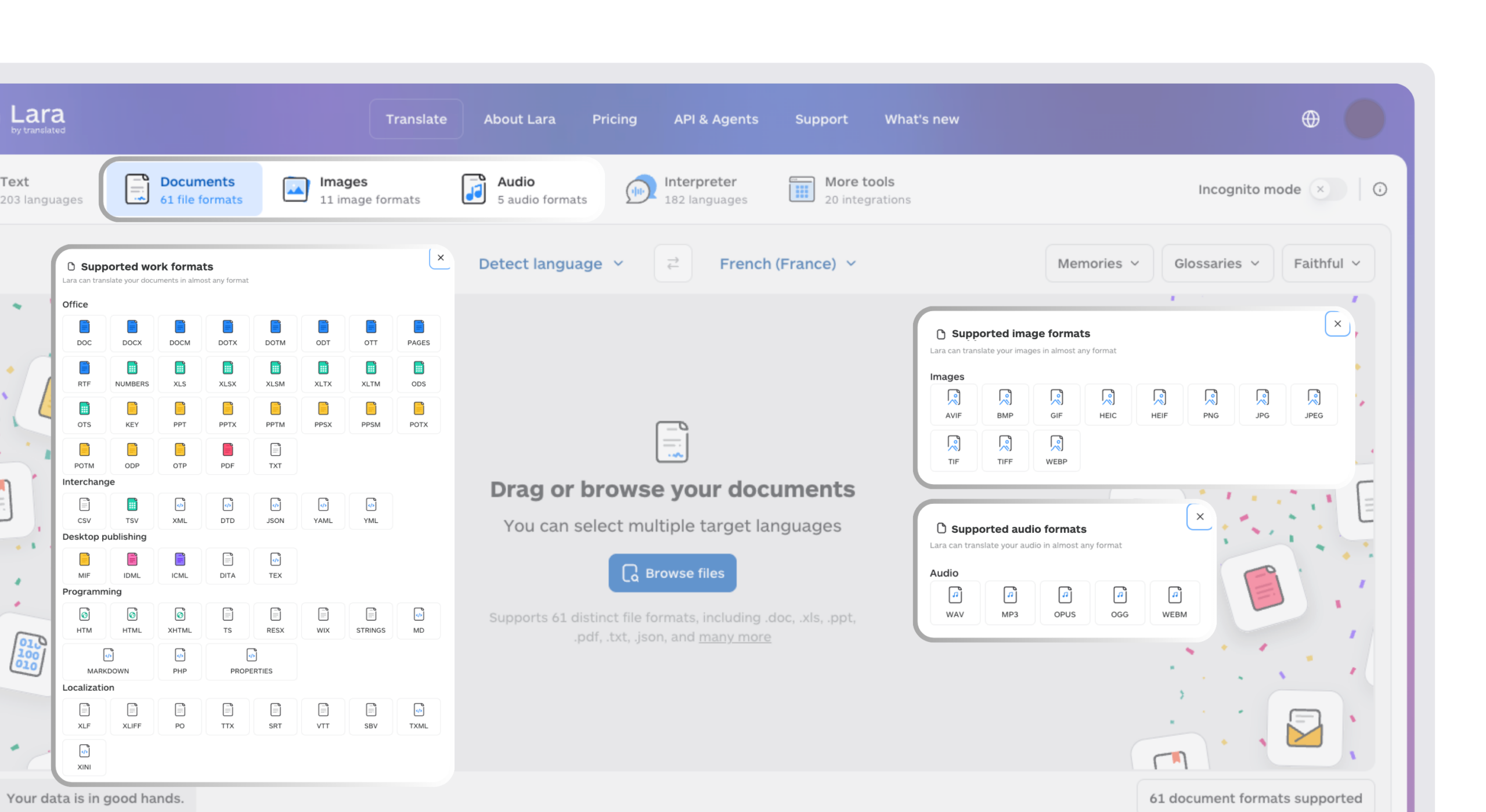
Lara Translate supports 200+ languages and 60+ file formats. Keep subscriber segmentation and sending in your email platform, and test links, merge tags, layout, and calls to action before launch. This connects the workflows through text or file transfer without assuming a native integration.
Keep campaign terminology consistent across languages
Translate the email and its supporting guide with Lara Translate, then review both together so the message and destination stay aligned.
Conclusion
Choose a platform around the automations you need, the audience you expect to build, and the way you sell. Test a complete campaign before committing, including signup, segmentation, sending, and reporting. For multilingual audiences, include translation and review in that same production process.
Have a valuable tool, resource, or insight that could enhance one of our articles?
Send us an email at press@laratranslate.com
We’ll be happy to review it and consider it for inclusion to enrich our content for our readers! ✍️
Frequently asked questions
What is an email marketing platform?
An email marketing platform lets businesses build subscriber lists, design and send campaigns, set up automated emails, and track opens and clicks. Many also include landing pages, signup forms, and basic CRM tools.
How much does email marketing cost for a small business?
Free plans can cover a small list and limited sending. Paid plans in this comparison start from $9 per month, with costs rising by contacts, sends, features, and billing terms. Estimate your total at the list size and frequency you expect to reach.
What is the difference between a campaign and an automation?
A campaign is a one-time email sent to a list or segment. An automation is a series of emails triggered by an action, such as signing up or abandoning a cart, and it runs without manual sending.
Do I need a free plan or a paid plan?
A free plan suits a new list and a few test campaigns. A paid plan makes sense when you need more automations, higher send limits, or support, so review the free limits before you build your workflows there.
What is list segmentation and why does it matter?
Segmentation groups subscribers by characteristics such as purchases, behavior, location, or language. It lets you select the audience for a message and adapt the offer or content to that group. Evaluate results against your campaign goals.
How do businesses send emails in several languages?
Store each subscriber’s language preference, create a segment for each language, and prepare reviewed versions of the campaign. Translate the subject line, preview text, body, buttons, and destination pages together. Test layout, links, and the selected audience before sending.
This article is about
- Email marketing platforms differ in free limits, automation caps, and pricing models
- How contact counts, sending allowances, billing terms, and add-ons affect costs as a list grows
- Matching the platform to how you sell, from newsletters to online stores
- Segmenting subscribers by language is a different task from translating campaign content
- Templates, landing pages, and PDF lead magnets need accurate translation for multilingual audiences
Useful links
- The biggest problems in B2B sales, and the tools that solve them
- Best AI Sales Tools in 2026
- Lara Translate: document translation
- Lara Translate: supported formats
This article was produced by the Lara Translate content team. Lara Translate is an AI translation platform built by Translated, with more than 25 years of professional translation experience. Email marketers use Lara Translate to translate newsletters, landing-page content, and PDF lead magnets, across 200+ languages and 60+ file formats.