

A finance team waiting on an invoice buried in a 40-page PDF, or an engineering team trying to feed thousands of contracts into a retrieval pipeline, runs into the same wall: documents arrive unstructured, and most software still expects structured data. AI document processing platforms exist to close that gap, turning scanned forms, PDFs, and images into clean, usable data without a person retyping it by hand.
This guide compares AI document processing and extraction platforms in 2026, spanning open-source parsing libraries, developer APIs, workflow automation, and managed cloud services. It also explains how multilingual extraction differs from translation, and where a separate translation step can help people use the resulting content.
|
TL;DR
|
What makes a document processing platform worth using in 2026?
Parsing and workflow automation solve different problems. A parser returns document content and structure for use in another system. A workflow platform can add validation, review queues, routing, and integrations. Several vendors offer both, so compare the capabilities included in the product and plan you select.
Test accuracy on representative documents. Dense tables, multi-column forms, nested line items, poor scans, and handwriting can expose different failure modes. Check field-level correctness, reading order, and table relationships instead of relying on a single vendor benchmark.
APIs and visual workflow builders offer different ways to implement the same process. An API gives engineers control over integration and downstream handling; a visual builder lets operations teams configure supported workflows. Either approach still needs validation rules and a way to handle exceptions.
Cloud integration is one evaluation criterion. A managed service can fit existing identity, storage, and billing arrangements, but its extraction quality still needs testing on your documents. Avoid assuming that a cloud service or specialist API is inherently more accurate.
Pricing models vary from fully custom-quoted to transparent, pay-as-you-go rates. Cloud providers and developer APIs generally publish per-page or per-call pricing, while more workflow-heavy platforms tend to require a sales conversation once volume and review requirements are factored in.
Multilingual extraction and translation are separate capabilities. Some providers explicitly document support for multiple source languages. Confirm language coverage for the exact OCR or extraction model, then decide whether the extracted content also needs translation for a reader or downstream process.
AI document processing platforms compared
| Tool | Best for | Category | Starting price |
|---|---|---|---|
| Unstructured.io | AI and data engineering teams that need a reliable parsing and ETL layer to feed documents into LLM and RAG pipelines | Document ETL / parsing library | Free library; hosted processing $0.015/page after introductory allowance |
| Reducto | Teams parsing complex tables, forms, and layouts | Vision-based parsing API | $150 free usage; endpoint-based pricing |
| LlamaParse | Teams building document workflows with LlamaIndex | LLM-ready document parsing | Free monthly credits; Starter $50/month |
| Docsumo | Finance and operations teams automating extraction from recurring document types like invoices and bank statements | Intelligent document processing | 14-day trial; custom production plans |
| Nanonets | Teams configuring document extraction and approval workflows | No-code IDP platform | $50 trial credits; usage charged per workflow block |
| Extend | Engineering teams building document processing directly into their own AI applications and pipelines | Document processing infrastructure | Custom, contact sales (free dev trial) |
| Rossum | Finance teams automating accounts payable and order processing end to end | Finance document automation | Custom, contact sales |
| Mindee | Developers building document extraction into applications | Developer OCR / IDP APIs | Free trial; credit-based subscription plans |
| Amazon Textract | Teams already built on AWS wanting document extraction as a managed cloud service | Cloud OCR and document analysis | Pay-as-you-go, per page/feature |
| Azure AI Document Intelligence | Teams already built on Azure wanting document extraction as a managed cloud service | Cloud OCR and document analysis | Pay-as-you-go, per page/model |
Dollar amounts are in US dollars. Compare the total workflow cost, including processing tiers, repeat calls, review, storage, and integration work. Introductory allowances are distinct from recurring free plans.
Document processing and extraction platforms
Unstructured.io
Best for: AI and data engineering teams that need a reliable parsing and ETL layer to feed documents into LLM and RAG pipelines
Unstructured.io ingests PDFs, images, Office files, HTML, and other document types and transforms them into clean, structured data that downstream LLM applications can actually use. It is available both as an open-source library and as a hosted Platform for teams that need production-scale processing without managing the pipeline themselves.
Pricing: The open-source library is free to use. Hosted processing includes an introductory allowance of 10,000 pages, then costs $0.015 per page. Business deployment options are custom-priced.
- Notable strength: An open-source parsing library alongside a hosted platform for document transformation
- Known limitation: Parsing and transformation still need downstream application logic to turn the output into a business action
- Scale: Hosted and Business deployment options support different processing volumes and infrastructure requirements
Verdict: A strong default choice for teams that want an established, open-source-rooted parsing layer feeding directly into an existing LLM or RAG stack.

Reducto
Best for: Engineering teams evaluating parsing for complex tables, forms, and layouts
Reducto provides APIs for document parsing and extraction, with additional endpoints for classification, splitting, and editing. Its parsing tools address document structure such as tables and forms for retrieval and agent workflows. Evaluate the relevant endpoint against your own documents and output requirements.
Pricing: Standard includes $150 in free usage, followed by endpoint-based rates. Published prices per 1,000 pages include $10 for r-1 Parse, $20 for Extract, and $40 for Deep Extract. Growth and Enterprise pricing is custom.
- Notable strength: APIs for parsing, extracting, classifying, splitting, and editing documents
- Known limitation: API outputs need integration and validation within the team’s application or workflow
- Scale: Growth and Enterprise plans add volume pricing and higher-throughput deployment options
Verdict: Consider Reducto when preserving complex document structure is important to your application and you want to test it through an API.
LlamaParse
Best for: Teams already building on LlamaIndex who need complex PDFs turned into clean, LLM-ready text
LlamaParse is LlamaIndex’s commercial document platform, offering parsing alongside extraction and indexing capabilities. It handles complex PDFs and structured content for document workflows and retrieval applications. It can be used through APIs; an existing LlamaIndex stack is a relevant fit rather than a requirement.
Pricing: Free includes 10,000 credits per month. Starter is $50 per month with 40,000 credits, and Pro is $500 per month with 400,000 credits. Credit consumption depends on the action and processing tier; Enterprise is custom-priced.
- Notable strength: Parsing, extraction, and indexing capabilities within the LlamaIndex ecosystem
- Known limitation: Usage and costs depend on the selected action and processing tier, so credits do not translate into a single fixed page allowance
- Scale: Free, Starter, Pro, and Enterprise plans offer different credit allowances and processing limits
Verdict: The natural choice for teams already standardized on LlamaIndex who need a parsing layer that fits directly into that pipeline.
Docsumo
Best for: Finance and operations teams automating extraction from recurring document types like invoices and bank statements
Docsumo combines document classification, splitting, field and table extraction, validation, and review. It supports recurring operational documents such as invoices and bank statements, with APIs, webhooks, and exports for downstream systems. Case management and broader document workflows depend on the selected plan.
Pricing: A 14-day trial includes up to 1,000 pages. Business and Enterprise are custom-priced according to document volume and workflow requirements.
- Notable strength: Extraction combined with validation and review for operational documents
- Known limitation: Case management and broader workflow capabilities depend on the selected plan
- Scale: Business and Enterprise plans are priced around document volume and workflow requirements
Verdict: A strong fit for finance and operations teams that need a reviewed, structured extraction workflow rather than a raw developer API.
Nanonets
Best for: Teams wanting a no-code way to automate invoice, receipt, and ID extraction without engineering resources
Nanonets combines OCR and AI models in a no-code platform, letting finance, HR, and operations teams build document extraction and approval workflows for invoices, receipts, and IDs without writing code or managing a parsing pipeline themselves.
Pricing: New accounts receive $50 in free credits. Usage is charged per workflow block run: published rates include $0.02 for simple operations, $0.10 for standard AI, and $0.30 for complex AI. Estimate the cost of the complete workflow, not just one extraction step.
- Notable strength: A visual workflow approach connecting extraction with validation, routing, and export
- Known limitation: Several billable blocks may run for a single document, so extraction cost alone does not represent the full workflow cost
- Scale: Usage-based workflow processing with volume discounts and enterprise deployment options
Verdict: Consider Nanonets when the team building the workflow does not have engineering resources to spare on a custom pipeline.
Make extracted content useful across languages
Use Lara Translate to translate validated text or supported documents for the people who need to review them. Keep the original alongside the translation for traceability.
Extend
Best for: Engineering teams building document processing directly into their own AI applications and pipelines
Extend provides document processing infrastructure purpose-built for AI applications, parsing, extracting, and splitting documents using specialized vision models so the output is ready to feed directly into an AI pipeline rather than requiring further cleanup. It is aimed squarely at developers, with a free trial available through a simple pip install rather than a sales conversation.
Pricing: Custom, contact sales; a free trial is available for developers via pip install
- Notable strength: Vision-model-based parsing and extraction built specifically for consumption by downstream AI applications
- Known limitation: No published multi-language document support
- Scale: Used by companies including Brex, Flatiron Health, Vendr, Mercury, Opendoor, FactSet, Checkr, Ironclad, and Square to process documents at production scale
Verdict: A strong pick for engineering teams that want document processing built as infrastructure for their own AI product, rather than a standalone review tool.
Rossum
Best for: Finance teams automating accounts payable and order processing end to end
Rossum focuses on document automation for finance workflows specifically, procure-to-pay and order-to-cash, built to capture documents wherever they arrive, including as email attachments, and route extracted data directly into existing finance systems.
Pricing: Custom, contact sales
- Notable strength: Document intake and automation designed around transactional finance workflows
- Known limitation: Confirm the integrations and workflow configuration needed for the intended finance process
- Scale: Pricing is tailored to page or document volume, workflow complexity, and additional services
Verdict: The right choice for finance teams whose primary need is automating accounts payable or order-to-cash, not general document parsing.
Mindee
Best for: Developers wanting document extraction APIs inside their own applications
Mindee provides APIs for document data extraction, with configurable models, confidence scores, and supporting utilities. Developers can integrate extraction into their applications and define the fields required for their documents. Evaluate the current model options and output schema against representative files before deployment.
Pricing: A free trial and credit-based Starter, Pro, and Enterprise plans are available. Confirm the selected credit volume, currency, billing term, and model usage costs on the pricing page.
- Notable strength: Configurable extraction models, confidence scores, and supporting API utilities
- Known limitation: Model configuration and output validation still need testing against the application’s document types
- Scale: Credit-based plans range from Starter and Pro to custom Enterprise contracts
Verdict: Consider Mindee when an API-based extraction service fits your application and you need configurable document models.
Amazon Textract
Best for: Teams already built on AWS wanting document extraction as a managed cloud service
Amazon Textract is AWS’s managed OCR and document analysis service, extracting text, forms, and tables from scanned documents and integrating directly with the rest of the AWS ecosystem for teams that already run their infrastructure there.
Pricing: Pay-as-you-go AWS pricing, charged per page and per feature such as tables, forms, or queries
- Notable strength: Managed document extraction within the AWS ecosystem
- Known limitation: Requires application integration and validation; language support differs by feature
- Scale: Usage-based processing charged by page and selected feature, with rates dependent on region and volume
Verdict: A sensible default for teams already standardized on AWS who want document extraction without adding a new vendor relationship.

Azure AI Document Intelligence
Best for: Teams already built on Azure wanting document extraction as a managed cloud service
Azure AI Document Intelligence, formerly Form Recognizer, is Microsoft’s managed document analysis service, offering prebuilt models for common document types alongside custom extraction models, and integrating directly with the rest of the Azure ecosystem.
Pricing: Pay-as-you-go Azure pricing, charged per page and per model type
- Notable strength: Prebuilt and custom document models within the Azure ecosystem
- Known limitation: Language coverage and capabilities vary by model, and application integration still needs implementation
- Scale: Page- and model-based pricing supports usage-based deployment; confirm region and tier availability
Verdict: The natural choice for teams already standardized on Azure who want document extraction without adding a new vendor relationship.
How to choose the right document processing platform
Step 1: Decide whether you need a raw parsing layer or a full workflow platform. Unstructured.io, Reducto, and LlamaParse hand back structured data for a system you already built. Docsumo, Nanonets, and Rossum add review, approval, and routing on top.
Step 2: Test accuracy on your actual document types, not a generic benchmark. A platform that excels at clean invoices may struggle with dense multi-column contracts, and the reverse is just as common.
Step 3: Match the platform to who is building the pipeline. A developer-first API suits an engineering team wanting full control; a no-code platform suits a finance or operations team without engineering resources to spare.
Step 4: Evaluate cloud integration and extraction quality together. Compare identity, storage, deployment, monitoring, and billing requirements, then test accuracy and review effort on the same sample documents.
Step 5: Confirm source-language support for the selected model. Test printed text, handwriting, tables, and mixed-language files separately where relevant. Add translation when readers or downstream processes need another language, while retaining the source values.
Connecting Lara Translate to a multilingual document workflow
Extraction reads content and returns fields or document structure; translation expresses that content in another language. A platform can support non-English extraction without translating its output. Check each model’s language coverage and test your actual files before deciding where translation belongs.
Lara Translate can sit alongside an extraction service to translate validated text, contracts, forms, or other supported documents for the intended readers. Retain original values and source references, and review the translated output before operational use. Translate descriptive text separately from identifiers, account numbers, and numeric fields that must remain unchanged; translation does not correct an extraction error.
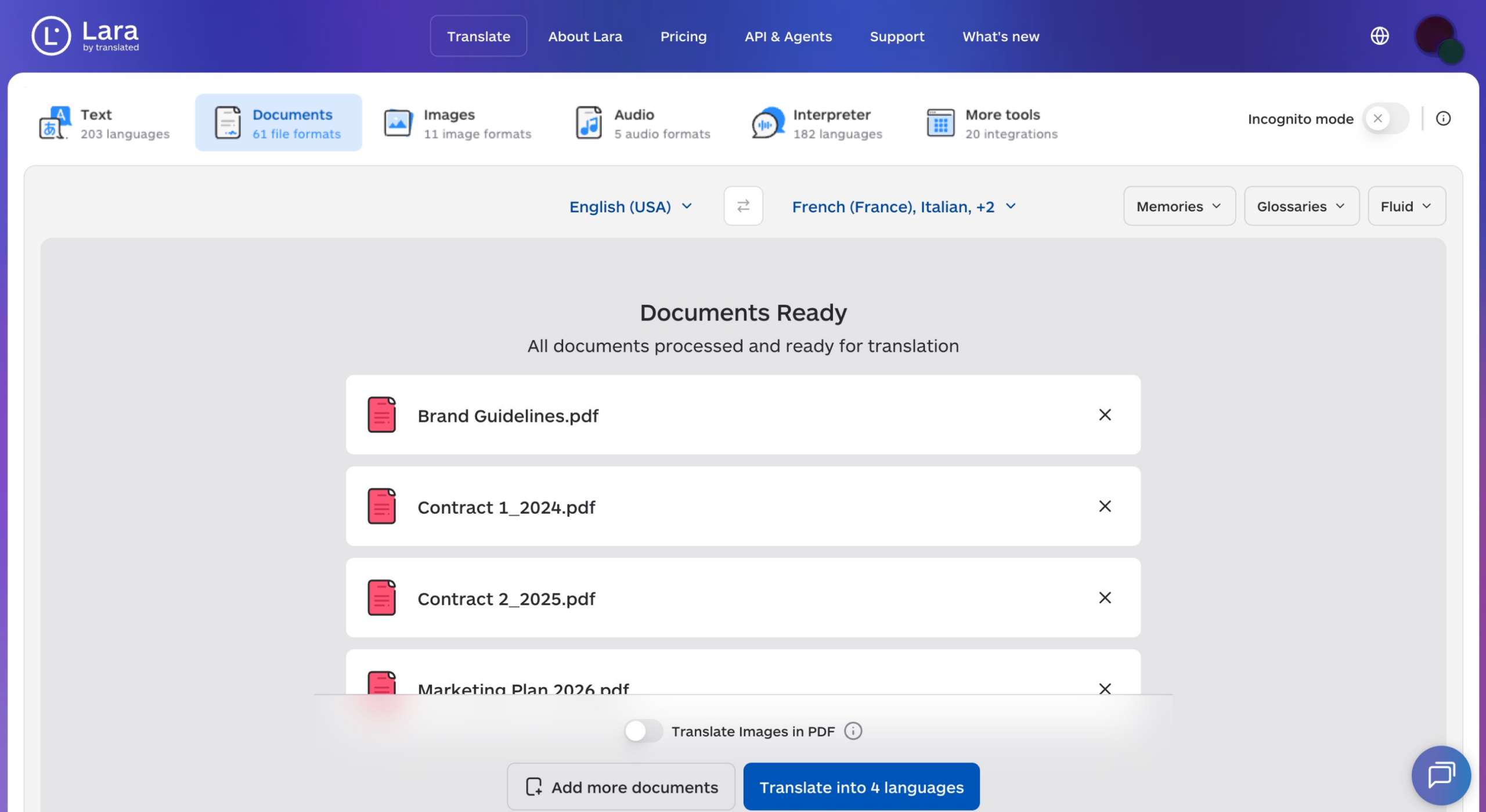
A technical team can connect the Lara Translate text translation API to selected extracted text fields, or use the document translation API for supported files. This is a custom workflow approach rather than a claim of native connectors to the platforms listed here. Use a glossary for recurring terminology and keep the source, translation, and review status linked.
Add reviewed translation to your document workflow
Prepare translated contracts, forms, and extracted text with Lara Translate, while preserving source records and keeping validation part of the process.
Conclusion
Choose the platform around the output and workflow you need: parsed content for an application, validated fields for an operational process, or a managed service within your cloud environment. Test accuracy, exception handling, and total cost on representative files. For international workflows, evaluate source-language extraction and translation as separate steps.
Have a valuable tool, resource, or insight that could enhance one of our articles?
Send us an email at press@laratranslate.com
We’ll be happy to review it and consider it for inclusion to enrich our content for our readers! ✍️
Frequently asked questions
What is AI document processing?
AI document processing uses techniques such as OCR, computer vision, and language models to turn documents into machine-readable content or structured fields. Depending on the product, it may also classify files, split document bundles, validate values, and route exceptions for review.
How is document extraction different from OCR?
OCR recognizes text in images. Extraction identifies the particular fields or relationships needed by an application, such as invoice totals, dates, and line items. A document workflow may use OCR as one step before extraction and validation.
How much does AI document processing cost?
Costs may be charged per page, document, credit, model call, or workflow step. Compare the same document sample and output requirements across providers, including repeated processing, human review, storage, and integration costs. Free trial allowances do not necessarily recur.
Can document processing handle multiple languages?
Yes, some products explicitly support multilingual OCR and extraction, but coverage varies by model and feature. Test your source languages, scripts, handwriting, and mixed-language files. Translation is a separate requirement when a reader or downstream process needs the content in another language.
What is the difference between a parser and a workflow platform?
A parser returns content and structure, such as text, tables, or document blocks. A workflow platform can add validation, review, approvals, and routing to business systems. Many vendors combine these capabilities, so compare the exact product and plan rather than relying on the category label.
How should I test extraction accuracy on tables and forms?
Use a representative set with known correct answers and measure the fields and relationships your workflow depends on. Include poor scans, merged table cells, multi-page records, and relevant source languages. Track both errors and the effort needed to review or correct them.
This article is about
- Distinguishing OCR, parsing, field extraction, and workflow automation.
- Choosing between developer APIs, visual workflow tools, and managed cloud services.
- Testing complex layouts, source languages, and exception handling on representative documents.
- Comparing total processing costs across page-, credit-, and workflow-based pricing.
- Adding translation while preserving original values, source references, and review status.
Useful links
- How to Translate a Word Document Without Losing Formatting
- Adaptive Document Translation API: Translate 70+ File Formats with Layout Preserved
- Lara Translate text translation API
- Lara Translate document translation API
This article was produced by the Lara Translate content team. Lara Translate is an AI translation platform built by Translated, with more than 25 years of professional translation experience. Teams use Lara Translate to translate contracts, forms, and extracted document text for international readers, across 200+ languages and 60+ file formats.