

Face filters and virtual try-on require more than a convincing demo. Product teams need reliable tracking on their target devices, a workable content pipeline, and instructions that users understand in each market.
This guide compares AR SDKs for face filters and virtual try-on by effect types, platform coverage, licensing, and integration needs. It also explains how to prepare interface text, store listings, and supporting documentation for a multilingual release.
|
TL;DR
|
What makes an AR SDK worth using in 2026?
Platform coverage sets your reach. Banuba lists Windows, macOS, iOS, Android, Web, Unity, Flutter, and React Native. For every toolkit, confirm support for the specific product, SDK version, operating system, and browser you intend to ship.
Effect type decides the fit. Face masks, makeup simulation, eyewear alignment, and world tracking require different capabilities. Test the relevant feature and product assets rather than assuming every AR toolkit offers the same try-on experience.
Creation tools affect production effort. Compare visual editors, scripting, asset formats, testing tools, and update workflows. Banuba lists a filter editor with scripting.
Licensing models differ. Products may charge by active users, views, sessions, or a negotiated license. Include content creation, hosting, and commercial-use restrictions in the comparison.
Website languages do not establish SDK localization coverage. Banuba lists a site in five languages. Separately check whether the tool exposes user-facing strings for translation and whether your app supports text expansion, fonts, and right-to-left layouts. Product claims and permission text need review in each target language.
AR SDKs and virtual try-on platforms compared
| Provider | Best for | Model | Pricing |
|---|---|---|---|
| Snap Camera Kit | Teams bringing Lens-based AR to their own apps | AR SDK | Depends on licensing terms |
| Banuba | Teams building face AR and video editing into apps | AR and video editing SDKs | Custom, quoted on usage and scope |
| DeepAR | Developers adding face and body effects to apps and sites | Face and body AR SDK | From $25/month for 1,000 MAU |
| Perfect Corp | Beauty and fashion brands adding try-on | Virtual try-on and AI platform | Product-specific plans or quote |
| Visage Technologies | Teams building face tracking and makeup features | Face tracking and makeup SDKs | Free evaluation; quoted licenses |
| Zappar | Teams building web AR with code or no-code tools | WebAR creation platform | Commercial Pro $315/month; Enterprise custom |
| 8th Wall | Web developers who want a free AR engine | Free WebAR platform | Free components; license and hosting conditions apply |
| WebAR.rocks | Web developers adding face and hand tracking | JavaScript computer vision libraries | Request current library or product licensing |
| Fittingbox | Eyewear retailers adding try-on | Eyewear virtual try-on platform | Request a quote |
| ModiFace | Beauty brands adding makeup and hair color try-on | Beauty virtual try-on | Request a quote |
Snap Camera Kit
Best for: Teams bringing Lens-based AR to their own apps.
Snap Camera Kit brings Lenses into iOS, Android, and web applications, with Lens Studio used to create AR content. It supports a range of camera experiences, but available Lens features can differ by integration and platform. Check Camera Kit compatibility and app-review requirements before committing to a particular effect.
Pricing: Confirm current licensing, usage terms, and any Lens content or production costs with Snap before commercial deployment.
Verdict: Consider Snap Camera Kit when Lens Studio authoring and a broad set of tracking types matter.

Banuba
Best for: Teams building face AR and video editing into apps.
Banuba is an AR and video editing SDK provider. Its offering includes a Face AR SDK for face tracking, beauty effects, and AR filters, a Video Editor SDK for in-app video creation, and Virtual Try-On (TINT) for web e-commerce, on Windows, macOS, iOS, Android, Web, Unity, Flutter, and React Native. The site is available in English, Spanish, Italian, Brazilian Portuguese and Korean.
Pricing: Face AR SDK is priced based on three things set the quote: the platforms you ship on, the feature categories you turn on, and monthly active users. The Video Editor SDK is monthly active users plus platforms.
Verdict: Consider Banuba when face AR, video editing, and web try-on from one vendor matter.
DeepAR
Best for: Developers adding face and body effects to apps and sites.
DeepAR provides face and body effects, background segmentation, and virtual try-on capabilities. Its SDK targets mobile and web experiences, with platform-specific integration requirements. Evaluate the SDK and any separate shopping or beauty products against the exact effects and devices you need.
Pricing: SDK documentation lists $25/month for up to 1,000 monthly active users, $100 for 5,000, $500 for 30,000, and $1,000 for 100,000. A free watermarked development tier covers up to 10 MAU. Annual options and larger deployments have separate terms; add-on products may cost extra.
Verdict: Consider DeepAR when face filters and try-on across mobile and web matter.
Perfect Corp
Best for: Beauty and fashion brands adding try-on.
Perfect Corp offers beauty and fashion try-on alongside AI analysis tools, including makeup, hair, nail, jewelry, and other product categories. Its business portfolio spans web, mobile, and API-based offerings. Confirm whether your chosen feature uses live AR, photo-based generation, or another workflow, and check the required product-asset preparation.
Pricing: Pricing depends on the selected product and deployment. Request the applicable plan or quote, including usage allowances, asset preparation, and integration services.
Verdict: Consider Perfect Corp when many try-on categories and AI analysis matter.
Visage Technologies
Best for: Teams building face tracking and makeup features.
Visage Technologies provides face tracking and analysis tools alongside makeup|SDK for virtual cosmetics. Its makeup technology supports products such as foundation, eyeshadow, and lipstick, with customization options. Confirm the supported platforms and implementation requirements for the selected SDK rather than assuming identical coverage across the portfolio.
Pricing: A free evaluation license is available on request. Commercial licenses are quoted by sales; the makeup SDK page states that licenses do not limit the number of SKUs.
Verdict: Consider Visage Technologies when core face tracking with a customizable makeup SDK matters.
Prepare your AR experience for each market
Translate interface copy, product guidance, and store listings with Lara Translate, then review them in the app before release.
Zappar
Best for: Teams building web AR with code or no-code tools.
Zappar offers Zapworks tools for creating and publishing web AR, including Mattercraft, Designer, and Universal AR SDKs. The SDK portfolio includes integrations for Unity, Three.js, A-Frame, PlayCanvas, and Babylon.js. Compare authoring tools, tracking capabilities, hosting options, and distribution methods for your project.
Pricing: The non-commercial Developer plan is $12.99/month. Commercial Pro is $315/month or $2,640/year, with view allowances and possible extra charges. Enterprise pricing is custom, and revenue or funding eligibility rules may require that plan. A 14-day trial is offered.
Verdict: Consider Zappar when app-free web AR with several creation tools matters.
8th Wall
Best for: Web developers who want a free AR engine.
8th Wall now provides downloadable tools and open-source components for WebAR. Face effects, image targets, sky effects, utilities, and examples are available under MIT licensing, while the XR engine binary has a separate limited-use license. The desktop editor is available for Mac and Windows. Review the license and feature availability for each component.
Pricing: Available components and the XR engine binary are free under their respective terms, with hosting and maintenance handled separately. Platform access and subscriptions ended on February 28, 2026; existing hosted projects continue until February 28, 2027. Review migration requirements for projects that depend on discontinued cloud services.
Verdict: Consider 8th Wall when a free web AR engine you host yourself matters.
WebAR.rocks
Best for: Web developers adding face and hand tracking.
WebAR.rocks provides browser-based JavaScript libraries for face, hand, object, and image tracking. Its demos include accessories, makeup, shoes, watches, and rings, with Three.js examples and web integration code. Distinguish the tracking libraries from any packaged commerce product when defining the implementation and license you need.
Pricing: Request current terms for the specific library or packaged try-on product. Confirm commercial rights, usage limits, maintenance, and any asset or integration fees.
Verdict: Consider WebAR.rocks when your team wants browser-based tracking libraries and control over the web implementation.
Fittingbox
Best for: Eyewear retailers adding try-on.
Fittingbox specializes in eyewear try-on, digital frame assets, 3D viewing, and optical measurement tools for online and in-store experiences. Confirm catalog coverage, frame digitization, commerce integration, and the measurement workflow needed for your store. Test the experience with your actual frame assortment and target devices.
Pricing: Request a quote covering the try-on product, digital frames, measurement tools, integration, and expected traffic. Demo access is available.
Verdict: Consider Fittingbox when eyewear try-on with measurement tools matters.
ModiFace
Best for: Beauty brands adding makeup and hair color try-on.
ModiFace develops beauty technology for makeup and hair-color try-on, skin analysis, and recommendations. Evaluate the relevant service, supported deployment channels, product digitization process, and rendering options for your brand’s catalog.
Pricing: Request a quote for the chosen beauty services, product range, integration, and usage requirements.
Verdict: Consider ModiFace when makeup and hair color try-on for beauty retail matter.
How to choose an AR SDK for face filters and virtual try-on
Define the feature. Write down whether you need open-ended face filters, product try-on, or both, and confirm each SDK lists those effects.
List your platforms. Check iOS, Android, web, desktop, and game engine support against the app you are building.
Understand the licence. Check whether pricing depends on active users, try-on sessions, or a flat fee, and ask for a quote where prices are not shown.
Test on real devices. Use a free trial or evaluation licence to check tracking quality and performance on the phones your users carry.
Plan for languages. Decide who translates interface strings, store listings, documentation, and in-experience captions for each market.
Connect your AR localization workflow with Lara Translate
Use Lara Translate alongside your app development workflow to translate interface strings, store listings, product guidance, and documentation across 200+ languages and 60+ file formats.
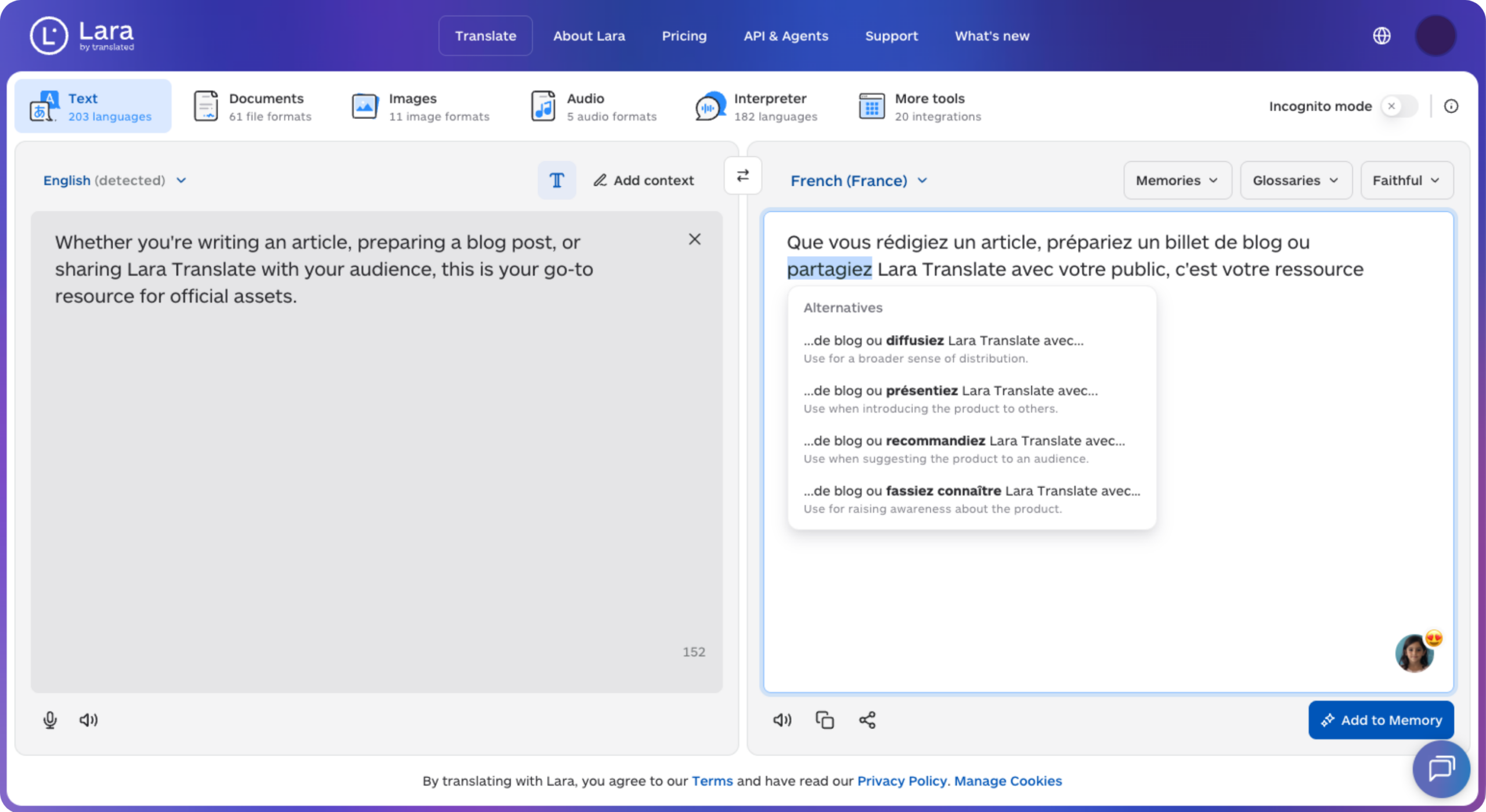
Export user-facing copy in a supported format or copy the text, add a glossary for product terminology, and import the reviewed translations into your localization system. Preserve string keys, placeholders, markup, and code identifiers. Test each language on a device for text expansion, font coverage, and placement over the camera view. This text-and-file workflow does not assume a native SDK integration; qualified reviewers should check product claims and permission wording.
Keep translated AR content aligned with each release
Translate approved copy updates with Lara Translate, then check the wording and layout inside the experience before publishing.
Conclusion
The right AR SDK depends on the effects you need, the platforms you target, and how you expect your audience to grow. Shortlist two or three and run a trial on each before you commit.
Have a valuable tool, resource, or insight that could enhance one of our articles?
Send us an email at press@laratranslate.com
We’ll be happy to review it and consider it for inclusion to enrich our content for our readers! ✍️
Frequently asked questions
What is an AR SDK for face filters?
An AR SDK for face filters is a software development kit that tracks a face through the camera and renders effects such as masks, makeup, and backgrounds in real time. Developers add it to a mobile, web, or desktop app.
What is virtual try-on?
Virtual try-on lets a shopper see a product such as glasses, makeup, or jewelry on their own face or body through a camera or photo. It is used in apps and online stores to reduce uncertainty before buying.
How much does an AR SDK cost?
Costs depend on the vendor and are often based on active users, try-on sessions, or a flat licence, and many vendors quote prices on request. Ask for a trial and compare the total at your expected usage.
Can face filters run in a web browser?
Yes, several toolkits run in the browser using JavaScript and WebGL, so users do not install an app. Browser performance varies by device, so test on the phones your audience uses.
Which platforms should an AR SDK support?
It should support the platforms your app already targets, typically iOS, Android, and web, and a game engine such as Unity if you build with one. Cross-platform frameworks such as Flutter and React Native matter if your app uses them.
How do I localize an app with AR features?
Translate user-facing interface text, store listings, documentation, and captions, while preserving code identifiers and placeholders. Test text expansion, fonts, right-to-left layouts, and placement inside the camera experience. Have qualified reviewers check product claims and permission wording before release.
This article is about
- How general face effects differ from product-specific beauty and eyewear try-on
- How platform compatibility, tracking quality, and device performance affect SDK selection
- Why effect authoring, product assets, and content updates belong in the implementation plan
- How active-user pricing, view allowances, hosting, and license restrictions affect total cost
- How translated interface text and localized visual testing support international app releases
Useful links
- Lara Translate September 2026 Updates: Lara Translate in ChatGPT, Group Admins, and My Translations
- Lara 3 Is Now Available: The Translation Model Professional Translators Preferred in Blind Tests
- Lara Translate: text and document translation
This article was produced by the Lara Translate content team. Lara Translate is an AI translation platform built by Translated, with more than 25 years of professional translation experience. App teams use Lara Translate to prepare interface text, store listings, and documentation for review, across 200+ languages and 60+ file formats.