

An old mailing list can contain mistyped, abandoned, or otherwise undeliverable addresses. Email verification helps identify these risks before a campaign, but it cannot guarantee inbox placement or replace permission-based list building and sound sending practices.
This guide compares email verification and list cleaning tools for bulk uploads, signup forms, and CRM workflows. It covers verification methods, integrations, pricing, and the separate task of preparing campaign content for recipients in different languages.
|
TL;DR
|
What makes an email verification tool worth using in 2026?
Bulk and real-time checking solve different problems. Bulk verification reviews an existing list, while real-time validation checks addresses at collection. Clearout offers bulk verification with three modes: Fastest Turnaround, Highest Accuracy, and Deep Verify. Its Form Guard checks email, phone, and name fields in real time to help block bots and fake registrations. Automated cleaning can help keep connected CRM or email-platform records current; check how results are written back and how suppression rules work.
Catch-all and risk detection affect result quality. A server that accepts arbitrary recipients may prevent a verifier from confirming a particular mailbox. Clearout’s Deep Verify uses multi-layer SMTP analysis and email-gateway detection to resolve catch-all addresses into valid or invalid results where possible, while reporting unresolved addresses separately. Compare the treatment of catch-all, disposable, role-based, and unknown results instead of assuming a single valid label guarantees delivery.
Extra tools can replace other subscriptions. Hunter combines an email finder, verifier, and cold email sequences, Clearout lists an email finder, CRM enrichment, and phone validation, and BriteVerify lists phone and address validation next to email checks. Teams that want the enrichment side kept current without manual uploads can also look at LinkFinder AI, which finds verified work emails and refreshes CRM contact and firmographic data on a schedule through its API and n8n, Make, or Zapier integrations.
Pricing models differ. Compare one-time credit packs, recurring allowances, expiry rules, and the credit cost of extra checks. Advertised lowest unit rates may require a large purchase and may not apply to advanced catch-all analysis or enrichment.
Languages are rarely the whole picture. Website translations do not establish product-interface languages or support for internationalized email addresses. Check those capabilities separately. A verified list also needs reviewed subject lines, email templates, and landing pages in the recipient’s preferred language; keep email addresses and contact identity fields unchanged.
Email verification and list cleaning tools compared
Prices are USD examples unless noted. Compare the same verification volume and check expiry, recurring billing, advanced-check costs, and separate product allowances.
| Provider | Best for | Model | Pricing |
|---|---|---|---|
| ZeroBounce | Teams who want validation plus deliverability tools | Validation and deliverability platform | ZeroBounce ONE $99/month |
| Clearout | Teams who want catch-all checks, bulk cleaning, forms, and CRM enrichment | Validation and prospecting platform | Annual, monthly, or pay-as-you-go; 100 free credits |
| NeverBounce | Teams who want real-time checks and automated cleaning | Email verifier and list cleaner | Check current volume pricing and Sync charges |
| Bouncer | Teams who want API, form checks, and CRM cleaning | Email verification platform | 1,000 credits $8; 10,000 credits $60 |
| MillionVerifier | Teams who want bulk checks and daily subscriber cleaning | Email verification service | From $39; 50,000 credits $89 |
| Emailable | Teams who want scoring, forms, and deliverability checks | Email verification service | 5,000 credits $38 pay-as-you-go |
| Hunter | Teams who find, verify, and email prospects in one tool | Outreach and lead platform | Free: 50 credits/month; Starter $34/month billed annually |
| DeBounce | Teams who want monitoring and a finder with many integrations | Email validation platform | From $0.00045/check at volume; advanced checks cost more credits |
| Verifalia | Teams who want detailed result codes and SDKs | Email verification service | Free: 25 daily credits; paid packs and plans |
| BriteVerify | Teams who also verify phone and address data | Contact data quality tool | Not listed; demo offered |
ZeroBounce
Best for: Teams who want validation plus deliverability tools.
ZeroBounce combines bulk and real-time email validation with scoring, activity data, an email finder, inbox placement testing, blacklist monitoring, and other deliverability tools. Confirm the allowance for each service and the integration needed to move verification results into your existing workflow.
Pricing: ZeroBounce ONE lists 10,000 monthly verification credits for $99/month, or $79/month billed annually. The free account includes 100 monthly credits. Pay-as-you-go options are also available; the pricing page states that credits do not expire while a ONE subscription remains active.
Verdict: Consider ZeroBounce when verification and deliverability tools in one account matter.

Clearout
Best for: Teams who want catch-all verification, bulk list cleaning, form checks, and CRM enrichment.
Clearout is an email validation and sales prospecting platform offering single, bulk, and API verification. Clearout reports 99.73% email verification accuracy and offers three verification modes: Fastest Turnaround, Highest Accuracy, and Deep Verify. Deep Verify adds analysis for catch-all and email-gateway-protected addresses. Form Guard validates email, phone, and name fields at the point of entry to help block bots and fake registrations.
Its broader offering includes an email finder, Data Pulse for CRM contacts, Prospect for lead lists, and ClearoutPhone for phone validation in 248+ countries, with HubSpot, Mailchimp, ActiveCampaign, Google Sheets, Zapier, and WordPress integrations. The pages reviewed do not state supported languages.
Pricing: Clearout offers annual and monthly subscriptions and one-time pay-as-you-go credit purchases. See its pricing page for dollar prices at your chosen volume. Purchased credits do not expire, unused subscription credits roll over, and new accounts receive 100 free credits. Deep Verify is priced separately from standard verification credits.
Verdict: Consider Clearout when catch-all resolution, bulk verification, form checks, and CRM enrichment in one account matter.
NeverBounce
Best for: Teams who want real-time checks and automated list cleaning.
NeverBounce offers bulk list cleaning, real-time verification, and automated cleaning through Sync. Compare the collection-point integration, result categories, and writeback behavior needed for your forms or CRM. Confirm current integration availability before selecting a plan.
Pricing: Check the current volume-based quote or pricing calculator and confirm whether Sync has a separate subscription. Test-credit offers and allowance terms should be checked at signup.
Verdict: Consider NeverBounce when entry-point checks and automated cleaning through a sync matter.
Bouncer
Best for: Teams who want an API, form checks, and CRM cleaning.
Bouncer provides a web app and verification API, Shield for checks at entry, and AutoClean for connected CRM workflows. Its broader product range includes catch-all verification, toxicity checks, enrichment, and deliverability testing. Compare the scope and billing of these services separately from standard verification.
Pricing: Pay-as-you-go examples are $8 for 1,000 credits, $60 for 10,000, and $400 for 100,000. Verification credits do not expire. Subscription options and separately priced products are available; confirm the cost of your chosen workflow.
Verdict: Consider Bouncer when API access, form checks, and automatic CRM cleaning matter.
MillionVerifier
Best for: Teams who want bulk checks and daily subscriber cleaning.
MillionVerifier provides single-address and bulk verification, a real-time API, and EverClean for automated list maintenance. It also offers catch-all and disposable-address checks and integrations with email platforms. Evaluate its result categories and the actions EverClean takes on connected lists before enabling automation.
Pricing: Bulk plans start at $39, with published examples of $89 for 50,000 credits and $449 for one million. Purchased credits do not expire, and signup includes 100 free credits. Check EverClean pricing separately.
Verdict: Consider MillionVerifier when bulk checks and daily subscriber cleaning matter.
Prepare campaign copy for every language
Use Lara Translate to prepare subject lines, email templates, and landing-page copy, then review each language before sending.
Emailable
Best for: Teams who want scoring, form checks, and deliverability checks.
Emailable provides bulk and single-address verification, an API, a form widget, and deliverability testing. Its checks cover categories such as disposable, accept-all, and role-based addresses, with scoring to support list decisions. Confirm the integrations and handling of uncertain results needed for your workflow.
Pricing: The pricing page lists 5,000 credits for $38 pay-as-you-go or $32.30/month on subscription. Signup includes 250 free credits, and purchased credits do not expire. Check the separate allowances for deliverability services.
Verdict: Consider Emailable when scoring and a form widget with team accounts matter.
Hunter
Best for: Teams who find, verify, and email prospects in one tool.
Hunter combines lead discovery, an email finder, verification, enrichment, and email sequences. It also offers integrations and a Google Sheets add-on. Compare credit use for finding and verifying addresses, and distinguish the core subscription from optional inbox-protection and email-account services.
Pricing: The free plan includes 50 credits per month. Starter is listed at $34/month billed annually ($408/year), including 24,000 annual credits. Higher tiers and add-ons have separate charges. Credits are not the same as a guaranteed number of new leads.
Verdict: Consider Hunter when finding, verifying, and emailing prospects in one tool matters.
DeBounce
Best for: Teams who want monitoring, a finder, and many integrations.
DeBounce provides bulk validation, an API, a real-time form widget, list monitoring, catch-all checks, enrichment, and an email finder. Integrations connect it to common CRM and email platforms. Review how monitoring updates your lists and which checks consume additional credits.
Pricing: Pay-as-you-go rates are advertised from $0.00045 per check at volume, with non-expiring credits and 100 free signup credits. Standard validation uses one credit; catch-all validation uses 10, successful enrichment uses 20, and monthly monitoring uses twice the list size in credits. Price the actual combination you need.
Verdict: Consider DeBounce when daily monitoring and a wide integration list matter.
Verifalia
Best for: Teams who want detailed result codes and SDKs.
Verifalia provides list uploads, a real-time API, an embeddable widget, and developer SDKs. It classifies results as Deliverable, Undeliverable, Risky, or Unknown and supplies detailed status codes. Its quality levels offer different processing options; confirm support for the internationalized addresses and form languages in your audience.
Pricing: The free plan includes 25 daily credits. Paid plans and pay-as-you-go packs are available. Purchased pack credits do not expire, while unused daily credits expire each day. Standard verification uses one credit; higher quality levels use more.
Verdict: Consider Verifalia when detailed result codes, SDKs, and non-ASCII address support matter.

BriteVerify
Best for: Teams who also verify phone and address data.
BriteVerify powers contact data quality within Validity Engage. The offering includes email syntax, domain, MX, and mailbox checks alongside phone and US postal-address validation. Confirm which broader CRM functions, such as duplicate management and field updates, are included in the package you are considering.
Pricing: Request a quote for the required verification volume and contact data quality capabilities, including integrations and any broader Engage services.
Verdict: Consider BriteVerify when email, phone, and US address checks in one tool matter.
How to choose an email verification tool
Define where addresses come from. Note whether you clean uploaded lists, collect addresses on forms, or keep a CRM clean, and confirm each tool supports that path.
Check how risky results are handled. Look at how each tool treats catch-all, role-based, and disposable addresses, and decide which of them you will still send to.
Compare credits and pricing. Check free credits, whether credits expire, and the cost per check at your list size, since several pages show prices only on a separate pricing page.
Test with a sample. Run the same 500-address sample through two or three tools and compare the results before you buy a large pack.
Plan for languages. Check which languages the tool and your forms support, and decide who translates and reviews subject lines, templates, and landing pages for each market.
Connect your email content workflow with Lara Translate
Use Lara Translate alongside your email platform to translate subject lines, preheaders, email templates, and landing-page copy. Export a supported document or copy the campaign text, add context about the audience and desired tone, and return reviewed translations to your email editor. Preserve email addresses, contact names, merge fields, HTML variables, tracking URLs, and unsubscribe links.
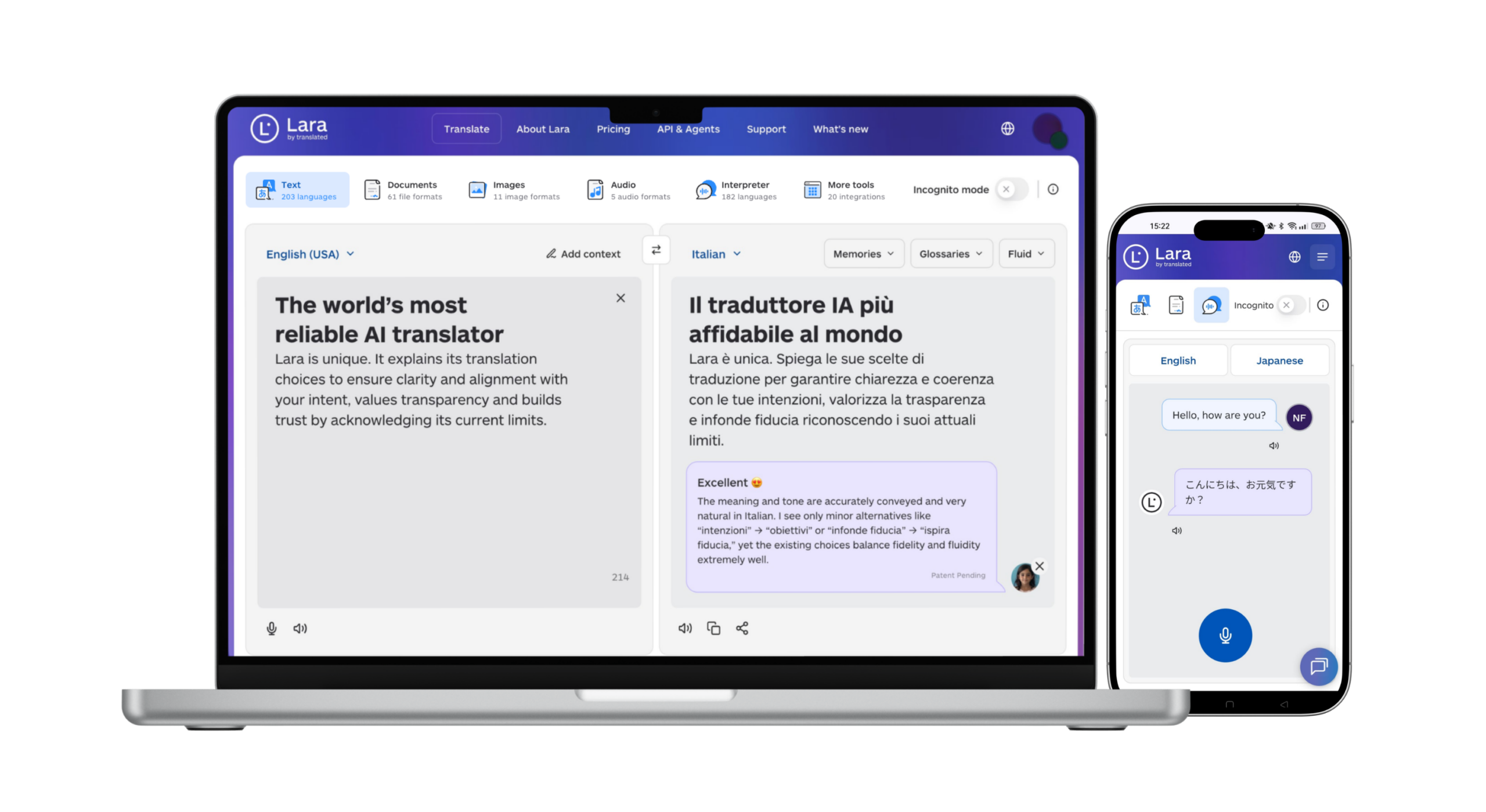
Test the final message for text expansion, layout, and link behavior. This content workflow does not require a native connection to an email verifier and does not alter your contact records.
Keep multilingual campaigns consistent
Translate approved campaign updates with Lara Translate, then review the message and test each template before launch.
Conclusion
Choose a tool around your collection points, result-handling rules, and list volume. Test the same representative sample, compare uncertain results and total costs, and connect verification to a clear suppression and review process. Keep campaign translation as a separate content workflow.
Have a valuable tool, resource, or insight that could enhance one of our articles?
Send us an email at press@laratranslate.com
We’ll be happy to review it and consider it for inclusion to enrich our content for our readers! ✍️
Frequently asked questions
What is email verification?
Email verification assesses whether an address is formatted correctly and whether its domain and mailbox appear able to receive mail. It can flag invalid or risky addresses without sending a campaign message. Results are a point-in-time assessment and do not guarantee inbox placement.
What is a catch-all email address?
A catch-all address belongs to a domain whose mail server accepts messages for any address, so a simple check cannot confirm that a specific mailbox exists. Verification tools usually flag these as risky or unknown.
How often should I clean my email list?
Recheck older or inactive lists before sending, and use real-time checks at signup where practical. Set an ongoing schedule based on list age, turnover, campaign frequency, and bounce patterns rather than relying on one universal interval.
How much does email verification cost?
Pricing is usually per check or per credit, and several tools offer free credits on signup. Compare the cost at your expected list size and check whether credits expire.
What is the difference between bulk and real-time email verification?
Bulk verification cleans an uploaded list in one batch, while real-time verification checks each address as someone types it into a form or API call. Many teams use both.
How do I run email campaigns for subscribers in different languages?
Segment subscribers using their stated language preferences, then translate subject lines, email copy, and linked landing pages. Have a fluent reviewer check meaning and tone, and test the final template. Preserve email addresses, names, merge fields, tracking links, and unsubscribe functionality.
This article is about
- How email verification identifies invalid and risky addresses without guaranteeing inbox placement
- How bulk checks, real-time validation, and automated CRM cleaning serve different workflows
- Why catch-all, disposable, role-based, and unknown results need explicit handling rules
- How credit expiry, volume tiers, subscriptions, and advanced checks affect total cost
- How translated campaign content complements list verification while preserving contact data
Useful links
- Best Creator Sales and Email Platforms in 2026
- Best Email Marketing Platforms for Small Businesses in 2026
- Lara Translate: text and document translation
This article was produced by the Lara Translate content team. Lara Translate is an AI translation platform built by Translated, with more than 25 years of professional translation experience. Email marketers use Lara Translate to prepare subject lines, templates, and landing pages for professional review, across 200+ languages and 60+ file formats.