

A research team records forty hours of interviews across six countries, and the real project doesn’t start until every recording becomes searchable, readable text. A deposition, a webinar, a lecture hall full of international students, all of it depends on the same unglamorous first step: turning spoken words into accurate text, often in more than one language, before anyone can actually use the content.
AI transcription and translation platforms help turn recordings into text that teams can review, translate, and reuse. This guide compares options in 2026 by language coverage, human review, integrations, and editing features, and explains what to check if you also need to translate written documents.
|
TL;DR
|
What makes an AI transcription and translation platform worth using in 2026?
Language breadth varies dramatically, and it’s worth checking your specific languages, not just the headline count. Check transcription and translation separately: supported languages can differ between services, and human review may cover a different set again.
Pure AI accuracy and hybrid AI-plus-human accuracy solve different risk levels. Test representative recordings and assess the corrections required. Rev and Happy Scribe offer human services alongside AI options; choose the review process according to how the transcript will be used.
Integration depth changes how much manual file handling a team does day to day. Sonix supports connections with Dropbox, Google Drive, Zoom, and Zapier, alongside workflows for Adobe Premiere. Check whether each connection supports the import, export, or automation you need.
Some platforms generate content from a transcript, not just the transcript itself. Konch’s Magic Doc feature turns a finished transcript directly into summaries, essays, or business insights, a step beyond what pure transcription tools offer.
Written-document translation deserves a separate workflow check. Some providers also accept written documents: GoTranscript, for example, offers text translation services. Compare supported file formats, terminology controls, and review options before choosing a tool for reports, contracts, or other documents.
Best AI transcription and translation platforms in 2026
| Platform | Best for | Languages | Starting price |
|---|---|---|---|
| Happy Scribe | Multilingual AI and human-reviewed services | Varies by service | $8.50/month billed annually |
| Sonix | Connected transcription workflows | 54+ languages | $10/hour pay-as-you-go; Core $25/month |
| Trint | Collaborative editorial workflows | 40+ transcription; 70+ translation | Check current plans |
| Konch | Education and legal clients wanting AI content generation from transcripts | 55+ languages | Starting from $0.08/min, Free trial available |
| Verbit | Captioning and accessibility workflows | Varies by product | Media Standard from $24/month |
| Rev | AI and human transcription options | 37+ AI languages on eligible plans | $0.25/min AI; $1.99/min human |
| Descript | Text-based audio and video editing | 25 transcription; 30+ dubbing on eligible plans | Free; Hobbyist $16/person/month annually |
| Notta | Multilingual meeting notes and visual summaries | 58 transcription languages | $8.17/seat/month billed annually |
| Maestra | Live transcription and media localization | 125+ transcription languages | Free live transcription; paid products available |
| GoTranscript | Human transcription and translation | 140+ transcription languages | Per-minute transcription; order estimate |
Happy Scribe
Best for: Teams needing multilingual transcription with AI and human-reviewed options.
Happy Scribe offers AI transcription, human transcription and proofreading, and subtitle workflows. Language availability varies by service, so confirm support for your recordings and any human review you need. Subtitle export formats and editing capabilities depend on the plan.
Pricing: Basic starts at $8.50/month billed annually. Human proofreading starts at $2/minute; a transcription trial is available.
Verdict: Consider Happy Scribe when language diversity is the primary requirement and you need both automated and human-reviewed accuracy options in one platform.

Sonix
Best for: Teams processing high volumes of audio and video who need deep tool integration.
Sonix combines automated transcription, translation, and AI analysis across 54+ languages. Its integrations include cloud storage, Zoom, and Zapier, with import and export workflows for editing software such as Adobe Premiere. Check the supported workflow for your tools before choosing a plan.
Pricing: Pay-as-you-go transcription costs $10/hour. Core costs $25/month and includes 5 hours of transcription and translation. A 30-minute trial is available.
Verdict: Consider Sonix when existing tool integrations and processing speed at volume matter more than the widest possible language list.
Trint
Best for: Editorial and content teams building stories collaboratively from transcripts.
Trint supports transcription in 40+ languages and translation in 70+ languages. Its collaborative tools help editorial teams review transcripts and develop stories from recorded material. Confirm the collaboration and production features included in your chosen subscription.
Pricing: See Trint’s current subscription plans or contact sales for a team quote.
Verdict: Consider Trint when collaborative editorial review and story-building workflows matter more than the lowest available price.
Konch
Best for: Educational institutions and legal clients wanting transcription paired with AI-generated content and expert human review options.
Konch, led by CEO Ankit Bhayani, is a small, GDPR-compliant platform supporting transcription in 55+ languages and translation in 74+ languages. Its clients include Texas A&M and NYU alongside legal firms and corporate businesses. For high-accuracy requirements, the platform features a Precision option with human review conducted by certified experts. Additionally, its Magic Doc feature goes a step beyond standard transcription by generating summaries, essays, and business insights directly from the finished transcript.
Pricing: Standard AI starting from $0.08/min. Custom plans available through sales.
Verdict: Consider Konch when you need certified human precision alongside an AI-driven platform supporting 55+ transcription and 74+ translation languages to turn raw audio into immediate, usable content.
Verbit
Best for: Enterprises with strict accessibility and compliance obligations.
Verbit provides transcription, captioning, audio description, and translation services for media, education, and business use. Offerings differ by product and include options for human review. Match the service and contractual terms to your organization’s accessibility requirements.
Pricing: Media Standard starts at $24/month. Other products and enterprise requirements are quoted separately.
Verdict: Consider Verbit when captioning and accessibility services need to fit a defined organizational workflow.
Translate the documents that support your recorded content
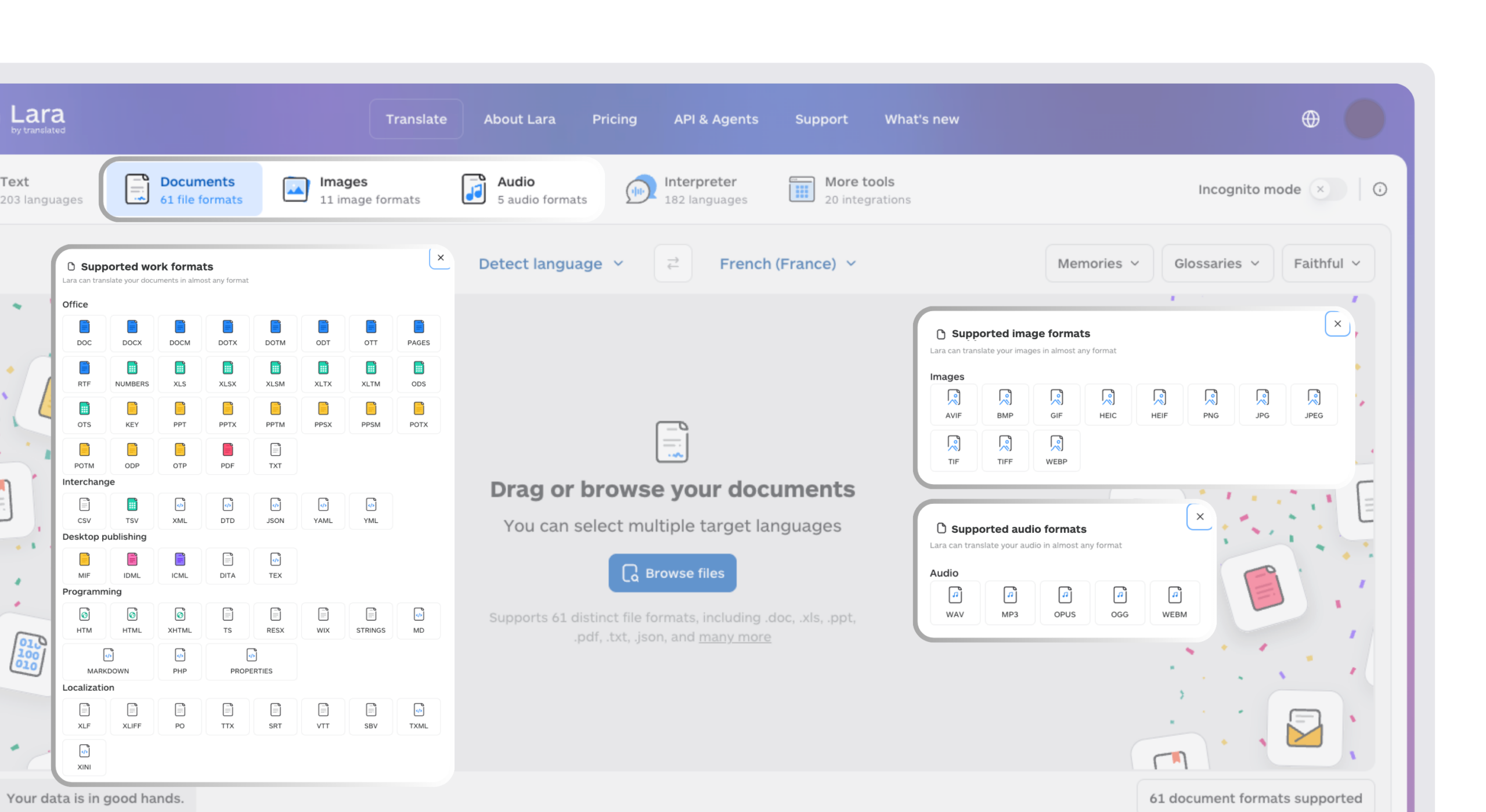
Use Lara Translate to translate reports, research materials, and business documents across 200+ languages, with support for 60+ file formats.
Rev
Best for: Teams needing a choice between AI transcription and human transcription services.
Rev offers AI transcription alongside human transcription and captioning services. AI language support depends on the plan, with 37+ languages available on eligible subscriptions. Evaluate turnaround, review requirements, and data-handling terms for your intended use.
Pricing: Pay-as-you-go AI transcription costs $0.25/minute; human transcription starts at $1.99/minute. Subscription options are also available.
Verdict: Consider Rev when you want human transcription services alongside an AI option and a shared review workflow.

Descript
Best for: Creators who want to edit podcasts and video by editing the transcript text directly.
Descript pairs transcription with text-based audio and video editing, so creators can cut and rearrange recorded content by editing words. It supports transcription in 25 languages and offers dubbing in 30+ languages on eligible plans. Check translation and dubbing entitlements separately from basic transcription.
Pricing: The free plan includes 60 media minutes/month. Hobbyist costs $16/person/month billed annually or $24 billed monthly; translation and dubbing features depend on the plan.
Verdict: Consider Descript when text-based post-production editing is central to your workflow.
Notta
Best for: Teams wanting multilingual meeting transcription and AI-generated visual summaries.
Notta supports transcription in 58 languages and provides meeting notes and translation tools. Notta Brain can turn source material into outputs such as slides and infographics. These are generated content outputs, with access and usage subject to the selected plan or add-on.
Pricing: Pro starts at $8.17/seat/month billed annually. Translation and Notta Brain usage may require additional paid features.
Verdict: Consider Notta when multilingual meeting notes and visual summaries fit your team’s workflow.
Maestra
Best for: Teams needing live transcription and media localization tools for subtitles, voiceover, and dubbing.
Maestra offers a free live transcription tool and paid services for transcription, subtitles, translation, voiceover, and dubbing. Its pricing page lists transcription in 125+ languages. Confirm which languages, usage allowances, and localization features are included in each product.
Pricing: Free live transcription is available. Paid subscriptions and usage allowances vary by product; check transcription, subtitles, and dubbing plans separately.
Verdict: Consider Maestra when subtitles, voiceover, and dubbing need to live in the same platform as transcription itself.
GoTranscript
Best for: Organizations seeking human transcription and translation services.
GoTranscript provides human transcription across 140+ languages and offers audio and written-document translation. It is included here as a human-service alternative to AI transcription platforms. Teams can select service options according to language, turnaround, and the requirements of the material.
Pricing: Transcription is priced per audio minute, with the order estimate varying by language, turnaround, and selected options. Translation is quoted according to the service and source material.
Verdict: Consider GoTranscript when you prefer a human-service workflow for transcription or translation.

How to choose the right AI transcription and translation platform
Step 1: Confirm your specific languages, not just the headline language count. Confirm support for the actual source and target languages, including any dialects, and check whether human review is available for them.
Step 2: Match accuracy requirements to your content’s actual stakes. Test recordings with your typical accents, terminology, and audio conditions. Plan an appropriate review step for quotations, publication, or other uses where errors have consequences.
Step 3: Check integration depth against your existing toolchain. Check whether connections such as Sonix’s cloud storage, Zoom, and editing-software workflows cover the steps your team actually performs.
Step 4: Decide whether you need content generation, not just transcription. Konch’s Magic Doc feature and Descript’s text-based editing both go beyond producing a raw transcript, which matters if that’s actually part of your workflow.
Step 5: Plan separately for written documents that never came from an audio recording. Compare file-format support and review options. A dedicated document translation workflow can help when your selected transcription service does not support the written materials you need to translate.
Using Lara Translate for audio and document translation
Best for: Teams needing original and translated transcripts, translated audio, and document translation.
Lara Translate supports audio-to-text, returning the original transcript and translated text organized by paragraph. Audio input supports 68 languages, with translated text available in 200+ languages. Glossaries and translation memories help apply preferred terminology. Files can be up to 200 MB and two hours long. For audio-to-audio, the web app’s Audio tab produces translated speech and supports multiple files and target languages. Both workflows accept WAV, MP3, OPUS, OGG, and WEBM. Document translation is also available across 200+ languages and 60+ file formats.
Pricing: Audio-to-text costs €0.05 or $0.05 per minute. Audio-to-audio uses the character pool at 40 characters per second of audio. Check the respective service’s billing before uploading.
Verdict: Consider Lara Translate when you need translated transcripts or spoken output alongside written-document translation. Choose the audio workflow according to the output you need.
Translate audio and documents in one platform
Choose translated text or translated audio for your recordings, and use Lara Translate for the reports and documents that accompany them.
Conclusion
Choose an AI transcription and translation platform around your languages, review requirements, and the work that follows transcription. Test representative recordings, compare total usage costs, and check integrations before committing. For written documents, assess file support and terminology needs separately so the translation workflow fits the material.
Have a valuable tool, resource, or insight that could enhance one of our articles?
Send us an email at press@laratranslate.com
We’ll be happy to review it and consider it for inclusion to enrich our content for our readers! ✍️
Frequently asked questions
What is the best AI transcription and translation platform in 2026?
Choose according to your workflow. Happy Scribe offers AI and human-reviewed options, Sonix connects transcription with other tools, and Trint supports collaborative editorial work. Konch stands out for education and legal clients wanting AI-generated content directly from transcripts.
How accurate is AI transcription compared to human transcription?
Accuracy depends on audio quality, speakers, terminology, language, and the review process. A single percentage cannot describe every recording. Test a representative sample and compare the time needed to correct AI output with the cost and turnaround of a human service.
What’s the difference between these platforms and a dedicated translation tool?
Compare the workflow and supported inputs. A transcription platform may translate text derived from recordings, while a document translation tool can focus on uploaded written files and their formatting. Some providers cover both: GoTranscript offers written-document translation as well as transcription. Lara Translate supports document translation across 200+ languages and 60+ file formats.
How much do AI transcription and translation platforms cost in 2026?
Compare billing terms and included usage. Happy Scribe Basic starts at $8.50/month billed annually, and Notta Pro at $8.17/seat/month billed annually. Sonix offers pay-as-you-go and subscription plans; Rev offers per-minute services and subscriptions. Human review, translation features, and add-ons can change the total cost.
Can these platforms translate written documents that were never recorded as audio?
Some can. GoTranscript offers text translation for written documents, including common office file formats. Check each provider’s supported inputs and formatting options. Lara Translate is another option for translating written documents across 200+ languages and 60+ file formats.
Should a research team choose an AI-only platform or a hybrid AI-plus-human option?
Start with a representative sample and define the review standard for the project. AI transcription can speed up an initial draft, while human transcription or review may suit material requiring careful quotations and terminology checks. Budget for verification before citing or publishing a transcript.
This article is about
- AI transcription, human review, and human transcription are different service options; evaluate each against representative recordings.
- Happy Scribe offers multilingual AI and human services, and Sonix supports connected transcription workflows, while Konch differentiates with AI-generated content built directly from transcripts
- Check transcription languages, translation languages, and human-review availability separately.
- Compare billing periods, included recording time, review fees, and translation add-ons to estimate total cost.
- Konch’s Magic Doc feature and Descript’s text-based editing both extend beyond raw transcription into content generation and editing respectively
- Written-document translation requires its own check of supported formats, terminology needs, and review options.
Useful links
- Lara Translate August 2026 Updates: Team Collaboration, Shared Resources, and Voice Cloning
- AI Translation for Customer Support: A Practical Workflow Guide
- Lara Translate: document translation
- Lara Translate: supported file formats
- Translated: company background
This article was produced by the Lara Translate content team. Lara Translate is an AI translation platform built by Translated, with more than 25 years of professional translation experience. Teams use Lara Translate to translate written documents, reports, and business content accurately, across 200+ languages and 60+ file formats.