

Translation inside a company is rarely a solo activity. A marketing team, a support desk, and a legal group can all work from the same account, each needing its own terminology, with an owner somewhere trying to keep shared resources organized without locking anyone out.
August 2026 puts most of its attention there. Team owners can now organize members into groups and share glossaries and translation memories with a whole team or a single group. On mobile, iOS gained translation memories and glossaries, and Alternative Translations arrived on both iOS and Android. On the developer side, Audio-to-Text translation is available through the API and SDKs, and Audio-to-Audio translation added voice cloning. And Lara for Zapier is now live in the Zapier marketplace.
Here are the Lara Translate August 2026 updates: what shipped, and why it matters for teams.
|
TL;DR
|
What’s new for teams: groups, shared glossaries and translation memories
When a whole organization works from one Lara Translate account, the marketing team’s glossary is not the legal team’s glossary, and an owner needs a way to keep those apart without spinning up a separate account for every department.
Team owners can now manage groups directly inside Lara Translate. From the group management area, you can add a group, rename it, or delete it. Members can be assigned to groups individually or in bulk, and invitation links can be configured so a new user joins a specific group as soon as they accept. A member belongs to one group at a time.
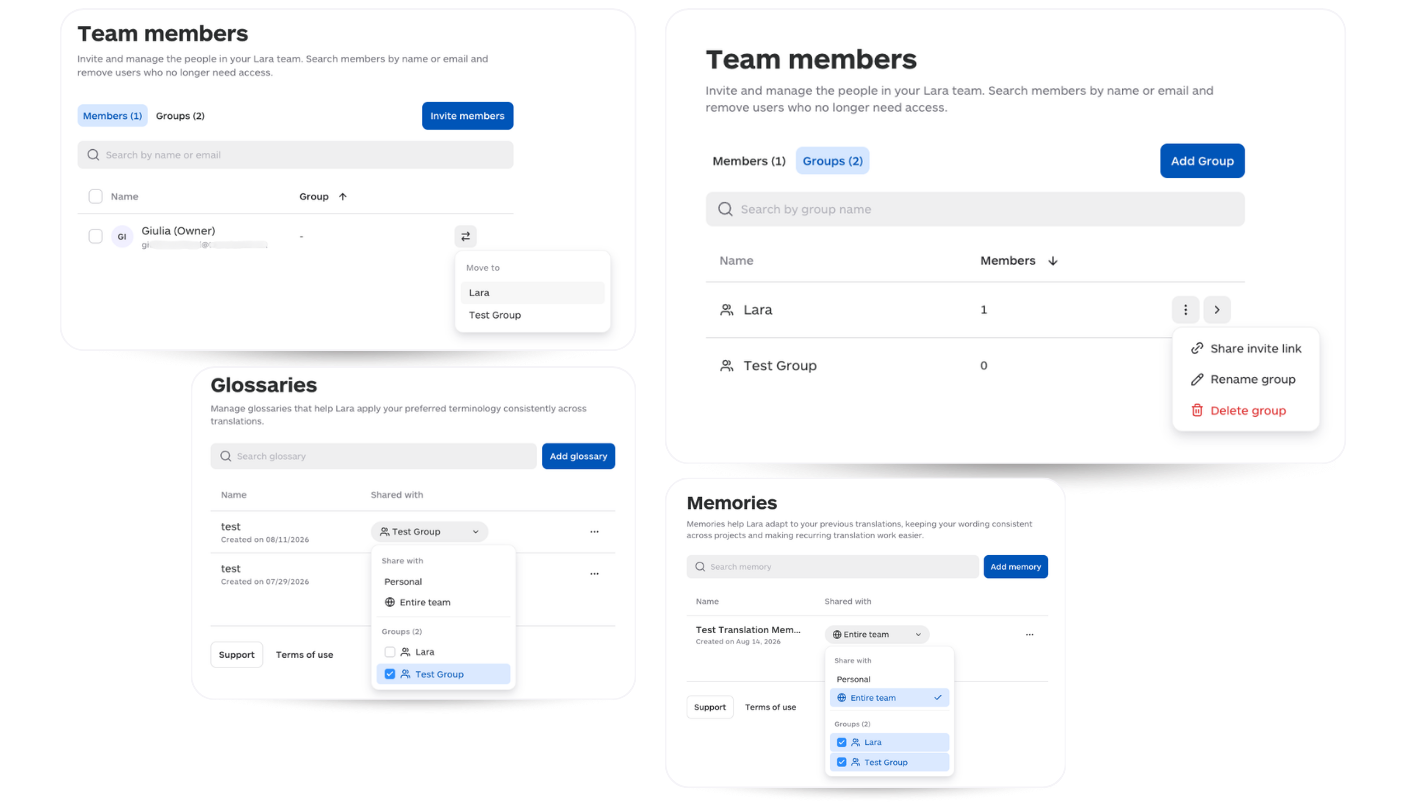
Groups now connect to Lara Translate’s linguistic resources too. Glossaries and translation memories can be shared through a Shared with picker at three levels: personal (just you), the entire team, or one or more specific groups. That gives each part of an organization control over which terminology and translation history it works from.
At the same time, team members can create their own personal glossaries and translation memories and rename the resources they own, so personal work stays separate from shared team assets. The translation interface was updated to make personal, team, and group resources easier to tell apart when you select them.
See the full guide to team groups and resource sharing.
Bring your team onto one translation account
Organize members into groups and share glossaries and translation memories where they belong.
What’s new on mobile: translation memories, glossaries, and Alternative Translations
The translation you do on your phone should not forget everything your account already knows. Until now, memories and glossaries lived on the web.
 The iOS app now brings translation memories and glossaries into the mobile experience. You choose which memories and glossaries Lara should adapt to from the options menu, and the selection applies across Text, Documents, and Images. It is account-wide, matching the web app, so the resources you pick follow you across surfaces. A visual indicator on the control shows when memories or glossaries are active, and resources that are still importing or that failed to import are disabled and show their status. Creating and importing resources still happens in the web app for now, with a Manage action that opens the right web page from iOS.
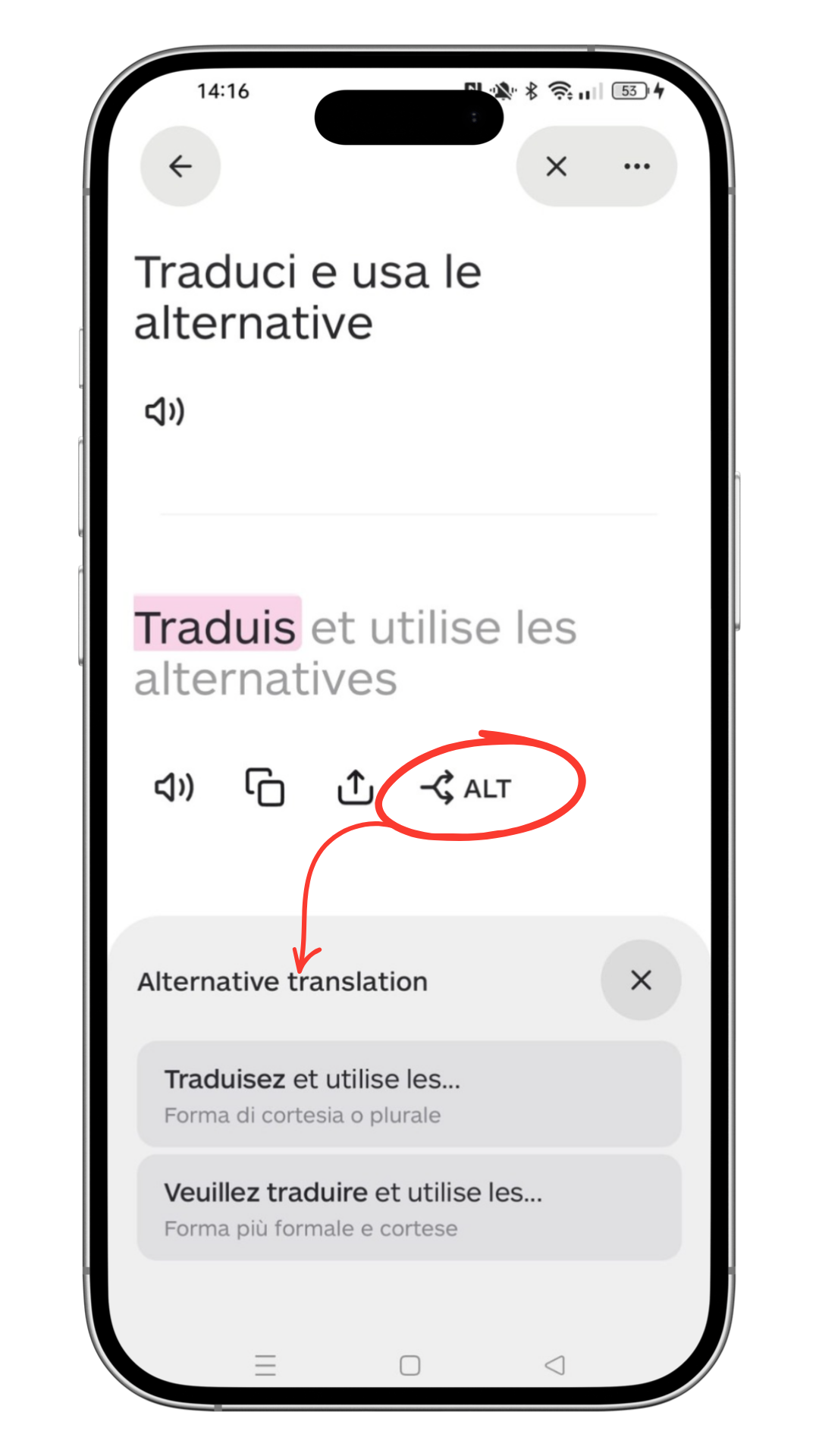
Alternative Translations is now available on both iOS and Android. Tap ALT below a translated text to see alternative renderings for specific words or phrases, each with a short explanation of the context or register, then swap in the one that fits. It is a way to fine-tune wording without rewriting the sentence or starting the translation over.
Learn how to use translation memories and glossaries in the mobile app.
Get Lara Translate on your phone
Translation memories, glossaries, and Alternative Translations, now in your pocket.
 |
 |
What’s new for developers: Audio-to-Text and voice cloning
Spoken content is hard to work with. A recorded interview or a voice note is not searchable, not translatable in place, and not something you can drop into a text pipeline without transcribing it first.
 Audio-to-Text translation is now available through the Lara API and SDKs. Upload an audio file and get back both the original transcription and its translation as text, in a single workflow. Supported formats are .wav, .mp3, .opus, .ogg, and .webm, with 68 source languages for the audio and over 200 target languages for the translated text. Files can run up to 200 MB and two hours, and processing is asynchronous, which suits longer recordings and backend integrations. You can apply translation memories, glossaries, and a translation style (Faithful, Fluid, or Creative). Pricing is €0.05 / $0.05 per minute of audio. It fits use cases like subtitles, translated transcripts, meeting notes, media analysis, and accessibility.
Audio-to-Audio translation now supports voice cloning. Instead of recreating translated audio with a predefined target voice, Lara can analyze the acoustic profile of the source speaker, including timbre, pitch, and vocal nuance, and generate target-language audio that closely mimics their original voice. You turn it on with the voice_cloning parameter. It requires explicit opt-in and has its own pricing, and it is built for audio with one primary speaker, such as voiceovers, narrations, training material, and podcasts. This keeps speaker identity consistent across languages, which matters for multilingual media, training content, and presentations.

See the audio translation documentation for developers.
Is Lara Translate available on Zapier?
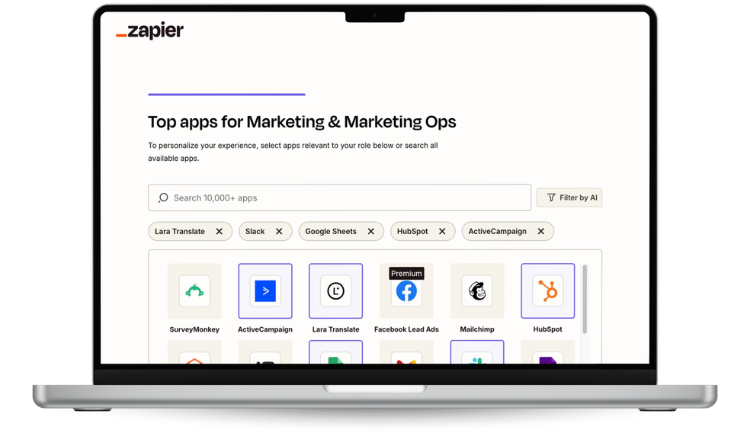
Yes. Lara for Zapier is approved and now live in the Zapier marketplace, so you can add translation to your workflows without building a custom integration.
The integration provides four actions: Translate Text, Upload Document for Translation, Get Document Status, and Download Translated Document. You can connect Lara Translate to the apps you already use, so a new file in a shared drive or a new row in a spreadsheet can trigger a translation and route the result wherever it needs to go. Translation memories, glossaries, and styles carry into those Zaps, so automated translations follow the same terminology as the rest of your work. Even with incognito mode.
Explore Lara Translate on Zapier.
What else is new in integrations: Wordscope and Langdock
Lara Translate is most useful where you already work. Two new integrations bring it into a professional CAT tool and into an AI workspace, so you do not have to switch apps to get context-aware translation.
Wordscope is a browser-based CAT tool for professional translators. With the new integration, Lara Translate works as a machine translation engine inside Wordscope, delivering suggestions directly in your translation projects. If you have an active Lara Translate subscription, you add Lara as a private engine in Wordscope under Settings, then Machine Translation, using your API credentials (the Access Key ID and Access Key Secret from My Account, API, Credentials). Once validated, Lara is available across all your Wordscope projects. See the Wordscope integration.
Langdock is an AI workspace where teams build agents and workflows. Through Lara Translate’s MCP server, those agents can call Lara’s translation tools directly, including language detection, translation, and memory management. You connect it from Langdock’s Integrations settings by adding the remote MCP server URL, authorizing with your Lara Translate credentials over OAuth, and enabling the tools you want. From there, translation becomes an action your agents can run inside a workflow. See the Langdock integration.
What to expect next
August’s shipped updates, team groups with shared glossaries and translation memories, mobile memories and glossaries on iOS, Alternative Translations on both mobile apps, Audio-to-Text through the API and SDKs, voice cloning for Audio-to-Audio, and Lara for Zapier, are built around one theme: making Lara Translate work for teams and for the tools teams already use.
A few more things are already moving. My Translations is rolling out as a dedicated area where you can save useful source and translated pairs, including your edits, and return to them later without repeating the work. And the Lara Translate plugins for Make and Slack have been submitted for review in their respective marketplaces. You can follow the full changelog on the What’s New page.
FAQ
How do team groups work in Lara Translate?
Team owners manage groups from a dedicated group management area inside Lara Translate. You can add, rename, and delete groups, assign members individually or in bulk, and configure invitation links so a new user joins a specific group when they accept. A member belongs to one group at a time.
Can I share a glossary or translation memory with only part of my team?
Yes. Glossaries and translation memories can be shared through a Shared with picker at three levels: personal (just you), the entire team, or one or more specific groups. This lets different departments work from their own terminology and translation history.
Can I use translation memories and glossaries in the Lara Translate mobile app?
On iOS, yes. You select which memories and glossaries Lara should adapt to from the options menu, and the selection applies across Text, Documents, and Images. It is account-wide and matches the web app. Creating and importing resources still happens in the web app for now, reachable through a Manage action from iOS.
What are Alternative Translations?
Alternative Translations, available on iOS and Android, let you tap ALT below a translated text to see alternative renderings for specific words or phrases, each with a short explanation of context or register, and swap in the one you prefer without rewriting the sentence.
What is the difference between Audio-to-Text and Audio-to-Audio translation?
Audio-to-Text returns written output: it transcribes spoken content and translates it into text. Audio-to-Audio produces a synthesized voice file in the target language. Audio-to-Text supports .wav, .mp3, .opus, .ogg, and .webm files up to 200 MB and two hours, with 68 source languages and over 200 target languages, priced at €0.05 / $0.05 per minute.
What is voice cloning in Audio-to-Audio translation?
Voice cloning lets Audio-to-Audio translation preserve the original speaker’s voice instead of using a predefined target voice. Lara analyzes the source speaker’s acoustic profile, including timbre, pitch, and vocal nuance, to generate target-language audio that mimics their voice. It is enabled with the voice_cloning parameter, requires opt-in, has its own pricing, and is built for audio with one primary speaker.
What can I do with Lara for Zapier?
Lara for Zapier, now live in the Zapier marketplace, offers four actions: Translate Text, Upload Document for Translation, Get Document Status, and Download Translated Document. You can connect Lara Translate to the apps you already use to automate translation inside existing workflows, and translation memories, glossaries, and styles carry through.
Which new integrations does Lara Translate support?
Two new integrations shipped alongside Zapier. Wordscope, a browser-based CAT tool, can now use Lara Translate as a private machine translation engine through your API credentials. Langdock, an AI workspace, can connect to Lara Translate’s MCP server so its agents call translation, language detection, and memory tools directly inside workflows.
Have a valuable tool, resource, or insight that could enhance one of our articles?
Send us an email at press@laratranslate.com
We’ll be happy to review it and consider it for inclusion to enrich our content for our readers! ✍️
This article is about
- Team groups in Lara Translate, with members assigned individually or in bulk and invitation links that join a specific group
- Sharing glossaries and translation memories with a whole team or one or more specific groups
- Translation memories and glossaries in the Lara Translate iOS app across Text, Documents, and Images
- Alternative Translations on iOS and Android
- Audio-to-Text translation through the Lara API and SDKs
- Voice cloning in Audio-to-Audio translation
- Lara for Zapier, now live in the Zapier marketplace
- New integrations with Wordscope (a browser-based CAT tool) and Langdock (an AI workspace, via MCP)