

Renew Weglot at the wrong tier, and the bill moves the wrong way fast: pricing scales with words translated and page views, so a site that adds a blog, a product catalog, or a second market can watch its translation line item double without a single new feature. That is the moment most teams start pricing alternatives, and the honest answer is that there is no single “best” one. The right pick depends on how your site is built and where your costs actually come from.
Five options cover most situations. Lara Translate for API-driven, privacy-sensitive deployments with human validation on tap. TranslatePress for WordPress owners who want self-hosted control. Lokalise for product teams running enterprise TMS workflows. DeepL Pro when raw machine translation quality is the priority. Crowdin or Transifex when continuous localization across a growing app matters more than simplicity.
This shortlist was built around four decision axes: deployment model (plugin, SaaS widget, API, or self-hosted), pricing shape (per-word, per-seat, or usage-based), machine translation quality, and how much translation memory or TMS infrastructure you actually need. Buyer research from Capterra and G2 both show shoppers comparing no-code widgets, WordPress plugins, and full TMS platforms side by side, which is exactly why a single “best alternative” rarely exists.
Before you shortlist, weigh these axes:
- Deployment: JavaScript snippet, WordPress plugin, API, or self-hosted
- Pricing driver: word count, page views, seats, or API calls
- MT quality and available human post-editing
- Translation memory, glossary, and TMS depth
- Data residency and compliance posture
TL;DR
|
Key Takeaways
The best Weglot alternative depends on matching deployment model and pricing shape to your actual translation volume and compliance needs.
| Point | Details |
|---|---|
| Match deployment to your stack | Choose WordPress plugins for self-hosted sites, APIs for developer-driven workflows. |
| Watch the pricing driver | Per-word pricing punishes frequent updates; usage-based API pricing suits fast-changing content. |
| Budget for human review | Post-editing by professional linguists is the hidden cost most buyers underestimate. |
| Migration takes days to months | Small sites migrate in under a week; enterprise TMS rollouts can take six to twelve weeks. |
| Lara Translate fits API-first, privacy-conscious teams | It combines 200+ languages, 61 document formats, and optional human validation in one platform. |
Best Weglot Alternatives Compared Side by Side
The table below covers the ten most relevant entrants for most buyers. Every other tool worth knowing about gets a mention further down, but these are the ones that show up again and again in buyer comparison guides.
| Tool | Best for | Pricing model & free tier | Deployment | MT engine / quality |
|---|---|---|---|---|
| Lara Translate | API-driven, privacy-first, high-volume sites | Freemium, paid tiers for volume and human validation | API, SaaS | Adaptive AI model with human validation option |
| TranslatePress | Self-hosted WordPress sites | Free version for one extra language; paid add-ons | WordPress plugin | Uses Google/DeepL as connected engines |
| Lokalise | Enterprise TMS and dev workflows | Paid, seat-based; trial available | SaaS, API, CI/CD | Connects to multiple MT engines |
| DeepL Pro | Teams prioritizing MT fluency | Freemium, subscription by character volume | API, SaaS | DeepL’s own neural engine |
| Crowdin | Continuous localization for software | Freemium, paid by strings/seats | SaaS, API, CI/CD | Multiple connected MT engines |
| WPML | Complex WordPress multilingual builds | Paid license, no free tier | WordPress plugin | Connects to third-party MT or manual |
| Phrase | Localization-as-code for dev teams | Paid, usage and seat-based | SaaS, API | Multiple connected MT engines |
| Smartling | Enterprise localization at scale | Paid, custom enterprise pricing | SaaS, API | Multiple connected MT engines |
| Google Translate | Low-cost, broad-language quick translation | Free widget; paid API by character | Widget, API | Google Neural MT |
| Transifex | Continuous software localization | Freemium, paid by resources | SaaS, API | Connects to multiple MT engines |
Lara Translate leads this list because it treats translation as a hybrid pipeline rather than a single MT call: text passes through an adaptive language model, then optionally through professional linguists, with results stored via translation memory and glossaries that improve over repeated use. It handles 61 document formats and 11 image formats alongside straight web text, which matters if your localization scope goes beyond page copy into product manuals or marketing assets.
TranslatePress keeps translations on your own server rather than a third-party cloud, a distinction that matters for site owners wary of vendor lock-in. Its free version supports one additional language on a self-hosted WordPress site, which makes it the default recommendation for small sites testing multilingual traffic before committing budget.
Lokalise, Phrase, Crowdin, and Transifex share a family resemblance: all four are built for engineering teams shipping localized strings through CI/CD pipelines rather than marketers translating landing pages. Localazy fits the same developer-first mold with a lighter, more cost-conscious pricing structure. XTM Cloud and memoQ TMS sit a tier up, aimed at enterprises managing multiple translation vendors across dozens of language pairs. If you are weighing these platforms head to head, our guide to the best localization platforms breaks the category down further.
DeepL Pro and Google Translate represent the pure-MT end of the spectrum. Neither ships translation memory or glossary management on its own, so teams pair them with a plugin or TMS layer when they need more than raw output. Smartcat and LILT split the difference by combining MT with a built-in marketplace of human translators for post-editing.
A second group of tools serves narrower needs. ConveyThis and Bablic target small business owners who want a simpler widget-style setup similar to Weglot’s own model. Linguise and GTranslate compete directly on automatic detection and SEO-friendly translated URLs. Polylang is WordPress-only and popular among sites that manage multilingual content manually rather than through MT. Tolgee and LingoHub appeal to developer teams wanting open, self-hostable localization infrastructure. Bureau Works and Verbi lean toward managed translation services with more human oversight built in. Webflow Localization is relevant only if your site already runs on Webflow, and Perso Dubbing solves a different problem entirely: audio and video dubbing rather than text.
Test translation quality before you migrate
Run your real content through Lara Translate and compare output against your current tool, side by side.
How Do You Choose the Right Weglot Alternative?
The single most important factor is where your deployment model and pricing shape intersect. A WordPress site with predictable traffic fits a plugin billed by word count. An app shipping new UI copy weekly fits an API billed by usage, not word volume, because a per-word model punishes frequent small updates.
Before signing anything, run through this checklist with each vendor:
- Where is translated content stored, and does that location satisfy your data residency requirements?
- Does the vendor publish GDPR compliance details or SOC 2 / ISO certification, and can you request documentation?
- Can you export your translation memory and glossaries if you switch tools later?
- Does the platform generate SEO-friendly localized URLs and update your sitemap automatically?
- Is there a staging environment, and can you roll back a bad translation batch without redeploying?
Migration itself follows a predictable arc regardless of vendor:
- Audit your current content and word count (1 to 3 days for small sites, up to two weeks for enterprise catalogs).
- Export existing translations and glossary data from your current tool.
- Integrate the new plugin, API, or snippet and connect your CMS or e-commerce platform.
- QA translated pages across devices and locales, checking for broken layout and missing strings.
- Switch over DNS or routing, ideally during low-traffic hours.
- Monitor for MT errors and broken links for at least two weeks post-launch.
Small WordPress sites typically complete this in under a week. Mid-size e-commerce sites with product catalogs run a few weeks. Enterprise migrations involving multiple TMS integrations and vendor contracts often take several weeks to a few months.
Pricing drivers vary sharply by vendor type:
| Vendor type | Primary cost driver | Common hidden cost |
|---|---|---|
| Plugin (TranslatePress, WPML, Polylang) | Word or page count, add-on licenses | Developer time for custom template support |
| API/SaaS (Lara Translate, DeepL Pro) | API calls or character volume | Human validation or post-editing fees |
| Enterprise TMS (Lokalise, Smartling, XTM Cloud) | Seats and workflow modules | Integration engineering and vendor onboarding |
The hidden cost that trips up most buyers isn’t the subscription line. It’s post-editing and professional linguist review for pages where an MT error creates legal or brand risk, like pricing pages, medical content, or contracts.

Why Lara Translate Deserves a Spot on Your Shortlist
Lara Translate fits best when your priority list includes API-first deployment, enterprise-grade privacy controls, and the option to route sensitive content through human validation without switching tools. It covers 200+ languages and 61 document formats, plus images and audio, which lets one platform handle web copy, product PDFs, and support recordings instead of stitching together three separate services.
- 200+ languages supported by an adaptive model that improves through real professional translation feedback
- 61 document formats, 11 image formats, and 5 audio formats, extending beyond typical webpage-only tools
- Incognito mode for privacy-sensitive content and enterprise-grade security
- Translation memory and glossaries for consistent terminology across large sites
- Optional human validation by professional linguists for critical pages
Two scenarios show where this fits in practice. A developer running CI/CD pipelines can call the Lara Translate API directly rather than managing a JavaScript snippet, keeping translation inside the existing deployment flow. A marketing team preparing a multilingual product launch can bulk-translate spec sheets and catalog PDFs, then route the highest-traffic pages through human review before publishing.
The gap most site owners underestimate is between “translated” and “trustworthy.” Machine translation alone gets you readable pages. Adding a human validation layer on the pages that touch pricing, legal terms, or brand voice is what keeps readable from becoming embarrassing.
One caveat worth stating plainly: Lara Translate is a translation engine and API, not a drop-in JavaScript widget that renders a translated site for you the way Weglot does. If you want a no-code snippet that auto-detects and swaps your site’s language in minutes, a widget-style tool is the faster route. If you want control over where content is translated and stored, and the option to add human review, the API-first approach earns its place.
A note on trade-offs
Every alternative on this list trades convenience for control somewhere. Snippet widgets like Weglot or Google Translate deploy in minutes but limit customization. Self-hosted plugins and TMS platforms give more control but demand more setup time. Lara Translate’s API-first approach favors teams that want that control without building translation infrastructure from scratch. Audit your site’s actual translation volume and pick two candidates to trial before committing.
Test Lara Translate Before You Commit to a Migration
Lara Translate gives you a freemium path to test API performance and bulk document translation before you touch a single line of production code, unlike the fixed-scope trials most TMS vendors offer.
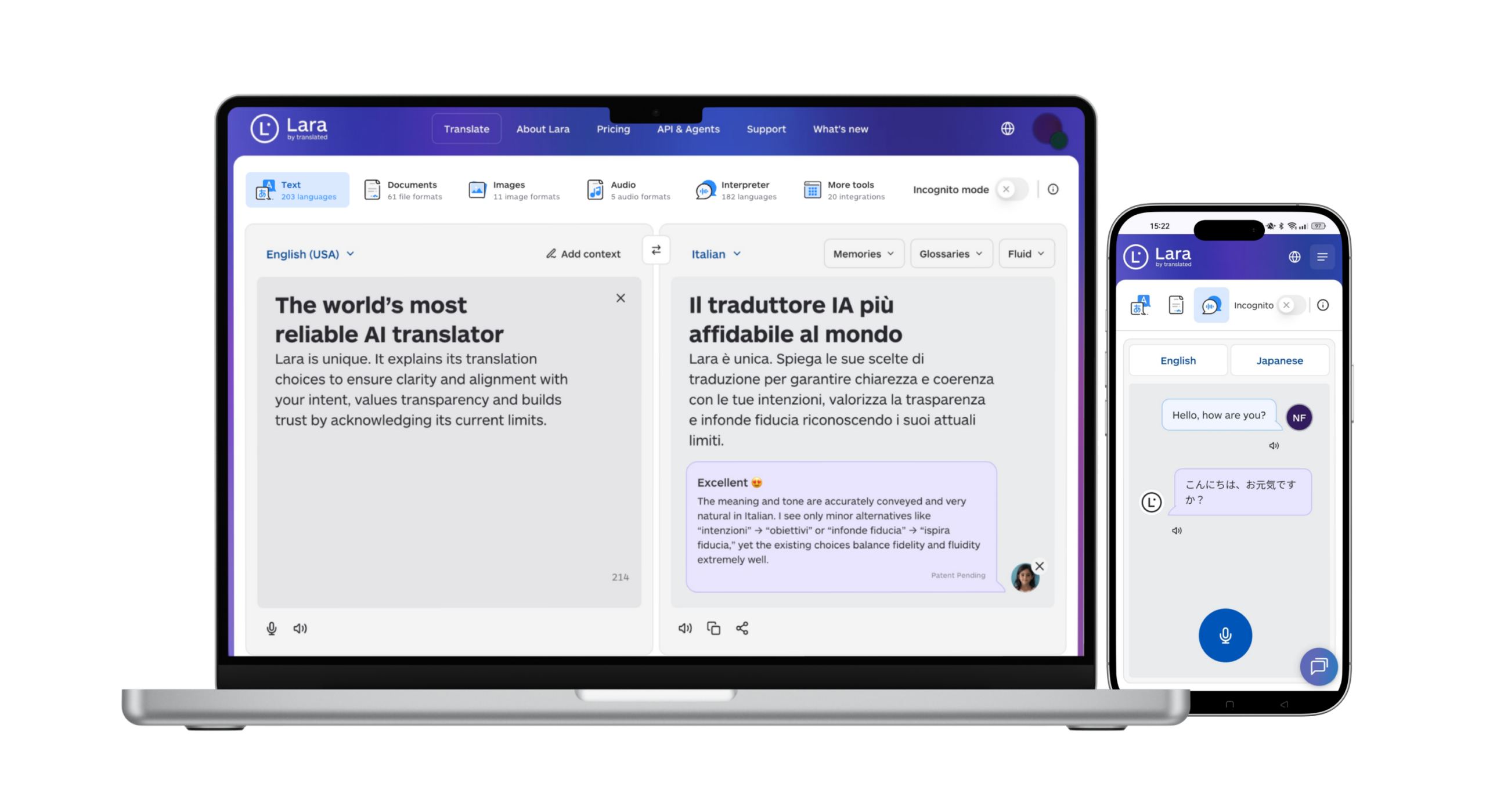
During a trial, focus on three things: API response speed under real traffic conditions, how cleanly your existing glossary and translation memory import into Lara’s system, and how the human review workflow handles a batch of critical pages, like pricing or legal copy. Run the same set of test documents through Lara Translate and your current shortlist finalist side by side. If you’re translating primarily to or from English, the dedicated English translation workflow is a fast way to see output quality on real content.
See what fits before you switch
Compare pricing tiers and human-validation options against whatever you’re paying Weglot today.
Conclusion
There is no universal best Weglot alternative, only the one that matches how your site is built and how your costs actually accrue. Start from deployment model and pricing shape, not from a feature list, then shortlist two tools and run your own content through both. For self-hosted WordPress, TranslatePress or WPML is the natural first look. For engineering-led localization, Lokalise or Crowdin. For API-first teams that want translation memory, privacy controls, and optional human validation in one place, Lara Translate belongs on the list.
Have a valuable tool, resource, or insight that could enhance one of our articles?
Send us an email at press@laratranslate.com
We’ll be happy to review it and consider it for inclusion to enrich our content for our readers! ✍️
FAQ
Is Weglot worth it?
Weglot works well for simple JavaScript-snippet deployments, but its per-word pricing model can get expensive fast for larger or frequently updated sites, which is why many buyers compare it against plugin, API, and TMS alternatives before renewing.
Does Weglot have a free version?
Weglot offers a limited free plan capped at a small word count and one language, while alternatives like TranslatePress offer a free tier that supports one additional language on self-hosted WordPress sites.
What is the most accurate free translation site?
Google Translate remains the most widely used free option for quick, broad-language translation, though it lacks the translation memory and glossary tools that keep terminology consistent across a full website.
How much does Weglot cost?
Weglot’s cost scales with word count and page views, and pricing rises as your site grows, leading many localization managers to consider usage-based or self-hosted alternatives like Lara Translate or TranslatePress.
This article is about
This article is about the best Weglot alternatives in 2026 and how to choose one by deployment model, pricing shape, and translation quality. It compares WordPress plugins (TranslatePress, WPML, Polylang), enterprise TMS platforms (Lokalise, Phrase, Crowdin, Smartling), pure machine translation tools (DeepL Pro, Google Translate), and API-first engines like Lara Translate, and it walks through a vendor checklist and a step-by-step migration plan.
Sources
- Best Weglot Alternatives 2026 (Capterra)
- Top Weglot Alternatives & Competitors in 2026 (G2)
- TranslatePress, WordPress plugin page
- Weglot pricing
Check each vendor’s own documentation and pricing pages before you commit, since terms change more often than comparison articles do.
Recommended
- AI Translation in 200+ Languages | Lara Translate
- Document Translation Across 61 Formats | Lara Translate
- Best Translation Management Systems Compared
- Best Localization Platforms for Growing Teams