

You paste a 40-page contract into Google Translate and the tables collapse, the footnotes scramble, and your legal team asks where, exactly, the confidential text was just sent. That is the moment the free tab stops being enough.
Google Translate is fast and free for a menu, or a text message, but professional, privacy-sensitive, and file-heavy work needs layout retention, glossary control, and a privacy policy someone will actually sign off on. This guide maps the real alternatives across five categories, and for most professional use the strongest all-around pick is Lara Translate, which pairs AI translation with human validation across 60+ document formats and 200+ languages.
TL;DR
|
What Is the Best Alternative to Google Translate?
Google Translate solves one problem well: fast, free, low-stakes translation. It falls short the moment you need layout retention in a 40-page contract, a glossary that keeps your brand terminology consistent, or a privacy guarantee your legal team will actually sign off on. That gap is where the real alternative-to-Google-Translate market lives, and it splits into five distinct categories rather than one single winner.
Lara Translate leads the pack for professional use because it pairs machine translation with human post-editing, handles documents, images, and audio, and offers an API for teams that need to automate the work. DeepL built its reputation on fluent, natural-sounding output for European language pairs, though its file support and enterprise controls are narrower than a full localization stack. Cloud APIs like Amazon Translate and Microsoft Translator exist for developers who want to translate at scale inside their own applications, billed by character volume rather than by seat. Localization platforms such as GlobalLink Web and Weglot target teams managing an ongoing multilingual website or product, with translation memory and workflow tools baked in. And a cluster of lighter tools, iTranslate, Baidu Translate, and Yandex Translate among them, cover mobile, offline, and region-specific use cases where portability matters more than enterprise governance.
| Category | Best for | Format support | Privacy & human review | Availability | Pricing model |
|---|---|---|---|---|---|
| Lara Translate | Professionals needing files, privacy, and human validation | Documents (61 formats), images (11 formats), audio (5 formats) | Incognito mode, human validation by linguists | Web, mobile, API | Freemium, paid tiers, enterprise plans |
| High-fluency engines (DeepL, Linguee) | Natural-sounding text for common language pairs | Mostly text, limited document formats | Varies by plan, minimal human review | Web, browser extension, some API | Free with paid tiers |
| Cloud translation APIs (Amazon Translate, Microsoft Translator, Yandex Translate) | Developers automating bulk translation | Text and structured data via API | Enterprise-grade cloud security, no built-in human review | API-first, some web tools | Pay-per-character, volume discounts |
| Localization platforms (GlobalLink Web, Weglot, TranslatePress AI, Supertext) | Ongoing website and product localization | Web content, CMS integration, some documents | Workflow-based review, translation memory | Web, plugin, API | Subscription, often tiered by page or word volume |
| Offline/mobile apps (iTranslate, Reverso, Baidu Translate) | Travel, casual use, niche or regional languages | Text, voice, photo | Minimal, few enterprise controls | Mobile-first, some offline modes | Free with premium unlocks |
A comparative industry overview of AI translation tools makes a similar distinction: general-purpose engines are fine for quick, disposable translations, but specialized engines and localization platforms pull ahead once you are translating product copy or marketing content that has to stay consistent across languages and updates.
For a fast decision, match the job to the tool:
- Translating a .docx or .pdf while preserving layout: choose a platform with dedicated document translation support, or a localization tool with document import.
- Translating an audio transcript or recorded meeting: choose a platform with audio translation and human review, since automatic transcription accuracy drops on accents and overlapping speech.
- Adding live translations to a website via API: choose a localization platform (Weglot, GlobalLink Web) or a developer-friendly API (ModernMT, Amazon Translate) depending on whether you want a managed plugin or raw integration control.
How to Choose an Alternative to Google Translate
Picking the right tool starts with naming what you are actually translating and how much risk a mistake carries. A casual travel phrase and a signed vendor contract are not the same job, and treating them the same is how errors slip into professional documents.
Run through this checklist before committing to any tool:
- Accuracy needs. Is this customer-facing, legal, or medical content where a mistranslation has real consequences, or a quick internal note?
- File-format and layout retention. Does the tool preserve formatting in Word, PDF, PowerPoint, or InDesign files, or does it just dump raw text?
- Glossary and memory support. Can you lock in brand terms, product names, and past translations so the engine stays consistent across projects?
- Human post-editing. Is a professional linguist review available for anything going to a client, regulator, or the public?
- API and integration needs. Do you need to plug translation into a CMS, app, or internal workflow, or is manual upload fine?
- Privacy and data retention. Where does your content go, how long is it stored, and does the vendor publish a clear policy?
- Language coverage. Does it support the specific pairs and dialects you need, not just the major world languages?
A quick 10 to 15 minute test beats any spec sheet. Take a real paragraph, not a generic sample sentence, run it through your top two candidates, and score each on fluency, terminology accuracy, and layout retention. Then feed the same text through with a short glossary of five key terms and see whether the output actually respects them. Professional testing from the American Translators Association found that accuracy varies meaningfully by language pair and text type, which is exactly why a generic online review cannot tell you how a tool will handle your content.
Watch for red flags: no published list of supported file formats, no visible privacy policy, no glossary or memory feature, or pricing that is vague until you have already uploaded your files.

Pro Tip: Always test with real content and a short style brief or glossary, not a generic sentence. That is the fastest way to see how an engine handles your specific terminology before you commit budget to it.
Test it with a real document, not a sample sentence
Upload a contract, a deck, or a scanned PDF and see how the layout and terminology hold up.
Which Features Actually Matter in a Translation Tool?
Marketing pages list dozens of features, but only a handful actually change your day-to-day results.
- Document translation: check which formats are supported (Word, PDF, PowerPoint, and beyond) and whether layout, tables, and formatting survive the round trip, especially for anything longer than a few pages.
- Image and OCR translation: useful for signs, screenshots, and scanned documents, but expect to manually correct text that is stylized, handwritten, or in a low-resolution image.
- Audio and live interpretation: latency matters for live conversations, and transcription accuracy drops with accents, background noise, or crosstalk. Lara Translate’s live voice interpretation covers 182 languages, which matters for multilingual meetings and in-person calls.
- API and developer features: look for clear per-character or per-word billing, rate limits, and whether the API supports batch jobs, not just single strings.
- Consistency and governance: translation memory, glossaries, and alternative-suggestion features keep terminology stable across a large project or a growing website. Website teams often pair a translation engine with a CMS plugin like TranslatePress to preserve layout and manage updates over time.
- Privacy and security: incognito or no-retention modes, clear data policies, and enterprise compliance documentation matter most for legal, medical, or financial content.
Why Lara Translate Stands Out for Professional Translation
Lara Translate supports 200+ languages and covers 61 document formats, 11 image formats, and 5 audio formats, putting it ahead of most single-purpose tools on raw format coverage alone. Live voice interpretation runs across 182 languages, useful for calls and in-person meetings where a delay breaks the conversation. It is built by Translated, a language-services company operating since 1999, and carries certifications including ISO 17100, ISO 27001, and GDPR compliance.
The trust signals line up with what professional and regulatory guidance actually recommends. The European Commission’s guidance on machine translation for public bodies stresses quality, privacy, and human post-editing, and Lara Translate builds on the same principles:
- Human validation by professional linguists for AI plus human translation projects
- Translation memory and glossary support for terminology consistency
- Incognito mode and enterprise-grade security for sensitive content
- An API for developers building translation into their own products
What Actually Matters When You Weigh Quality, Privacy, and Cost
A free quick-translate tool is the right call for a menu, a text message, or a quick gist of a foreign article. It is the wrong call the moment content has a name attached to it: a contract, a medical form, a public-facing product page. That is where an AI-plus-human platform earns its cost, because the human review catches the terminology and tone errors a machine will not flag on its own. If you take one thing from this guide, build a glossary before your first real project. It costs you twenty minutes and saves you from explaining a mistranslated brand name to a client later.
Try Lara Translate for Your Next Translation Project
If the comparison above left you leaning toward a platform built for real professional work, Lara Translate is worth testing directly against whatever you are using now. It handles the specific pain points this guide covers: documents across 61 formats, images, audio, live voice interpretation in 182 languages, and human validation when a project needs a linguist’s eyes before it goes out the door.
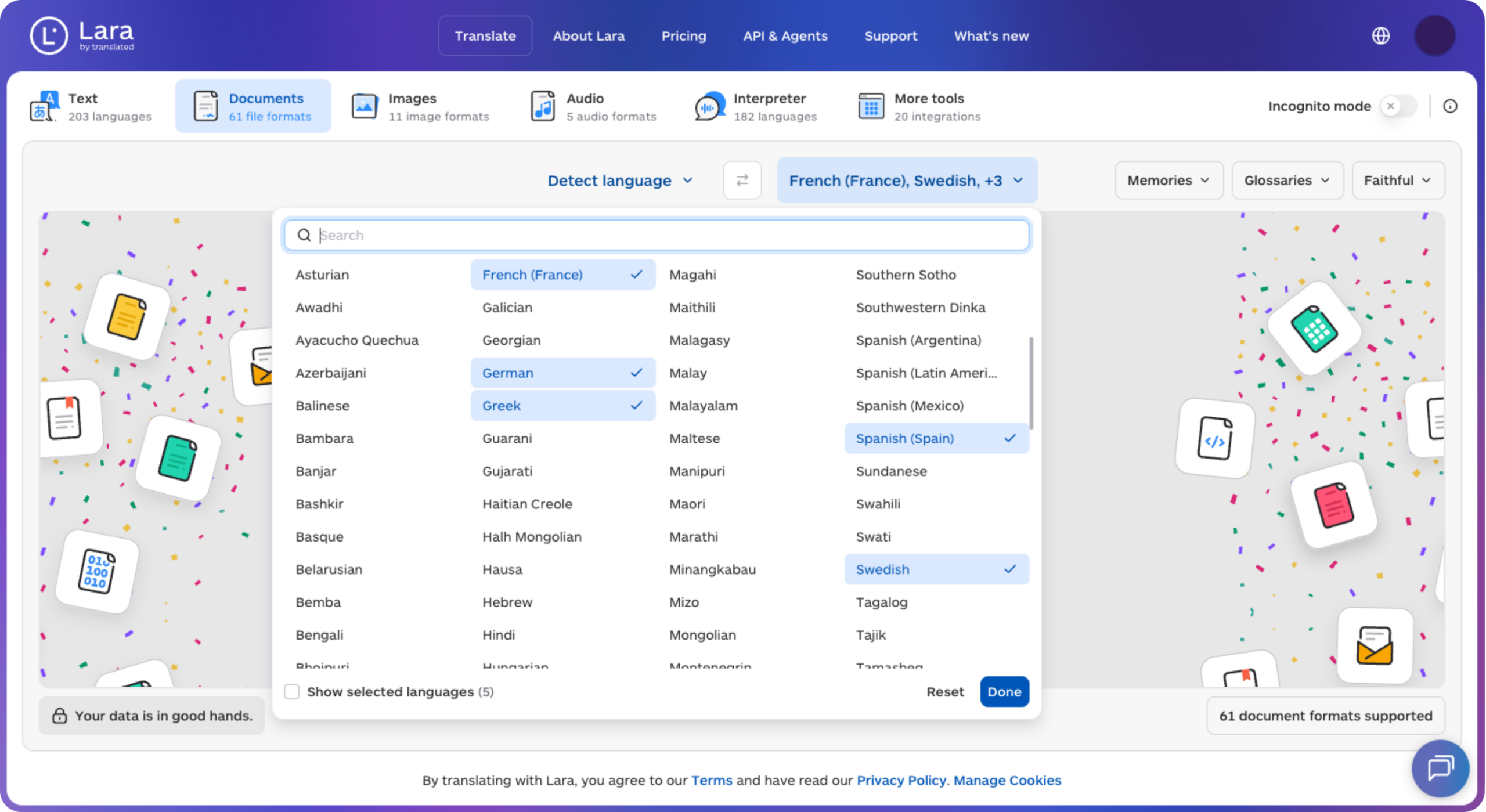
You can try Lara Translate free and run your own side-by-side test with a real document rather than a sample sentence. Teams that need ongoing human review or enterprise-level contracts can look at the AI plus human translation option, which adds professional linguist validation on top of the machine output. And if you are translating specifically to or from English, the English translation page is a fast way to see format support in action. For teams that also need multilingual content to rank well once it is translated, pairing your translation workflow with SEO translation best practices is worth a look before you publish.
Ready to move past the free tab?
Start translating text, documents, images, and audio, then add human validation when a project needs it.
Have a valuable tool, resource, or insight that could enhance one of our articles?
Send us an email at press@laratranslate.com
We’ll be happy to review it and consider it for inclusion to enrich our content for our readers! ✍️
FAQ
What is the best alternative to Google Translate?
For professional, file-heavy, or privacy-sensitive work, Lara Translate is the strongest overall pick because it combines AI translation with human validation across documents, images, and audio. For quick casual translations, a high-fluency engine like DeepL may be sufficient.
Is there a translator better than Google Translate?
For specific use cases, yes. DeepL often produces more natural phrasing for European languages, while Lara Translate adds human post-editing, broader file-format support, and privacy controls that Google Translate does not offer.
Is ChatGPT a better translator than Google Translate?
General-purpose AI chat tools can produce fluent translations for casual text, but they typically lack dedicated file-format support, glossary management, and human-review workflows that professional translation platforms provide.
Is DeepL really the best translator?
DeepL is well-regarded for fluency in supported language pairs, but testing shows accuracy varies by language pair and content type, so no single tool is best for every document and industry.
This article is about the best alternatives to Google Translate for professional use, comparing five categories of translation tools (professional platforms, high-fluency engines, developer APIs, localization platforms, and offline apps) and explaining how to match accuracy, file support, glossaries, human review, and privacy to your specific translation job.
Sources
The European Commission’s machine translation guidance outlines quality and privacy expectations for public-sector use. The ATA Compass review offers a professional translator’s hands-on test of four popular apps.
- Machine translation for public administrations (European Commission)
- Best Translation Apps: A Translator Puts Four to the Test (ATA Compass)