

Most teams end up buying localization twice. They pay for a translation tool that moves fast, then pay again for a vendor to handle human review, format edge cases, or the security paperwork procurement asks for. Choosing the best localization platform in 2026 is really about finding the one that closes that gap in a single place.
For professionals who need AI speed, human validation, and enterprise-grade security together, Lara Translate is the recommended pick. It covers 200+ languages, 70+ file formats, and pairs machine translation with optional professional linguist review, a combination most platforms force you to assemble from separate vendors.
TL;DR
|
Here is the prioritized shortlist for procurement teams who need to move fast:
- Lara Translate — Best overall for AI-accelerated localization with human review and enterprise tooling
- Phrase — Best for engineering-led SaaS and app localization with deep Git/CI integration
- Lokalise — Best for product teams translating UI strings, with strong Figma and mobile SDK support
- Smartling — Best for large enterprises needing workflow governance and localization analytics
- Crowdin — Best for projects combining crowd contributions with developer CI/CD pipelines
- Lilt — Best for teams that need adaptive MT with translator-in-the-loop post-editing
- Transifex — Best for continuous localization of web and app content with broad file-format support
- XTM Cloud — Best for enterprise localization teams with heavy translation memory usage
- memoQ — Best for linguist-led workflows and agency partnerships
- Smartcat — Best for teams that want a bundled vendor marketplace and TMS in one platform
- Weglot — Best for marketing websites needing fast, plugin-based site translation
- OneSky — Best for mobile apps and games with SDK-driven developer automation
The side-by-side comparison below covers the dimensions that most affect procurement decisions.
Pro Tip: Before booking demos, confirm which platforms offer a self-serve trial. Lara Translate, Lokalise, Crowdin, and Transifex all let you test core features without a sales call, which saves real time during initial screening.
As GALA describes, modern localization relies on an ecosystem combining machine translation, translation memory, TMS platforms, and integration standards. Any platform you evaluate should show strength across all four layers, not just one.
Key Takeaways
The best localization platform for most professional teams in 2026 combines AI-first speed, human validation, broad format coverage, and enterprise security. That is exactly the profile Lara Translate is built around.
| Point | Details |
|---|---|
| Start with Lara Translate | Covers 200+ languages and 70+ file formats with AI plus human validation in one platform. |
| Shortlist by use case | Phrase for engineering-led SaaS, Lokalise for UI/Figma workflows, Smartling for enterprise governance. |
| Pilot before you commit | Run real segments through any platform and measure TM match rate and format fidelity. |
| Verify security early | Ask every vendor for data-residency options and GDPR processor agreements before procurement. |
| Watch for lock-in red flags | Confirm TM and glossary data is exportable in open formats (TMX, CSV) before signing a contract. |
Which localization platform wins on the features that matter most?
The table below uses these abbreviations: AI = AI-assisted automation, HT = human translation or professional review available, TM = translation memory, API = developer API available.
Key specs at a glance:
- Lara Translate: 200+ languages, 70+ file formats, 11 image formats, 5 audio formats
- Phrase: a wide variety of file formats supported, strong XLIFF and JSON handling
- Lokalise: numerous integrations including Figma, Sketch, and major mobile SDKs
- Crowdin: hundreds of integrations listed in its marketplace
- OneSky: SDK/CLI tooling available for automated pipeline integration
Per-platform reviews: features, pricing, and who each tool suits
Lara Translate
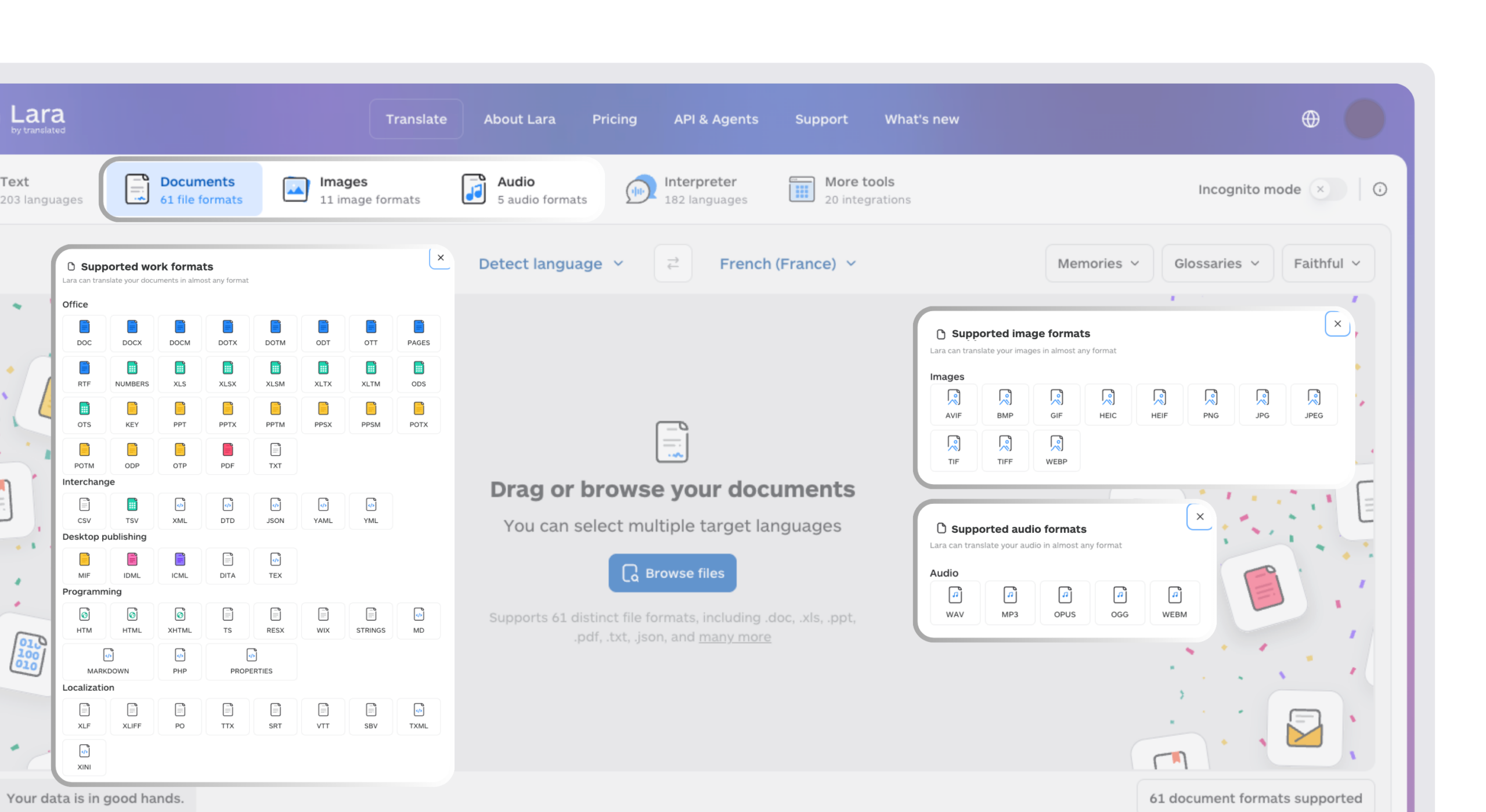
Most teams assemble AI speed and human review from two separate vendors. With Lara Translate you can have both in one solution, and that is its core differentiator. The AI plus human translation workflow lets teams run machine translation at speed, then route selected content to professional linguists for validation, without switching tools or vendors. Style adaptation (faithful, fluid, or creative) gives marketing and legal teams control over tone, and incognito mode addresses the privacy requirements enterprise procurement teams increasingly flag in RFPs.
- Standout features: 200+ languages, 70+ file formats, live voice interpretation in 182 languages, bulk translation, memory and glossaries, alternative translation suggestions
- Integrations: API, developer integrations, web page translation
- Pricing: Free with paid tiers for advanced features, high-volume use, human validation, and enterprise
- Pros: Widest format coverage in the comparison; AI plus human on request; privacy-first incognito mode
- Cons: Newer brand recognition than legacy TMS vendors; enterprise SLA details require direct contact
Phrase
Phrase is the go-to for engineering teams that treat localization as part of the release pipeline. Its Git and CI/CD integrations are among the tightest in the market, and its XLIFF and JSON handling covers most SaaS file structures without custom configuration.
- Pros: Deep CI/CD integration; strong developer documentation; solid TM and glossary management
- Cons: Less suited to non-technical localization managers; pricing scales steeply with volume
Lokalise
Lokalise stands out for product teams that work across design and engineering at the same time. The Figma plugin lets designers push strings directly into the localization workflow, and mobile SDK support covers both iOS and Android without extra middleware.
- Pros: Figma-native workflow; mobile SDK depth; clean UI for non-technical contributors
- Cons: Enterprise security features require higher-tier plans; TM management is less mature than XTM or memoQ
Smartling
Smartling is built for enterprises where localization governance matters as much as translation quality. Its workflow orchestration layer lets program managers define approval chains, set quality gates, and pull analytics on throughput and cost per word, capabilities smaller platforms rarely match.
- Pros: Enterprise workflow controls; strong analytics; reliable professional translator network
- Cons: High contract minimums; implementation timelines can run several weeks for full rollout
Crowdin
Crowdin’s strength is flexibility. It supports crowdsourced community translation alongside professional workflows, and its 600+ integrations make it easy to plug into existing CI/CD pipelines. Open-source projects and gaming studios use it heavily for this reason.
- Pros: Largest integration marketplace; crowdsourcing support; free tier for open-source
- Cons: Quality control for crowd contributions requires active management; UI can feel cluttered at scale
Lilt
Lilt’s adaptive MT engine learns from post-editor corrections in real time, so translation quality improves the longer a team uses it. That makes it especially effective for product documentation and help-center content with high segment repetition, exactly the content type where translation memory delivers the strongest productivity gains.
- Pros: Adaptive MT that improves with use; strong translator-in-the-loop tooling
- Cons: Enterprise-only pricing; limited self-serve trial options
Test Lara Translate on your own content
Run a real client file through Lara Translate and see how it handles your terminology, context, and formatting, no sales call required.
Transifex
Transifex focuses on continuous localization. Content changes in your codebase or CMS sync automatically, translators see only the delta, and updated strings ship without manual file exports. Its file-format breadth is wide, covering most web and app content types.
- Pros: Continuous sync architecture; broad file-format support; free tier available
- Cons: Analytics and reporting are less developed than Smartling’s; UI localization features lag behind Lokalise
Weglot
Weglot is the fastest path to a translated marketing website. Install the plugin, connect your CMS (WordPress, Shopify, Webflow, and others), and the site is translated within minutes. It is not a TMS for complex workflows, but for marketing teams that need to go live in multiple languages quickly, nothing is faster.
- Pros: Fastest time-to-live for website translation; minimal technical setup
- Cons: Limited control over translation memory; not suited for app or document localization
XTM Cloud
XTM Cloud is a mature enterprise TMS with strong TM management and workflow features. It is the platform of choice for large in-house localization teams that run high volumes of repetitive content and need detailed TM leverage reporting.
- Pros: Robust TM and workflow management; ISO 17100 and SOC 2 compliance
- Cons: Steeper learning curve; implementation requires dedicated localization engineers
memoQ
memoQ is the preferred environment for professional translators and agencies. Its CAT (computer-assisted translation) features are among the most mature in the industry, and its on-premise deployment option addresses data-residency requirements that cloud-only platforms cannot meet.
- Pros: Best-in-class CAT features; on-premise option; strong agency ecosystem
- Cons: Less suited to developer-led workflows; UI feels dated next to newer platforms
Smartcat
Smartcat bundles a vendor marketplace with TMS functionality, letting teams source translators, manage projects, and pay vendors from a single interface. The freemium model makes it accessible for smaller teams, and the marketplace removes the need for separate vendor contracts.
- Pros: Integrated marketplace; freemium entry point; end-to-end project management
- Cons: Translation quality depends heavily on marketplace vendor selection; enterprise features are limited
OneSky
OneSky targets mobile app and game developers specifically. Its SDK and CLI tooling automates content sync directly from build pipelines, and its human translation network covers major app-store languages. Developer experience is the platform’s clearest strength.
- Pros: SDK/CLI automation; developer-friendly API; human translation network for app content
- Cons: Less suited to document or marketing content; reporting is basic
Centus, MotionPoint, GlobalLink, and Localize
Centus suits small-to-mid localization teams that need a clean TMS without enterprise complexity. MotionPoint is a managed website translation service that handles the technical layer for enterprises that prefer a done-for-you model. GlobalLink (TransPerfect’s enterprise TMS) covers the full enterprise stack with ISO and SOC 2 compliance. Localize targets SaaS and web apps with a JavaScript snippet approach that needs minimal developer effort to deploy.

Pro Tip: For any platform with a managed or enterprise-only model (Smartling, Lilt, GlobalLink, MotionPoint), request a proof-of-concept project with your actual content before signing. Vendor demos use optimized content; your content will surface the real integration and quality gaps.
How to choose the right localization platform for your team
Selection criteria differ by stakeholder. Use this checklist to structure your evaluation.
Engineering:
- Does the platform offer a public API with complete documentation and versioned endpoints?
- Are there Git, GitHub, or GitLab connectors that fit your current release cycle?
- Does the vendor publish public SDK or CLI examples so you can validate developer experience before committing?
- What file formats are supported natively, and which need custom parsers?
Localization managers:
- How does the platform handle TM leverage reporting, and can you export TM data in TMX format?
- Is glossary management available, and does it enforce terminology across MT and human workflows?
- What quality assurance (QA) checks run automatically before delivery?
Procurement and legal:
- Where is data stored, and can you specify data residency (US, EU, or other regions)?
- Does the vendor support GDPR processor agreements and data-subject request handling? Even if your primary market is the US, if you serve EU customers this matters.
- Who owns the TM and glossary data if you switch vendors?
- What are the contract minimums, and is there a month-to-month option for the pilot phase?
Red flags to watch:
- No public API documentation or sandbox environment
- Pricing that is entirely quote-based with no published tier structure
- TM and glossary data locked to the vendor’s proprietary format with no export option
- No stated data-residency controls or security certifications
Timeline and cost benchmarks:
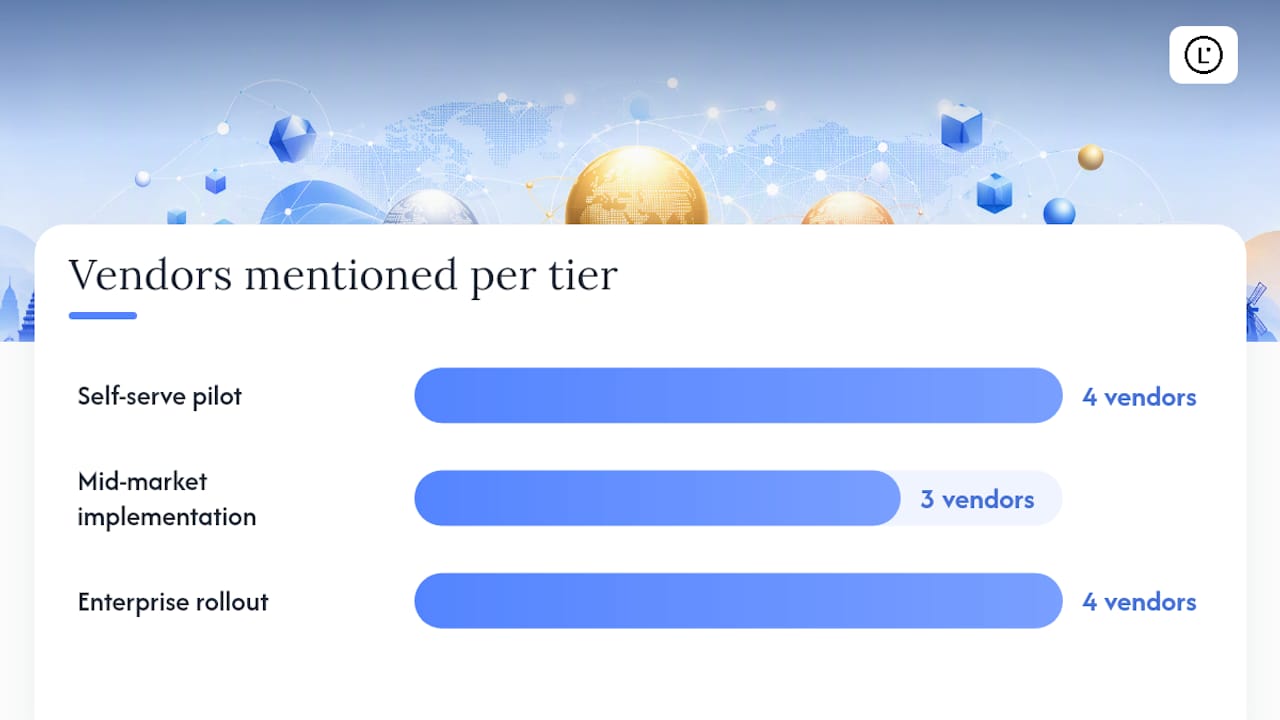
- Self-serve pilot (Lara Translate, Crowdin, Transifex, Lokalise): 1 to 2 weeks to first translated content
- Mid-market implementation (Phrase, Smartcat, OneSky): 2 to 4 weeks including integration
- Enterprise rollout (Smartling, XTM Cloud, GlobalLink, Lilt): multiple weeks for full workflow configuration
How we evaluated these localization platforms
This review assessed 16 platforms across six weighted categories.
Primary data sources:
- Vendor documentation, public API references, and developer repositories
- Industry standards from GALA’s language technology knowledge center
- Academic research on translation memory effectiveness
- Public SDK repositories on GitHub
Limitations: Enterprise pricing for Smartling, Lilt, GlobalLink, and MotionPoint is not publicly listed; figures in this review reflect published ranges and vendor-confirmed tiers where available. Some enterprise security features are disclosed only under NDA. Pricing changes often, so verify current tiers directly with each vendor before procurement.
Why Lara Translate earns the top recommendation
Lara Translate’s technical profile addresses the three requirements most enterprise buyers struggle to satisfy at the same time: language breadth, format coverage, and human validation in a single platform.
Key technical capabilities:
- 200+ languages, with full language coverage details published
- 70+ file formats, including 11 image formats and 5 audio formats, the widest format coverage in this comparison
- Live voice interpretation in 182 languages
- Style adaptation: faithful, fluid, or creative output depending on content type
- Translation memory and glossary management
- Incognito mode for privacy-sensitive content
- API and developer integrations for pipeline automation
- AI plus human validation workflow with professional linguist review
Trust signals: Lara Translate runs as a freemium SaaS with enterprise tiers, so procurement teams can validate quality on real content before committing to a contract. Incognito mode and the enterprise security posture address the data-handling concerns that GDPR guidance makes standard agenda items in vendor RFPs, even for US-based buyers whose products reach EU customers.
Pro Tip: In the first 30 days of any pilot, measure three things: TM match rate on your actual content, format fidelity (does the translated document keep its layout and structure?), and time-to-delivery for human-validated segments. These three metrics tell you more than any vendor demo.
When an AI-first platform makes sense, and when it doesn’t
AI-first platforms like Lara Translate accelerate localization most visibly in three scenarios: high-volume iterative content (product UI strings, help-center articles, release notes), near-real-time needs (live customer support, news content), and bulk document translation where speed matters more than stylistic polish. In these cases the productivity difference between AI-first and human-first workflows is substantial, and the cost per word is dramatically lower.
Human-first workflows remain the right call for legal contracts, regulated financial disclosures, and brand-sensitive creative content where a mistranslation carries real liability. The practical answer for most enterprise teams is not either/or: use AI for volume and speed, route high-risk content to professional review. Lara Translate’s hybrid workflow is built precisely for this split.
My recommendation for pilot scope: start with one content type (help-center articles or UI strings work well), run a moderate number of segments through the AI workflow, then send a representative sample to human review. Measure the agreement rate between AI output and human-reviewed output.
Lara Translate is ready when you are
Most localization platform evaluations stall at the demo stage because vendors require a sales call before you can touch the product. Lara Translate removes that friction. You can start translating text, documents, images, or audio across 200+ languages immediately without a contract or a kickoff call.
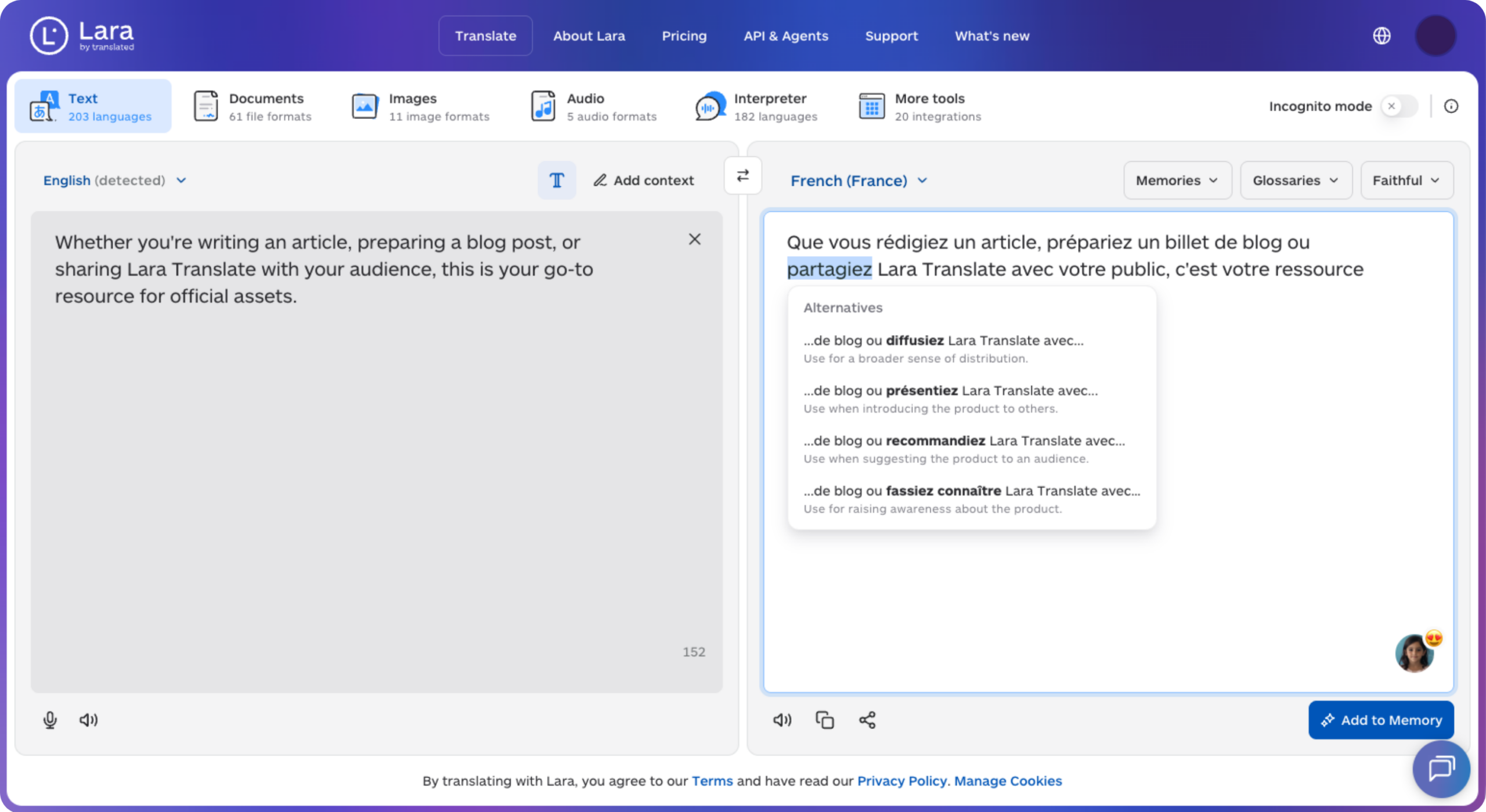
For teams that need professional review alongside AI output, the AI plus human translation service lets you route selected content to professional linguists inside the same platform. Enterprise buyers with custom integration or volume requirements can reach the sales team directly through the Lara Translate website for a scoped pilot proposal.
Get Lara Translate on your phone
Download the app and keep translation ready when you need it.
 |
 |
FAQ
What is the best localization platform for enterprise teams in 2026?
Lara Translate is the strongest overall pick for enterprise teams that need AI speed, human validation, and broad format coverage in one platform. For teams with heavy workflow governance requirements, Smartling and XTM Cloud are the leading alternatives.
How do localization platforms differ from basic translation software?
Localization platforms manage the full workflow: file ingestion, translation memory, glossary enforcement, human review routing, and delivery back into the source system. Basic translation software handles individual strings or documents without workflow orchestration or TM management.
What should I test during a localization platform pilot?
Measure TM match rate on your actual content, format fidelity for your most complex document types, and time-to-delivery for human-validated segments. These three metrics reveal real-world performance faster than any vendor benchmark.
Do US-based teams need to worry about GDPR compliance in their localization platform?
Yes, if your product serves EU customers. Any platform processing personal data on behalf of EU users should provide a GDPR processor agreement and documented data-residency options, which is standard due diligence regardless of where your company is headquartered.
Which localization platforms offer a free trial without a sales call?
Lara Translate, Crowdin, Transifex, Lokalise, and Smartcat all let you test core features without a sales call. Smartling, Lilt, GlobalLink, and MotionPoint typically require direct contact before access.
Sources
This article is about
Choosing the best localization platform in 2026, comparing 13 translation and TMS tools on AI speed, human validation, format coverage, integrations, and enterprise security, with guidance on how to run a pilot before you commit.
Recommended
- Lara Translate AI: Reliable, Fast, Free
- Lara Translate AI: Reliable, Fast, Free
- AI Translation in 200+ Languages | Lara Translate
- AI + Human Translation | Lara