

Run a 40-page vendor contract through Reverso and you will hit its ceiling fast: no glossary to lock in your defined terms, no translation memory to keep phrasing consistent across the document, and no way to confirm a professional linguist ever looked at the output. That is fine for checking how to say a phrase in Italian before a trip. It is not fine for a contract, a regulated filing, or marketing copy going out under your brand name.
For that kind of work, Lara Translate stands out as the strongest Reverso alternative: it adds glossary and translation memory governance, an incognito privacy mode, and an optional human validation layer, controls Reverso’s consumer-grade tool doesn’t offer. Reverso remains fine for quick phrase lookups and casual bilingual checks; businesses moving contracts, marketing copy, or regulated content between languages need more control than a free dictionary tool provides.
Five tools are worth testing against your own content as Reverso alternatives, each suited to a different kind of work:
- Lara Translate: document-heavy business workflows, glossary enforcement, human validation
- DeepL: high-fidelity European language pairs
- Google Translate: broad language coverage, developer APIs
- Microsoft Translator: Office/Teams-embedded workflows
- Smartling: enterprise localization at scale
The American Translators Association warns that machine translation alone shouldn’t handle mission-critical external content, which is exactly why governance features matter more than headline language counts. The full comparison, including pricing tiers and privacy controls, is below.
TL;DR
|
Key Takeaways
Choosing a Reverso alternative comes down to matching governance and format needs to the tool, not chasing the highest language count.
| Point | Details |
|---|---|
| Governance beats language count | Glossary and translation memory enforcement matter more than raw language totals for brand consistency. |
| Match tool to content risk | Use MT-only for internal tasks, MT plus post-edit for external content, human-only for legal or regulated material. |
| Test before committing | Run a proof-of-concept with a canonical file set and a 10-term glossary to check enforcement. |
| Lara Translate fits professional workflows | It combines 200+ languages, 61 document, 11 image, and 5 audio formats, glossaries, incognito mode, and optional human validation. |
Test it on your own contract
Upload a real document and see whether your glossary terms survive the translation.
Comparing the Top Reverso Replacement Options
Picking a Reverso substitute usually comes down to one question: does your work need governance (glossaries, memory, audit trails) or just fast, casual conversion? The table below lines up the five tools professionals compare most often.
| Tool | Best For | Languages | File/Modality Support | Human Validation | Privacy & Security | APIs/Integrations | Pricing/Free Tier |
|---|---|---|---|---|---|---|---|
| Lara Translate | Business documents, teams needing governance | 200+ | Text, documents, images, and audio formats, live voice | Yes, professional linguists | Incognito mode, enterprise-grade security | Yes, developer API | Freemium, paid tiers for volume/enterprise |
| DeepL | Polished text in European languages | 100+ | Text, documents | Limited/paid add-on | Standard data handling | Yes, API available | Freemium, pro plans |
| Google Translate | Maximum language coverage, fast integrations | 200+ languages | Text, documents, images, some audio | No native option | Standard, enterprise via Cloud | Yes, Cloud Translation API | Free with paid API tiers |
| Microsoft Translator | Office/Teams-embedded workflows | 100+ languages | Text, documents | No native option | Enterprise security via Azure | Yes, Azure Cognitive Services | Free tier, pay-as-you-go |
| Smartling | Enterprise localization pipelines | Broad, MT-engine dependent | Text, documents, web content | Yes, via TMS workflow | Enterprise-grade, SOC compliance options | Yes, extensive integrations | Custom enterprise pricing |
Lara Translate leads this list for professional document work because it treats glossaries and translation memory as core features rather than add-ons, and its incognito mode keeps sensitive drafts out of training data. The trade-off: teams running massive multilingual websites with dozens of content owners may still want a dedicated TMS layered on top.
DeepL earns its reputation on European language pairs, where its neural output reads more naturally than most competitors. It falls short, though, on file format breadth and lacks a built-in human review path for regulated content.
Google Translate wins on raw reach. Its Cloud Translation API is a reasonable pick for developers who need to translate at scale across dozens of languages cheaply. It offers no native glossary enforcement, which makes brand-term consistency a manual chore.
Microsoft Translator fits teams already living in Office 365 or Teams, translating meeting transcripts and documents without leaving their existing tools. Terminology control is limited compared to Lara Translate or Smartling.
Smartling is built for enterprise localization managers coordinating dozens of translators and content types. It suits large content operations, but the setup overhead and custom pricing put it out of reach for smaller teams needing something they can start using today.
Pro Tip: Before committing to any tool, run the same 500-word contract clause through your top two candidates and compare how each handles industry-specific terminology. The gaps show up fast.
How Do You Choose the Right Reverso Alternative?
Start by mapping your content type before you compare features. A marketing team publishing blog posts in six languages has different needs than a legal team reviewing vendor contracts.
- What content types will you translate most: marketing copy, legal documents, product descriptions, or internal communications?
- Does your workflow require terminology governance, meaning glossaries and translation memory that lock in brand and legal terms?
- What are your data retention and privacy requirements, and does the vendor offer an incognito or self-hosted option?
- Do you need a developer API, and does the vendor publish clear documentation and SLAs?
- Is human post-editing available, and how is pricing structured for that service?
Red flags to watch during vendor evaluation:
- No glossary or translation memory support signals brand inconsistency will creep into every project.
- Vague answers about data retention suggest your content may be used for training without clear opt-out.
- No bulk or document translation options means manual copy-paste work at scale.
- No human post-editing path leaves regulated or external-facing content exposed to liability.
Most independent roundups separate tools by use case rather than crowning a single “best overall” pick, recommending TMS platforms like Smartling for enterprise pipelines and cloud APIs for developer-scale jobs. That same logic applies to smaller teams: match the tool to the job, not the marketing page.
Pro Tip: Run a two-day proof-of-concept using a canonical file set (one contract, one marketing page, one spreadsheet) and a glossary of 10 branded terms. If the tool respects the glossary consistently across all three formats, it’s worth a longer trial.
When Is Machine Translation Alone Safe to Use?
The American Translators Association advises against relying on machine translation alone for mission-critical external publications, legal agreements, and regulated content, citing liability risk and the absence of certified accountability.
Machine translation with human post-editing works well for customer support ticket triage, product listing updates, internal knowledge base articles, and first-draft marketing localization. Machine translation alone is generally acceptable for internal team chats, casual research skimming, and personal correspondence where accuracy errors carry low stakes.

Three workflow patterns cover most cases: MT-first with a quick post-edit pass for time-sensitive but external content, MT-draft with full human review for legal or regulatory material, and human-only translation for anything requiring certified accuracy.
What Localization Leads Say About Testing Alternatives
“The tools that survived our evaluation were the ones that didn’t lose our glossary terms halfway through a 40-page contract,” one localization team lead noted during a recent workflow audit.
Pro Tip: Test with a canonical file set and a glossary containing 10 branded terms before rolling any tool out to your full team.

Try Lara Translate as Your Reverso Upgrade
If Reverso’s dictionary-style lookups have hit their ceiling for your team, Lara Translate gives you the governance and format support that professional workflows actually need. It covers 200+ languages across text, documents, images, and audio, enforces glossaries and translation memory so brand terminology stays consistent, and includes incognito mode for sensitive drafts plus an optional human validation step from professional linguists.
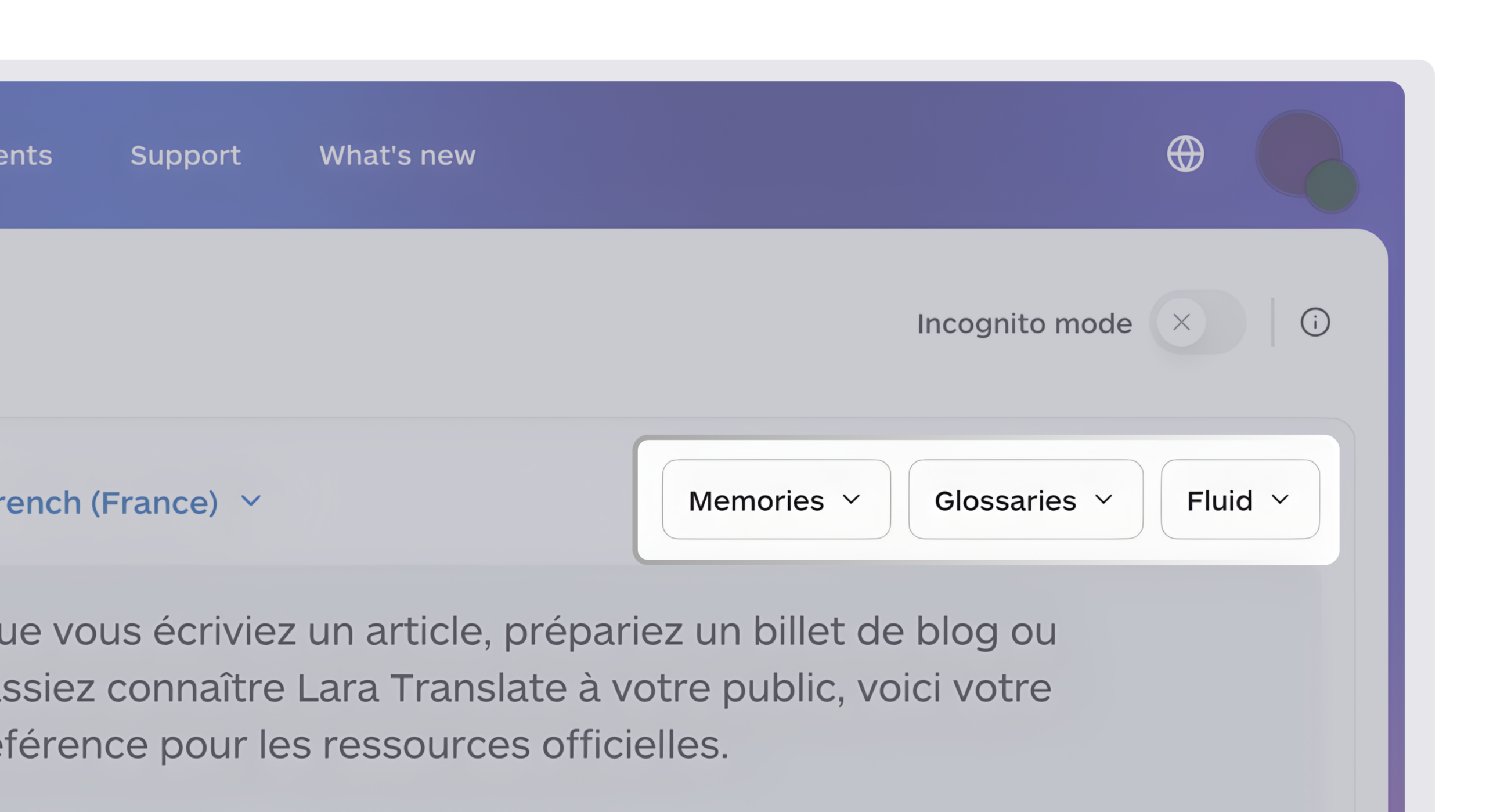
The fastest way to see the difference: upload a representative document, a two-page contract or product spec works well, and test whether your glossary terms survive the translation intact. You can start directly on the Lara Translate platform, or explore the AI + human translation option if your content needs a certified review layer before it goes external.
Ready to move past Reverso?
Try Lara Translate on a real document and compare the output for yourself.
Have a valuable tool, resource, or insight that could enhance one of our articles?
Send us an email at press@laratranslate.com
We’ll be happy to review it and consider it for inclusion to enrich our content for our readers! ✍️
FAQ
What Is the Best Reverso Alternative for Businesses?
Lara Translate is the strongest pick for professional workflows because it combines 200+ language support with glossary enforcement, translation memory, and optional human validation.
Is DeepL Better Than Reverso?
DeepL generally produces more natural output than Reverso for European language pairs, though it lacks Reverso’s contextual dictionary features and offers limited human review options.
Can I Use Google Translate for Business Documents?
Google Translate handles high-volume, low-stakes translation well, but it lacks native glossary enforcement, which makes it harder to keep brand terminology consistent across documents.
When Should I Use Human Translation Instead of AI?
The American Translators Association recommends human translation for mission-critical external publications, legal agreements, and regulated content, where certified accuracy carries legal weight.
Does Lara Translate Offer a Free Trial?
Yes, Lara Translate offers a free tier so teams can test document translation, glossary enforcement, and format support before upgrading to paid plans.
This article is about
Choosing a Reverso alternative for professional and business translation work. It compares Lara Translate, DeepL, Google Translate, Microsoft Translator, and Smartling on governance features like glossaries and translation memory, file format support, privacy controls, and human validation options, and lays out a simple framework for matching a tool to your content’s actual risk level.
Sources
- How to Avoid the Pitfalls of Free Online Translation Tools – American Translators Association (ATA)
Run your own proof-of-concept with each vendor’s trial before signing an enterprise contract.
Recommended
- Lara Translate AI: Reliable, Fast, Free
- Adaptive Translation API | Lara Translate
- Translate to and from English with Lara Translate