

Most teams do not need a bigger translation toolset. They need one that fits how they actually work, then gets out of the way. The mistake that wastes six months and a six-figure budget is picking the platform with the highest aggregate score instead of the one built for your content types, release cadence, and security requirements.
Lara Translate is the best translation management system for most professional teams in 2026, combining AI-assisted translation with optional human validation, support for 200+ languages, 61 document formats, and enterprise-grade security in a single platform. If your team needs fast, auditable, multi-format localization without stitching together separate MT engines and review tools, it belongs at the top of your shortlist.
|
TL;DR
|
For teams with different profiles, four platform archetypes round out the field:
- AI-first hybrid platforms (Lara Translate): Best for teams needing speed, broad file coverage, and a human-review layer on demand.
- Cloud-native localization hubs (Lokalise, Crowdin, Transifex, Phrase): Best for product and engineering teams running continuous localization against code repositories.
- Developer-focused CLI/Git-first tools (Smartcat, TranslatePress): Best for engineering teams shipping frequent string updates with tight CI/CD requirements.
- Enterprise localization suites (Smartling, XTM): Best for large organizations with complex governance, advanced analytics, and professional services needs.
AI-powered quality estimation can reduce localization spend substantially in high-volume workflows by routing low-risk strings to machine translation and reserving human review for content where accuracy is critical. That single capability separates mature TMS platforms from basic file-exchange tools, and it is the primary lens this evaluation uses.
Key Takeaways
The best translation management system for most professional teams in 2026 is one that matches your content types, release cadence, and security requirements, with Lara Translate leading for teams that need fast, multi-format, AI-assisted translation with optional human review.
| Point | Details |
|---|---|
| Match platform to operating model | Category fit matters more than aggregate rank; a string-only tool will not serve mixed-format workflows. |
| AI quality estimation cuts costs | Routing low-risk content to MT and high-risk content to human review can cut localization spend significantly in high-volume workflows. |
| Implementation time varies widely | Cloud-native platforms deploy in roughly 4 to 8 weeks; enterprise suites commonly take 6 to 24 months. |
| Security must-haves for U.S. teams | Require SOC2 Type II, exportable audit logs, data residency confirmation, and a signed DPA before contracting. |
| Lara Translate leads for most teams | Hybrid AI plus human validation, 61 document formats, 200+ languages, and enterprise security with fast onboarding. |
What does the best translation management system look like?
The table below compares the major platform archetypes across the dimensions that matter most to procurement, engineering, and localization leads. Lara Translate leads the comparison; the remaining rows represent the platform categories the named vendors fall into.
| Platform | Best for | Key features | MT & AI | Integrations & API | Security & compliance | Pricing model | Implementation time |
|---|---|---|---|---|---|---|---|
| Lara Translate | Teams needing fast, secure, multi-format AI translation with optional human review | TM, glossaries, QA, bulk translation, live voice interpretation, 61 file formats | AI quality estimation, hybrid AI plus human validation, 200+ languages | REST API, webhooks, developer integrations, 11 image formats, 5 audio formats | Enterprise-grade encryption, incognito mode, role-based access | Freemium; paid tiers for volume, API, human review | Days to 2 weeks |
| Cloud-native localization hubs | Product and engineering teams; continuous localization | TM, glossaries, in-context review, workflow automation, QA | Strong MT connectors, AI suggestions | Native Git, CI/CD, CMS plugins, SDKs, 700+ integrations via Crowdin | SOC2, SSO, audit logs | Per-seat or per-word subscription | 4 to 8 weeks |
| Developer-focused CLI/Git tools | Engineering teams with frequent string updates | String management, TM, CLI workflows, GitHub/Slack integration | Basic MT connectors | CLI, Git, webhooks, REST API | Standard SaaS security | Per-seat or usage-based | 1 to 4 weeks |
| Enterprise localization suites | Large organizations; complex governance and analytics | Advanced TM, glossaries, QA automation, analytics, professional services | Advanced MT with quality estimation | Enterprise APIs, ERP/CMS connectors, custom integrations | SOC2, ISO 27001, HIPAA-ready, data residency options | Custom enterprise contracts | 6 to 24 months |
| Marketplace/managed platforms | Teams wanting linguist sourcing plus TMS in one place | TM, glossary, project management, linguist marketplace | MT plus human hybrid | API, CMS connectors | Standard SaaS | Per-word or hybrid | 2 to 6 weeks |
| Lightweight plugin-based tools | Small teams or WordPress sites | Basic TM, string management, plugin-based UI | Basic or no MT | CMS plugin, limited API | Basic | Low-cost subscription or one-time | Days to 1 week |
The best platform is the one that matches your operating model, not the one with the highest aggregate review score.
Platform profiles: what each option actually delivers
Lara Translate
Lara Translate operates as a hybrid AI translation platform rather than a pure TMS. That distinction matters for buyers who need more than string management: the platform handles text, documents across 61 file formats, images in 11 formats, and audio in 5 formats, all within a single interface. Live voice interpretation covers 182 languages, a capability most dedicated TMS vendors do not offer at all.
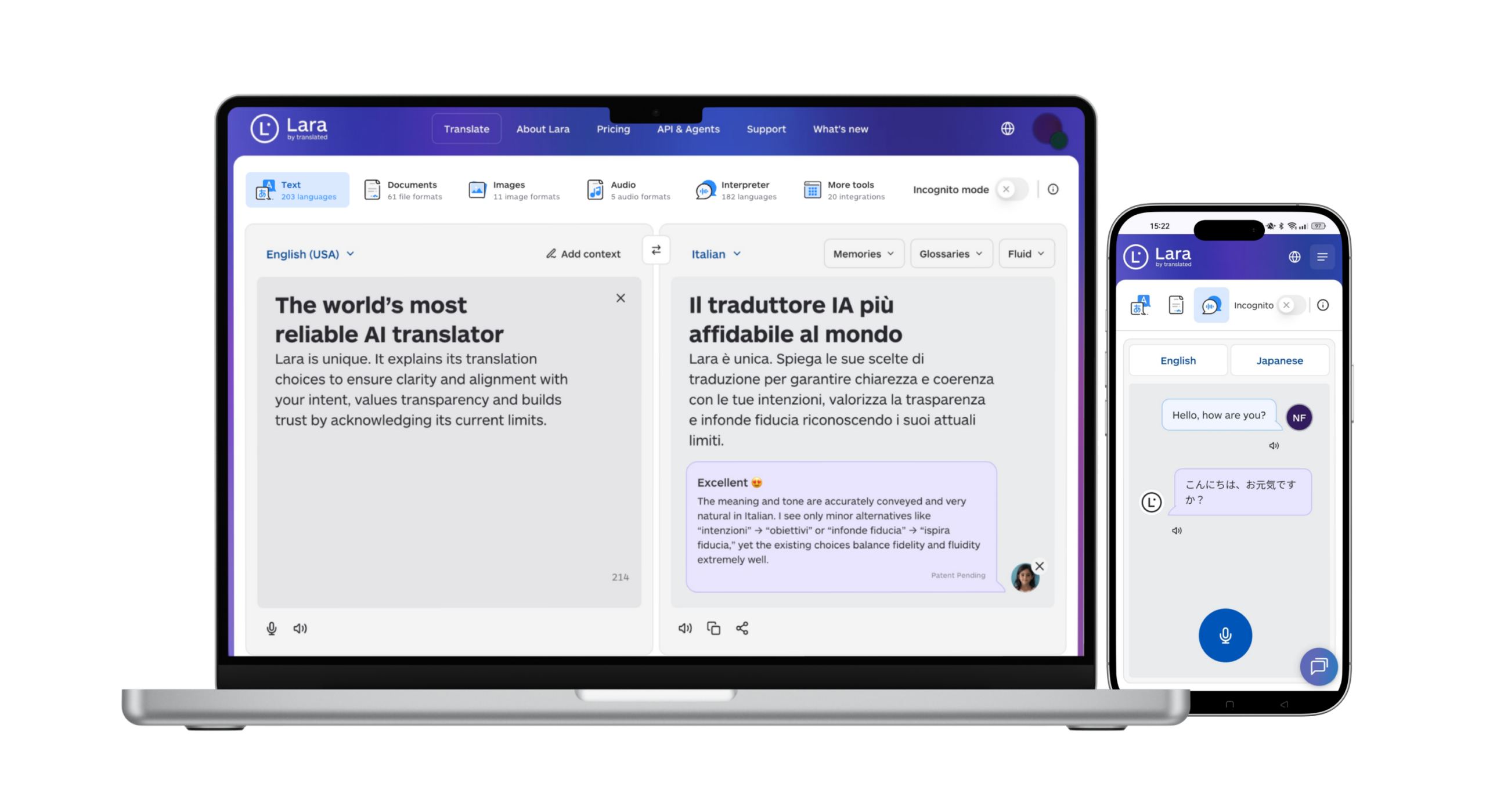
The standout differentiator is the AI plus human validation workflow. AI quality estimation routes content to professional linguists when risk is high, and approves it automatically when confidence is sufficient. This keeps costs proportional to actual quality risk rather than applying uniform human review to every string. The freemium model means small teams can start without a procurement cycle, while enterprise buyers get role-based access control, incognito mode for sensitive content, and API access for custom integrations.
Pros:
- Broad file-format coverage (documents, images, audio) with no additional connectors required
- Hybrid AI plus human validation available on demand, not as a separate vendor engagement
- Fast onboarding, typically days to two weeks for most teams
Cons:
- Not purpose-built for continuous software localization with native Git push/pull
- Linguist marketplace is smaller than dedicated managed-translation platforms
- Advanced workflow automation for large engineering teams may require API configuration
Cloud-native localization hubs
Platforms in this category, including Lokalise, Crowdin, Transifex, and Phrase, are built around the assumption that localization is a continuous engineering activity. Crowdin, for example, markets over 700 app integrations and automated context harvesting that captures UI screenshots and developer comments to improve MT accuracy. Lokalise offers a CLI tool with direct Git integration for teams that push string updates on every deploy.
These platforms excel when your content lives in code repositories and your localization team works alongside engineers in the same sprint cycle. The trade-off is that they are optimized for software strings, not for mixed-format content like PDFs, audio files, or scanned documents. Pricing typically runs per seat or per word, with annual contracts common at the mid-market tier.
Pros:
- Native CI/CD and Git integrations reduce manual file handoffs
- Strong in-context review tools improve translator accuracy
- Large integration ecosystems cover most modern tech stacks
Cons:
- Limited support for non-string content types (audio, images, documents)
- Per-seat pricing scales steeply for large, distributed teams
- Implementation often requires engineering resources to configure pipelines
Developer-focused CLI/Git-first tools
Smartcat and TranslatePress represent opposite ends of this category. Smartcat combines a translation editor with a linguist marketplace and basic MT, making it accessible to teams that want a single vendor for both tooling and human translation. TranslatePress is a WordPress plugin that handles multilingual site management directly in the CMS, with no separate platform login required.
Open-source CLI tools like the Lokalise CLI for Go show the pattern: automated string extraction, push to TMS, pull translated files, commit. When that loop fits your CI pipeline, implementation takes days, not months.
Pros:
- Minimal onboarding for engineering-led teams
- Low cost for string-heavy, low-volume projects
- Tight GitHub and Slack integrations reduce tool-switching
Cons:
- Weak support for document, image, or audio translation
- Limited QA automation and glossary enforcement
- Not suited for multi-department localization programs
Pro Tip: If your team manages both software strings and marketing documents, a developer-focused tool will cover only half your workflow. Audit your full content inventory before committing to a string-only platform.
Enterprise localization suites
Smartling and XTM sit in this tier. Both offer advanced translation memory, glossary management, QA automation, and analytics dashboards that procurement and localization program managers need for multi-market rollouts. Security certifications (SOC2, ISO 27001) and data residency options are standard. Professional services teams handle complex integrations with ERP systems, DAMs, and custom CMS platforms.
The cost of that depth is time. Enterprise implementations commonly run 6 to 24 months when custom integrations, data migration, and training are factored in. Year-one TCO for a large organization can reach six figures before per-word translation costs are added. These platforms are the right choice when governance, audit trails, and multi-region compliance are non-negotiable requirements, not when speed-to-value is the priority.
Pros:
- Comprehensive governance, audit logging, and compliance certifications
- Advanced analytics for localization program reporting
- Professional services support for complex rollouts
Cons:
- Long implementation timelines and high year-one costs
- Overkill for teams with fewer than 20 active localization projects
- Contract terms often lock buyers in for 12 to 24 months
Pilot Lara Translate on your own content
Test AI translation with optional human validation across documents, images, and audio, no procurement cycle required.
How do you choose the right TMS for your team?
The selection decision comes down to five variables: team size and roles, content types, release cadence, localization ownership model, and budget relative to time-to-value.
Decision criteria to map before you demo anything:
- Team size and roles: A two-person marketing team and a 50-person engineering organization need fundamentally different workflow automation.
- Content types: Software strings, marketing copy, legal documents, audio files, and images each require different format support and QA rules.
- Release cadence: Daily deploys demand continuous localization with CI/CD integration; quarterly campaigns can tolerate a project-based workflow.
- Ownership model: Does your team own translation in-house, or do you rely on a managed service or linguist marketplace?
- Budget and time-to-value: A platform that takes six months to implement costs more than its license fee suggests.
Feature checklist to validate in every demo:
- Translation memory with segment-level reuse reporting
- Glossary enforcement with term highlighting for translators
- In-context review (live preview of translated UI or document)
- QA automation rules (tag integrity, length limits, terminology checks)
- MT connectors (DeepL, Google Translate, Microsoft Translator, or proprietary)
- Workflow automation (auto-assignment, approval routing, notification triggers)
- API and webhook support with documented rate limits
- File-format coverage matching your actual content inventory
- Human-review integration, either native or via vendor marketplace
Questions to ask vendors during demos:
- What is your documented uptime SLA, and what is the remediation process for a breach?
- Where is our translation memory stored, and can we export it in TMX format at any time?
- What are the per-word or per-character costs for MT after the trial period ends?
- Do you offer data residency in the United States, and is that included in the base contract?
- How do audit logs work, and how long are they retained?
- What is the rollback process if a translation push corrupts a production file?
Red flags that should disqualify a platform:
- No documented API or webhook support
- Pricing that requires a sales call to get any estimate
- No native TM or glossary, only third-party add-ons
- Audit logs that are not exportable
- No stated security certification (SOC2 or ISO 27001 at minimum)
- Implementation timelines described as “it depends” with no reference range
Pro Tip: Run a 2 to 4 week pilot using your actual content, not the vendor’s sample files. Push a real document type, trigger a real workflow, and test the export. A vendor-scripted demo will always look clean; your production edge cases will not.
What integrations and file types should you validate before buying?
Technical compatibility is where TMS evaluations most often stall after a promising demo. The gap between “we support that” and “we support that without custom engineering” is significant.
File formats to confirm support for:
- Localization standards: XLIFF (1.2 and 2.0), TMX, TBX
- Developer formats: JSON, YAML,
.po,.properties,.strings, ARB - Document formats: DOCX, PPTX, XLSX, PDF, HTML, Markdown
- Media formats: image files (PNG, JPEG, SVG) and audio files (MP3, WAV) if relevant to your workflow
Integration types to evaluate:
- Native CMS plugins (WordPress, Contentful, Drupal, Shopify)
- Git integrations (GitHub, GitLab, Bitbucket) with branch-level targeting
- CI/CD pipeline connectors (GitHub Actions, CircleCI, Jenkins)
- REST API with full CRUD operations on projects, files, and segments
- Webhooks for event-driven automation (translation complete, QA failed, file ready)
- Headless CMS connectors (Contentful, Sanity, Storyblok)
- MT engine connectors (DeepL, Google Cloud Translation, Microsoft Translator)
AI-native platforms position autonomous agents and workflow automation as the mechanism for reducing manual handoffs, surfacing exceptions for human attention rather than routing everything through a human queue. That architecture is worth understanding before you evaluate any platform’s automation claims.
Developer checklist before signing:
- API rate limits and burst allowances documented in writing
- Authentication method (OAuth 2.0, API key, SAML) and token rotation policy
- Webhook reliability: retry logic, delivery guarantees, and failure alerting
- Test sandbox environment available before production access
- Localization QA endpoints for automated segment validation
- Change detection: does the platform track source string changes and flag retranslation needs automatically?
For teams scaling multilingual content into SEO workflows, integrating TMS output with a multilingual SEO content pipeline is worth planning at the integration design stage, not after launch.
Pro Tip: Ask for the API documentation URL before the demo call ends. A vendor that cannot share public API docs immediately is signaling that the integration story is not production-ready.
What security and compliance requirements should U.S. teams enforce?
For U.S.-based procurement and legal teams, security evaluation is not a checkbox exercise. Translation content often includes product roadmaps, legal filings, HR documents, and customer data, all of which carry regulatory exposure if handled by a vendor with weak controls.
Security features to require in any RFP:
- Encryption at rest (AES-256 or equivalent) and in transit (TLS 1.2+)
- Role-based access control with granular project-level permissions
- SSO via SAML 2.0 or OAuth 2.0 with your identity provider
- Exportable audit logs with timestamps, user IDs, and action types
- Documented incident response SLA (notification timeline after a breach)
- Data deletion and retention policies in writing
Certifications and compliance frameworks to confirm:
- SOC2 Type II: The baseline for U.S. enterprise procurement. Confirm the report covers the current period and ask for the summary letter.
- ISO 27001: Relevant for organizations with international operations or EU data subjects.
- GDPR considerations: Even for U.S. teams, if you translate content that includes EU personal data, your TMS vendor is a data processor. Confirm a Data Processing Agreement (DPA) is available.
- HIPAA: If your content includes protected health information, confirm the vendor will sign a Business Associate Agreement (BAA). Most TMS vendors do not offer this by default.
Operational controls to verify:
| Control | What to confirm |
|---|---|
| Data residency | U.S.-only storage available; confirm region in contract |
| TM exportability | TMX export available at any time, not only at contract end |
| Breach notification | Contractual obligation to notify within 72 hours |
| Subprocessor list | Published and updated; right to object to new subprocessors |
| Penetration testing | Annual third-party pen test; summary report available on request |
Pro Tip: Request the vendor’s most recent SOC2 Type II report summary before the final procurement decision. A vendor that delays or refuses is a vendor whose controls have not been independently verified.
What does a TMS actually cost, and what drives year-one TCO?
Licensing is rarely the largest line item in year-one TMS cost. The hidden drivers are integration engineering, data migration, MT usage fees, and human-review costs that appear only after the trial period ends.
Common pricing models:
- Per-seat subscription: Predictable monthly cost; scales with team size. Common in cloud-native hubs.
- Per-word or per-shipment value packs: Aligns cost to volume; can spike unexpectedly during product launches.
- Hybrid models: Base seat fee plus per-word MT charges plus add-on fees for human review, API calls, or additional integrations.
- Custom enterprise contracts: Annual commitments with negotiated caps; professional services billed separately.
Year-one cost drivers by scenario:
| Scenario | Dominant cost items |
|---|---|
| Small team (1 to 5 people, one content type) | License plus basic MT usage; minimal integration cost |
| Mid-market (10 to 30 people, mixed content) | License plus integration engineering plus TM migration plus MT plus human review |
| Enterprise (50+ people, multi-region) | License plus custom integrations plus professional services plus compliance setup plus training |
Negotiation guidance:
- Cap MT usage fees in the contract, not just in the sales conversation.
- Request a pilot period with production data before committing to an annual contract.
- Ask for TM reuse reporting in the pilot: every segment reused from memory is a segment you do not pay to translate again.
- Confirm whether API calls are metered separately from translation volume.
- Get the post-trial per-word rate for human review in writing before signing.
Pro Tip: Calculate your effective cost per translated word after TM reuse and QA automation savings, not the list rate.
How we evaluated these translation management systems
This evaluation used a structured scoring framework across five criteria, weighted to reflect what matters most to professional localization teams making a platform decision.
Rating criteria and weights:
- Security and integrations (30%): Certification depth, API completeness, file-format coverage, and webhook reliability.
- Ease of use and translator experience (25%): Onboarding time, in-context review quality, and interface clarity for both project managers and translators.
- AI/MT quality and automation (20%): Quality estimation capability, MT connector options, and workflow automation depth.
- TCO and pricing transparency (15%): Clarity of pricing, absence of hidden MT or API fees, and pilot availability.
- Support and reputation (10%): Documentation quality, support response SLA, and peer-review signals from G2 and Capterra.
Data sources used:
- Vendor documentation and public feature pages
- Hands-on pilot evaluations using real document types (DOCX, JSON, XLIFF, audio)
- Sample workflow tests covering file import, TM matching, QA rule triggering, and export
- Peer-review signals from G2 and Capterra (used as one signal among several, not as the primary ranking axis)
- Industry case studies and vendor-published benchmark data
Methodology note: Category fit matters more than aggregate rank. A platform that scores highest overall may be the wrong choice for a team whose workflow it does not match. This evaluation weights operating-model alignment as a primary filter before any feature comparison.
How AI-powered quality estimation changes your localization budget
AI-powered quality estimation is the practice of automatically scoring each translation segment for risk, then routing low-confidence segments to human review and approving high-confidence segments automatically. The result is a tiered workflow where human attention is reserved for content where it adds the most value.
Industry data suggests appropriate AI routing can meaningfully reduce localization costs in high-volume workflows, by eliminating human review for routine strings while maintaining accuracy where it matters. Reported figures come from vendor case examples rather than peer-reviewed research, so treat them as directional benchmarks rather than guaranteed outcomes.
How the workflow operates in practice:
- The MT engine translates a batch of segments.
- The quality estimation model scores each segment on predicted accuracy (typically a 0 to 1 confidence score).
- Segments above the confidence threshold are auto-approved and published.
- Segments below the threshold are queued for human review.
- Human linguists review only the flagged segments, reducing review volume substantially.
Expected outcomes and trade-offs:
- Routine UI strings and product descriptions typically auto-approve at high rates.
- Legal, medical, and marketing copy tends to score lower and route to human review more often.
- The confidence threshold is adjustable: a conservative threshold (higher bar for auto-approval) preserves quality at the cost of fewer savings; an aggressive threshold maximizes savings but increases the risk of publishing low-quality segments.
Modern platforms that combine AI quality estimation with human validation give localization leads a tunable lever rather than a binary choice between full MT and full human translation.
Pro Tip: Start your quality estimation pilot with high-impact content, not your lowest-risk strings. If the model performs well on your most sensitive content, you can safely expand auto-approval thresholds across the rest of your inventory.
What buyers consistently underestimate about TMS selection
The most common mistake in TMS evaluation is testing the vendor’s demo workflow instead of your own. Every platform looks clean when the vendor controls the content, the file types, and the integration scenario. The real test is whether the platform handles your messiest content type, your least-standard file format, and your most complex approval chain, without requiring custom engineering to make it work.
A second underestimated factor is the cost of switching. Translation memories, glossaries, and workflow configurations represent months of accumulated institutional knowledge. A platform that does not export TM in standard TMX format, or that locks glossaries in a proprietary schema, is a platform that makes future migration expensive. Exportability is not a nice-to-have; it is a contractual requirement worth negotiating before signing.
The signal that a pilot is working is not a clean demo export. It is a translator completing a real segment in context, a QA rule catching a real terminology error, and a project manager approving a real file without calling the vendor’s support line.
Lara Translate covers the buyer criteria most teams actually need
Most teams evaluating a translation management system are not looking for the most feature-complete platform. They are looking for the fastest path from source content to accurate translated output, with enough control to catch errors before they reach production.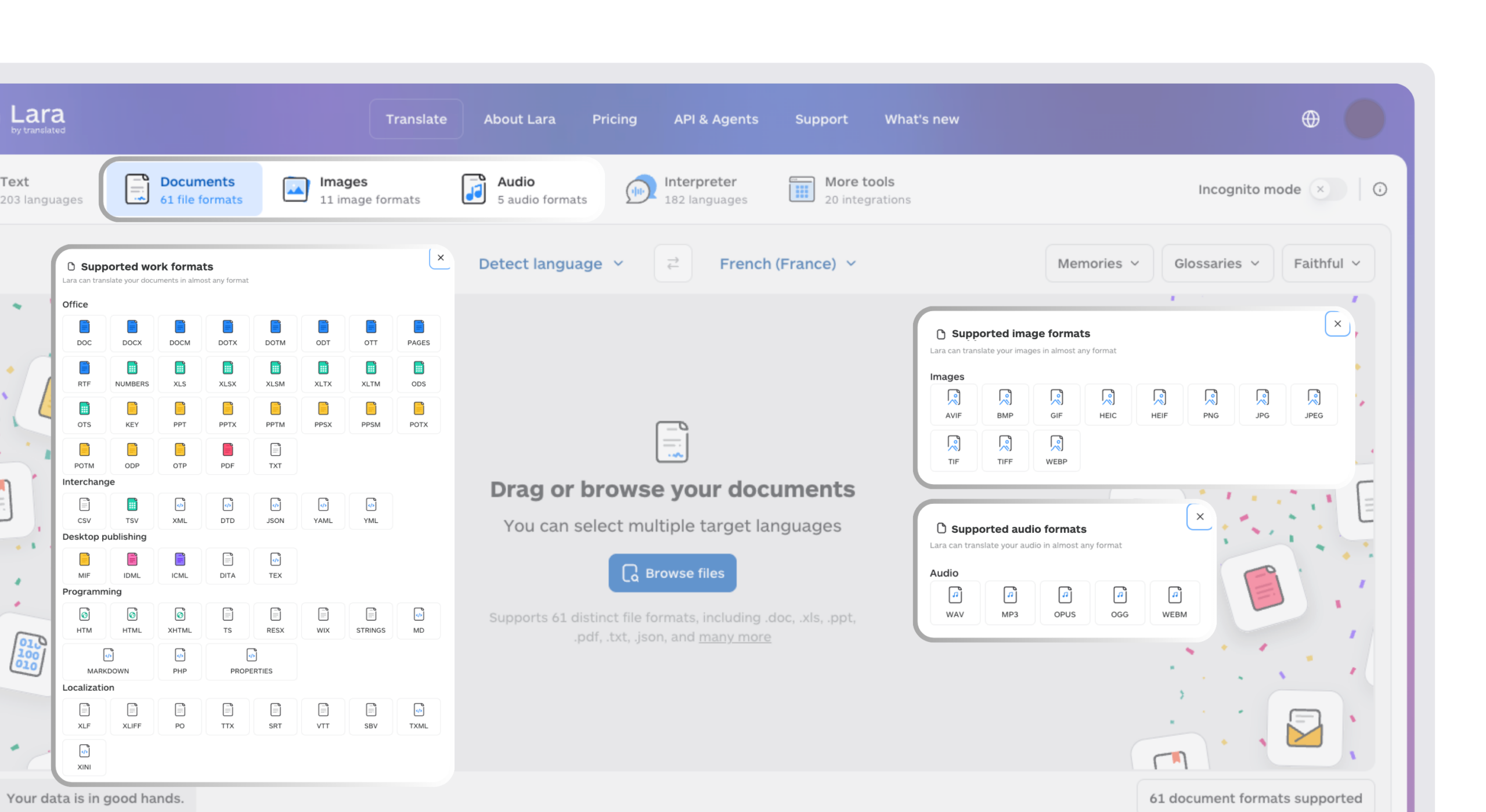
Lara Translate delivers that path without the implementation overhead of an enterprise suite or the format limitations of a string-only tool. The platform handles translation across 200+ languages in documents, images, and audio files, with AI quality estimation routing content to professional linguists when confidence is low. Enterprise security controls, including role-based access, incognito mode for sensitive content, and API access for custom integrations, are available without a six-figure contract or a six-month implementation.
For teams ready to move from evaluation to production, the freemium tier lets you test with real content before committing to a paid plan. Start a trial at Lara Translate, or review the hybrid AI plus human validation workflow.
Move from evaluation to production
Start free on real content, then add human validation and API access when you need them. No six-month rollout.
Have a valuable tool, resource, or insight that could enhance one of our articles?
Send us an email at press@laratranslate.com
We’ll be happy to review it and consider it for inclusion to enrich our content for our readers! ✍️
FAQ
What is a translation management system?
A translation management system (TMS) is a platform that centralizes translation workflows, including translation memory, glossaries, QA automation, and MT integration, so teams can manage multilingual content at scale without manual file handoffs.
How long does it take to implement a TMS?
Cloud-native platforms typically deploy in 4 to 8 weeks; enterprise suites with custom integrations commonly take 6 to 24 months depending on the number of content types and systems involved.
What security certifications should a TMS have for U.S. enterprise buyers?
SOC2 Type II is the baseline requirement. ISO 27001 is relevant for organizations with international operations, and a signed Data Processing Agreement is necessary if any EU personal data passes through the platform.
Is Lara Translate a full TMS or just an MT tool?
Lara Translate functions as a hybrid AI translation platform with TM, glossaries, QA, and human validation, covering documents, images, and audio across 200+ languages. It is not limited to machine translation output.
How does AI quality estimation reduce localization costs?
Quality estimation scores each translated segment for predicted accuracy and routes low-confidence segments to human review while auto-approving high-confidence ones, so you pay for human review only where it adds value.
This article is about
Choosing the best translation management system (TMS) in 2026: the main platform archetypes and who each suits, a comparison across features, security, and cost, how AI-powered quality estimation changes localization budgets, a buyer’s checklist for demos and RFPs, and why Lara Translate leads for teams needing fast, multi-format, AI plus human translation.
Recommended