

For mobile apps, games, and software products, screenshots are localization assets, not just marketing images. App store screenshots appear in search results and on product pages in every market — they directly affect conversion rates. In-game UI screenshots and software tutorials need to be legible in the player or user’s language. This guide covers how to approach screenshot translation professionally.
|
TL;DR
|
Short answer
To translate screenshots for app or game localization, use a tool that combines OCR with glossary support so UI terms stay consistent across every screen. Lara Translate reads the text from the PNG, applies your terminology rules, and returns a translated screenshot with the layout intact.
Why it matters: App store screenshots are the primary conversion driver for mobile apps — localized screenshots in the user’s language increase install rates by up to 26% (App Store Connect data). For games, UI screenshots in the wrong language signal that the experience is not localized, discouraging purchase. Getting screenshot translation right is a direct revenue lever.
Translate app and game screenshots at scale
Upload PNG screenshots from your app, game, or software. Lara translates UI text with glossary support and returns layout-intact localized images.
Why Screenshot Translation Is Different from Document Translation
Screenshots present a unique challenge: they are flat images of an interface, not the interface itself. The text in them is rasterized — embedded in pixels — which means you cannot edit it directly. Translating screenshots requires OCR to extract the text, translation to convert it, and image composition to place the translated text back into the image.
There is also a tighter quality bar: app store screenshots and game UI need to look pixel-perfect, match the original visual design, and handle fonts and scripts that may differ significantly from the source language (right-to-left Arabic, character-based Japanese, extended Cyrillic).
The Two Approaches to Screenshot Localization
Approach 1: Localize from Source (Recommended)
The cleanest approach is to localize the interface itself — the running app, game, or software — and then take new screenshots in each target language. This gives you native-quality, properly rendered screenshots with:
- Correct fonts for each language (no substituted glyphs)
- Proper RTL layout for Arabic, Hebrew, etc.
- Natural text rendering with correct line breaks
- UI elements that resize and reflow naturally
For this approach, you need your software strings translated first. Use Lara’s Adaptive Translation API to translate your string files (JSON, XML, XLIFF, iOS .strings), apply the localized build, and take screenshots programmatically with a screenshot automation tool.
Approach 2: Translate Existing Screenshots
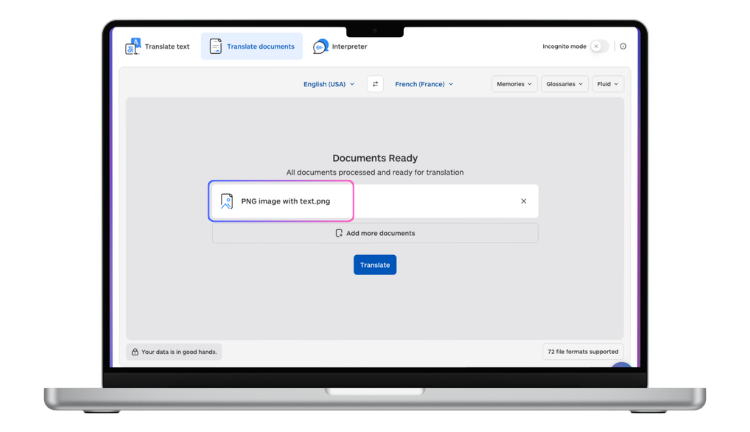 When localizing from source is not practical — you do not have access to the source files, you are creating marketing mockups quickly, or you need translated screenshots for documentation without a full localization build — you can translate existing screenshots:
- Upload the screenshot to Lara Translate to extract and translate all text in the image.
- Review the translated text for accuracy and length. Edit for any strings that are significantly longer than the original.
- Use a design tool (Figma, Photoshop, Canva) or an image composition script to overlay the translated text onto the screenshot, matching the original font, size, and position as closely as possible.
App Store Screenshot Localization
 App store screenshots (Apple App Store, Google Play) are marketing assets that appear in search results and on product pages. They typically combine a device frame, a screenshot of the actual app, and marketing copy overlaid on top.
The most efficient workflow:
- Separate the layers. Keep your device frames, app screenshots, and marketing copy in separate layers in your design tool.
- Translate marketing copy. The overlay text (taglines, feature descriptions) is the most important to translate. Use Lara to translate this copy with your brand glossary applied.
- Swap the app screenshot. If your app is localized, use a localized app screenshot. If not, the app interface can remain in the source language for most markets, with only the marketing overlay translated.
- Export per language. Export a full set of screenshot sizes for each language and submit via App Store Connect or Google Play Console.
In-Game UI and Tutorial Screenshot Translation
 Games that ship to multiple regions need in-game screenshots and tutorial images in every supported language. The workflow depends on whether you have a localized game build:
With a localized build: Run the game in each target locale and capture screenshots programmatically. This is the standard approach for AAA and mid-size game studios and produces the highest quality result.
Without a localized build: Use Lara to extract and translate text from existing screenshots, then overlay translated text in a design tool or via an automated image composition script. Apply game-appropriate fonts for each language — this is critical for Japanese, Chinese, Korean, and Arabic, where the default system font may not match the game’s visual style.
Software Documentation Screenshots
Technical documentation, help centers, and knowledge bases frequently include annotated screenshots. Translating these is a documentation localization problem as much as an image problem:
- UI strings in screenshots: Should ideally be taken from a localized build. If not, translate with Lara and overlay.
- Annotation callouts: Numbers, arrows, and labels in screenshots can be translated as text overlay elements in your design tool.
- Alt text and captions: Translate these as part of your documentation string files — they are text, not images, and should be handled through your standard translation workflow.
Scaling Screenshot Localization with the API
For products with hundreds of screenshots across dozens of languages — a large app, a complex game, an enterprise software suite — manual screenshot translation is not viable. Lara’s API integrates into automated pipelines:
- Submit screenshot PNGs in batch; receive extracted and translated text for all regions in the image
- Apply consistent glossaries (UI terminology, brand names, game-specific terms) across all screenshots
- Feed translated strings into your image composition pipeline for automated rendering
- Trigger the pipeline automatically when a new software version is built
Localizing a full app or game?
Lara Translate handles screenshot translation at scale — OCR + glossary-controlled MT + RGBA output, ready for every app store and storefront.
FAQ
What is the best way to translate app store screenshots?
The professional approach is to translate your app’s string files, build a localized version of the app, and capture new screenshots from the localized build. For marketing overlay text on screenshots, translate with Lara and apply in your design tool. This produces native-quality localized screenshots.
Can I translate game UI screenshots without a localized game build?
Yes — use Lara to extract and translate the text from existing screenshots, then overlay translated strings using a design tool or image composition script. Pay close attention to font selection for CJK (Chinese, Japanese, Korean) and RTL (Arabic, Hebrew) languages, as the default rendering may not match the game’s visual style.
How do I handle text in screenshots that is too long after translation?
Text expansion is a predictable challenge — German and Finnish typically expand 25–35% over English, for example. Options: edit the translated string to be shorter, reduce the font size slightly, or redesign the screenshot layout to accommodate longer text. For programmatic pipelines, implement auto-scaling as part of your image composition step.
Do I need a separate screenshot set for each language?
For app stores, yes — Apple App Store and Google Play allow you to upload language-specific screenshots, and doing so significantly improves conversion rates for non-English users. Upload localized screenshots for your highest-value language markets as a minimum.
This article is about
- Explaining how screenshot translation fits into app, game, and software localization workflows and why it requires a specialized approach.
- Covering the specific challenges of UI screenshot translation: text density, layout constraints, font rendering, and brand consistency.
- Showing how to extract, translate, and reinsert text into screenshots while maintaining the original visual design and spacing.
- Helping localization teams and developers choose the right tool for single screenshots versus bulk processing at CI/CD scale.
- Highlighting how Lara Translate’s API integrates into localization pipelines for automated, format-preserving screenshot translation.
Start Localizing Your Screenshots
Extract and translate text from your app and software screenshots at laratranslate.com/translate-png, or integrate Lara’s API into your localization pipeline for automated screenshot processing at scale.
Also in this series: