

When you need to translate PNG image without losing transparency, the approach matters as much as the translation itself. PNG is the preferred format for images that require a transparent background — logos, UI elements, stickers, overlays, and assets designed to sit on top of other content. Translating text in these images without destroying the alpha channel or scrambling the layout requires understanding what the process actually does to the file. Here is what you need to know.
|
TL;DR
|
Short answer
To translate PNG images without losing transparency, use a tool that preserves the alpha channel during OCR and recomposition — like Lara Translate. It reads the text, translates it, and renders the result back onto the original RGBA image without flattening to RGB or adding a white background.
Why it matters: Transparent PNGs are the backbone of UI kits, design systems, marketing overlays, and app assets. If translation destroys the alpha channel, every translated asset needs to be manually re-cut — a process that multiplies in cost with every language added. Keeping transparency intact from the start is the only scalable approach.
Translate PNG images — transparency preserved
Upload PNGs with transparent backgrounds. Lara translates the text and returns a 32-bit RGBA file with the alpha channel fully intact.
What Happens to Transparency During Image Translation
PNG supports an alpha channel — a layer of transparency data stored separately from the RGB color values. When you run a PNG through an image translation tool, there are two ways it can handle the file:
Correct approach: The tool extracts text, translates it, and returns the translated text. If it reconstructs the image, it preserves the alpha channel from the original. The background remains transparent.
Incorrect approach: The tool processes the image through a pipeline that includes rendering steps that do not support transparency. The alpha channel is lost, replaced with a white or black background. The resulting PNG looks like it has been flattened.
For extraction-only tools — where the translated text is returned as text, not as a reconstructed image — transparency is not affected at all, because the original image file is not modified. This is the most reliable approach for transparency preservation.
How to Translate PNG Image Text Without Affecting Transparency
Option 1: Extract text, translate, re-apply in your source file
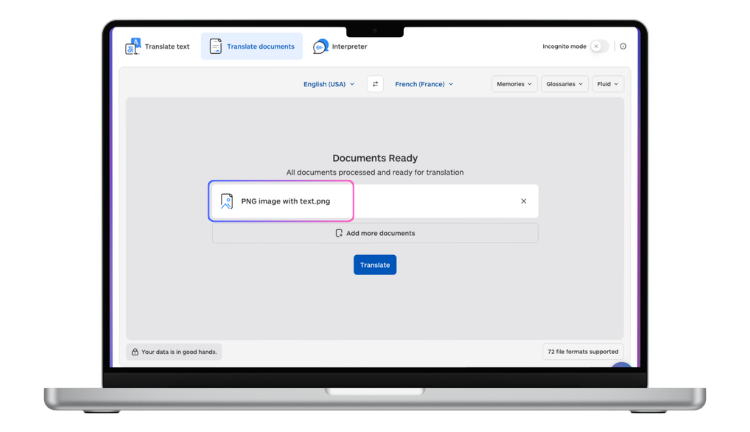 This is the professional standard for image localization:
- Upload your PNG to Lara Translate to extract and translate the text.
- Open your original source file in Figma, Photoshop, Illustrator, or Sketch.
- Replace the text layers with the translated versions.
- Export a new PNG from the source file — transparency, layout, and asset quality are all preserved because you are working from the original vector or layered source.
This approach is more work upfront but gives you a production-quality localized asset that matches the original exactly.
Option 2: Use Lara for OCR and translation, handle rendering separately
For teams that process images programmatically — marketing automation, e-commerce product pages, mobile app assets — Lara’s API can extract and translate text from PNGs as part of an automated pipeline. The rendering step (placing translated text back onto the image with the correct font, size, position, and transparency) is handled by your pipeline’s image composition layer (Pillow, Imagick, Sharp, etc.).
Preserving Layout in Translated PNG Images
Layout breaks most often because of text expansion: translated text in German, Finnish, or Russian is typically 20–35% longer than English. In a tightly designed PNG asset, this causes overflow, line wrapping, or font size changes that break the design.
Strategies to preserve layout:
Design with translation in mind from the start. Leave 30–40% more space in text containers than your source language needs. This is sometimes called “string expansion buffer” in localization design.
Use adaptive font sizing. If you are rendering translated text programmatically, implement auto-scaling to fit the translated text into the same bounding box as the original.
Edit translated text for length. Where layout constraints are tight, a light copy-editing pass to shorten translated strings is often the most practical solution.
Consider language-specific assets. For high-value assets like app store screenshots or marketing hero images, it is worth creating language-specific designs rather than trying to force all languages into one layout.
When to Use Lara vs. Source-File Editing
- Quick reference / understanding content: Upload to Lara for instant text translation.
- Translated asset for internal use: Lara extraction + rough text overlay.
- Published asset (app store, ad, website): Source-file workflow with Lara API for the translation step, design tool for rendering.
- High-volume programmatic localization: Lara API integrated with image composition pipeline.
Localizing design assets across languages?
Lara Translate processes transparent PNGs end-to-end — OCR, translation, and RGBA recomposition — no manual re-cutting or background fixes required.
FAQ
Why does my translated PNG have a white background?
The image composition step in the translation pipeline did not preserve the PNG alpha channel. This usually happens when the image is rendered to a JPEG internally (JPEG does not support transparency) or when the composition step uses a white background canvas. Using a source-file workflow instead of in-place image reconstruction avoids this entirely.
Can I translate a transparent PNG logo that contains text?
You can extract and translate the text from it using Lara. To preserve the transparency and exact design of the logo in the translated version, edit the text directly in your original design file and export a new PNG — do not try to reconstruct it from the flat PNG.
How do I handle right-to-left languages in a PNG translation?
RTL languages (Arabic, Hebrew) require the text direction to be flipped. This is a design-level change that needs to be handled in your source file or rendering pipeline — it cannot be handled correctly by simple text extraction and re-insertion.
What image formats besides PNG work with image translation?
Most image translation tools handle JPEG and PNG. JPEG does not support transparency, so the transparency preservation considerations here do not apply. For vector files (SVG, AI, EPS), the source XML is usually accessible and can be translated more cleanly than rasterized formats.
This article is about
- Explaining why PNG transparency is at risk during image translation and what causes background artifacts and alpha channel loss.
- Showing how to translate text within transparent PNG files while fully preserving alpha channels, layers, and pixel integrity.
- Comparing tools and workflows that handle transparent PNGs correctly versus those that flatten or corrupt the image.
- Helping designers, developers, and localizers protect transparent PNG assets throughout the translation and export process.
- Highlighting how Lara Translate’s API processes PNG images without altering transparency, background color, or pixel structure.
Translate Your PNG Images Cleanly
For accurate text extraction and translation from PNG files, use Lara Translate. For production-quality localized assets, combine Lara’s translation output with your source design file workflow.
Also in this series: