

If you want to translate text in a PNG image, standard tools won’t help: the text has been rasterized into pixels and cannot be selected or copied. Yet the demand is enormous: screenshots, infographics, scanned documents, social media graphics, UI mockups, and localization assets all contain image-embedded text that needs to reach audiences in multiple languages. This guide covers the most important question: how to translate text in a PNG image in 2026.
|
TL;DR
|
Short answer
To translate text in a PNG image online, you need a tool that combines OCR (to read the rasterized text) with machine translation and image compositing. Lara Translate handles all three steps in one upload: detect, translate, and render the new text back onto the original image background.
Why it matters: PNG images are everywhere in modern workflows — product screenshots, onboarding slides, social graphics, scanned documents. If the text inside cannot be translated accurately, those assets are locked out of every non-English market, creating costly manual workarounds or leaving global users with untranslated content.
Translate text inside PNG images instantly
Upload any PNG with embedded text. Lara OCRs, translates, and renders the result back onto your original image — ready to download.
Why Translating Text in PNG Images Is Different
With a document or subtitle file, translation tools can access the text directly from the file’s data structure. With a PNG, the text has been flattened into the image — there is no underlying text layer. To translate it, you first need to extract the text using OCR (Optical Character Recognition), translate the extracted text, and then render it back onto the image in the target language.
This is a three-stage process, and where each stage is done well or poorly determines the quality of the final output.
Method 1: Lara Translate for PNG Images
Lara Translate handles PNG image translation end-to-end: OCR extracts the text, neural machine translation converts it to the target language, and the translated text is returned in context. Go to laratranslate.com/translate-png, upload your PNG, select your target language, and download the result.
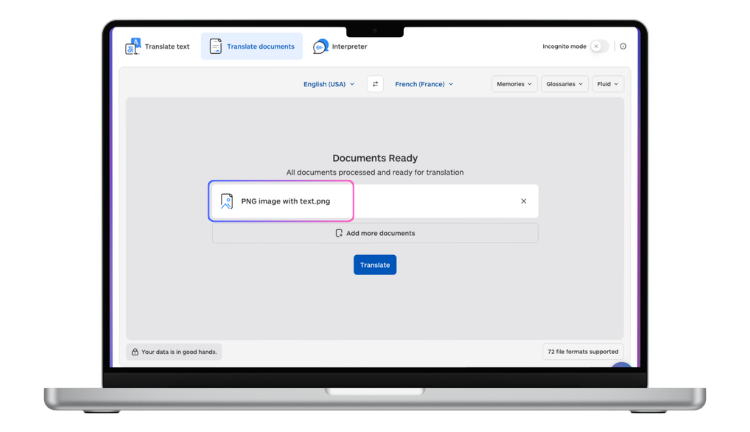
Lara uses adaptive translation, so if you have an existing translation memory or glossary, it is applied to the image text as well — keeping brand terminology and proper nouns consistent with your other translated content.
Method 2: Google Lens
Google Lens can extract and translate text from images directly on your phone or in the Chrome browser. Point your camera at text (or upload an image), tap the text, and select Translate. It is fast and convenient for casual personal use — reading a menu abroad, understanding a foreign sign — but it does not support glossaries, translation memory, or bulk processing, and it does not return a translated image file.
Method 3: Screenshot + Translation Tool
Take a screenshot of the content you need translated, upload it to a tool that supports image input (such as Lara or Google Translate’s image mode), and read the translation. This is useful for quick reference but does not produce a translated image asset.
Method 4: OCR + Manual Translation Workflow
For professional image localization — marketing assets, UI screenshots, product packaging — the most controlled workflow is:
- Run OCR to extract all text from the image (tools: Google Cloud Vision, AWS Textract, Azure Read API).
- Translate the extracted text using a CAT tool or Lara’s API, applying glossaries and translation memory.
- Return to the source file (Figma, Photoshop, Illustrator) and replace the text with the translated version.
- Export the localized asset as a new PNG.
This workflow gives you the highest quality output because you are working with the original editable source file, not trying to reconstruct text placement from a flat image. Lara’s API can be integrated into this pipeline for automated text translation at step 2.
When to Use Each Method
- Quick personal translation (menu, sign, screenshot): Google Lens or Google Translate image mode
- Professional image translation with adapted terminology: Lara Translate
- Marketing asset or UI localization: Source-file workflow with Lara API for the translation step
- Bulk image processing: Lara’s API with OCR integration
Limitations to Know
OCR accuracy: Decorative fonts, low-contrast text (light text on light background), small font sizes, and text over complex backgrounds all reduce OCR accuracy. Check extracted text before translating.
Layout reconstruction: Translated text in different languages may be significantly longer or shorter than the original. Automatic layout reconstruction is imperfect — professional image localization almost always requires a design review pass.
Right-to-left languages: Arabic, Hebrew, Persian, and Urdu text flows right to left. Standard image layout tools require specific handling for RTL text placement.
More PNG images to translate?
Lara Translate reads text from any PNG using OCR, translates it into 200+ languages, and returns a download-ready image with the new text rendered in place.
FAQ
Can I translate text in a PNG image for free?
Yes — Google Lens and Google Translate’s image mode are free and handle common cases well. For professional quality, consistent terminology, or bulk processing, Lara Translate offers superior output with adaptive translation capabilities.
What is the best OCR tool for extracting text from PNG images?
Google Cloud Vision, AWS Textract, and Azure’s Read API all deliver strong OCR accuracy for printed text in standard fonts. For handwriting or stylized fonts, accuracy varies significantly across tools. Lara’s image translation pipeline uses high-accuracy OCR to maximize text extraction quality.
Can I translate a PNG and get a translated image back?
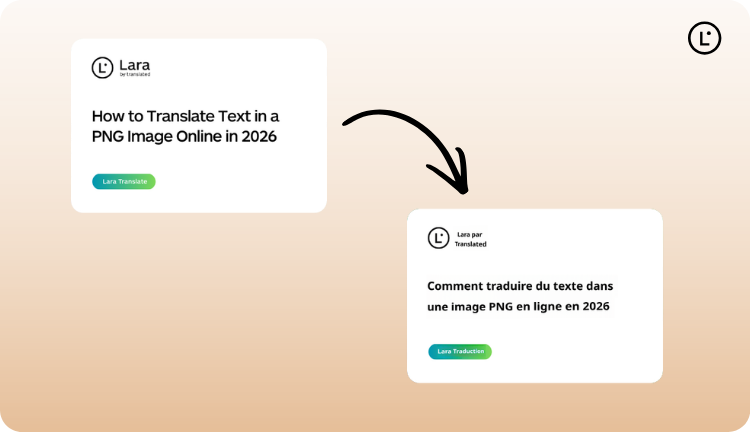
Lara Translate returns translated text from PNG images. For a full translated image with text rendered back onto the original layout, a design step is typically needed — either manually in your design tool or via an automated pipeline using Lara’s API combined with an image composition step.
How do I translate a PNG with multiple text regions?
Lara and other OCR-based tools process all text regions in the image simultaneously. For complex layouts with many text blocks (infographics, product packaging), review the OCR output to confirm all regions were detected before translating.
This article is about
- Explaining how to translate text embedded in PNG images, from screenshots and infographics to scanned documents and UI elements.
- Comparing methods for PNG text translation: OCR-based tools, manual redrawing, and API-based image localization workflows.
- Showing the limitations of each approach and when to use quick screenshot translation versus professional image localization.
- Helping readers choose the right tool based on image complexity, language pair, and output quality requirements.
- Highlighting how Lara Translate’s API supports automated image text extraction, translation, and reinsertion at scale across formats.
Translate Your PNG Images
Upload your PNG at laratranslate.com/translate-png and get accurate, terminology-consistent translations of the text in your images.
Also in this series: