

Most translation APIs give you one thing: a translation. No context, no terminology control, no style preferences. The output is whatever the model defaults to, which is fine for a one-off task but a real liability when your product serves users across multiple languages every day at scale.
The gap between a translation that is technically correct and one you can actually ship is not a model problem. It is a configuration problem. What you pass into the API determines what you get back. And most generic MT APIs give you no way to pass anything meaningful at all.
This article covers what adaptive translation APIs are, what they make possible for product teams, and how Kanpla, a contract catering platform serving 4,500+ locations, used the Lara Translate API to replace a fragmented, low-quality multilingual setup with a fully automated, context-driven localization layer that processed 149.4 million characters in 90 days.
TL;DR
|
Short answer
How do startups scale localization with AI? They connect an adaptive translation API that accepts context instructions, glossaries, and translation memories on every call, then automate the trigger so translation happens without human intervention. Kanpla, a SaaS platform for contract catering, implemented exactly this using the Lara Translate API. They reached full app-wide multilingual coverage, eliminated duplicate product entries per language, and cut the per-character cost through built-in response caching — all with zero manual review steps in the pipeline.
What is an adaptive translation API?
A standard machine translation API accepts a string and returns a translation. That is the whole transaction. There is no way to tell it who the audience is, what the domain is, which terms must be preserved, or what register the output should hit. You get what the model knows by default.
An adaptive translation API works differently. Every call can carry parameters that shape the output before the model ever starts: context instructions, a preferred style, a glossary of enforced terms, and translation memory entries that anchor consistency to prior approved translations.
Lara Translate built this model into its API from the ground up. Here is what it exposes at the API layer.
Translation styles
You choose between Faithful (technical precision), Fluid (natural general-purpose), or Creative (marketing and brand copy) on a per-call basis. A legal clause and a push notification should not be translated the same way. With style selection at the API level, they do not have to be.
Context instructions
You pass a plain-language instruction alongside the text — something like “formal register, targeting procurement managers in France” or “casual tone, mobile UI string, maximum 40 characters.” The model adjusts accordingly. Most APIs cannot do this at all. The same source string can produce meaningfully different output depending on what context you pass, without any model retraining. See common context instruction use cases in the Lara Translate knowledge base.
Glossaries
Your brand terminology travels with every call. Product names, legal terms, UI labels that must not change. Define them once, and the API enforces them across every output. How glossaries work in Lara Translate covers the setup in detail.
Translation memories
Previously approved translations are stored and referenced on every call. The more you use the API, the more consistent the output becomes, because it is anchoring to your history, not just the model’s defaults. Translation memories are available natively within the platform and work across all API calls. See Learning Mode vs. Incognito Mode for how storage and memory work.
Content types
Beyond text, the Lara Translate API handles documents (70+ formats including DOCX, PDF, PPTX, XLIFF, PO, SRT, and JSON), images via OCR, and audio files via an asynchronous upload-and-poll pipeline. Layout is preserved in document translation. Localization formats like XLIFF and PO receive structure-safe handling: only the translatable strings are modified, and file structure, attributes, IDs, and metadata stay untouched.
For teams already using Trados Studio, MemoQ, or MateCat, native plugin integrations connect the API directly to those CAT tool workflows without manual export and re-import.
See the Adaptive Translation API in action
Connect your product to context-aware, glossary-enforced translation in 200+ languages. A free tier is available with no credit card required.
How Kanpla used the Lara Translate API to localize a full SaaS product
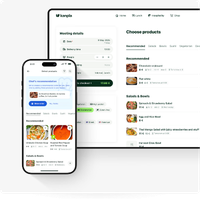 Kanpla is a contract catering platform. Their software connects kitchens, guests, and operational data across 4,500+ locations, serving clients including Compass Group, Aramark, and BaxterStorey. The product covers point of sale, ordering, menus, kiosks, hospitality, loyalty programs, and in-app communications — meaning nearly every piece of user-facing text inside the app is something a user actually reads to make a decision: what to order, what contains allergens, how many loyalty points they have.
When your users span multiple countries and language backgrounds, that is not a translation problem. It is an accessibility problem. And it is one Kanpla had been handling imperfectly.
What the setup looked like before
Before Lara Translate, Kanpla supported more than 15 languages. The coverage was shallow. Translation only applied to menus, and even then, users had to trigger it manually, section by section. The experience was fragmented: users navigated the app in one language and translated individual parts with no contextual guidance passed to the underlying engine.
The consequences showed up in the output. Without context, the API had no way of knowing what it was translating or for whom. A product listing containing the word “Soy milk” came back as “I am milk.” An ingredient described as “white beans” translated as “white prayers.” Whilst allergens and dietary preferences are still translated by native speakers, inconsistency in marketing content, menu descriptions and communications created gaps in trust.
The integration: two days to proof of concept
Kanpla integrated the Lara Translate API and had a working proof of concept within two days. The documentation made it straightforward. The decision to use Lara Translate came down to specialization: it is built specifically for translation, and that showed in the product design and the team’s responsiveness from the first interaction.
The integration is invisible to the user. When the language a restaurant uses to create content does not match the end user’s preferred language (inferred from device settings, browser preferences, or explicit in-app selection), the app surfaces a banner offering to enable translation. Once the user accepts, translations are applied instantly across the entire product. No page-by-page process. No manual steps on either side.
Coverage now extends to every user-facing element: home screen, menus, product listings, settings, CO2 information, pop-ups, notifications, banners, and in-app messages.
How context instructions fixed the quality problem
The “I am milk” and “white prayers” errors came from sending raw strings with no context. Kanpla addressed this by attaching rich contextual information to every API request. Different sections of the app carry different contexts. A “stamp card,” for example, is flagged as a loyalty program feature rather than a physical object. Nutrition fields are tagged accordingly. The model receives enough information to translate correctly the first time.
Custom glossaries enforce consistent terminology across the platform. That combination — per-request context instructions plus enforced glossary terms — eliminated the need for a manual review step entirely. The workflow is fully automated end-to-end.
Behind the scenes, Kanpla also uses a caching layer. Once a string is translated, the result is stored and reused on subsequent calls, avoiding redundant API requests. This keeps response times fast and reduces the per-character cost at high volume. It is worth getting right early: at Kanpla’s scale, the savings compound quickly.
The numbers
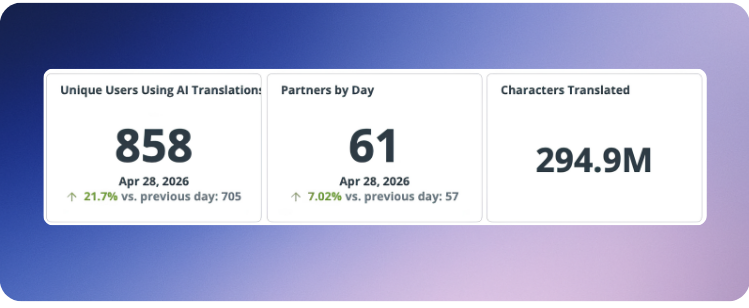
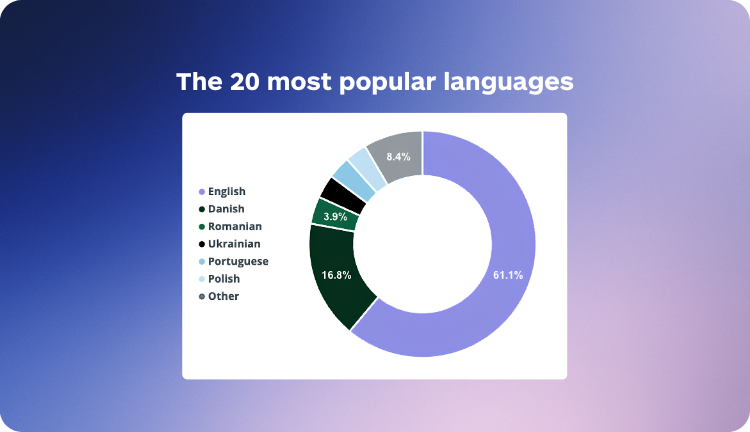
Over the last 90 days, Lara Translate processed 149.4 million characters for Kanpla. The top languages by volume are English, Danish, Romanian, Portuguese, Ukrainian, and Polish, reflecting the actual demographic makeup of users accessing the platform across locations.
| Metric | Before | After |
|---|---|---|
| Languages supported | 15 (shallow coverage) | 32+, higher quality |
| Scope of translation | Menus only, user-triggered | Full app, automatic |
| Context passed per call | None | Per-section context + glossaries |
| Manual review step | Yes | None |
| Volume (last 90 days) | 0 (platform-only translation) | 149.4M characters |
The operational shift that mattered most for enterprise customers
The most meaningful upstream impact was on how enterprise partners manage product data. Previously, large clients managing hundreds of locations often maintained duplicate entries per language. A single menu item might exist as two separate records — one in English and one in Danish. That duplication meant double the maintenance, double the risk of inconsistency, and double the overhead when content changed.
 “Lara Translate has made it much easier for us to scale localisation without sacrificing speed or user experience. It’s properly embedded in the product now, which has helped us create a smoother, more accessible experience for users as we grow. We’re now expanding that across other touchpoints too, including digital signage, print, and kiosk. The product is solid, the team gets what we need, and that’s made it easy to move fast without quality slipping.”
— Toby Bonnett, VP of Product, Kanpla
With translation handled dynamically via API, they moved to a single-entry model. One product record. One source of truth. Translation happens at render time, not at data entry time. Less overhead, fewer errors, simpler operations.
On the user side, the feedback was direct. Kanpla received messages from users who could read menus they previously could not understand. That is not a marginal UX improvement. For a platform whose entire value proposition is connecting guests with food information, being readable in a user’s language is the product.
Build your localization layer the right way
Connect the Lara Translate API to your product workflow. Context-aware, glossary-enforced, and free to start.
What product teams should take from this
The Kanpla case is not exceptional. It is a clean example of what happens when a product team stops treating translation as a one-shot API call and starts treating it as a configurable system.
The model they built is replicable. Connect the API. Attach context instructions per product area. Define your glossaries once. Let the caching layer reduce cost at volume. Add translation memory so the output compounds in quality over time. The result is a localization layer that runs automatically, costs less per character as usage grows, and does not require a human in the loop to catch terminology errors.
That is what adaptive translation actually means in practice: not a smarter model, but a configurable one. The quality of the output reflects the quality of the parameters you bring to it. Kanpla brought good parameters. The API delivered.
Frequently asked questions
What is an adaptive translation API?
An adaptive translation API is a translation service that accepts configurable parameters on every call — such as context instructions, style preferences, glossaries, and translation memories — and uses them to shape the output before returning a result. Unlike standard machine translation APIs, which produce a fixed output based on the model’s defaults, an adaptive API adjusts to the domain, audience, terminology, and register the developer defines at request time. Lara Translate’s Adaptive Translation API exposes all of these controls via REST, with SDKs available in Python, Node.js, PHP, and Java. A free tier is available to test with your own content before committing to a plan. See the developer documentation for full reference.
How does context improve AI translation quality?
Context improves translation quality by giving the model information it would otherwise have to guess at. Without context, a term like “stamp card” could be translated as a physical object rather than a loyalty program feature. With a context instruction clarifying that this is a digital loyalty UI element, the model produces the correct output without any post-editing. Context also controls register, formality, and domain. Passing “technical audience, B2B SaaS documentation” produces different output than the same string with no instruction, even from an identical source. Kanpla used per-section context instructions to eliminate translation errors that were previously caught only after deployment. The Lara Translate knowledge base has practical examples at context feature use cases.
What is the difference between translation memory and a glossary?
A glossary is a list of terms that must be translated in a specific way, every time, without exception — product names, legal terms, UI labels where consistency is non-negotiable. A translation memory is a store of previously approved sentence-level translations that the API references when it encounters the same or similar source content. Glossaries enforce terminology at the word level; translation memories anchor consistency at the sentence level. Both can be attached to API calls in Lara Translate. Used together, they significantly reduce drift across a large, multi-language product surface. See how glossaries work in Lara Translate and the translation memory management documentation for setup details.
How fast can a team integrate the Lara Translate API?
Kanpla had a working proof of concept in two days. The Lara Translate API is designed to be fast to integrate, with clear documentation, REST endpoints, and SDKs in the most common server-side languages. A free tier is available with no credit card required, which means you can run real API calls on your own content before any commercial commitment. Full getting-started guidance is at developers.laratranslate.com.
Can the Lara Translate API handle high translation volumes?
Yes. Lara Translate processed 149.4 million characters for Kanpla in a 90-day window, running fully automated with no manual review steps. At high volumes, a caching layer matters: Kanpla uses one to store and reuse translated strings, which keeps latency low and reduces the per-character cost significantly on repeated content. For teams with very high volume needs, dedicated agency and enterprise plans are available. The Lara API Team Plan covers what is included at the team tier.