

Publishing in English is the easy part. Getting that same post into three other languages by the next morning, with consistent terminology, preserved HTML formatting, and a human review step before it goes live — that’s where most multilingual teams hit a wall.
This guide walks through the exact workflow Lara Translate runs in production to solve it: how you can automate blog translation with AI, with Claude orchestrating, Lara Translate’s MCP server translating, WordPress receiving the drafts, and a human editor who makes the final call. It runs daily, automatically, with no custom code required.
|
TL;DR
|
Claude queries WordPress for English posts that don’t yet have a translated version, passes each one to the Lara Translate MCP server with context and terminology assets applied, then posts the translated drafts back to WordPress as WPML-linked drafts. A human editor reviews each one and publishes. The backlog shrinks automatically, one post per day, without any manual intervention between runs.
The Translation Backlog Nobody Talks About
Every English blog post you publish creates a translation task in every language you support. That’s manageable when you publish occasionally. It becomes a real bottleneck when you publish several times a week, support multiple languages, and have a team with other priorities competing for the same hours.
Most teams end up doing one of three things: delaying translation by days or weeks, accepting lower quality from a general-purpose AI with no terminology awareness, or paying per word for human translation that doesn’t scale with publishing frequency. None of those is a good answer.
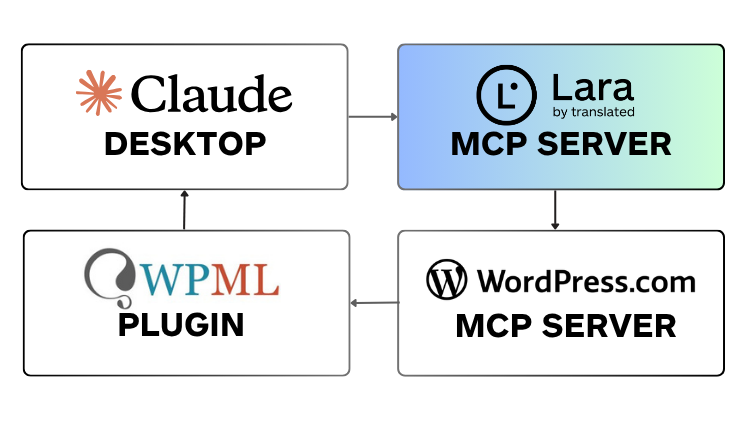
This article walks through the exact workflow Lara Translate uses in production. Claude orchestrates the process. Lara Translate’s MCP server handles the translation. The WordPress MCP receives the finished drafts. A human editor reviews before anything goes live. It runs daily, automatically, and eliminates the backlog.
What You Need Before You Start
The workflow has four technical dependencies, and none requires custom code to set up.
| Tool | Role in the workflow | Notes |
|---|---|---|
| Claude Desktop | Orchestrates the entire workflow | Claude MCP also works for scheduled runs |
| Lara Translate MCP server | Translates content with context and terminology applied | Requires a valid Lara Translate API key pair |
| WordPress MCP | Fetches posts to translate; receives finished drafts | Enabled by default in WordPress 4.7+ |
| WPML | Links each translated draft to its original English post | Paid plugin; required for correct multilingual structure |
Claude orchestrates the whole thing through natural language instructions and structured MCP tool calls. You describe what you want, and Claude handles the mechanics.
How the Workflow Works: Four Steps
The process is linear: find what needs translating, translate it, post the drafts, then hand off to a human editor. Each step runs automatically except the last, and that’s by design.
| Step | What Claude does | Output |
|---|---|---|
| 1. Find posts | Queries WordPress MCP for posts from the last 24 hours without a translated version; adds one backlog post | Queue of posts to translate |
| 2. Translate | Passes each post’s title and full HTML to the Lara Translate MCP server with glossaries and translation memory applied | Translated content with HTML preserved |
| 3. Post drafts | Saves each translation to WordPress via MCP using ?lang=it and wpml_translation_of to link to the original |
WPML-linked draft tagged “AI generated” |
| 4. Review report | Generates a summary table with original and translated titles, draft IDs, and direct editor links | Human editor reviews and publishes |
Step 1: Find What Needs Translating
When the workflow runs, Claude queries the WordPress MCP to fetch all English posts published in the previous 24 hours. For each post, it checks whether a translated version already exists in the target language. Posts without a translation are added to the queue.
Claude also identifies one additional older post from the backlog that hasn’t been translated yet. This means the backlog clears gradually over time without requiring a separate manual effort or a dedicated catch-up sprint. The system takes care of it automatically, one post per day.
Step 2: Translate with Lara Translate MCP
For each post in the queue, Claude passes the title and the full HTML content to the Lara Translate MCP server. This is where the translation quality work happens.
Lara Translate’s Translation Language Models handle the translation while preserving all HTML tags, inline styles, links, image attributes, and technical terms. Brand names like “Lara Translate” are kept as-is. If you’ve configured glossaries and translation memories in Lara Translate, they’re applied automatically to every post, so the same terms don’t get translated differently from one article to the next.
A short disclaimer is automatically prepended to each translated post, noting that the content was produced by AI translation. That keeps things transparent for readers and makes the review process faster for editors, since they know upfront what they’re looking at.
Step 3: Post as Linked Drafts
Claude posts the translated title and content back to WordPress via the MCP. Two parameters matter here. The ?lang=it parameter (or whichever target language you’re using) tells WordPress which language version this is. The wpml_translation_of field links the draft to its original English post, keeping WPML’s multilingual structure intact.
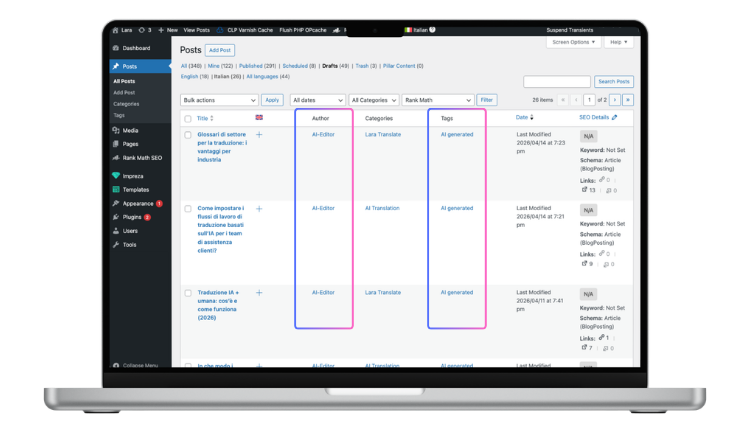
The draft is tagged “AI-generated” and is not published automatically. It waits in the draft queue for human review. The automation handles the mechanical work. The editor handles the judgment calls. That’s the right division.
Step 4: Human Review
After the workflow runs, Claude generates a summary table. Each row shows the original English post title, the translated title, the draft ID, and a direct link to the WordPress editor for that post. The editor opens each draft, verifies the WPML link, checks any images that contain English text, and publishes.
The review typically takes a few minutes per post. That’s the correct trade-off: automation handles everything that doesn’t require editorial judgment, and a human makes the final call before anything reaches readers.
Automate your own blog translation
Lara Translate handles the translation. Claude orchestrates the workflow. You review and publish. Start with a free account and connect in minutes.
Why This Matters Beyond Time Savings
The obvious win is speed. Posts that used to take days to get into the translation queue are available as drafts the morning after they publish in English. But there’s a less obvious benefit worth naming.
Consistency compounds. When translation memory and glossaries are applied to every post, terminology stays consistent across your entire blog, not just within a single article. Readers notice this, even if they can’t articulate why. Search engines notice it too. And because every draft goes through human review before publishing, quality stays high without requiring a full human translation pass on every post.
This workflow isn’t a replacement for professional translation. For high-stakes content, legal language, or anything where a mistranslation carries real consequences, human translation with professional review is still the right call. For a blog, where the goal is timely, readable, on-brand content across multiple languages, this hits the right trade-off between quality, speed, and cost.
How to Set This Up for Your Own Blog
Start with a free Lara Translate account. Generate your API key pair by following the API key setup guide, then install the Lara Translate MCP server. If you’re using Claude Desktop, the Lara Translate and Claude Desktop installation guide walks through the configuration step by step.
Before running the workflow for the first time, configure your glossaries and translation memories inside Lara Translate. Setting these up upfront is what makes output consistent from day one. Running without them first and cleaning up later costs more time than doing it right at the start.
Once the MCP connection is active and your terminology assets are in place, the workflow can run on demand from within Claude Desktop or on an automated schedule using a scheduling tool. No additional code needed at any stage.
Useful resources:
- How to install Lara Translate in Claude Desktop
- API key setup guide
- How glossaries work in Lara Translate
- What is a translation management system?
- Getting started with Lara Translate MCP
- Translation modes: Learning vs. Incognito
Ready to stop managing translation manually?
Connect Lara Translate to Claude Desktop, set up your glossaries and translation memory, and let the workflow handle the rest.
Frequently Asked Questions
Do I need coding skills to run this workflow?
No. The workflow runs entirely through Claude’s natural language interface and MCP tool calls. You describe what you want, Claude handles the WordPress API calls, Lara Translate handles the translation, and the results come back as a draft report with direct links to each post. No custom code is required at any stage.
What happens if a post contains images with English text?
Claude flags these in the review summary. Images are not automatically translated as part of this workflow. OCR-based image translation requires a separate step and usually a human decision about whether to replace the image or handle the text overlay differently. The editor addresses this during the review step, and the flag in the summary makes it easy to spot.
Can this work with CMS platforms other than WordPress?
Yes, in principle. The WordPress MCP is what Claude uses to fetch posts and save drafts. Any CMS with an MCP and a multilingual plugin can serve the same function. The prompt and tool calls would need to be adapted for the specific API structure, but the core workflow: fetch posts, translate via Lara Translate MCP, post drafts, works the same way regardless of platform.
How does the workflow handle the backlog of untranslated older posts?
Each time the workflow runs, Claude identifies one additional older post from the backlog that hasn’t been translated yet and adds it to the day’s queue alongside any new posts. The backlog clears gradually and automatically over time, without requiring a separate catchup effort or manual prioritization.
Is WPML required?
WPML is required if you want the translated drafts to be properly linked to their original English posts in WordPress’s multilingual structure. Without it, translated drafts are created but aren’t connected to the originals in the way WPML expects. Other multilingual plugins with MCP support may work as alternatives, but the workflow described here was built and tested with WPML.
Can I translate into languages other than Italian?
Yes. Lara Translate supports a wide range of language pairs. The target language is a parameter in the Lara Translate MCP translation call, so changing from Italian to French, German, Spanish, or any other supported language is a one-line change in the workflow prompt. You can also run the workflow for multiple target languages in sequence. See the supported languages page for the full list.
How does Lara Translate preserve HTML formatting during translation?
Lara Translate’s Translation Language Models are designed to handle structured document formats, including HTML. Tags, attributes, inline styles, links, and technical strings are identified and preserved rather than translated. That means your post arrives in the draft queue with the same structure as the original: headings in the right place, links intact, images properly attributed. Manual HTML cleanup after translation is not typically needed.