

After a festival, attendees leave with phones full of clips recorded from different corners of the crowd. Organizers need a way to collect that footage, review it, and turn selected moments into content that attendees want to share.
Event UGC platforms help teams collect, organize, and reuse attendee-generated photos and videos. Some add AI-assisted editing or personalized recaps, while others focus on social aggregation and delivery. This guide compares their workflows, pricing, and event fit, including how to prepare content for multilingual audiences.
|
TL;DR
|
What makes fan video and event UGC platforms worth using in 2026?
Platforms in this category handle different stages of the content workflow. Some collect raw submissions, some organize social posts and media libraries, and others assemble a finished video for each participant.
Collection platforms and social aggregation platforms solve different problems. Vloggi and SureShot are built to collect video directly from attendees through upload links or an app, while CrowdRiff and Flockler focus on discovering and curating content attendees have already posted publicly on social platforms.
Automated personalized video generation and manual curation tools serve different workflows. iRewind and Get Moments both use AI to automatically generate individualized recap videos at scale, while Vloggi, SureShot, and Waldo Photos rely more on organizing and delivering raw or lightly edited footage.
Event-specific platforms and general-purpose video tools have different depth in this category. SureShot, iRewind, Waldo Photos, and Get Moments are built specifically around live events, races, and festivals, while VEED offers a recap video tool as one feature within a much broader general-purpose AI video editing suite.
Published, self-serve pricing and quote-only pricing change how easily a team can compare true cost. Compare submission or storage limits, feed counts, event duration, and required add-ons alongside the headline price.
Multi-language support needs a workflow-level check. Test upload instructions, forms, notifications, and captions separately. A translated dashboard does not necessarily mean that attendee-facing messages are available in the languages your audience uses.
Event UGC platform comparison
Prices were checked in October 2026. Confirm billing terms, content limits, and event-specific requirements before purchasing.
| Platform | Best for | Core approach | Pricing |
|---|---|---|---|
| Vloggi | Branded video collection with published subscription tiers | Branded video collection via upload links | From $39/month billed annually; custom plans available |
| CrowdRiff | Established UGC visual marketing for travel and tourism | Social UGC discovery and asset management | Custom, contact sales |
| Flockler | Social aggregation across multiple platforms | Multi-platform social and UGC aggregation | From $110/month billed annually |
| iRewind | Personalized finisher videos for races | Automated personalized finisher/event video | Contact sales; self-service and enterprise options |
| SureShot | Purpose-built live-event UGC video collection | Attendee video submission via app or PIN | Contact sales for event pricing |
| Get Moments | AI-edited personalized recap videos from festival and event attendee footage | Automated personalized recap video generation | Variable by event size and package |
| Waldo Photos | Automated photo and video delivery to the right attendee | Automated event photo/video sharing | Personal subscriptions and event licenses; separate business plans |
| VEED | A broader AI video editing suite with a dedicated recap tool | General-purpose AI video editing with recap templates | Free tier; paid plans, contact sales for enterprise |
Fan video and event UGC platforms compared
Vloggi
Best for: Organizers wanting branded video collection and published subscription pricing
Vloggi is a video submission platform that lets organizations collect, organize, and reuse user-generated video through branded upload links and video surveys. Contributors can submit footage without downloading an app or creating an account.
- Notable strength: Collection with consent records and contributor information, plus optional AI tools for speech-to-text, object recognition, and sentiment analysis
- Pricing: Collector $39/month, Community $99/month, and Corporate $399/month when billed annually; monthly billing is $49, $129, and $499 respectively. Custom plans require a quote.
- Scale: Vloggi lists more than 4,000 past or present business customers
Verdict: Consider Vloggi when branded upload links, consent records, and published subscription tiers fit your collection workflow.

CrowdRiff
Best for: Travel and tourism brands wanting established UGC discovery and visual asset management
CrowdRiff is a visual marketing platform that helps travel and tourism brands discover, manage, and deploy user-generated visuals, combining machine-learning-powered UGC discovery with a centralized digital asset library.
- Notable strength: Machine-learning image discovery purpose-built to find on-brand content from real visitors and locals, paired with short-form video tools through CrowdRiff Creators
- Pricing: Custom, contact sales
- Scale: Used by destination marketing organizations including Destination Canada
Verdict: Consider CrowdRiff when the use case is destination or tourism marketing specifically, not a single live event.
Flockler
Best for: Organizers wanting social content aggregated across multiple platforms
Flockler aggregates content from Instagram, TikTok, YouTube, and other supported sources into customizable feeds for websites, digital screens, intranets, and event apps. Direct submission forms are available on selected plans.
- Notable strength: Flexible social displays with manual moderation on all plans, plus AI moderation and automated alt text on higher tiers. AI moderation currently covers images and text.
- Pricing: Basic from $110/month, Business from $195/month, and Pro from $325/month billed annually. Monthly billing is $129, $229, and $379 respectively; Premium pricing is custom.
- Scale: Plans include 8, 15, or 30 feeds, with unlimited feeds available on Premium
Verdict: Consider Flockler when aggregating and displaying existing social content matters more than collecting new, unpublished footage.
iRewind
Best for: Race organizers wanting personalized finisher videos generated automatically
iRewind is a SaaS platform for instant personalized video, capturing, personalizing, producing, and distributing individualized video content to participants in real time, built primarily for the sports and race industry.
- Notable strength: Self-service capture, personalization, publishing, and video analytics, with support for multiple camera angles
- Pricing: Contact sales for self-service and enterprise requirements
- Scale: Its MarathonFoto case study describes video integration across more than 60 events
Verdict: Consider iRewind when the event has a clear, identifiable moment per participant, like a finish line, to trigger personalized video at scale.
Make your event messages clear in every market
Use Lara Translate to prepare upload instructions, attendee emails, and captions in your audience’s languages. Review the translations before publishing.
SureShot
Best for: Live-event organizers wanting purpose-built, low-friction video collection from attendees
SureShot is a platform built specifically for collecting user-generated video at live events, using a web dashboard for organizers and a mobile app where attendees submit clips through a unique event PIN.
- Notable strength: An organizer dashboard for collecting, reviewing, and curating attendee clips before reuse
- Pricing: Contact sales for current event pricing and available plans
- Scale: Ask for submission, storage, and event-duration limits based on your expected attendance
Verdict: Consider SureShot when purpose-built, low-friction attendee video collection at a single live event is the specific need.
Get Moments
Best for: Festival and live-event organizers wanting AI-generated personalized recap videos built directly from fan footage
Get Moments is a user-generated content platform for events that collects attendee-recorded video, analyzes it with AI, and automatically generates personalized video recaps that attendees can share, alongside a TikTok-style feed and a searchable content library for organizers.
- Notable strength: Automated generation of individual, shareable recap videos directly from crowd-shot footage, paired with an embeddable fan video feed and a searchable, quality-ranked content library for organizer use; usage rights are included and easily managed by each fan.
- Pricing: Custom, contact sales
- Scale: Deployments include Tomorrowland Belgium 2026, with more than 200,000 videos and photos uploaded and a 69% share rate, with 31,000-plus recap views in the app alone.
Verdict: Consider Get Moments when automatically generating personalized, shareable recap videos from fan footage is the core need, not just collecting or aggregating raw clips.
Waldo Photos
Best for: Organizations wanting automated photo delivery and shared event photo and video libraries
Waldo Photos is a platform for sharing and storing event photos and videos, built to automatically deliver relevant content to the right participant across consumer events, schools, camps, corporate events, and youth sports.
- Notable strength: Photo matching and delivery, shared photo and video storage, and separate offerings for organizations and professional photographers
- Pricing: Waldo Plus $7.99/month or $49.99/year; Waldo Gold $49.99 as a one-time payment. Single-event licenses, business plans, and professional photography plans are priced separately.
- Scale: Personal plans include 200GB of photo and video storage; assess business requirements separately
Verdict: Consider Waldo Photos when getting existing photos and videos to the right person matters more than generating a new, AI-produced recap.
VEED
Best for: Teams wanting a broader AI video editing suite with a dedicated event recap tool included
VEED is a general-purpose AI video creation platform that includes a dedicated recap video maker for event highlights, year-in-review montages, and summary videos, alongside a much wider set of editing, captioning, and translation tools.
- Notable strength: A built-in video translator that generates translated subtitles for finished videos, alongside auto-captioning, a royalty-free music library, and templates covering far more than just event recaps
- Pricing: Free tier available; paid plans scale up, with custom pricing for enterprise
- Scale: Suitable for teams editing event highlights alongside other video content; usage and export limits depend on the plan
Verdict: Consider VEED when a broader, general-purpose AI video editing suite that happens to include recap tools fits better than a dedicated event UGC platform.
How to choose the right fan video or event UGC platform
Step 1: Decide whether you need to collect new footage or curate content already posted publicly. Vloggi and SureShot collect raw, unpublished footage directly from attendees; CrowdRiff and Flockler are built to discover and curate content already live on social platforms.
Step 2: Confirm whether automated, personalized video generation is the actual goal. iRewind and Get Moments both generate individualized recap videos automatically; most other platforms in this comparison focus more on collection, curation, or manual editing.
Step 3: Match the platform to your event type. iRewind is built specifically around races and finish-line moments, SureShot and Get Moments around festivals and live events more broadly, and CrowdRiff around ongoing destination and tourism marketing rather than a single event.
Step 4: Get a real number before committing, not just a homepage claim. Vloggi and Flockler publish concrete tier pricing directly; most other platforms in this comparison require a demo or sales conversation before a comparable figure appears.
Step 5: Plan for the languages your attendees use. Prepare translated upload instructions, event emails, and captions, then review them in the actual submission or viewing experience. Confirm who will update each language version when the original changes.
Connect event content with Lara Translate
Use Lara Translate alongside your event UGC platform to translate attendee instructions, recap descriptions, and follow-up emails. For subtitled video, export an SRT or VTT file where your editor supports it, translate it with Lara Translate, then import the reviewed file back into a compatible editor and check timing and line breaks.
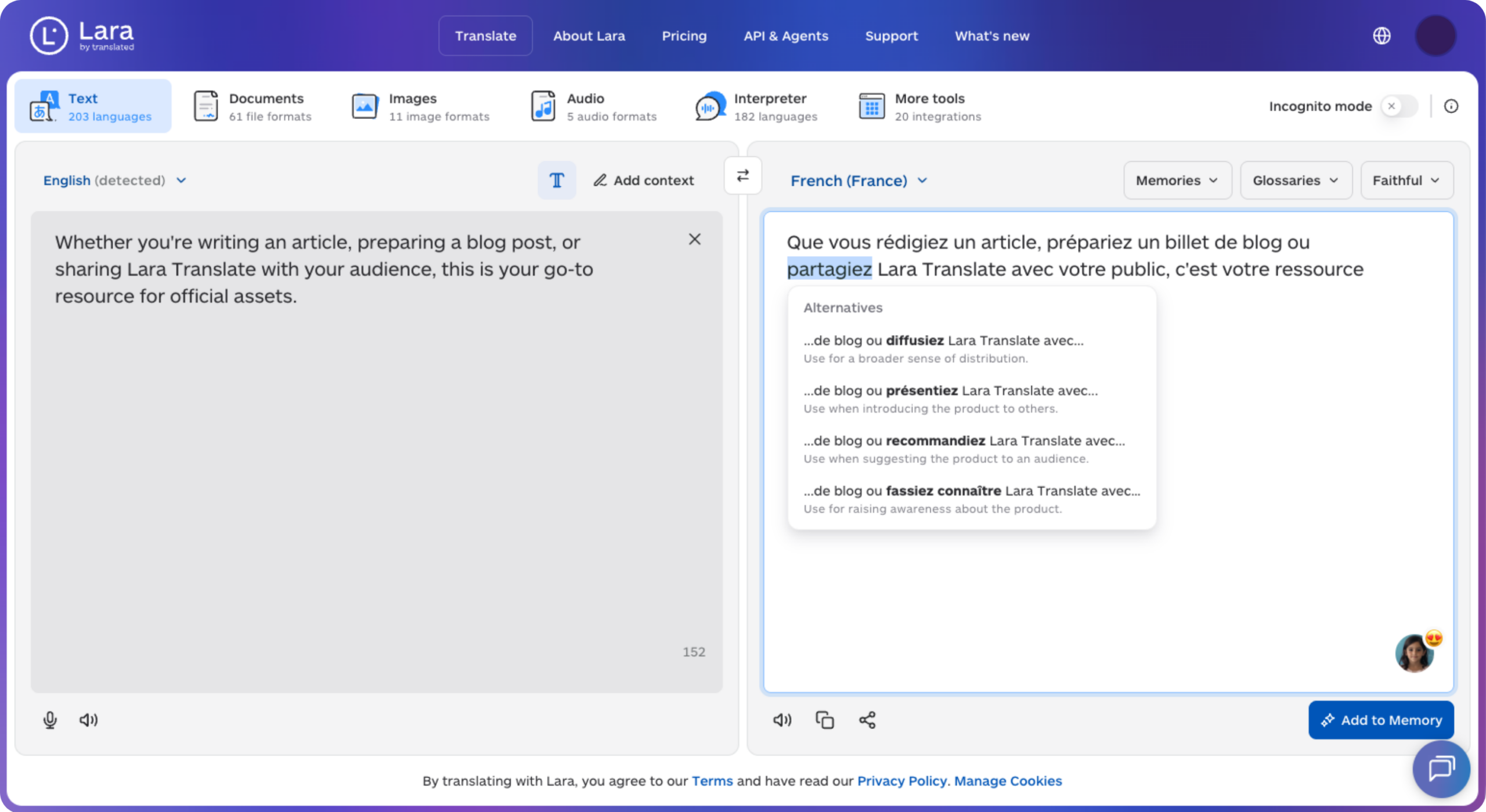
This connects translation to your existing content workflow through file exchange. Lara Translate supports 200+ languages and 60+ file formats, including subtitle and document formats.
Give your recap a caption more attendees can read
Prepare translated captions and event copy with Lara Translate, then review the finished viewing experience for each language.
Conclusion
Choose the platform around the output you need: an organized footage library, a social wall, or a personalized recap. Test submission, moderation, export, and delivery together, and compare a quote based on your event’s actual size and duration.
Have a valuable tool, resource, or insight that could enhance one of our articles?
Send us an email at press@laratranslate.com
We’ll be happy to review it and consider it for inclusion to enrich our content for our readers! ✍️
Frequently asked questions
What is a fan video or event UGC platform?
It’s software that collects, curates, or automatically edits video that event attendees record on their own phones, turning scattered personal footage into shareable recap videos, marketing assets, or personalized keepsakes.
How is a UGC collection platform different from an AI recap video generator?
A collection platform focuses on gathering and organizing raw footage submitted by attendees. An AI recap generator goes a step further, automatically editing that footage, or an individual’s contribution to it, into a finished, shareable video without manual editing.
Do attendees need to download an app to submit video?
Not always. Some platforms accept footage through a browser-based upload link, while others use an app or event PIN. Test the submission flow on common phones and check how it handles weak connectivity and larger files.
What should I check before reusing attendee footage?
Check the permission records attached to each submission and whether they cover your intended use. Review how the platform stores those records and handles removal requests, and include a moderation step before publishing clips.
Can this kind of platform work for events other than festivals and concerts?
Yes. Several platforms in this comparison serve sports events, races, corporate events, conferences, and destination marketing, not just music festivals, though the best fit still depends on the event’s format and size.
Do these platforms support communicating with attendees in different languages?
Language support varies by feature. Test submission instructions, forms, notifications, and captions in each target language. Prepare reviewed translations for gaps in the workflow, and check that captions remain readable and correctly timed in the finished video.
This article is about
- How event UGC platforms differ in collection, social aggregation, delivery, and personalized recap creation.
- The difference between platforms that collect new attendee footage and platforms that curate content already posted publicly.
- How automated, personalized video generation differs from manual curation and editing across this category.
- Why event-specific platforms and general-purpose video editors suit different production needs.
- How subscription limits, feed counts, and custom event packages affect total cost.
- How translated submission instructions, event messages, and captions support a multilingual audience.
Useful links
- UGC Multilingual Marketing: How to Scale Reviews, Images, and Community Content Across Languages
- 7 essential UGC multilingual marketing strategies for global campaign success
- Lara Translate: subtitle and document formats
This article was produced by the Lara Translate content team. Lara Translate is an AI translation platform built by Translated, with more than 25 years of professional translation experience. Event teams use Lara Translate to translate attendee communications, upload instructions, and video captions, across 200+ languages and 60+ file formats.