

A marketing manager sends a product brochure to four reviewers, and by Thursday there are three PDFs, two email threads, and a screenshot with arrows drawn in a chat app, each asking for a different change. Nobody can say which comment is current or who approved the final file.
This guide compares creative proofing software and content review and approval tools for 2026 on file types, workflows, automation, integrations, and pricing. It also covers how to prepare multilingual content for review, so teams can match a tool to their assets and approval process.
|
TL;DR
|
What makes creative proofing software worth using in 2026?
File types set the scope. Check support for the assets you actually produce, including images, PDFs, video, audio, packaging, and websites. Test how the tool renders a representative file and whether comments stay attached to the right page, frame, or version.
Workflow and automation shape the review round. PageProof routes proofs by role with decision thresholds and reminders, Filestage lists automations with custom triggers and actions, ReviewStudio lists workflow automation for sign-offs, and Ziflow lists routing, automation, and a checklist feature.
AI checks are arriving. Filestage lists Review Agents that check files against brand guidelines and regulations before human reviewers start, PageProof lists PageProof Intelligence and custom AI agents, and Ziflow lists ReviewAI, which verifies checklist items.
Where the tool sits matters. ProofHub and Wrike place proofing alongside project management, Frame.io and Dropbox Replay focus on video and creative media, and Krock.io focuses on video review with editing app plugins.
Check language support separately from the website language selector. Reviewers need to understand the interface, but the copy, packaging text, and subtitles also need appropriate language versions. Assign reviewers with the necessary language and subject expertise, and track approval for each version.
Best creative proofing and content review and approval software in 2026
| Provider | Best for | Model | Pricing |
|---|---|---|---|
| Filestage | Teams that want review workflows with Review Agents | Online proofing software | Free plan; paid from $99/month stated |
| Ziflow | Teams that want workflows, checklists, and AI review | Online proofing platform | Free; from $199/month billed annually |
| PageProof | Teams that review packaging, web, and video proofs | Online proofing software | Contact sales or check current pricing |
| ReviewStudio | Teams that review many media types with approvals | Online proofing software | Free; Pro $12/user/month billed annually |
| ProofHub | Teams that want proofing inside project management | Project management with proofing | From $45/month billed annually |
| Frame.io | Teams that review video and images with storage | Creative cloud platform | Free; from $15/member/month |
| Dropbox Replay | Teams that review audio, video, and images | Review and approval add-on | €9/user/month billed annually, plus Dropbox plan |
| MarkUp | Teams that give visual feedback on sites and images | Visual feedback tool | Pro from $79/month |
| Wrike | Teams that want proofing in a work platform | Work management with proofing | Free; Team $10/user/month billed annually |
| Krock.io | Teams that review video and audio versions | Video review software | Free; Pro advertised at $10/user/month |
Filestage
Best for: Marketing, creative, and compliance teams that need multi-step approvals and a clear sign-off record.
Filestage is review and approval software for marketing, creative, legal, and compliance teams, including teams in regulated industries such as pharma, healthcare, and finance. Its offering includes annotation on artwork, packaging, video, documents, designs, and live websites; multi-step review workflows with due dates and automations; version comparison; an approval history for audits; and Review Agents that check files against brand guidelines and regulations before human review.
Pricing: A free plan and a 14-day free trial are available, and paid plans start at $199 per month.
Verdict: Consider Filestage when content needs sign-off from several teams, including legal or compliance, and you need a record of who approved what.

Ziflow
Best for: Teams that want workflows, checklists, and AI review.
Ziflow is an online proofing platform. Its offering includes review and markup for design files, videos, and live websites, routing and automation, built-in checklists, an audit trail, ReviewAI for checklist verification, a Ziflow API, and integrations with monday.com, Asana, Slack, Jira, and Wrike.
Pricing: Free is $0 for 2 users, Standard is $199 per month and Pro is $329 per month both billed annually, Enterprise is by quote, and reviewers are unlimited on every plan.
Verdict: Consider Ziflow when workflows, checklists, and automated review checks matter.
PageProof
Best for: Teams that review packaging, web, and video proofs.
PageProof is online proofing software. Its offering includes AI markup suggestions and custom AI agents, proofs for packaging, HTML emails, live websites, and video, role-based workflows with reminders, compare mode, a barcode and QR code scanner, and integrations with Asana, Adobe Creative Cloud, Slack, and Teams.
Pricing: Check current Team, Team Plus, and Enterprise terms directly with PageProof before budgeting.
Verdict: Consider PageProof when packaging and print proofs with role-based approvals matter.
ReviewStudio
Best for: Teams that review many media types with approvals.
ReviewStudio is online proofing software. Its offering includes markup tools for images, video, audio, documents, web pages, and 3D files, version tracking, workflow automation for sign-offs, native integrations with Asana, Monday, Wrike, and Dropbox, and an open API with Zapier and Make.
Pricing: Free Starter plan; Pro $15/user/month or $12/user/month billed annually; Advanced $25/user/month or $20/user/month billed annually, with a 5-user minimum. Enterprise pricing is by quote. A 30-day trial is available.
Verdict: Consider ReviewStudio when one tool for many file types with approval automation matters.
ProofHub
Best for: Teams that want proofing inside project management.
ProofHub is a project management and collaboration tool. Its offering includes task boards, Gantt charts, discussions, time tracking, and proofing with markup, annotations, and multiple file versions, with integrations for Dropbox, OneDrive, and Slack.
Pricing: Essential is $45/month billed annually or $50 monthly. Ultimate Control advertises introductory rates of $89/month on annual billing or $99 monthly for the first three months, followed by $135 or $150 respectively. Both plans allow unlimited users; confirm the introductory terms before subscribing.
Verdict: Consider ProofHub when proofing alongside tasks and projects for a whole team matters.
Prepare each language version for review
Translate marketing copy, packaging text, and subtitles with Lara Translate, then route each version to the right reviewers.
Frame.io
Best for: Teams that review video and images with storage.
Frame.io combines cloud storage with review of video, images, and documents. Its features include frame-accurate comments, metadata-based organization, task assignment, transcription and captions, branded shares, and integration with Premiere. Review member limits, storage allowances, and advanced collaboration features by plan.
Pricing: Free includes up to 2 members. The pricing page displays Pro at $15 and Team at $25 per member per month, plus tax, with monthly and annual billing options. Enterprise pricing is by quote; confirm the selected billing term at checkout.
Verdict: Consider Frame.io when video review with cloud storage matters.
Dropbox Replay
Best for: Teams that review audio, video, and images.
Dropbox Replay is a review and approval tool for creative media. Its offering includes comments and markup on video, image, audio, PSD, and PDF files, version comparison, due dates, password-protected review links, transcriptions and captions, and integrations with Premiere Pro, After Effects, Final Cut Pro, and DaVinci Resolve.
Pricing: The regional pricing page displays the Replay add-on at €9/user/month billed annually (€108/year), or €11 monthly. An eligible Dropbox Plus or higher subscription is also required. Check your local currency and plan eligibility before purchasing.
Verdict: Consider Dropbox Replay when review of media inside an existing Dropbox setup matters.
MarkUp
Best for: Teams that give visual feedback on sites and images.
MarkUp is a visual feedback tool. Its offering includes pinned comments on websites, images, PDFs, and videos, drawing and highlighting on the work, comments tied to video timestamps or PDF pages, priority labels, guest access without sign-up, and a Chrome extension.
Pricing: Pro starts at $79/month for 50 MarkUps; Business starts at $499/month for 200 MarkUps. Plans include unlimited users. Annual options have specific usage allowances, so compare like-for-like quotas. A 14-day Pro trial is available.
Verdict: Consider MarkUp when quick visual comments from reviewers without accounts matter.
Wrike
Best for: Teams that want proofing in a work platform.
Wrike combines work management with proofing and approvals. Reviewers can add contextual feedback to creative work and manage approvals alongside tasks and projects. Confirm which subscription includes the file types and proofing features your team needs.
Pricing: Free plan; Team $10/user/month and Business $25/user/month, billed annually. Higher-tier plans require a quote. Proofing availability depends on the plan; confirm it before choosing based on the entry price.
Verdict: Consider Wrike when proofing within a broader work management platform matters.

Krock.io
Best for: Teams that review video and audio versions.
Krock.io is video review and media collaboration software. Its offering includes time-coded and drawn comments, version comparison in overlay and auto-compare modes, approvals, role-based access, storyboard tools, unlimited reviewers, and plugins for DaVinci Resolve, Adobe Creative Cloud, and Final Cut Pro.
Pricing: Free includes 1 user, 2 GB storage, and 2 projects. Pro is advertised at $10/user/month with a minimum of 2 users; Enterprise is quoted. Confirm the selected billing term and storage needs. Reviewers are unlimited.
Verdict: Consider Krock.io when version comparison for video work matters.
How to choose creative proofing software
Step 1: List what you review. Write down whether you review print artwork, packaging, documents, video, or live websites, and confirm each tool supports them.
Step 2: Map your approval stages. Count how many reviewers and sign-off stages a typical asset needs, and check how each tool routes and records decisions.
Step 3: Check where your team works. Look at integrations with your project management, chat, and storage tools so reviews start where tasks already live.
Step 4: Compare the full price. Check plan price, user or member limits, storage, and reviewer limits, since each tool counts them differently.
Step 5: Plan for languages. Decide which markets review content, who translates copy, labels, and subtitles before each round, and who approves the final wording.
Connect your content review workflow with Lara Translate
Use Lara Translate before opening a multilingual review round. Export approved source copy or a supported document, translate it using a glossary for brand and product terminology, and upload each language version to your proofing tool. Lara Translate supports 200+ languages and 60+ file formats.
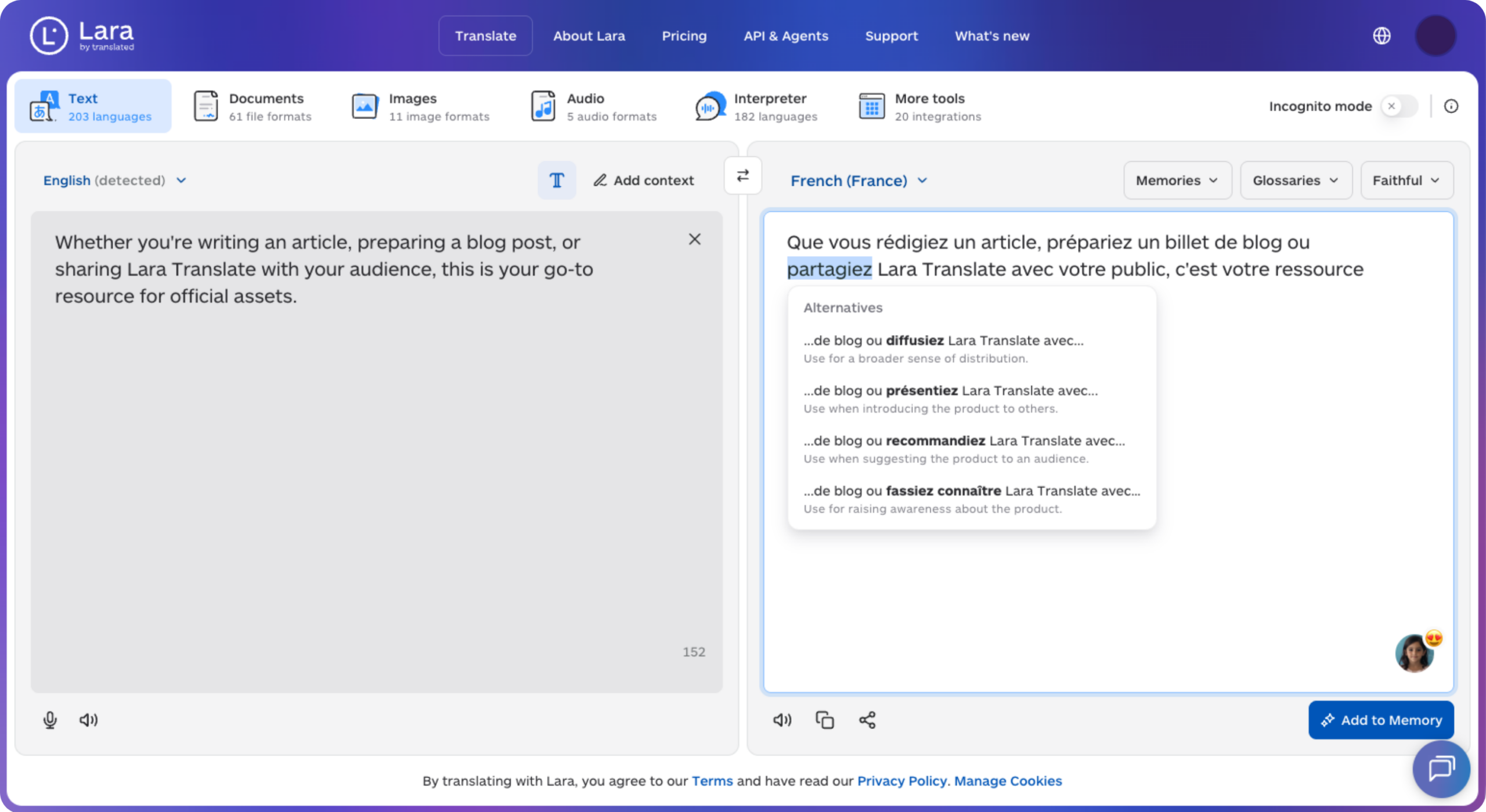
Assign language and subject specialists to check copy, packaging text, and subtitles, including layout and timing where relevant. Keep language and version names consistent, and send revised translations through approval when the source changes. This file-transfer workflow does not assume a native integration with the platforms listed here.
Keep multilingual review rounds aligned
Prepare translated files with Lara Translate, then track feedback and approval for each language version in your review platform.
Conclusion
The right tool depends on what you review, how many people sign off, and where your team already works. Shortlist two or three and run one real review round on each before you commit.
Have a valuable tool, resource, or insight that could enhance one of our articles?
Send us an email at press@laratranslate.com
We’ll be happy to review it and consider it for inclusion to enrich our content for our readers! ✍️
Frequently asked questions
What is creative proofing software?
Creative proofing software lets teams upload files, mark them up with comments, and collect approvals in one place. It replaces email threads and annotated PDFs with a single record of feedback and sign-offs.
What is the difference between proofing and digital asset management?
Proofing focuses on reviewing and approving work in progress, while digital asset management focuses on storing, organizing, and distributing finished assets. Some tools offer both, but they solve different steps of the content process.
How much does online proofing software cost?
Prices range from free plans to a few hundred dollars per month for team plans, and enterprise plans are usually quoted. Compare user limits, storage, reviewer limits, and file types, not only the headline price.
What file types can proofing tools review?
Most tools review images, PDFs, and video, and many add packaging artwork, audio, HTML emails, and live websites. Check the vendor file type list against the assets your team actually produces.
Can AI help with content review and approval?
AI can flag potential issues against brand rules or review checklists, depending on the tool and plan. Review its findings against the source material and keep a named human approver responsible for the final decision, particularly for regulated content.
How do I run review rounds for content in several languages?
Prepare translated copy, labels, and subtitles, then create clearly named language versions. Assign reviewers with the right language and subject expertise, record feedback against the correct version, and repeat approval when the source changes. Review layout, line breaks, and subtitle timing as well as wording.
This article is about
- Creative proofing software collects markup, comments, and approvals on creative files in one place
- How tools compare on file types, review stages, automation, integrations, and pricing
- Some tools are dedicated proofing platforms, while others add proofing to project management or video review
- AI review features check files against brand rules and checklists before human reviewers start
- Marketing copy, packaging text, and subtitles need translation and native review for each market
Useful links
- Best Portfolio Website Builders for Photographers and Creatives in 2026
- Best Presentation and Infographic Design Tools in 2026
- Lara Translate: supported file formats
This article was produced by the Lara Translate content team. Lara Translate is an AI translation platform built by Translated, with more than 25 years of professional translation experience. Marketing and creative teams use Lara Translate to translate copy, packaging text, and subtitles for review, across 200+ languages and 60+ file formats.