

The gap between “I have a game idea” and “I have a playable game” has effectively collapsed. What used to require months of engine setup, asset production, and boilerplate code now happens through a text prompt and an iterative loop, sometimes in under an hour. The tools driving that shift range from full no-code game makers that output a complete, shippable game to specialist generators that each handle one piece of the pipeline (3D assets, NPC dialogue, concept art) exceptionally well.
This guide compares ten leading AI game development tools in 2026, and closes with the step most indie pipelines skip: what happens to all that generated dialogue, UI text, and narrative content once the game needs to reach players who do not read English.
|
TL;DR
|
What makes an AI game development tool worth using in 2026?
Full game makers and asset specialists solve different problems. Tools like Rosebud AI and Summer Engine take a text prompt and output an actual playable game, code, logic, and assets included, and can carry that game all the way to a shippable build. Specialist tools like Meshy, Scenario, and Inworld generate one piece of the pipeline exceptionally well, and the developer assembles the pieces in an engine.
Export and deployment capability determines whether a game reaches players. A tool that only outputs a browser demo creates real friction if the goal is a Steam or mobile release, so the export path matters as much as the generation quality.
Narrative and NPC tooling has become its own specialized category. Visual novels, narrative-driven RPGs, and games built around AI characters increasingly rely on dedicated tools, with Inworld and Convai handling NPCs that carry memory and real-time voice.
Most serious indie pipelines combine several tools rather than relying on one. A typical indie stack in 2026 runs three to five tools across the pipeline, and the combined subscription cost usually lands somewhere in the low tens of dollars per month.
The step almost every pipeline skips is what happens to all that generated text once the game needs a global audience. UI strings, item names, quest text, and especially dialogue-heavy narrative content all need to reach players in their own language to convert into downloads, reviews, and revenue internationally. There is a dedicated section on that below, because it deserves more than a footnote.
The best AI game development tools in 2026
| Tool | Best for | Category | Starting price |
|---|---|---|---|
| Rosebud AI | No-code browser game building, from prototype to shipped Steam game | Full game maker | Free tier; paid credit-based plans |
| Ludo.ai | Pre-production ideation and full asset generation | Ideation and asset generator | Free tier; paid plans available |
| Meshy AI | 3D asset creation with auto-rigging | 3D asset specialist | Free tier; paid plans vary |
| Inworld AI | AI NPCs with persistent memory and voice | NPC/character specialist | Free tier; paid plans from around $25/month |
| Convai | AI NPC dialogue and voice integration | NPC/character specialist | Free tier; paid plans vary |
| Scenario | Custom-trained, style-consistent 2D art | 2D art specialist | Free tier; paid plans vary |
| Summer Engine | No-code with desktop and Steam export | Full game maker | Free tier; paid plans vary |
| GDevelop | Open-source, no-code with desktop export | Full game maker | Free (open-source); paid plans for cloud features |
| Leonardo.ai | Generative art with game-specific features | 2D art specialist | Free tier (150 tokens/day); paid plans vary |
| Unity AI | AI-assisted tooling inside a professional engine | Engine-integrated assistant | Included with Unity (open beta) |

1. Rosebud AI
Best for: No-code game building in the browser, from first prototype to a shipped game
Rosebud AI lets users describe a game concept in natural language, and its AI engine generates the code, logic, physics, and assets, playable directly in the browser. Its assistant, Rosie, handles both 2D and 3D projects. Rosebud is fast enough for a quick prototype and complete enough to build a finished game, and teams have shipped full games built entirely in Rosebud, which is why multiple 2026 industry comparisons now rank it among the leading no-code game makers.
In 2026 Rosebud added a native Windows .exe download on its paid plans. The download packages an executable, the supporting runtime files it needs, and an editable copy of the project source. That download is what makes a Steam release possible, since Steam does not accept browser-only games. Publishing to Steam itself is still the standard Steamworks process (its own account, the one-time fee, a store page, and a SteamPipe upload), so Rosebud produces the shippable build while the storefront setup stays in your hands. Rosebud is also used in education, with dedicated tooling for classrooms.
Core mechanic: Text-to-game engine, browser-based.
2026 update: Native Windows .exe download on paid plans, which enables a Steam release.
Pricing: Free tier available; paid plans run on a credit-based subscription model.
Verdict: The strongest choice for genuinely no-code game creation, fast for prototyping and capable of taking a finished game all the way to a desktop or Steam release since adding the .exe download.
2. Ludo.ai
Best for: Pre-production ideation before committing to a development tool
Ludo.ai functions as an intelligence and ideation layer for game studios rather than building the game itself, generating market research, concepts, and a full stack of assets that plug into other engines and workflows. Its Model Context Protocol (MCP) server exposes that asset generation to AI coding environments like Cursor and Claude, so generation can happen inside the workflow a developer already uses.
Ludo.ai is built around the earliest stage of development, when a studio is still deciding what to make. It combines market and trend research with game concept and mechanic generation, and an assistant, Ask Ludo, that a team can query for ideas, references, and design directions before a single line of code exists. The asset side then produces images, 3D models, audio, and animation that export into the engine of choice, so the same platform that helped shape the concept also supplies the first round of production-ready assets. Because the MCP server turns that generation into a headless API, a developer can trigger it from inside Cursor or Claude without leaving their editor, which suits teams that treat asset creation as one more step in an existing coding workflow.
Verdict: The right choice for teams that want structured, market-informed ideation feeding into their own engine workflow.
3. Meshy AI
Best for: Fast, high-quality 3D asset generation with auto-rigging
Meshy AI generates textured 3D assets from text or image prompts, with auto-rigging and animation workflows that compress a process that traditionally took days into a matter of minutes. Developers report moving from generation directly into an engine in that kind of timeframe.
Meshy AI also handles what comes after the mesh. It auto-rigs a character model in around thirty seconds, then lets developers apply motion from a library of hundreds of prebuilt animations, and exports the result in standard formats like FBX and GLB that drop straight into Unity or Unreal. A text-and-image API extends the same generation to a studio’s own pipeline, so 3D content can be produced in bulk rather than one model at a time. For a small team without a dedicated 3D artist, that combination of generation, rigging, animation, and clean engine-ready export is what turns 3D from a bottleneck into a same-day task.
Verdict: The clear leader for 3D asset generation specifically.
4. Inworld AI
Best for: AI-driven NPCs with persistent memory and real-time voice
Inworld AI is a development platform purpose-built for game characters that respond to player actions and game state, with persistent memory and dynamic personality rather than static dialogue trees. Its pricing combines a free on-demand tier with paid subscription plans starting at around $25 per month, plus usage-based billing for generated speech, and on-premise deployment handled as a custom arrangement.
An Inworld character carries a configurable brain: a backstory, goals, knowledge, and personality that shape how it reacts in the moment, along with speech-to-text and text-to-speech so players can talk to it and hear it answer in real time. It integrates with engines like Unity and Unreal, which lets a studio drop a reactive character into an existing project instead of building a dialogue system from scratch. In 2026 Inworld cut its prices and moved to a model that bills for what a game actually uses, with a free on-demand tier for early experimentation and higher volumes handled through subscription and usage-based billing, which lowers the cost of prototyping conversational NPCs before committing to a full production build.
Verdict: A strong choice specifically for teams building deep, reactive NPC interaction.
5. Convai
Best for: AI NPC dialogue and voice integration in real-time gameplay
Convai focuses on giving game characters real-time conversational ability and voice, positioned alongside Inworld as one of the two leading specialists in the AI-NPC category.
Convai pairs each character with its own knowledge base and backstory, then adds low-latency voice and lip-sync so conversations stay responsive during play. It ships plugins for engines like Unity and Unreal and supports characters that understand and reply across many languages, which makes it a practical drop-in for studios that want talking NPCs without building the speech pipeline themselves.
Verdict: A strong alternative to Inworld for teams prioritizing real-time voice integration specifically.
Building a game with a global cast of characters?
AI NPCs and narrative dialogue only land with players who can read them. Lara Translate localizes character voice and quest text so your writing carries across languages instead of getting flattened.
6. Scenario
Best for: Custom-trained, style-consistent 2D art generation
Scenario lets teams train custom style models, producing 2D art, UI elements, and concept art that stays visually consistent with a game’s specific art direction rather than more generic output.
Because the models are trained on a studio’s own references, Scenario keeps output on-model across hundreds of assets, which matters when characters, props, and UI all need to share one look. Beyond flat images it covers textures, skyboxes, and other game-ready art, with an API so the same trained style can feed generation directly into a production pipeline.
Verdict: The right choice when art style consistency across a large asset library matters more than raw generation speed.

7. Summer Engine
Best for: No-code game creation with genuine desktop and Steam export
Summer Engine targets the same no-code, prompt-based audience as Rosebud, but built its export path around desktop and Steam distribution from the outset. Projects are standard Godot 4 projects underneath, exportable to Windows, macOS, and Linux for upload to Steam, with no lock-in or revenue share.
Because every project is a real Godot 4 project, a developer can open it in Godot directly and keep working by hand once the prompt-driven pass gets them started. The Windows, macOS, and Linux export targets cover the platforms a Steam release expects, and the absence of lock-in or revenue share means a finished game stays entirely the developer’s.
Verdict: A strong alternative to Rosebud specifically for developers who know from day one they want a genuine Steam release.
8. GDevelop
Best for: Free, open-source, no-code development with desktop export
GDevelop is a long-established, open-source, no-code game engine with visual event-based logic and native desktop export, increasingly adding AI-assisted features on top of its existing free foundation.
Cost: Free and open-source, with paid plans for cloud builds and extra features.
Verdict: The strongest free, open-source option for developers prioritizing cost and independence.
9. Leonardo.ai
Best for: A generous free tier for generative art with game-specific features
Leonardo.ai offers fine-tuned models for pixel art, concept art, textures, and UI elements, with one of the more generous free tiers in the category: 150 tokens per day. That is a daily token budget rather than 150 finished images, since each generation spends several tokens depending on the model and settings.
Free tier: 150 tokens per day.
Verdict: A strong free option for concept art and 2D asset generation at meaningful daily volume.
10. Unity AI
Best for: Experienced developers wanting AI assistance inside a professional engine
Unity AI, in open beta as of 2026, brings AI-assisted tooling directly into the Unity engine rather than requiring developers to leave their existing professional workflow for a separate no-code platform.
Status: Open beta.
Verdict: The right choice for developers who already know Unity and want AI acceleration without switching to a no-code abstraction layer.
How to choose the right AI game development tool
Step 1: Decide whether you need a full game maker or a pipeline specialist. Rosebud, Summer Engine, and GDevelop output a playable game directly. Meshy, Scenario, Inworld, and Convai each handle one stage exceptionally well.
Step 2: Confirm the export path matches your actual release goal. If a genuine Steam or app store release is the goal, confirm the tool supports that export path now, not eventually.
Step 3: Treat narrative and NPC tooling as its own decision. If your game leans on dialogue or character interaction, evaluate Inworld or Convai specifically.
Step 4: Budget for a multi-tool stack, not a single platform. Most serious indie pipelines in 2026 combine three to five tools across code, art, audio, and narrative.
Step 5: Plan for localization from the start, not after launch. UI text, item names, and especially AI-generated narrative dialogue all need to reach players in their own language. A dedicated document translation tool can localize that content while preserving character voice and narrative tone, which the next section covers in detail.
Localizing what you built: reaching players who do not read English
A single AI-built game can generate thousands of lines of dialogue, item and quest names, menu strings, and tutorial text. Most of that content ships in English by default, and English speakers are a minority of the global gaming audience, so an English-only build leaves most of its potential players, wishlists, reviews, and revenue untouched. Localization is the step that turns a finished game into something the rest of the world can actually play, and it is the piece the AI pipeline above does not handle for you.
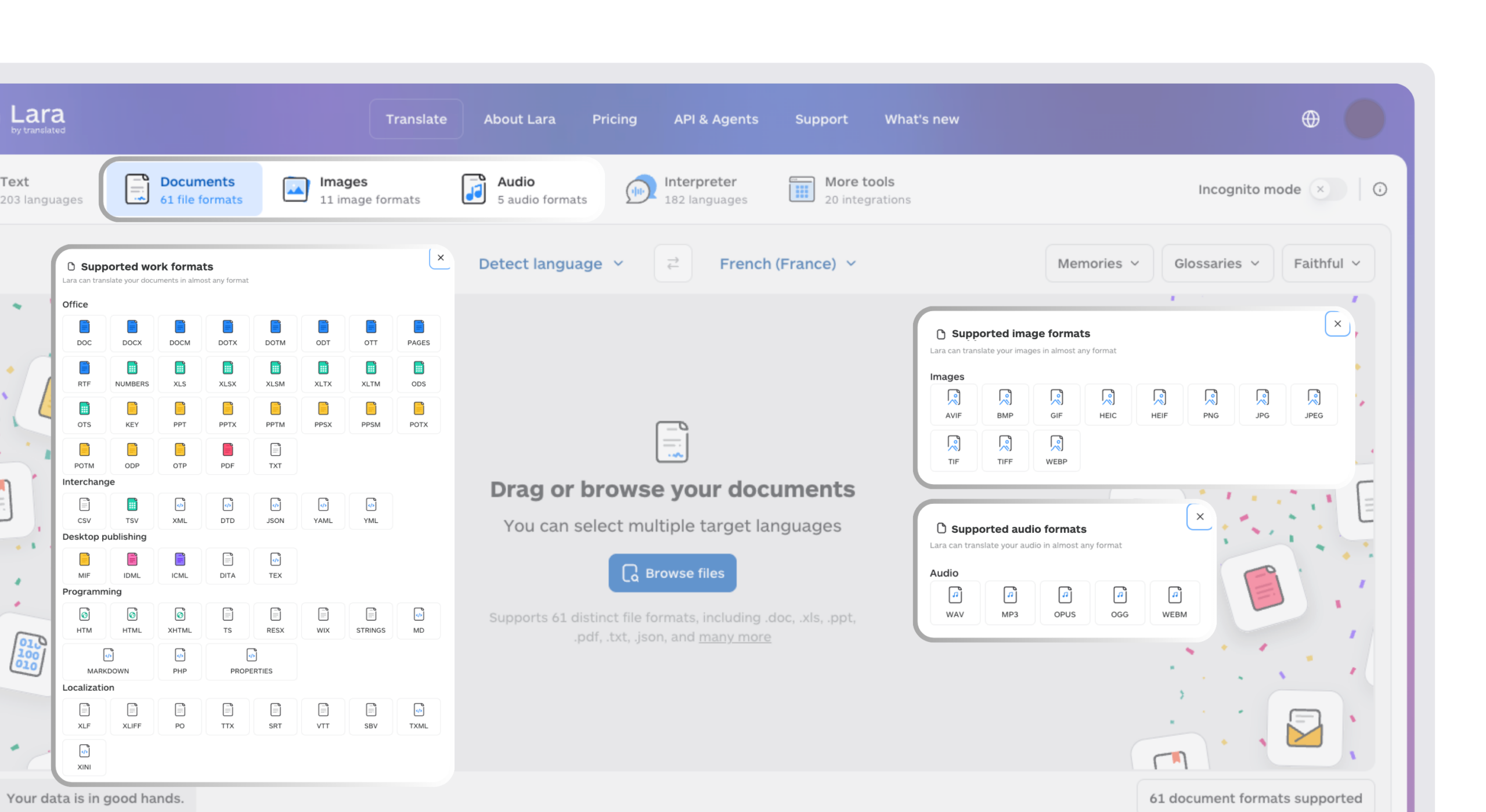
Lara Translate is an AI translation platform built by Translated, a company with more than 25 years of professional translation experience. Indie developers and small studios use Lara Translate to localize UI text, item names, and dialogue-heavy narrative content across 200+ languages and 60+ file formats, translating with document-level context so tone and character voice carry across rather than getting flattened by a generic machine pass. For a game whose whole appeal is its writing and its characters, that difference is what separates a translation players enjoy from one they complain about in reviews.
Ready to ship your game to the rest of the world?
Translate your game’s UI, menus, and narrative into 200+ languages while keeping tone and character voice intact, across 60+ file formats.
The bottom line for 2026: the tools to build a game have become fast, cheap, and genuinely accessible, so the real differentiators are now the choices around the build. Pick the right combination of full makers and specialists for what you are making, confirm the export path early, and localize the content so the game reaches the players who make an indie release succeed.
Have a valuable tool, resource, or insight that could enhance one of our articles?
Send us an email at press@laratranslate.com
We’ll be happy to review it and consider it for inclusion to enrich our content for our readers! ✍️
Frequently asked questions
What is the best AI game development tool in 2026?
It depends on what you are building. Rosebud AI leads for no-code, browser-based game building, taking a project from prototype to a shipped game. Ludo.ai leads for pre-production ideation and full asset generation. Meshy AI leads for 3D assets specifically. Inworld and Convai lead for AI-driven NPC characters.
Can I actually ship a real game with a no-code AI tool like Rosebud?
Yes. Rosebud is built for no-code game creation in the browser, and teams have shipped complete games built entirely in Rosebud to Steam. Rosebud added a native Windows .exe download on its paid plans in 2026, which is the build you need for a desktop or Steam release, and Summer Engine built Godot-based desktop and Steam export in from the start. Getting a Rosebud game onto Steam still means doing the normal Steamworks setup yourself, but the export that was previously missing is now there.
Do I need multiple AI tools, or can one platform cover everything?
Most serious indie developers use several. A typical 2026 indie stack combines three to five tools across code, art, audio, and narrative, and the combined subscription cost usually sits in the low tens of dollars per month.
How does game localization work with AI-generated content?
UI text, item and quest names, and narrative dialogue generated by these tools all need translation to reach international players effectively. The hard part is preserving tone and character voice, which a literal, word-for-word pass tends to lose. Document translation tools like Lara Translate can localize this content while maintaining that nuance across languages.
Are AI-generated games allowed on platforms like Steam?
Yes, with disclosure requirements. Valve requires generative-AI disclosure, and since January 2026 it has used a two-tier system: pre-generated assets need a simple checkbox and category note, while live, in-game generation (like runtime NPC dialogue) needs fuller documentation. Pure developer-efficiency tools such as AI-assisted coding are exempt. By 2026, AI disclosure had become common on new Steam releases, with published estimates ranging from around one in five to nearly one in three depending on which set of releases was measured.
What is the difference between an AI game maker and an AI asset generator?
An AI game maker, like Rosebud or Summer Engine, outputs a runnable game directly from a prompt. An AI asset generator, like Meshy or Scenario, outputs individual pieces that a developer then assembles inside an existing engine.
This article is about
- AI game development in 2026 splits into full no-code game makers and pipeline specialists, and most serious indie teams combine three to five tools rather than relying on one.
- Export capability is now a primary selection criterion: Rosebud added a native Windows .exe download on paid plans, and teams have shipped full games built entirely in Rosebud to Steam.
- NPC and narrative tooling is its own category, led by Inworld AI and Convai for characters with memory and real-time voice.
- 2D and 3D asset generation is handled best by specialists: Meshy for 3D with auto-rigging, Scenario for style-consistent 2D art, Leonardo.ai for concept art on a generous free tier.
- Steam requires generative-AI disclosure under a two-tier policy that took effect in January 2026, exempting developer-efficiency tools like AI coding assistants.
- Localization is the step most AI pipelines skip; translating UI, item names, and dialogue into 200+ languages is what lets a finished game reach a global player base.
Sources
- Rosebud, How to Download Your Rosebud Game as a Windows EXE (2026)
- Rosebud, From Rosebud to Steam: Publishing Your AI Game (2026)
- Ludo.ai, API and MCP Integration
- Meshy AI, AI Auto Rigging
- Inworld AI, Billing and pricing documentation
- Summer Engine, Steam Game Maker (Godot export)
- Leonardo.ai free plan: 150 tokens per day
- Unity AI, tools in beta: getting started
- Steam AI disclosure rules 2026 (two-tier policy, effective January 16, 2026)
- Translated, company information (founded 1999)
This article was produced by the Lara Translate content team. Lara Translate is an AI translation platform built by Translated, with more than 25 years of professional translation experience. Indie developers and small studios use Lara Translate to localize UI text, item names, and narrative dialogue while preserving character voice and narrative tone, across 200+ languages and 60+ file formats.