

Localization means adapting a product, website, or piece of content so it feels like it was created for a specific market rather than simply translated. Language is part of it, but so are currency, images, payment methods, legal requirements, and all the small details that make an experience feel familiar.
If you’ve ever visited a website that used the right language but still felt a little “off,” you have seen what happens when you overlook localization.
In this guide, we’ll explain what localization (l10n) involves, how it differs from internationalization (i18n) and globalization, and how to build a localization strategy that works as you expand into new markets.
|
TL;DR
|
What is Localization (L10n)
Localization is the process of adapting a product or piece of content to the language, culture, and expectations of a specific market. It is also known as l10n because there are 10 letters between the L and the n.
Localization (L10n) is a broader job than translation. A translated product uses the right words. A localized product uses the right words, the right currency, the right imagery, the right date format, and the right tone for the target audience.
In short, localization makes global brands feel local no matter where a customer is logging in from.
Here’s what typically falls under localization work:
- Product copy, UI text, and error messages
- Images, icons, and color choices
- Date, time, number, and currency formats
- Payment methods and pricing display
- Legal and regulatory text (privacy policies, terms, disclaimers)
- Tone of voice and idioms
- Customer support content

Translation vs. Localization: What is the Difference
Translation and localization get used interchangeably, but they solve different problems.
| Parameters | Translation | Localization (L10n) |
| Goal | Convert text from one language to another accurately | Adapt the full experience to a target market |
| Scope | Words and sentences | Words, formatting, imagery, currency, legal text, tone, UX |
| Example | “Add to cart” becomes “Ajouter au panier” | A French e-commerce page also shows prices in euros, EU-standard sizing, and GDPR-compliant consent language |
| Who typically does it | Translators | Translators, localization engineers, designers, and legal reviewers working together |
A useful way to think about it: translation changes the language. Localization changes the experience.
What is Internationalization
Internationalization, also called i18n, is the engineering and design process of building a product so it can be adapted to different languages and regions without rework.
Internationalization happens before localization, usually during development. It is mostly invisible to end users because it does not add any language. It just removes the barriers that would make adding a language painful later.
In practice, internationalization means:
- Using Unicode (UTF-8) so any language’s characters display correctly
- Pulling text out of code and into separate resource files, instead of hard-coding strings like “Welcome!” directly into the interface
- Leaving enough space in the UI for text expansion (German and Finnish, for example, often run significantly longer than English)
- Supporting right-to-left layouts for languages like Arabic and Hebrew
- Formatting dates, currencies, and numbers dynamically based on locale, rather than assuming one format
Let’s understand from an example: Instead of a button that says (“Add to cart”), an internationalized product calls a key, like (t(“add_to_cart”)), and the correct language-specific text is pulled in automatically based on the user’s locale.
Skipping internationalization and localization gets expensive fast. Every new language turns into a development project instead of a translation task, because the codebase was never built to separate content from language in the first place.
Why is Internationalization Important
Internationalization reduces the amount of technical rework needed when adapting a product for new markets.
For example, a button that displays “Buy now” in English may need more space in German or another language. A flexible interface can accommodate changes in text length instead of assuming that every translation will have the same size.
Internationalization is mainly a development and design concern, while localization applies the product to a particular target market.
What is Globalization
Globalization, sometimes abbreviated G11n, is the overall business strategy of expanding a company’s products, services, and operations into international markets.
Globalization is the umbrella. It covers market research, business operations, legal entity setup, pricing strategy, and go-to-market planning, with internationalization and localization as two of the tools that make it work. A company can internationalize its codebase and localize its content perfectly and still fail at globalization if it picks the wrong markets or ignores local regulations around business operations.
For example, a software company based in the United States wants to expand into Europe and Asia.
Its globalization work may involve:
- Researching international markets
- Planning its business expansion
- Preparing products for multiple regions
- Internationalizing its software
- Localizing websites and marketing materials
- Supporting customers in different countries
- Managing international operations
Localization and internationalization can be part of a company’s globalization strategy, but globalization also covers broader business activities beyond language and product adaptation.
What is the Difference Between Localization, Internationalization, and Globalization
The difference is mainly about what each process focuses on and when it happens.
| Concept | What it means | Example |
| Globalization | Expanding a business or product across international markets. | A clothing brand begins selling in India, Germany, and Japan. |
| Internationalization (i18n) | Preparing software or a product to support different languages and regions. | Developers build a website that supports multiple languages and regional formats. |
| Localization (l10n) | Adapting a product or content for a specific market. | The website is adapted for German customers, including language and regional conventions. |
| Translation | Converting text from one language to another. | English product descriptions are translated into German. |
How this process works:
- Globalization: The broader international business expansion
- Internationalization (i18n): Prepare the product for multiple markets
- Localization (l10n): Adapt the product for a specific region
- Translation: Translate the relevant content as part of the localization work
Here is the easiest way to remember the difference:
- Internationalization: Can we build the product so it supports different markets?
- Localization: How do we adapt the product for this particular market?
- Globalization: How do we expand and operate the business internationally?
Why Does Language Localization Matter for Global Business
Language localization matters because customers are more likely to understand and use content that fits their language and regional expectations.
When a company expands internationally, it must consider how customers in each market interact with its products and services.
A localized experience can help address differences in language, cultural references, formatting, and user expectations. It does not guarantee business success, but it can remove some barriers that customers face when using unfamiliar content.
1. Localization Helps Customers Understand Your Content
A customer may struggle with technical instructions, product descriptions, or checkout information when everything is written in a language they do not prefer.
For example, a French customer visiting an online store may find it easier to understand product details and payment instructions when the website is available in French.
Localization can make the content more accessible to the intended audience.
2. Helps Businesses Adapt to Regional Expectations
Different markets may use different currencies, date formats, measurements, and expressions.
For example, a website serving customers in the US and UK may need to consider differences such as:
- color vs. colour.
- Different date conventions.
- Miles vs. kilometers, where relevant.
- Different terminology for everyday items.
These changes are not necessarily major, but they can make content more familiar to local users.
3. Supports a Consistent Customer Experience
A business that serves multiple markets needs a way to maintain consistent product information and brand communication while adapting content appropriately.
Localization workflows can help teams manage translated content, preferred terminology, and market-specific adaptations.
4. Supports International Growth
Localization (L10n) is one component of international expansion. A localized website can help a company communicate with customers in new markets, but the results depend on factors such as product-market fit, pricing, competition, distribution, and customer support.
Businesses should treat localization as part of a broader international strategy rather than a guaranteed growth tactic.
How Localization Works
Localization (L10n) usually involves adapting a product or content for a specific target market. The exact process depends on whether you’re localizing a website, software, video game, marketing campaign, or another type of product.
A typical localization workflow includes identifying what needs to be adapted, preparing the content, translating it, reviewing the result, and checking whether it works for the target audience.
Here are common types of localization.
1. Software Localization
Software localization is the process of adapting an application or software product for users in a specific language or region.
Software localization can involve translating interface text, adapting regional formats, supporting writing direction, and checking that translated content fits the user interface.
For instance, a project management app originally designed in English is adapted for French-speaking users. Menu labels, notifications, help text, and date formats are adapted for the target locale.
Software localization often depends on internationalization because the application needs to handle multiple languages and regional requirements.
2. Website Localization
Website localization means adapting a website for users in a particular country or region.
Website localization can include:
- Translating website content.
- Adapting currencies and date formats.
- Adjusting images or cultural references.
- Reviewing navigation and user interface text.
- Supporting local language and regional conventions.
Understand it this way: An American e-commerce website expands to Japan. The business adapts its website content for Japanese users and reviews its formatting, product information, and other market-specific details.
Website localization is broader than translating web pages. The website should also work appropriately for its intended audience.

3. Video Game Localization
Video game localization adapts a game for players in different markets.
Video game localization may include translating:
- Dialogue and subtitles.
- Menus and instructions.
- Character names and descriptions.
- In-game items.
- Marketing and support content.
It may also involve cultural adaptation, voice-over, and testing.
For example, a game developed in Japan is released for English-speaking players. The localization team adapts dialogue, menus, and other content while checking that the translated text works within the game’s interface.
4. Product Localization
Product localization means adapting a physical or digital product to the needs of a particular market.
For a physical product, this could involve packaging language, instructions, measurements, or regional requirements.
For a digital product, it may include localized user interfaces, product descriptions, and region-specific settings.
For instance, a smart home device sold in Germany may need German-language instructions, localized packaging, and region-specific product information.
The exact changes depend on the product and the market.
5. Marketing Localization
Marketing localization means adapting marketing content for a particular audience, language, and market.
It can include:
- Advertising copy.
- Social media posts.
- Landing pages.
- Email campaigns.
- Product messaging.
- Promotional materials.
The goal is to communicate the intended message in a way that fits the target audience.
Understand it with an example: A company launches the same product in France and India. It may adapt its advertising language, examples, imagery, and messaging for each market instead of using an identical campaign everywhere.
Translation can support marketing localization, but marketers still need to consider the campaign’s purpose, audience, and local context.
How Can Lara Translate Help With Website and Marketing Localization
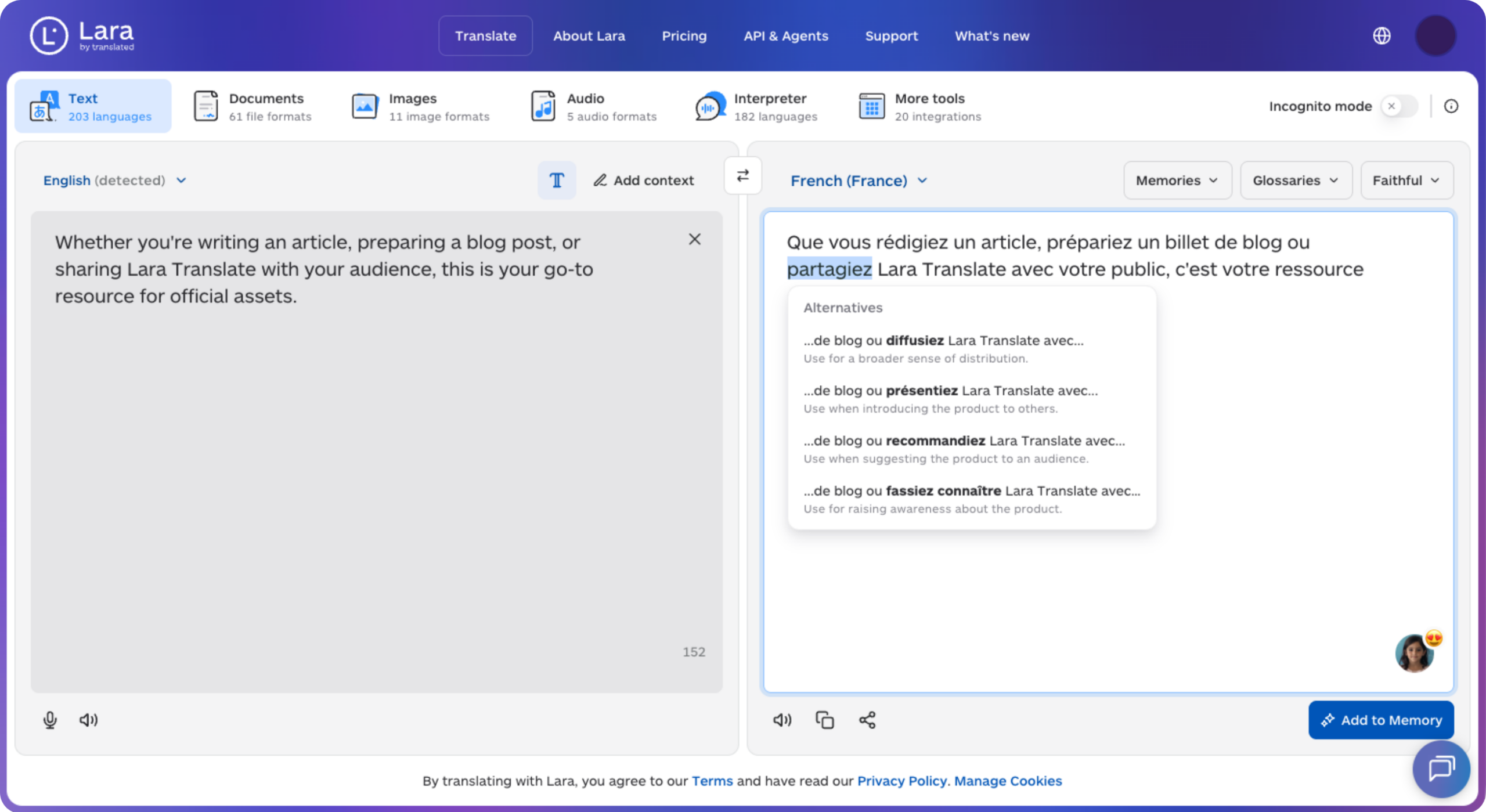
Lara Translate supports translation workflows, while Lara CLI provides developer-focused tools for working with localization files.
These capabilities can be useful when a team is preparing multilingual content or automating parts of its localization process. They do not remove the need for product decisions, local market research, or review of the final localized experience.
How Does Lara CLI Support Website Localization
Lara CLI brings Lara Translate’s translation capabilities into the command line and development workflow. It supports internationalization file formats such as JSON, PO, TypeScript, Vue, Markdown, and Android XML. It can also use project instructions, translation memories, and glossaries.
Imagine a developer has an English website with translation files.
Instead of manually copying and translating each file, the developer can configure Lara CLI to work with the project’s localization files and target locales.
A simplified workflow looks like this:
- Prepare the website’s localization files
Keep translatable content in supported formats, such as JSON or PO files.
- Configure the project
Set the source and target locales, file paths, and relevant translation instructions.
- Add terminology guidance
Use glossaries or translation memories where needed to maintain consistent terms.
- Run the translation workflow
Use Lara CLI to translate the configured files into the target languages.
- Review and test
Check the translated content on the website, including layout, terminology, and user-facing behavior.
The CLI documentation supports this type of file-based translation workflow. The exact setup and configuration depend on the project.
How to Get Started with Lara CLI
For developers who want to automate translation within a project:
- Install Lara CLI using the documented installation method.
- Configure the required API credentials securely.
- Initialize the project.
- Configure locales and files.
- Add project instructions, glossaries, or translation memories where needed.
- Run the translation command and review the output.
See the official documentation for the current installation and configuration instructions: Lara CLI setup and configuration.
Make website localization easier with Lara Translate
If your team manages multilingual website files, Lara CLI can help bring translation into the development workflow.
How Can Lara Translate Help With Marketing Localization
Marketing localization often requires more than converting words from one language to another. The translated message should match the intended tone, audience, and context.
Lara Translate provides features such as translation styles, context, glossaries, and translation memories that can help teams manage translation quality and consistency.
Suppose an English company slogan says:
“Built for busy teams.”
A team adapting the slogan for a French audience may need to consider the campaign’s purpose, audience, and tone before choosing the final wording.
You can use Lara Translate to generate a translation with relevant context and style instructions. The marketing team can then review whether the result fits its brand and campaign.
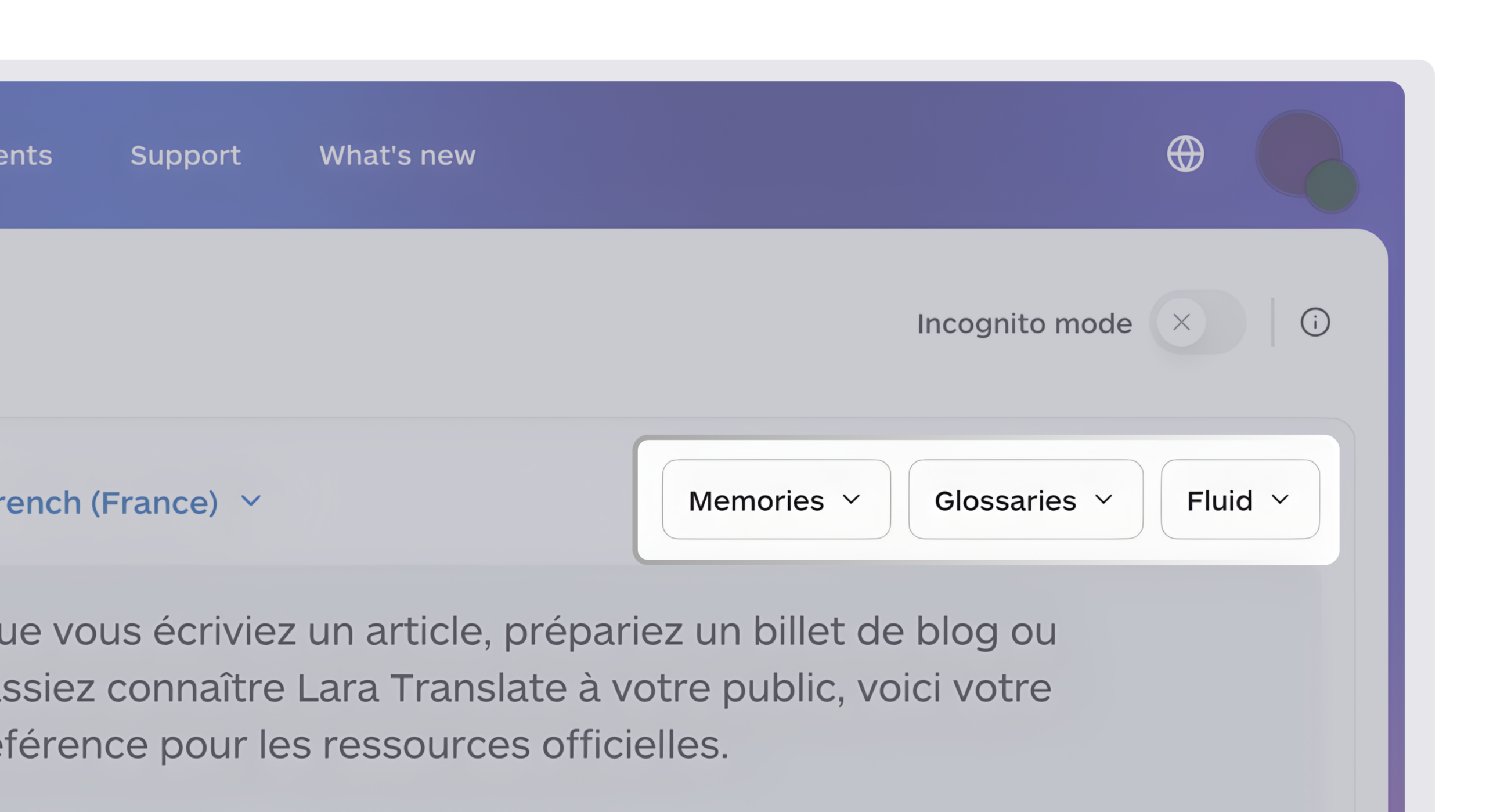
Three Lara Translate features that can help:
| Feature | How it can support marketing localization |
| Context | Gives the translation system additional information about the intended meaning or use of the content. |
| Glossaries | Helps maintain preferred terminology, including brand terms and recurring expressions. |
| Translation styles | Lets users select an appropriate translation style, such as Faithful, Fluid, or Creative. |
These features support the translation part of marketing localization. Teams still need to make campaign decisions and review whether the result fits the target audience.
What is Localization Strategy and Its Need for Businesses
A localization strategy is a plan for adapting a business’s products, content, and customer experience for specific international markets.
Instead of translating content whenever a new market appears, a business creates a repeatable approach to decide:
- Which markets to target
- Which content needs localization
- Which languages and locales to support
- How to manage terminology and brand voice
- Who reviews the localized content
- How the business measures the results
For example, a software company wants to expand from the US into France and Germany.
Its localization strategy may define:
- French and German as initial target languages
- Which product screens and help documents need translation
- Which terminology should remain consistent across markets
- Who reviews translated user interface text
- How the team manages localization files
- How the company evaluates customer feedback after launch
A strategy helps connect translation work with the business’s international expansion plans.
What are the Benefits of a Localization Strategy
A well-planned localization strategy can help businesses organize their multilingual content and manage market-specific requirements.
Turns Localization From a Cost Center Into a Growth Lever
Without a strategy, localization gets treated as a line item: pay a translator, ship the page, move on. With a strategy, localization becomes a repeatable system that compounds. A documented glossary, style guide, and workflow mean the second market you launch costs less time and money than the first, and the tenth costs even less than that. Companies that never formalize this keep paying the “first market” price every single time, because nothing from the last launch carries forward.
Protects Brand Consistency at Scale
A single translator can keep a brand voice consistent. Five translators across five markets, working from five different briefs, usually can’t, not because they’re careless, but because nothing is forcing alignment. A localization strategy fixes this by centralizing terminology and tone decisions before translation starts, so a product name, a tagline, or a legal disclaimer reads the same way whether the reviewer is in Berlin or São Paulo. That consistency is what lets a global brand still feel like one brand.
Reduces Legal and Reputational Risk
Localization touches more legally sensitive surface area than most teams assume: consent language, disclaimers, pricing display, data handling notices. A strategy assigns ownership for reviewing that content market by market, instead of assuming whoever translated the marketing page also caught the compliance issues. Businesses that skip this step tend to find out about the gap from a regulator, a lawsuit, or a viral screenshot, all of which cost more than the review would have.
Gives Leadership a Way to Justify (or Cut) Spend
“Localization is working” is not a metric. A strategy forces a business to define what success looks like before spending on a market, whether that’s conversion rate, support ticket volume, or organic traffic, and to measure against a baseline. That turns localization from a belief into a business case: leadership can see which markets are earning their investment and which ones need a different approach, instead of guessing.
Shortens the Time Between “We’re Entering This Market” and “We’re Live”
Every decision made once at the strategy level (which languages, which level of localization, which tools, who signs off) doesn’t need to be re-litigated for every new market or piece of content. Teams with a strategy move straight to execution. Teams without one spend the first few weeks of every launch answering questions a strategy would have already settled.
What is the Process of Creating a Localization Strategy
Creating a localization strategy involves deciding what to localize, where to launch, and how to manage the work.
Here is a practical process businesses can follow.
Step 1: Which Markets and Audiences Should You Target
Start by identifying the markets your business wants to serve.
Consider:
- Customer demand
- Existing website traffic
- Business expansion plans
- Language requirements
- Product suitability
- Available localization resources
For example, a US-based software company chooses France and Germany as its first two target markets based on its business plans and customer research.
Step 2: What Content Needs Localization
List the content that customers will interact with.
This may include:
- Website pages
- Product interfaces
- Marketing campaigns
- Help documentation
- Legal or policy content
- Email communications
Prioritize the content that is most relevant to the target audience and launch.
Step 3: Which Languages and Locales Should You Support
Choose the language and regional settings required for each market.
For example, a business may need to distinguish between:
- en-US and en-GB
- fr-FR and fr-CA
- de-DE and other German locales, depending on its target market
The correct locale depends on the intended audience and the product’s requirements.
Step 4: How Should You Prepare Your Content and Software
Prepare the content and technical systems for localization.
For software, this may involve internationalization, externalizing translatable text, and supporting regional formatting.
For marketing content, it may involve documenting brand terminology, tone, and market-specific messaging requirements.
Step 5: How Will You Translate and Review Content
Choose the tools and people responsible for the workflow.
For example:
- AI translation for suitable content
- Translation memories and glossaries for consistency
- Human review for important or sensitive material
- Product testing for localized software
- Marketing review for campaign suitability
The appropriate process depends on content type, risk, and business requirements.
Step 6: How Will You Measure and Improve Localization
After launch, review feedback and relevant business data.
Possible areas to monitor include:
- Customer feedback
- Language-specific content issues
- Product usability problems
- Support requests
- Conversion or engagement metrics, where relevant
Use the findings to improve future localization work.
Make Localization Process Easy With Lara Translate
Lara Translate is an AI translation platform built by Translated, trained on real professional translations rather than scraped web text, and designed to adapt to a team’s terminology and corrections over time. For localization work specifically, a few features do most of the heavy lifting: glossaries keep brand and product terms consistent, translation memory reuses approved translations instead of redoing the same line twice, and Faithful, Fluid, and Creative translation styles let a team match tone to content, whether that’s a legal disclaimer or a marketing headline.
Teams that need to keep translation files synced with a codebase can automate that with Lara CLI, and for legal, financial, or other business-critical documents, Lara Translate’s AI + human translation option adds a professional linguist review on top of the AI output. Content stays private in Incognito mode, which never stores or uses submissions for training, a relevant detail for anyone translating unreleased marketing copy or internal product strings.
Try Lara Translate in your own workflow
Explore Lara Translate to support your multilingual content and translation workflows.
For a closer look at picking the right tools for localization, see Best Localization Platforms in 2026: Ranked and Reviewed.
Have a valuable tool, resource, or insight that could enhance one of our articles?
Send us an email at press@laratranslate.com
We’ll be happy to review it and consider it for inclusion to enrich our content for our readers! ✍️
FAQs
What is an example of localization?
One of the easiest examples of localization is when a US-based e-commerce website expands to India. It translates its content into Hindi, displays prices in Indian rupees (₹), and adapts its content and regional formats for Indian customers. These changes help make the website relevant to the local market.
What is globalization vs. localization?
Globalization is the broader process of expanding a business into international markets. Localization adapts its website, product, or content to a specific market. For example, a company selling software in Germany and India is pursuing globalization. Translating and adapting its software for German and Indian users is localization.
What is website internationalization and localization?
Website internationalization is preparing a website to support multiple languages and regional settings. Website localization is adapting that website for a specific market. For example, a website may be built to support multiple locales and then adapted for users in France, Germany, or Japan.
What is localization in AI?
AI localization is the use of artificial intelligence to help adapt content, software, or products for different languages and markets. AI can support tasks such as translation, terminology management, and localization workflows.
The Article is About
- What localization (l10n) means and what it covers beyond translation
- The difference between translation and localization
- What internationalization (i18n) is and why it comes before localization
- What globalization means and how it relates to i18n and l10n
- A clear breakdown of localization vs. internationalization vs. globalization, with examples
- Why localization matters for global business growth
- The main types of localization: software, website, game, product, and marketing
- How to build and run a localization strategy
- How Lara Translate supports localization workflows with glossaries, translation memory, styles, and Lara CLI