

When you need to translate a business report or Word document — a contract, financial summary, or compliance filing — the requirements go far beyond what casual translation tools deliver. Business reports and contracts demand precise legal terminology, consistent defined terms, confidential handling, and formatting that must survive intact for signatures and compliance review. This guide covers the right approach for professional-grade DOCX translation.
|
TL;DR
|
Short answer
To translate a business report or contract in Word without losing structure, use a tool with glossary support and XML-level DOCX processing — like Lara Translate. This keeps defined terms consistent, preserves numbered clauses, and maintains cross-references across the whole document.
Why it matters: A mistranslated clause or inconsistent defined term in a contract is not just an editorial problem — it can be legally ambiguous or contractually void. Accurate, layout-preserving translation of business documents protects the integrity of every agreement and report you send.
Translate business documents — structure preserved
Upload reports and contracts as .docx files. Lara preserves numbered clauses, table structure, and defined terms with glossary support.
The Stakes Are Higher for Business Documents
 A mistranslation in a marketing brochure is embarrassing. A mistranslation in a contract can be legally consequential. When translating business documents, you need:
- Terminology consistency — defined terms (the “Agreement”, the “Licensor”, “Net Revenue”) must be translated the same way every time they appear.
- Formatting fidelity — numbered clauses, schedule tables, signature blocks, and headers must be preserved exactly.
- Confidentiality — the content should not be stored or used to train models by the translation provider.
- Auditability — for regulated industries, you may need to document which tool produced the translation and when.
Step 1: Build a Glossary Before You Start
 Before translating any business document, create a glossary of defined terms, brand names, and technical vocabulary. In a contract, terms defined in the opening clause (“hereinafter the Company”) must be rendered consistently throughout. In a financial report, terms like EBITDA, net working capital, or specific product names should either be left untranslated or translated according to a predetermined rule.
Lara Translate supports custom glossaries that are applied automatically during translation. Set up the glossary once and it is enforced across every document in that language pair.
Step 2: Translate the Document with Format Preservation
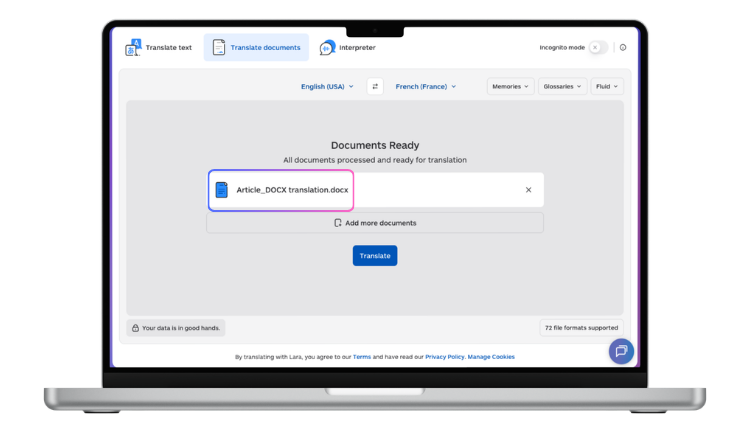
Upload your .docx contract or report to Lara Translate. Lara processes the file at the XML level, preserving:
- Numbered clause hierarchies (1., 1.1, 1.1.1)
- Tables (schedules, fee tables, comparison matrices)
- Headers and footers (including document reference numbers and page numbers)
- Signature blocks and form fields
- Bold and italic emphasis used for defined terms
Step 3: Post-Editing for Legal Accuracy
For contracts and compliance documents, machine translation should be treated as a high-quality first draft, not a final output. A qualified translator or bilingual legal reviewer should check the output, specifically for:
- Defined terms and their consistent rendering
- Jurisdiction-specific legal phrasing (the equivalent of “force majeure” or “indemnification” varies by legal system)
- Passive vs. active constructions that change obligation clarity
- Dates, numbers, and currency references
Lara’s adaptive translation learns from corrections made during post-editing, improving future translations automatically.
Handling Confidential Business Documents
 If your documents contain trade secrets, personal data, or legally privileged information, check your translation provider’s data processing policy before uploading. Lara Translate does not retain document content after translation and offers processing options suitable for sensitive business content. For enterprise deployments requiring full data isolation, the Adaptive Translation API can be deployed within your own infrastructure.
Scaling: When You Have Many Documents to Translate
Law firms, consulting firms, and multinational corporations often need to translate large volumes of reports or contracts at once — for due diligence, regulatory filing, or annual reporting cycles. Lara’s API supports batch processing: send multiple .docx files in parallel, receive translated outputs with formatting intact, apply consistent glossaries across all of them, and pipe the results directly into your document management system.
Translating sensitive business documents?
Lara Translate processes reports and contracts at the XML level — no text extraction, no broken clauses, glossary support for critical terminology.
FAQ
Can I translate a contract in Word and maintain legal accuracy?
Machine translation provides a strong first draft for legal documents, but professional post-editing by a qualified legal translator is recommended for documents with binding legal effect. Lara’s adaptive learning means it improves with each corrected translation in your language pair.
How do I protect confidential business information when translating?
Choose a provider with a clear data policy that prohibits retention and training use of your content. For maximum security, use Lara’s API within your own private infrastructure so content never leaves your environment.
How do I keep defined terms consistent across a long contract?
Create a glossary in Lara before translating. Add all defined terms with their required translations. The glossary is applied automatically and consistently across the entire document, regardless of length.
Can Lara handle reports with charts and data tables?
Text in Word tables is translated normally. Charts (embedded Excel objects) are more complex — chart labels may need to be updated separately. For reports with heavy chart use, consider translating chart labels as a separate step after translating the document body.
This article is about
- Explaining the unique challenges of translating business reports and contracts: terminology accuracy, legal precision, and layout fidelity.
- Comparing translation approaches suited to professional documents, from desktop tools to API workflows with glossary control.
- Showing how to handle sensitive content securely when using online translation tools for confidential business documents.
- Guiding readers on preparing DOCX files for professional translation: accepting tracked changes, managing styles, and protecting key terms.
- Highlighting how Lara Translate supports high-stakes document translation with format preservation, glossary enforcement, and bulk processing.
Start Translating Your Business Documents
Upload your Word report or contract to Lara Translate and get a formatted, terminology-consistent translation ready for review.
Also in this series: