

Per-seat billing was never the right model for a tool people share. A team of five buys five seats, but half of them use Lara Translate once a week. The other half use it every hour. Under a seat-based model, both cost the same. That stops making sense fast.
May 2026 is the month Lara Translate fixed that. The pricing model is now built around usage, not headcount. That is the biggest structural change in this release. But it is not the only one. Four updates shipped across pricing, the web app, the browser extension, and mobile. Here are the Lara Translate May 2026 updates: what changed and why it matters.
|
TL;DR
|
What changed in Lara Translate pricing?
From 25 May 2026, Lara Translate moved from a seat-based model to one built around a shared monthly character quota. The previous model counted users. The new one counts usage.
A Pro plan covers a single account. A Team plan supports unlimited users, all drawing from the same character pool. You invite as many people as you need; the only variable that drives cost is how much the team actually translates.
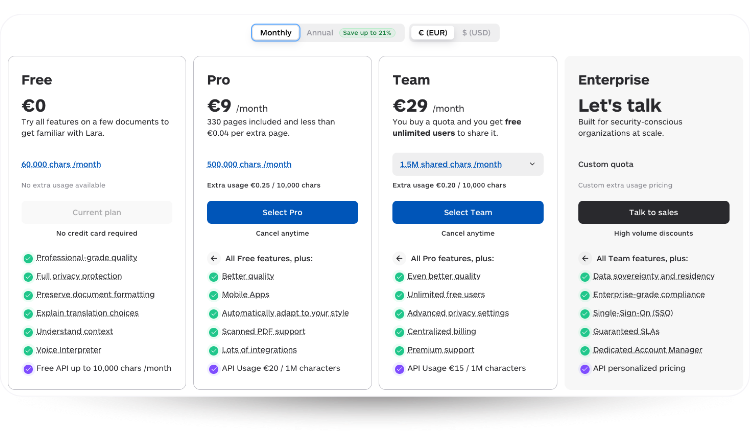
How the quota works. Characters are shared across all plan features: text translation, document translation, audio translation, image translation, and the Interpreter. Each feature applies its own consumption logic. Document translation has a minimum charge of 20,000 characters per document on paid plans. Interpreter usage is measured in seconds and converted to an equivalent character count. One pool, varying consumption rules depending on what you are translating.
If a team exceeds their monthly quota, they are not cut off. Overage is charged at a fixed rate per additional million characters, applied only to consumption beyond what the plan includes. The Free plan also gets more room under the new model, which makes it easier to test Lara Translate properly before committing to a paid tier.
See the full pricing details on the Lara Translate pricing page.
Try Lara Translate on the new pricing model
Usage-based billing. Unlimited users on Team. Pay for what you actually translate.
What is the new Images tab in Lara Translate?
Image translation now has its own tab in the main navigation. Before this update, Lara Translate supported 72 formats in total: 61 document file types and 11 image formats. Both lived under the same translation surface, which meant reaching image translation through a path built primarily for PDFs, spreadsheets, and localization files.
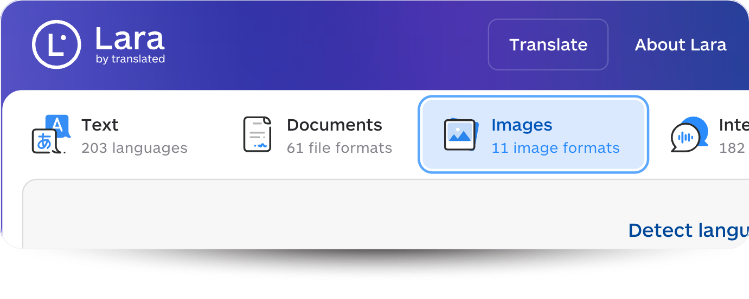
That was a detour that did not need to exist. The dedicated Images tab gives image translation its own entry point. The supported formats are immediately visible when you arrive: AVIF, BMP, GIF, HEIC, HEIF, PNG, JPG, JPEG, TIF, TIFF, and WEBP. Nothing changed about what Lara Translate can handle. The separation just makes it faster to find and use.
For teams translating marketing assets, product screenshots, or any visual content with embedded text, the workflow is now a single click from the homepage rather than a navigation step inside the document flow.
Open the Images tab in Lara Translate.
What is new in the Lara Translate Browser Extension?
The Browser Extension now supports document and file translation directly from the sidebar. You can drag and drop a file into the sidebar and translate it without leaving the browser or opening a new tab. No switching to the web app, no copying content across windows.
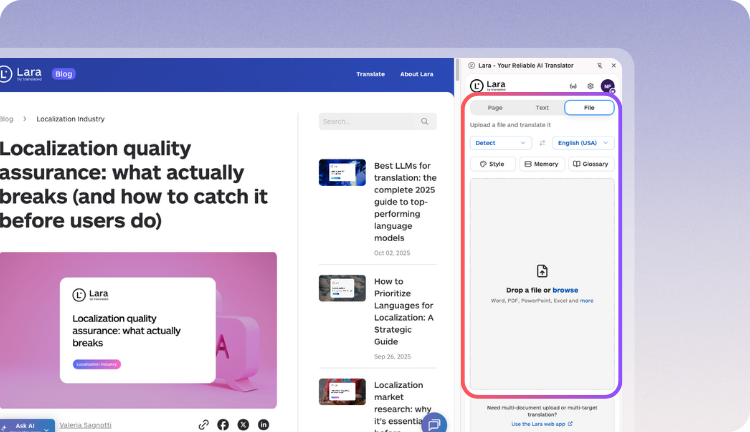
This makes the extension a more complete translation surface inside Chrome. It now handles page translation, selected text, free-form text input, and full document translation from the same place. The extension has been growing steadily, and that growth is what is driving continued investment in it: more people using it means more workflows to support, and page translation alone was not covering all of them.
Get the Lara Translate Browser Extension for Chrome.
What is new in the Lara Translate mobile apps?
May brought meaningful updates to both iOS and Android, covering the Interpreter, onboarding, and image translation.
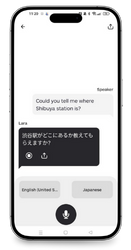 Interpreter
The Interpreter now lets you start speaking immediately while the connection is established in the background. The waiting screen before a session is gone. Speech recognition for low-volume speech has also been improved, making the Interpreter more reliable in quieter or less controlled environments. Microphone permissions are now requested proactively when you open the Interpreter section, so first-time setup does not interrupt an actual interpretation session.
iOS onboarding
Login and sign-up on iOS have been updated to use native platform capabilities, making the flow faster and reducing how much you need to type manually when setting up a new account.
Image translation from Photos
Lara Translate is now integrated into the iOS Share Sheet. You can translate an image directly from the Photos app by sharing it to Lara Translate, without opening the app first. It is a small change that removes one unnecessary step from a workflow many people use daily.
Get Lara Translate on your phone
Download the app and keep translation ready when you need it.
 |
 |
What to expect next
May’s updates address four concrete friction points: how teams are billed, how image translation is accessed, how much the browser extension can do, and how the mobile Interpreter behaves in real conditions. None of them were critical failures, but each one added up. Removing them matters.
More updates are on the way, including a dedicated Audio Translation tab in the web app and improvements to document layout and formatting quality. You can follow the full changelog on the What’s New page.
FAQ
Does the new pricing model cost more for heavy users?
It depends on how you were using the previous plan. Teams that were under-using their seats will likely pay less. Teams that were maxing out usage will have a clearer picture of actual cost through overage billing rather than being forced to upgrade to the next tier. The Free plan also gets more quota under the new model.
Can I still translate image files without switching to the Images tab?
Yes. The dedicated Images tab is an additional entry point, not a requirement. If you prefer to work through the main translation interface, image formats are still supported there. The tab just makes the workflow faster for people who primarily work with visual content.
What file formats does the Browser Extension now support for document translation?
The extension supports the same document formats available in the Lara Translate web app. You can drag and drop most common file types directly into the sidebar. For the full list of supported formats, see the Lara Translate knowledge base.
Is the Lara Translate Interpreter update available on both iOS and Android?
Yes. The faster startup time, improved low-volume speech recognition, and proactive microphone permission request are available on both platforms.
Does the character quota reset every month?
Yes. The monthly character quota resets at the start of each billing cycle. Any overage from the previous month is billed at the end of that cycle and does not carry over. You can check current usage at any time inside the Lara Translate account settings.
Have a valuable tool, resource, or insight that could enhance one of our articles? Submit your suggestion
We’ll be happy to review it and consider it for inclusion to enrich our content for our readers! ✍️
This article is about
- The Lara Translate pricing update in May 2026: moving from per-seat billing to a shared character quota model
- The new dedicated Images tab in the Lara Translate web app and the 11 supported image formats
- Browser Extension update: drag-and-drop document translation directly from the Chrome sidebar
- Mobile updates: Interpreter startup speed and low-volume speech recognition improvements, iOS onboarding, and image translation from the Photos Share Sheet