

Managing glossaries without API access. Profanity slipping through multilingual pipelines. Formatting that disappears on translation.
These aren’t edge cases — they’re the everyday friction that slows localization teams down. April 2026 is the month Lara Translate addressed most of them at once. Eight updates shipped across the web app, browser extension, integrations, and developer tooling. These are the Lara Translate April 2026 updates, maintained by the Lara team at Translated.
|
TL;DR In April 2026, Lara Translate shipped eight updates: a major browser extension release, Google Sheets defaults and preferences, multidirectional glossary CSV import and export in the web app, a More Tools tab, a Rich Text Toggle in the text editor, Interpreter voice selection with preview, profanity detection and filtering now in production, and Lara CLI v1.3.2. |
Quick Answer
In April 2026, Lara Translate shipped eight updates: a major browser extension release focused on translation quality and content handling, Google Sheets defaults and preferences for consistent translation workflows, multidirectional glossary CSV import and export now available in the web app, a More Tools tab for ecosystem discovery, a Rich Text Toggle in the text editor, Interpreter voice selection with preview, profanity detection and filtering in production as both an integrated and standalone service, and Lara CLI v1.3.2.
April’s theme is breadth without fragmentation. The updates touch almost every surface of the product — web app, browser extension, integrations, developer tooling — but each one addresses a specific, concrete friction point. Glossary management opens up to non-technical users. The Interpreter becomes more flexible. The CLI becomes more reliable. And across the board, the product gets closer to the standard enterprise teams expect.
What are the April 2026 updates?
These April 2026 release notes cover eight updates: the Browser Extension major release, Lara for Google Sheets defaults and preferences, Multidirectional Glossary CSV Import and Export in the web app, the More Tools tab, the Rich Text Toggle in Lara Text, Interpreter Voice Selection, Profanity Detection and Filtering, and Lara CLI v1.3.2. Some expand access to capabilities that previously required API or engineering involvement. Others improve reliability and control in workflows that already existed. A few do both.
What’s new in the Lara Browser Extension?
A major update to the Lara Browser Extension is now live, focused on translation quality and technical robustness across real web pages.
Web pages are messy. Non-standard layouts, complex content structures, dynamic content — these are the conditions the extension has to work in, not clean test cases. This release addresses the quality and stability gaps that show up in those real-world conditions.
- Improved page translation quality across a broader range of web content.
- Better handling of complex content structures, so pages with non-standard layouts translate more reliably.
- Increased performance and stability across typical browsing sessions.
Check out the browser extension here.
Can I set default preferences in Lara for Google Sheets?
The latest Lara for Google Sheets update lets users configure default translation styles, glossaries, and translation memories directly from the side panel.
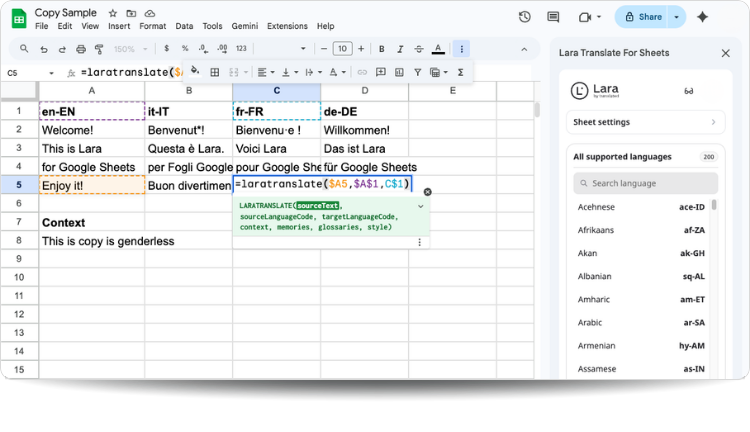
Before this update, you had to specify settings manually on every LARATRANSLATE function call. For teams running product catalogs, localization reviews, or content audits in Google Sheets, that adds up fast. Now your preferences are set once and applied automatically.
- Set default translation styles, glossaries, and translation memories from the side panel — applied automatically to every
LARATRANSLATEfunction call. - Incognito mode controls are now available, giving users explicit control over whether translation data is retained.
- Support for team-level preferences, so shared spreadsheets use consistent settings across everyone on the integration.
Read more about the new Google Sheet Add-on.
Can I now import and export multidirectional glossaries in the web app?
Multidirectional glossaries now support CSV import and export directly in the Lara web app, with no API access required.
Previously, multidirectional glossaries were only manageable via API or SDK. That meant localization managers, editors, and content leads had to route every terminology update through an engineer. This update removes that dependency entirely.

- Import multidirectional glossaries via CSV directly from the web app — no API access or engineering involvement required.
- Export glossaries in CSV format for backup, editing in a spreadsheet, or sharing across teams.
- Aligns the web experience with developer capabilities, so terminology management is accessible to everyone on your team.
- Works alongside the existing MCP Glossary Management toolkit introduced in March, giving teams full flexibility: manage glossaries from the web app or directly from your AI development environment.
For localization and content teams who maintain brand terminology across projects, this closes the gap between what developers could do and what everyone else could do. That gap was always friction. Now it isn’t.
Find out more about Multidirectional Glossaries.
Read the technical documentation.
What is the More Tools tab?
The More Tools tab is now fully available, surfacing the broader Lara ecosystem directly inside the app.
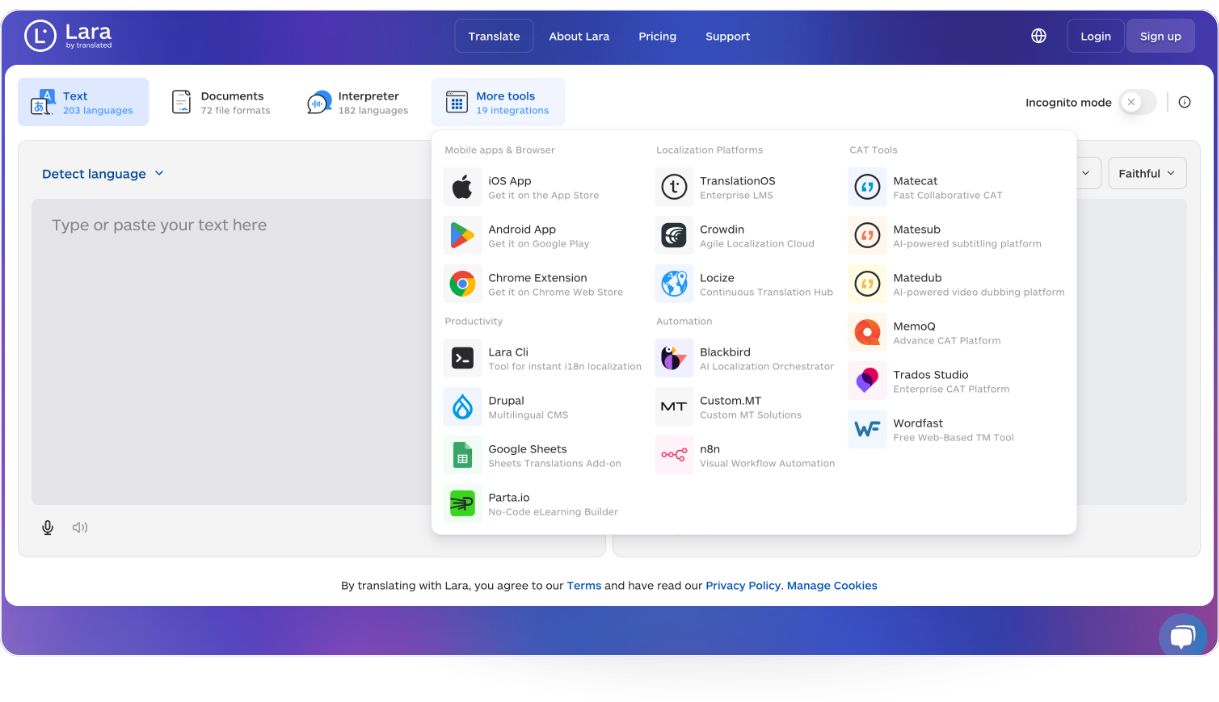
Until now, discovering connected tools and integrations meant leaving the main experience and searching elsewhere. The More Tools tab changes that: everything in the Lara ecosystem is one click away, without breaking your workflow.
- Makes the full Lara ecosystem discoverable in one place, with no need to visit separate pages or navigate away from the app.
- New integrations will be added in the upcoming release, further expanding what’s accessible from within Lara.
- Reduces switching friction for teams that use multiple Lara-connected products as part of their daily workflow.
What is the Rich Text Toggle in Lara Text?
A new toggle in the Lara text editor lets users explicitly enable or disable rich text handling when working with formatted content.
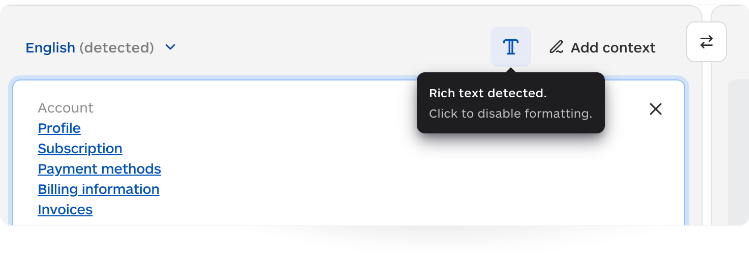
Previously, rich text processing happened in the background without user control. If you pasted formatted content, Lara made a decision for you. Now you make that decision yourself, which matters when source formatting should or shouldn’t carry through to the output.
- Enable or disable rich text handling directly in the editor, depending on the content you’re working with.
- A contextual tooltip appears the first time you paste rich text, explaining the feature for new users without getting in the way of experienced ones.
- Gives translators and editors explicit control over formatting behavior — particularly useful for content that carries structural markup the translation should preserve or strip.
Can I select and preview voices in the Interpreter?
The Interpreter now lets users select from multiple voices directly in the interface and preview each one before starting a session.
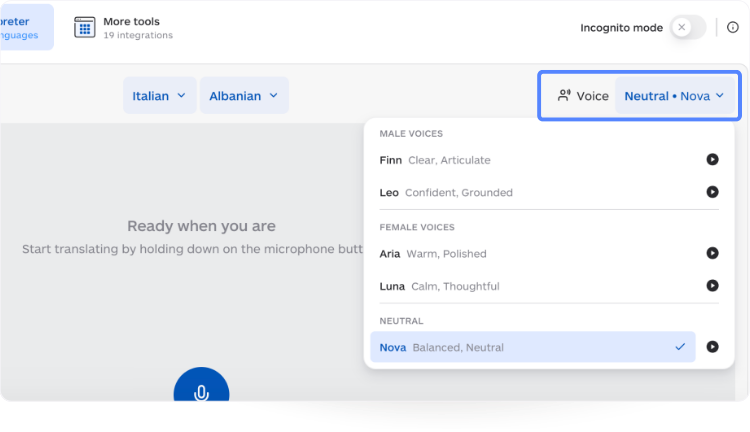
The right voice for a boardroom presentation is not the same as the right voice for a customer support call. Previously, you couldn’t test that difference before committing. Now you can.
- Browse available voices and choose the one that fits your context before a session begins.
- Preview mode lets you hear how each voice sounds, so there are no surprises once interpretation starts.
- Makes the Interpreter experience more adaptable across use cases — formal meetings, training sessions, live support, and more.
Discover voice selection for the Interpreter.
What is Lara’s new Profanity Detection and Filtering system?
Profanity detection and filtering is now fully available in production, integrated into Lara’s translation pipeline and available as a standalone API for independent content analysis.
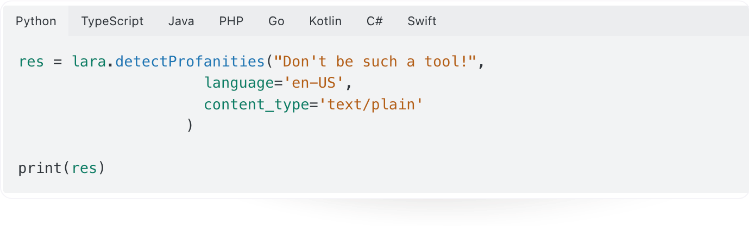
For content platforms handling user-generated text in multiple languages, this kind of tooling has historically required a separate vendor and a separate integration. It’s now built into Lara. That’s worth pausing on.
Within the translate text endpoint:
- Identifies offensive language in both the source text and the generated translation.
- Configurable handling modes, depending on your workflow requirements: flag for review, mask with symbols, or block the profanity entirely (eg, replacing the profanity with a non-profanity that carries the same meaning).
- Available for all SDK-supported programming languages, with Ruby and Go support releasing in the coming days.
As a standalone service:
- A dedicated profanity detection API is available for analyzing text without performing translation.
- Enables integration into moderation, compliance, and content analysis pipelines that operate independently of translation workflows.
Check out our documentation for the Profanity Detection.
Build with the Lara Translate API
Add context-aware translation and profanity detection to your product — explore the full API reference.
What’s new in Lara CLI v1.3.2?
Lara CLI v1.3.2 delivers a set of reliability and flexibility improvements for developer workflows, with the lock file corruption fix being the most significant change.
If you run Lara CLI in CI/CD pipelines or automation workflows, you’ve likely run into interrupted runs before. Previously, an interruption had the potential to corrupt the lara.lock file, requiring manual intervention to recover state. That risk is now addressed.
- Improved format and reliability of the
lara.lockfile - Fix for corruption issues caused by interrupted runs
- Fixes to translation text formatting
- Support for batch key translation
- Introduction of “no trace” mode
- Additional minor bug fixes
What’s next for Lara Translate?
April’s direction reinforces a consistent pattern: Lara Translate is expanding access to capabilities previously limited to technical users, improving the surfaces teams interact with most, and tightening reliability at the infrastructure level. You can follow future updates on the What’s New page and start testing these features in your workflows today.
Try Lara Translate in your own workflow
Test Lara Translate on a real project and see how it handles your terminology, context, and formatting.
Thank you for reading 💜
As a thank you, here’s a special coupon just for you: IREADLARA26.
Redeem it and get 10% off Lara PRO for 6 months.
If you already have a Lara account, log in here to apply your coupon. If you are new to Lara Translate, sign up here and activate your discount.
FAQ
What are the April 2026 updates in Lara Translate?
April 2026 brought eight updates to Lara Translate, spanning the web app, browser extension, integrations, and developer tooling. The browser extension received a major quality and stability release, and Lara for Google Sheets gained default preferences so teams no longer need to configure every function call manually. In the web app, multidirectional glossary CSV import and export is now available without API access, a More Tools tab surfaces the full Lara ecosystem in one place, and a Rich Text Toggle gives translators explicit control over formatting. The Interpreter added voice selection with preview, the profanity detection and filtering system moved to production as both an integrated endpoint and a standalone API, and Lara CLI v1.3.2 addressed lock file reliability and added batch key translation support.
What changed in the Lara Browser Extension?
The major update released in April improved page translation quality across a broader range of web content, added better handling of complex content structures so non-standard page layouts translate more reliably, and increased performance and stability across typical browsing sessions. Real web pages are messier than test cases — the update targets the quality and reliability gaps that appear in those real-world conditions specifically. A further update focused on UX improvements and document translation support inside the extension is planned before mid-May, so this release should be understood as foundational work rather than a final state.
What can I configure in Lara for Google Sheets?
You can now set default translation styles, glossaries, and translation memories directly from the side panel — these preferences are automatically applied to every LARATRANSLATE function call without requiring manual parameters each time. The update also adds incognito mode controls, giving users explicit control over whether translation data is retained during a session. Team-level preference support means shared spreadsheets use consistent settings across everyone on the integration, which matters for teams running product catalogs, localization reviews, or content audits at scale. Previously, every function call required manual configuration. That overhead is now gone.
Can non-technical users now manage multidirectional glossaries in Lara?
Yes. Multidirectional glossaries previously required API or SDK access, meaning every terminology update had to go through an engineer. As of April 2026, you can import and export them via CSV directly from the Lara web app — no engineering involvement required. This brings glossary management in line with what localization managers, editors, and content leads can do independently. It also works alongside the MCP Glossary Management toolkit introduced in March, so teams that prefer to manage glossaries from an AI development environment still can. The two approaches complement each other rather than replacing one another.
How does Profanity Detection and Filtering work in Lara?
Lara’s profanity detection and filtering system works in two modes. Integrated into the translate text endpoint, it identifies offensive language in both source text and translation output, with three configurable handling options: flag the content for review, mask it with symbols, or block the translation entirely. As a standalone API, it analyses text for profanity without performing translation, making it suitable for content moderation and compliance pipelines that operate independently of translation workflows. Both modes are available for all SDK-supported programming languages, with Ruby and Go support releasing shortly. For teams handling user-generated content in multiple languages, this removes the need for a separate moderation vendor.
Can I select and preview interpreter voices in Lara?
Yes. The Interpreter now lets you select from multiple voices directly in the interface and preview each voice before starting a session. This matters because the appropriate voice varies significantly by context: a formal boardroom presentation calls for a different register than a customer support interaction or a training session. The preview mode eliminates guesswork — you hear exactly how each voice sounds before committing, so there are no surprises once interpretation starts. Voice selection is available directly in the Interpreter interface without requiring any additional configuration.
What’s in Lara CLI v1.3.2?
Lara CLI v1.3.2 includes improved lara.lock file format and reliability, a fix for state corruption caused by interrupted runs, translation text formatting fixes, batch key translation support, “no trace” mode, and additional bug fixes. The lock file corruption fix is the most operationally significant change for teams running Lara CLI in CI/CD pipelines or automation workflows: previously, an interrupted run could corrupt state and require manual recovery. That risk is now addressed. Batch key translation support and “no trace” mode add flexibility for workflows that require either bulk processing or reduced logging footprint.
This article is about:
- Breaking down Lara Translate’s April 2026 updates, ordered by product area.
- Covering the browser extension major release and how it improves translation quality across real web pages.
- Explaining how Lara for Google Sheets defaults and preferences simplify translation workflows for spreadsheet-based teams.
- Explaining how multidirectional glossary CSV import and export in the web app extends terminology management to non-technical users.
- Covering the More Tools tab and Rich Text Toggle in the Lara text editor.
- Showing how Interpreter voice selection improves usability across use cases.
- Summarising the Profanity Detection and Filtering system — both integrated and standalone — now in production.
- Covering Lara CLI v1.3.2 reliability improvements.
Useful links and articles:
- Lara Translate web app
- Lara Translate Developer Docs
- Getting started with the Lara Translate MCP Server
- Lara Translate MCP Server (Help Center)
- Lara MCP Server on GitHub (open source)
- Lara Translate pricing
- What’s New: Lara Translate changelog