

You need a free translation API that you can actually test before committing. No credit card form, no billing setup, no stripped-down sandbox. Lara Translate’s free API gives you the full engine: context instructions and 200+ language pairs from your first call. Here’s what you can do with it.
TL;DR
|
Quick answer
The Lara Translate free API gives developers access to context-aware neural machine translation and 200+ language pairs at no cost and without a credit card. It’s built for prototyping multilingual apps, content automation pipelines, and document translation integrations before scaling to a paid plan where glossaries and translation memories become available.
Most free translation APIs give you a black box. This one doesn’t.
You’re building something multilingual and you need an API you can test right now, without a billing form. The usual options come up: Google Cloud Translation, DeepL, LibreTranslate. None of them let you tell the engine why you’re translating or who you’re translating for. Lara Translate’s free API does. Same context-aware engine used in production. No credit card required.
Try the Lara Translate API for free
No credit card. No setup friction. Generate your API key and make your first translation call in minutes.
What is the Lara Translate API?
Lara Translate is a neural machine translation platform built on ModernMT, Translated’s adaptive translation engine. The API gives developers programmatic access to the same translation layer that powers the web app, the browser extension, and the desktop integrations.
The text translation API supports over 200 language pairs and accepts contextual instructions from the very first call. Paid plans unlock document translation (70+ file formats including DOCX, PPTX, XLIFF, and PDF), custom glossaries, translation memories, and additional translation styles. You call it like any other REST API. The difference shows up in the output.
Why use a free translation API instead of building on Google or DeepL?
Before you pick an API to build on, you should know what the free tier actually lets you evaluate. All three options below give you text translation at no cost. The differences are in what you can test before committing a credit card or a codebase.
| Feature | Lara Translate | Google Cloud | DeepL |
|---|---|---|---|
| Credit card to start | No | Yes | No |
| Context instructions | Yes | No | No |
| Custom glossaries | Paid plans | No | Limited |
| Translation memory | Paid plans | No | No |
| Privacy / Incognito Mode | Yes | No | No |
| Document translation | Paid plans (70+ formats) | Paid (13 formats) | Paid (7 formats) |
| Language pairs | 200+ | 100+ | ~30 |
The context feature is the one that changes the output most. “Translate this product description for a fashion-forward audience in Italy” produces different output than the same text without context. That’s the gap between a translation that’s technically correct and one you can actually ship.
What can you actually evaluate on the free tier?
Before you wire a translation API into your product, you need to answer one question: does it produce output your users will trust? The free tier is where you find out. Here are the scenarios worth testing.
Multilingual web and mobile apps
You’ve decided to go multilingual. The real question isn’t language support — most APIs cover that. It’s whether the output matches the tone and register your users expect in each market. That’s what context instructions let you test: pass your actual UI strings with a market-specific instruction and see whether the output reads naturally or just reads translated.
Content automation pipelines
Publishing the same content across five markets isn’t just a translation problem. It’s a pipeline problem. The thing to verify before committing is whether the API fits into your existing CMS or publishing workflow without adding a manual review step on every output. Test that with real content, not placeholder text.
Localization workflow prototypes
Most localization failures happen before a single string gets translated — in the assumption that any engine will do. The free tier exists precisely to challenge that assumption. Run your actual strings through the API with context tuned to your product. If the output needs heavy editing, you know before you’ve built anything.
In-app translation and chatbots
A chatbot that replies in English to a user who wrote in Spanish isn’t broken. It just feels broken. What’s worth testing here isn’t whether the translation is technically correct — it’s whether real-time output in your interface produces replies users actually trust. Context instructions let you verify that before you ship.
Evaluating engine quality before scaling
The free tier runs on the same engine as every paid plan. That’s the point. What you see when you test with real content and real context instructions is exactly what you’ll get when you scale. There’s no upgrade surprise. That makes the free tier a decision tool, not just a taster.
What the free tier gives you to test with
When you’re evaluating a translation API, the free tier is your only honest test environment. Not a demo, not a sandboxed preview — actual API calls on your actual content. Here’s what that test covers with Lara Translate, and what only becomes available when you upgrade.
Context instructions (free)
The most important thing to verify before committing to a translation API isn’t language support or response time. It’s whether the engine can take direction. Context instructions are how you test that. Pass a plain-language instruction alongside your text — “formal register, targeting a legal audience in Germany” — and see whether the output reflects it. Most APIs can’t do this at all. Testing it for free, on your own content, is the point.
Incognito Mode (free)
If you’re running test calls on real content — production strings, customer-facing copy, anything sensitive — you need to know that content isn’t being stored or used to train the model. Incognito Mode handles that from your first API call, no upgrade required. Read more about Learning vs. Incognito mode.
What you unlock on paid plans
Once you’ve validated that the engine fits your use case, upgrading adds the quality controls that production integrations need. Glossaries enforce approved terminology on every call. Translation memories apply previously approved output to new content automatically, improving consistency over time. Document translation opens up 70+ file formats including DOCX, PPTX, XLIFF, PDF, and HTML, with formatting preserved. Translation styles let you tune output for different content types. These are the features that take a validated integration and make it production-grade.
How to get your free API key
Getting started takes three steps and about five minutes.
First, create a free account at laratranslate.com. No credit card required. Once you’re logged in, navigate to API credentials in your account menu and click “Create new credentials.” Name the key something descriptive so you can identify it later. When the key is generated, download the credentials file immediately. The key cannot be retrieved again after you leave the page.
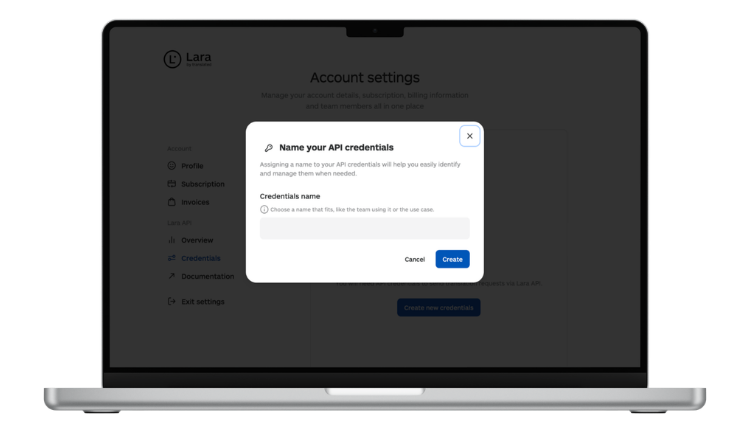
That’s it. You now have a working API key. The Lara Translate API documentation covers authentication, endpoint structure, request parameters, and code examples. The first call is a few lines in any language that can make HTTP requests.
One thing to note: free accounts can generate one API key. If you need multiple keys for different projects or environments, that’s available on the Pro and Team plans.
Start building with Lara Translate
Free account. No credit card. Full access to context instructions, glossaries, and 200+ language pairs from your first API call.
FAQ
Do I need a credit card to use the Lara Translate free API?
No. You can create a free account and generate an API key without entering any payment information.
What languages does the Lara Translate API support?
The API supports over 200 language pairs. You can check the full list of supported languages in the Lara Translate language support documentation.
Does the free API support document translation?
No. The free tier covers text translation only. Document translation (DOCX, PPTX, PDF, XLIFF, and 70+ other formats) is available on paid plans. See the full list of supported file formats.
Can I use glossaries and translation memories on the free plan?
Neither glossaries nor translation memories are included in the free plan. Both are available on Pro and Team plans. The free tier is the right place to test translation quality and integration before upgrading.
Is my content private when using the API?
Lara Translate offers Incognito Mode, which prevents your content from being stored or used for model training. This is available on both free and paid plans. You can learn more about Lara Translate’s privacy and data protection policies.
What’s the difference between the free API and the Pro or Team API plans?
The free API tier is designed for development, testing, and small-scale integrations. Pro and Team plans provide higher translation volumes, multiple API keys, and additional team management features. You can review the current plans at laratranslate.com/pricing.
Where can I find the API documentation?
The full API reference, including authentication guides, endpoint descriptions, and code examples, is at developers.laratranslate.com.