

Most open source projects are written by developers who communicate in English. But the people who use those projects — and who could contribute to them — speak every language. A README that’s only in English quietly excludes a large share of your potential user base and contributor pool. Localizing your README is one of the most impactful, lowest-overhead things you can do to make an open source project more welcoming internationally. This guide covers how to localize a README file correctly — from file naming conventions to translation workflow to keeping localized versions in sync when the English README changes.
|
TL;DR
|
Short answer
To localize a GitHub README: keep README.md in English, create locale-specific files (README.ja.md, README.de.md, etc.) using Lara Translate to preserve code blocks and badge syntax, and add a language selector at the top of the main README linking to each localized version.
Why it matters: GitHub doesn’t serve automatic translations. When a developer in Tokyo or São Paulo lands on your repository, they see your English README exactly as you wrote it. Japanese, Chinese, Korean, German, and Brazilian Portuguese-speaking developers are major forces on GitHub — providing a README in their language isn’t a courtesy, it’s a contribution to the health of your project.
Translate your README in minutes
Upload your README.md to Lara. Code blocks, badges, and link URLs stay intact. Only the prose gets translated — into 200+ languages, ready to commit to your repo.
Why Multilingual READMEs Matter for Open Source
Some of the world’s most active open source contributor communities are in countries where English is not the primary language. A README dense with jargon, long installation instructions, or technical context that’s harder to parse in a second language reduces the chance that an international developer engages — and makes a PR or issue almost impossible.
Beyond individual contributors, multilingual READMEs also improve discoverability. Developers searching GitHub in their native language find projects with localized READMEs more useful and are more likely to star, fork, and recommend them within their communities.
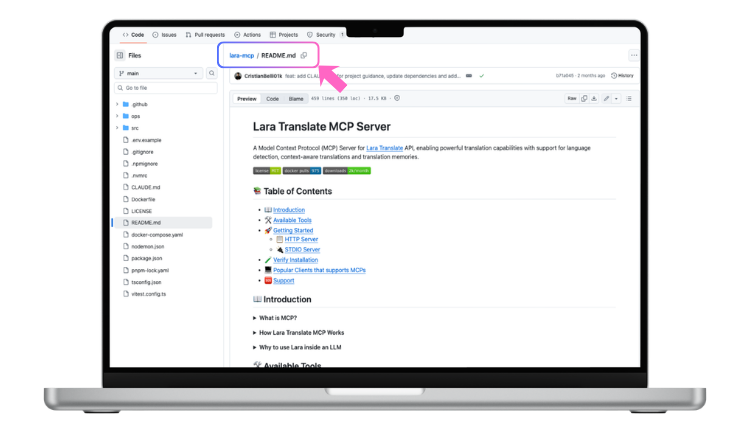
How to Structure Multilingual READMEs on GitHub
There’s no official GitHub standard, but the convention used by large, well-maintained projects is consistent:
Keep the primary README.md in English. Create locale-specific versions using BCP 47 language tags or ISO 639-1 codes as filename suffixes: README.ja.md for Japanese, README.de.md for German, README.zh-CN.md for Simplified Chinese, README.pt-BR.md for Brazilian Portuguese.
At the top of README.md, add a language selector before any other content:
**Read this in other languages:** [日本語](README.ja.md) | [Deutsch](README.de.md) | [Português](README.pt-BR.md)Each localized README mirrors the same structure as the English original: same sections, same order, same badge links (badge URLs point to external services and must never be modified), translated prose.
What to Translate and What to Leave Alone
Translate: section headings, explanatory paragraphs, installation instructions (the prose parts), usage descriptions, contribution guidelines, and license explanations.
Do not translate: code blocks and command examples, badge URLs and badge Markdown syntax, repository URLs, file names and paths, variable names and configuration keys, and language names in the selector at the top.
The failure mode to watch for: command-line examples like npm install package-name or git clone https://github.com/user/repo getting partially translated. A tool that doesn’t understand code blocks will produce broken instructions that fail when a user tries to follow them.
How to Translate a README File with Lara
- Go to laratranslate.com/translate-markdown
- Upload your README.md file
- Select English as source and your target language
- Add a glossary for your project name, library names, and technical terms that shouldn’t be translated
- Choose Faithful translation style for technical accuracy
- Download the output and save it as
README.[locale].mdin your repository root
For multiple languages, use Lara’s bulk upload to translate the same README into several locales in a single session.
Keeping Localized READMEs in Sync
The harder part of README localization isn’t the first translation — it’s keeping locale versions current as the project evolves. A README accurate six months ago may describe outdated installation steps, deprecated flags, or be missing a major new section.
A practical approach for active projects: note the commit hash of the English README at the time of each translation in an HTML comment at the top of each locale file — it won’t render on GitHub but gives you an auditable record of translation freshness. When the English README changes significantly, re-translate the affected sections and update the hash.
For projects with CI/CD pipelines, Lara’s API can trigger a new translation run whenever the English README changes in the main branch.
Adding Localized READMEs to Your Repository
- Place translated files in your repository root alongside README.md
- Update the language selector links at the top of README.md
- Commit and push to your main branch
- Verify that language selector links resolve correctly on GitHub
GitHub renders .md files automatically in the repository view when they follow the README naming convention.
Make your project accessible to international contributors
Translate your README into Japanese, German, Portuguese, Chinese, and more. Lara preserves every code block, badge, and link — just commit the output and you’re done.
FAQ
Does GitHub automatically show localized READMEs based on the user’s language?
No. GitHub doesn’t serve locale-specific README files based on browser language settings. Users must click a language selector link. This is why the language selector should be the very first thing in README.md, before any other content.
Will Lara translate my bash commands and code examples?
No. Lara’s Markdown processor detects code fences (triple backticks) and inline code (single backticks) and leaves them entirely untouched. Installation commands, code examples, and configuration snippets will be identical in the translated output.
What should I do about badge Markdown in my README?
Badge syntax like [](https://link) contains external URLs that must not be modified. Lara protects link URLs and image paths, so badges render correctly in translated READMEs without any manual adjustment.
How do I handle headings used as anchor links?
When headings are translated, their anchor format changes (GitHub generates anchor IDs from heading text). If your README uses [jump to section](#section-name) syntax, update the anchor references to match the translated heading text. Check your table of contents links after translation.
Can I keep translated READMEs updated automatically?
Lara’s translation memory ensures consistent output over time, and the API supports automated translation triggers in a CI/CD pipeline. For simpler workflows, retranslating the updated README via the web interface and diffing the output is efficient for most open source projects.
This article is about
- Explaining why multilingual READMEs matter for open source projects and international developer communities on GitHub.
- Walking through the standard file naming convention and language selector structure for localized GitHub READMEs.
- Identifying what to translate (prose) and what to leave alone (code blocks, badge URLs, command examples).
- Showing the step-by-step workflow for translating a README with Lara Translate and committing it to a repository.
- Covering the ongoing challenge of keeping localized READMEs in sync with the English source as the project evolves.
Localize Your README
Upload your README.md at laratranslate.com/translate-markdown and get a syntax-safe translation ready to commit to your repository.
Also in this series: