

An accessibility widget that scores well on an automated scan can still leave a store legally exposed and functionally unusable for real customers. The FTC made that point concrete: in January 2025 it announced a $1 million settlement with accessiBe over claims that its AI-powered overlay, accessWidget, could make any website fully WCAG compliant, and the Commission approved the final order in April 2025. The complaint detailed specific claims the FTC found deceptive: that the widget made a site compliant with 30% of WCAG’s requirements immediately and would reach full compliance with the remaining 70% within 48 hours, rescanning every 24 hours to maintain it. In practice, elements like menus, headings, tables, and images were not being made compliant. Courts have since made the same point more bluntly: an overlay is not a compliance strategy, and code-level fixes consistently hold up better under legal scrutiny than a widget bolted on top of an inaccessible site.
That distinction, overlay versus code-level fix, is the single most important thing to understand before choosing an ecommerce accessibility tool in 2026. This guide compares ten platforms across that line, and closes with the one requirement most accessibility checklists still leave out entirely: whether the store is actually usable in the language of the customer trying to shop it.
|
TL;DR
|
What makes an ecommerce accessibility tool worth using in 2026?
- Code-level fixes hold up better than overlays, and regulators have started saying so directly. An overlay adjusts what the browser renders without changing the underlying markup. A code-fix tool changes the actual HTML, ARIA labels, and semantic structure. Following the accessiBe settlement, courts have been explicit that overlays alone do not constitute compliance.
- Manual expert testing catches what automation cannot. Automated scanners find missing alt text and contrast issues reliably. They are much weaker at judging whether a complex interactive checkout actually works for a screen reader user.
- Legal documentation matters as much as the fix itself. VPATs, audit reports, and remediation logs are what a business needs to produce if it receives a demand letter. A tool with excellent remediation but no documentation trail leaves a business unable to prove the work was done.
- Multi-language widget support is a genuinely separate requirement. For international storefronts, the accessibility controls themselves need to be usable in the visitor’s own language, not just in English.
- Full accessibility and full language accessibility are two different compliance problems, not one. A store can pass every WCAG check and still be functionally inaccessible to a customer who cannot read the language it’s written in. More on this below.
The 10 best ecommerce accessibility tools in 2026
| Tool | Best for | Approach | Starting price |
|---|---|---|---|
| EnableAll | Shopify-native code-level fixes with legal risk reduction | Code-fix | Free tier; paid plans from $49/month |
| TestParty | AI code-level remediation plus certified expert validation | Code-fix + expert | Custom, contact sales |
| AudioEye | Enterprise managed accessibility with monitoring and legal docs | Hybrid (automation + expert) | Quote-based; ~$199-799/month per third-party trackers |
| Level Access (UserWay) | Large organizations needing governance and services | Widget + services | UserWay widget from $490/year (~$41/month) |
| EqualWeb | International stores needing a multilingual widget | Widget + AI remediation | From $39/month (100-page site) |
| Siteimprove | Teams wanting accessibility bundled with SEO/content quality | Platform (audit + monitoring) | Custom, contact sales |
| ADAcertify | SMBs wanting widget, audit, VPAT, litigation support in one | Widget + expert + legal docs | From $37/month |
| Deque axe DevTools | Developers embedding testing into CI/CD | Developer tooling | Free (core); Pro/Enterprise custom |
| accessiBe | Budget-conscious stores starting their accessibility journey | Overlay (AI widget) | ~$49/month |
| WAVE (WebAIM) | Free manual accessibility auditing and learning | Free browser tool | Free |
EnableAll
Best for: Shopify stores that want code-level fixes rather than an overlay, with built-in legal risk reduction
EnableAll fixes accessibility issues at the source, in the actual Shopify theme code, rather than adjusting what a browser renders. Its product suite includes an Auto Code-Fix engine, an Auto-Audit Scanner, an AI Alt Text Generator, and a Website Assist-Bar with 45+ WCAG AA and AAA features available in 133 languages, alongside a library of country-specific compliance guides covering ADA, the EAA, Canada’s ACA, Ontario’s AODA, and jurisdictions including Japan, Israel, and Brazil.
That jurisdiction-by-jurisdiction content library reflects a genuine strength: EnableAll’s positioning is built around the idea that accessibility law is not one-size-fits-all across countries, the same argument, extended to language rather than legal structure, that international stores need to apply to their content as well as their code.
- Approach: Code-fix (not overlay)
- Compliance coverage: ADA, WCAG 2.1/2.2, EAA, ACA, AODA, plus country-specific guidance
- Notable customers: Facegym, Unhidden, BuDaGirl, Sabatino, Trend Tonic, Antler
- Pricing: Free Starter tier (up to 1,000 sessions/month); Growth $49/month (25,000 sessions); Scale $149/month (100,000 sessions); Advanced $399/month (300,000 sessions); Enterprise custom
Verdict: a strong choice for Shopify merchants who want the code-level approach regulators and courts increasingly favor over overlay widgets, with transparent published pricing and jurisdiction-specific compliance guidance for stores expanding internationally.

TestParty
Best for: Stores that want AI-powered code remediation combined with certified human expert validation
TestParty combines automated code-level remediation with certified accessibility experts who validate findings and support WCAG 2.1 and 2.2 compliance, addressing the core weakness of pure automation: judgment on complex interactive elements. TestParty reports remediating over 1,575,000 WCAG issues across 100+ brands and was named to the Forbes Accessibility 100 in 2025, a self-reported figure that hasn’t been independently audited.
- Approach: Code-fix + expert validation
- Pricing: Custom, contact sales
Verdict: a strong option for brands that want the speed of automated remediation without giving up expert judgment.
AudioEye
Best for: Enterprise stores that need comprehensive accessibility with legal documentation and ongoing monitoring
AudioEye combines automated scanning, code-level remediation, manual expert testing, and formal legal compliance documentation, including its Assurance program, a limited financial guarantee against WCAG-related demand letters on qualifying Managed packages, with a monitoring dashboard tracking accessibility status continuously.
- Approach: Hybrid (automation + manual expert testing), offered across three tiers: Automated, Self-Managed, and Managed
- Pricing: AudioEye no longer publishes specific dollar figures on its own site; tiers are quote-based. Third-party pricing trackers cite roughly $199-799/month across tiers, though exact current figures aren’t confirmed on AudioEye’s own site, so get a quote before budgeting.
Verdict: the most comprehensive option for enterprise stores needing legal-grade documentation and ongoing monitoring, though get a current quote rather than budgeting off third-party estimates.
Level Access (formerly UserWay)
Best for: Large organizations that need governance tooling and professional services alongside a widget
Level Access acquired UserWay in a deal completed in March 2024, adding UserWay’s widget and automated remediation technology to Level Access’s broader governance and professional-services platform. UserWay’s widget continues to operate under its own brand as the more affordable entry point.
- Pricing: UserWay’s widget plans start at $490/year (~$41/month) for the Pro tier (up to 100K page views/month), rising to $1,190/year (~$99/month) for Pro Plus and $2,490/year (~$207/month) for Ultimate, all billed annually; the full Level Access governance platform is quoted separately.
Verdict: a reasonable choice for organizations wanting UserWay’s widget scale combined with Level Access’s enterprise governance capability, though confirm current-year pricing directly since UserWay’s plans are structured as annual commitments.
EqualWeb
Best for: International stores that need the accessibility widget itself available in multiple languages
EqualWeb‘s widget interface supports roughly 30 languages, not just the underlying site content, which matters for a visitor adjusting contrast or font size settings in their own language.
- Pricing: $39/month for sites up to 100 pages, $49/month up to 1,000 pages, $109/month up to 10,000 pages, $169/month up to 100,000 pages; the Managed tier (AI widget plus expert remediation) is custom-quoted.
Verdict: the right choice specifically for international storefronts where the accessibility controls themselves need to speak the visitor’s language, with published tiered pricing to plan against.
The widget speaks 30 languages. Does your product copy?
A multilingual accessibility widget doesn’t translate your storefront content. Localize product descriptions, policies, and checkout copy across 200+ languages, with terminology kept consistent.
Siteimprove
Best for: Teams that want accessibility bundled with SEO and content quality management
Siteimprove combines accessibility auditing with SEO analysis, content quality checks, and analytics in one dashboard, for organizations wanting one system covering multiple digital governance concerns.
- Pricing: Custom, contact sales. Third-party deal-tracking data puts typical enterprise annual contracts in the $15,000-$150,000+ range depending on page count and modules licensed; Siteimprove doesn’t publish these figures directly, so confirm with sales.
Verdict: sensible for teams wanting accessibility as one module in a broader digital governance platform.
ADAcertify
Best for: Small and mid-size businesses wanting the widget, audit, documentation, and litigation support bundled together
ADAcertify covers widget, AI scanning, expert audits generating a VPAT (INT Edition, covering WCAG 2.1, Section 508, and EN 301 549), and litigation support from one dashboard, useful for businesses that already received a demand letter and need documentation and legal support immediately.
- Pricing: Plans start at $37/month.
Verdict: strong for SMBs wanting full-spectrum protection without assembling several point solutions themselves, and priced accessibly for that segment.
Deque axe DevTools
Best for: Development teams that want accessibility testing built into their existing CI/CD workflow
Deque‘s axe-core engine integrates into browser extensions, automated testing frameworks, and CI/CD pipelines, making accessibility testing part of the development lifecycle itself. The free Chrome extension is unlimited for individual use; paid Pro and Enterprise tiers add Intelligent Guided Tests, AI-paired triage, and CI/CD pipeline gating.
- Pricing: Free (core browser extension); Pro and Enterprise pricing is quote-based and not published.
Verdict: the right choice for engineering-led teams wanting accessibility checks running continuously during development.

accessiBe
Best for: Budget-conscious stores just beginning their accessibility journey
accessiBe‘s AccessScan and automated widget, accessWidget, adjust contrast, font sizing, and keyboard navigation in real time at a low price point. Important caveat: in January 2025 the FTC announced a $1 million settlement, finalized in April 2025, over deceptive claims that accessWidget could make any website fully WCAG compliant, and the final order now bars accessiBe from making that specific claim without evidence to support it.
- Regulatory note: FTC settlement, announced January 2025 and finalized April 2025, over deceptive compliance claims
- Pricing: ~$49/month
Verdict: a practical low-cost starting point, but not a standalone compliance strategy, and not recommended as the sole solution for any store with real legal exposure.
WAVE (WebAIM)
Best for: Free manual auditing and understanding what’s actually wrong with a site
WAVE is a free browser-based tool, with extensions for Chrome, Firefox, and Edge, producing detailed visual reports with explanations, useful both as a learning tool and a lightweight ongoing check alongside a paid platform.
- Pricing: Free
Verdict: not a replacement for a full remediation platform, but an essential, no-cost first step.
The language-accessibility gap none of these tools solve
None of the ten tools above translate a store’s actual content. They fix code, add screen-reader support, and generate compliance documentation, but the product descriptions, policy pages, and checkout copy stay in whatever language they were written in.
Lara Translate, built by Translated, a company with more than 25 years of professional translation experience, addresses that separate layer: document-level translation across 200+ languages and 60+ file formats, with glossary and terminology controls that keep brand and legal language consistent across markets.
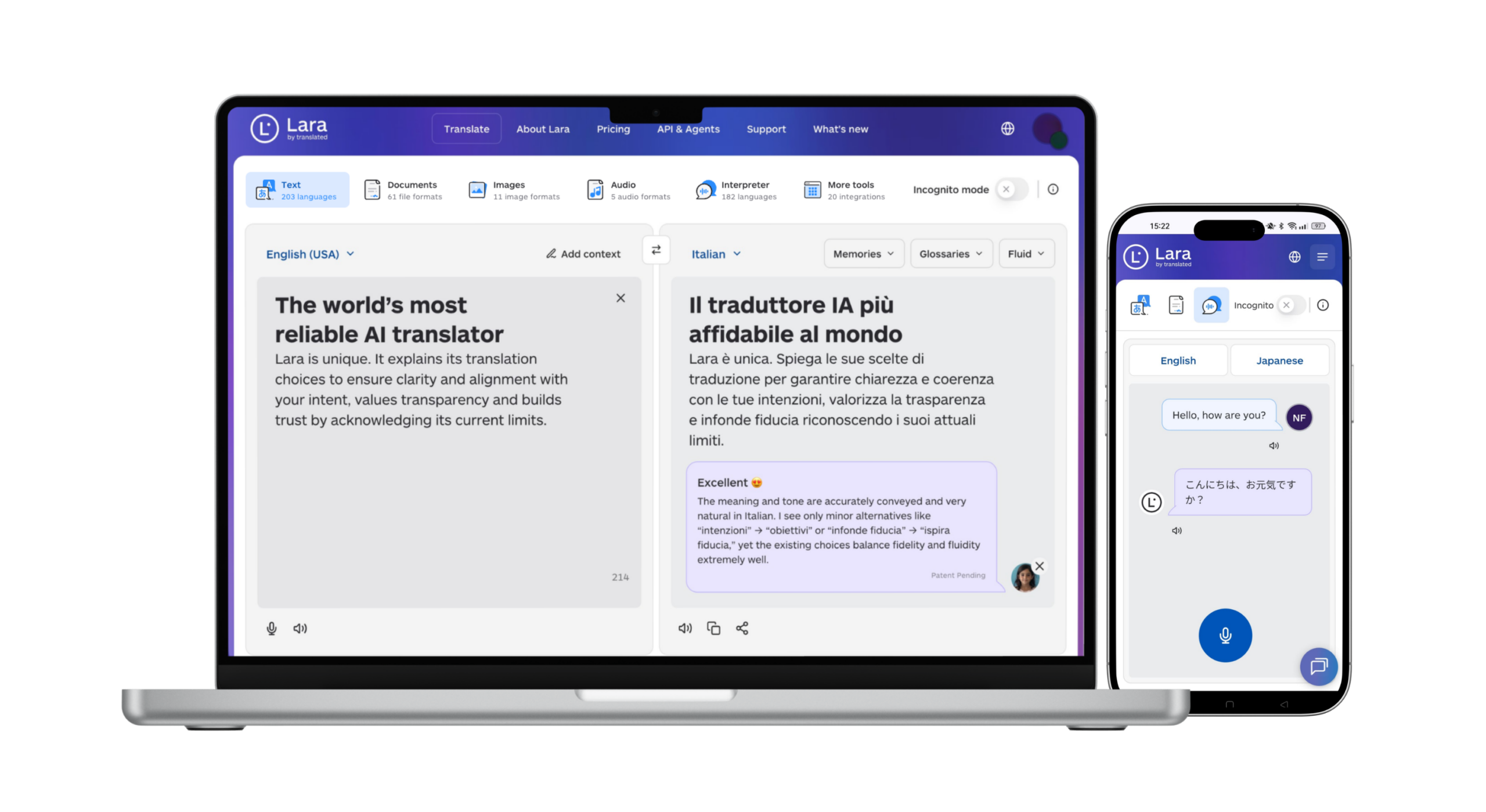
Ecommerce teams building genuinely accessible, global storefronts use both categories of tool together. A structurally accessible store that only speaks English is still inaccessible to a large share of the customers it’s trying to reach.
How to choose the right ecommerce accessibility tool
Step 1: decide whether you need code-level fixes or can start with an overlay. If your store has real legal exposure, start with a code-fix tool and documented expert review, not an overlay alone.
Step 2: confirm legal documentation is included, not an add-on afterthought. VPATs, audit reports, and remediation logs are what you need if a complaint arrives.
Step 3: check whether the tool includes manual expert testing. A tool with no expert-testing option is incomplete for anything beyond the simplest storefront.
Step 4: for international stores, check the widget’s own language support separately from site content. EqualWeb and EnableAll’s Assist-Bar both address this directly; most competitors don’t.
Step 5: treat language accessibility as a separate, equally real requirement. A structurally accessible storefront still needs its actual content, product copy, policies, checkout text, translated to reach customers who don’t read the language it was written in.
Building an accessible storefront for five new markets?
Pair your code-level accessibility fixes with proper content localization. Upload product copy, policies, and checkout text and get it back ready to publish.
The bottom line
No tool covers both halves of this problem alone. EnableAll and TestParty win on code-level Shopify fixes with governance documentation. AudioEye and Level Access win on enterprise-grade managed programs. EqualWeb wins on multilingual widget support. Deque axe DevTools wins on developer-led testing. Pick the approach that matches your actual legal exposure, code-fix over overlay if that exposure is real, and build from there.
One line belongs on every accessibility checklist regardless of tool: structural accessibility and language accessibility are two different problems. The accessiBe settlement is a warning about cutting corners on the first one. Don’t repeat the same mistake on the second by assuming a translation plugin closes the gap.
FAQ
What is the best ecommerce accessibility tool in 2026?
There is no single best option, it depends on risk exposure and budget. EnableAll and TestParty suit Shopify stores wanting code-level fixes. AudioEye and Level Access suit enterprise organizations needing governance and documentation. accessiBe remains a low-cost start but should not be relied on alone given its 2025 FTC settlement.
Are accessibility overlays enough for legal compliance?
No. In January 2025 the FTC announced a $1 million settlement with accessiBe, finalized that April, over claims that its overlay could make any website fully WCAG compliant. Courts consistently favor code-level fixes and documented human expert review over widget-only approaches.
What is the difference between an accessibility overlay and a code-level fix?
An overlay adjusts what a browser renders on top of existing code. A code-level fix changes the actual HTML, ARIA labels, and semantic structure. Code-level fixes are more defensible in litigation.
Does making a store accessible also make it usable for international customers?
Not automatically. Structural accessibility and language accessibility are separate requirements. A store can pass every WCAG check and still be unusable for a non-English-speaking customer if the content was never translated for that market.
What should international ecommerce brands look for beyond standard accessibility tools?
Confirm the accessibility widget supports the languages your customers use, and separately confirm your product and storefront content has been properly localized rather than machine-translated without review.
Have a valuable tool, resource, or insight that could enhance one of our articles? Submit your suggestion
We’ll be happy to review it and consider it for inclusion to enrich our content for our readers!
This article is about
- How 10 ecommerce accessibility tools compare on code-fix vs. overlay approach, legal defensibility, and multilingual widget support
- Why the FTC’s $1 million settlement with accessiBe changed how courts and regulators view overlay-only compliance strategies
- Why EnableAll, TestParty, AudioEye, Level Access, and EqualWeb each lead for a different risk profile and budget
- A 5-step framework for choosing an accessibility tool: code-fix vs. overlay, legal documentation, expert testing, widget language support, and content localization
- Why structural accessibility and language accessibility are two separate compliance problems, and why most stacks only solve one of them
Useful articles
- Best tools for international ecommerce compliance in 2026
- Best rank tracking & AI search visibility tools in 2026: 12 platforms compared