

A freelancer sends a client contract on Friday afternoon, and by Monday it is still unsigned because the signer had to create an account, find the right field, and print a page to sign it by hand. The deal was agreed. The signing step stalled it.
E-signature software lets people sign, send, and track agreements online, with an audit trail recording signing activity. This guide compares options for freelancers, small businesses, and larger teams on features, sending limits, integrations, language support, and pricing.
|
TL;DR
|
What makes e-signature software worth using in 2026?
Sending limits sit on specific plans. DocuSign Standard and Business Pro include 100 envelopes per user per year, while Zoho Sign Standard includes 25 envelopes per user per month. Check whether web-app sending, bulk sending, and API usage have separate allowances.
Pricing models differ by user. Dropbox Sign, PandaDoc, and BoldSign charge per user or seat, SignWell adds senders to a base plan, and Documenso bundles users into team and platform plans.
Some tools sit inside a wider workflow. PandaDoc combines proposals, quotes, and signing, Adobe Acrobat Sign sits inside Acrobat, and signNow connects to Salesforce, Google Workspace, and NetSuite.
API and open-source options serve builders. SignWell, BoldSign, signNow, and Documenso offer APIs for embedding signing in an app, and Documenso also offers self-hosting.
Cross-border agreements add a language step. Zoho Sign lists twelve supported languages, but translating the signing interface does not translate the contract itself. Prepare and review the agreement in the required languages before adding signature fields and sending it.
Best e-signature software in 2026
| Provider | Best for | Model | Pricing |
|---|---|---|---|
| SignWell | Small teams that want simple signing with an API | eSignature platform | Free plan; from $12/month |
| DocuSign | Teams that want established enterprise e-signature tooling | eSignature platform | From $10/user/month billed annually |
| Dropbox Sign | Individuals and small teams that want unlimited requests | eSignature tool | Check current annual pricing and offers |
| PandaDoc | Sales teams that send proposals, quotes, and contracts | Document automation and eSignature | Check current plans and pricing |
| Zoho Sign | Teams that want signing in several interface languages | eSignature tool | Free plan; paid pricing varies by region |
| BoldSign | Teams and developers that want low entry pricing and an API | eSignature platform | Free plan; from $5/user/month billed annually |
| Adobe Acrobat Sign | Teams that already work in Acrobat | eSignature within Acrobat | Check current team and enterprise pricing |
| signNow | Teams that want integrations and an API | eSignature platform | 7-day free trial; see pricing page |
| Documenso | Teams that want an open-source option | Open-source eSignature platform | Free plan; from $25/month billed annually |
| Signaturely | Freelancers and small teams that want a simple tool | eSignature tool | Free account; from $25/month |
SignWell
Best for: Growing teams and platforms that want unlimited signing with an API and no signer accounts.
SignWell is an eSignature platform trusted by 80,000 businesses worldwide for more than 17 million signed documents. Built for mid-market teams and API-driven platforms that need powerful document workflows, the SignWell platform provides enterprise-grade compliance, automation, and integration depth without the complexity or cost of legacy tools. Backed by SOC 2 Type II-certified security, HIPAA support, and audit-ready tracking, it offers reliable workflow automation, conditional logic, and embedded signing with flat pricing and no long-term contracts.
Its features include signing without recipient accounts, reusable templates and template links, bulk send, signing order and conditional field rules, a sender and signer experience in multiple languages, native integrations with Google Drive, QuickBooks, Xero, and Close plus 9,000+ apps through Zapier, and a REST API with embedded signing. Pricing is based on senders, not envelopes, so paid plans include unlimited signing requests. The free plan allows 3 documents per month, and the first 25 API documents each month are free.
Pricing: Free plan; Light $12/month ($10 billed annually); Business $36/month ($30 billed annually) with 3 senders; Enterprise custom pricing.
Verdict: Consider SignWell when unlimited signing, simple per-sender pricing, and an API matter.
DocuSign
Best for: Teams that want established e-signature tooling with many integrations.
DocuSign is an eSignature platform. Its features include reusable templates, delivery by SMS, WhatsApp, and email, drag-and-drop field placement, AI field suggestions and agreement summaries, and 1,100+ integrations. Standard and Business Pro plans include 100 envelopes per user per year.
Pricing: Personal $10, Standard $25, and Business Pro $40 per user per month, billed annually. Personal includes 5 envelopes per month; Standard and Business Pro each include 100 envelopes per user per year.
Verdict: Consider DocuSign when established tooling and a wide integration list matter.

Dropbox Sign
Best for: Individuals and small teams that want unlimited signature requests.
Dropbox Sign is an eSignature tool. Its features include unlimited signature requests, templates, Google Drive and Microsoft Word integrations, and signers who need no account. SMS authentication and SSO sit on higher plans, and the Standard plan needs at least 2 users.
Pricing: The pricing page lists annual-billing rates of $15/month for Essentials and $25/user/month for Standard, alongside discounted offers of $10.05 and $17.50 respectively. Standard starts with 2 users. Confirm the applicable offer, renewal rate, and billing total before subscribing.
Verdict: Consider Dropbox Sign when unlimited requests and simple signing matter.
PandaDoc
Best for: Sales teams that send proposals, quotes, and contracts.
PandaDoc combines document creation and electronic signing for sales workflows such as proposals, quotes, and contracts. Check the current plan for editor access, templates, CRM connections, approval workflows, and any additional usage charges.
Pricing: Check the current pricing page or request a quote for the required seats and document workflow.
Verdict: Consider PandaDoc when proposals and signing belong in one workflow.
Zoho Sign
Best for: Teams that want signing in several interface languages.
Zoho Sign supports twelve interface languages and offers templates, signature workflows, reminders, and audit trails. Branding, in-person signing, and other advanced features depend on the plan. Free includes 5 envelopes per month for one user; Standard includes 25 envelopes per user per month.
Pricing: Free plan available. Paid Standard, Professional, and Enterprise prices depend on the selected region, currency, and billing term; confirm the current quote on the pricing page.
Verdict: Consider Zoho Sign when signers read the interface in several languages.
Prepare agreements in the languages your signers use
Translate contract drafts, NDAs, and terms with Lara Translate, then review the translated version before preparing it for signature.
BoldSign
Best for: Teams and developers that want low entry pricing and an API.
BoldSign is an eSignature platform. Its features include audit trails, signer authentication, a REST API, and integrations with Salesforce, HubSpot, and Xero. SMS and WhatsApp delivery, identity verification, and qualified electronic signatures are add-ons, and the Growth plan allows 50 envelopes per user per month.
Pricing: Free plan; Growth from $5 per user per month and Business from $15 per user per month, billed annually.
Verdict: Consider BoldSign when low entry pricing and an API matter.
Adobe Acrobat Sign
Best for: Teams that already work in Acrobat.
Adobe Acrobat offers document preparation and electronic signature workflows, while Acrobat Sign solutions address additional business requirements. Confirm which product and license include the signing, branding, authentication, and integrations you need.
Pricing: Check current Acrobat team subscriptions and request a quote for Acrobat Sign solutions. Prices and included capabilities depend on the product, region, and contract term.
Verdict: Consider Adobe Acrobat Sign when signing needs to sit inside Acrobat.
signNow
Best for: Teams that want integrations and an API for signing workflows.
signNow provides electronic signatures, reusable templates, team collaboration, mobile access, and integrations. It also offers an API for embedded signing workflows. Check connector availability, authentication options, and API allowances separately from standard web-app sending.
Pricing: Check current business and API plans on the pricing page, or request a quote for your intended usage.
Verdict: Consider signNow when integrations and an API matter.
Documenso
Best for: Teams that want an open-source option they can self-host.
Documenso is an open-source eSignature platform. Its features include hosted plans, self-hosting, API access, embedded signing, and white-label embedding on the Platform plan. The free plan allows 5 documents per month with up to 10 recipients per document.
Pricing: Free plan; Individual $25/month, Teams $40/month, and Platform $250/month, all billed annually. Teams includes 5 users; additional users cost $8/month. Fair-use terms apply.
Verdict: Consider Documenso when open source and self-hosting matter.

Signaturely
Best for: Freelancers and small teams that want a simple signing tool.
Signaturely is an eSignature tool. Its features include signature requests, templates, cloud storage integrations, audit logs, and custom branding on the Business plan. The free account allows 1 document per month, and the Personal plan allows 5 signature requests per month.
Pricing: Personal $25/month; Business $50/user/month, with 20% off on annual billing.
Verdict: Consider Signaturely when a simple tool for occasional signing matters.
How to choose e-signature software
Step 1: Estimate your volume. Count how many documents you send per month and compare that with envelope limits, since limits differ by plan and by user.
Step 2: Check how pricing scales. Compare per-user, per-seat, and per-sender pricing against your team size, and note which features sit on higher plans.
Step 3: Match the integrations. Check whether the tool connects to your CRM, cloud storage, and accounting tools, and whether it offers an API if you want signing inside your own app.
Step 4: Check the audit trail and compliance. Confirm that the tool records signer details and timestamps, and review the rules for the countries and document types you sign in.
Step 5: Plan for languages. Check which languages the signing interface supports, and decide how the contract itself will be translated and reviewed before it is sent for signature.
Connect your signing workflow with Lara Translate
Use Lara Translate before uploading the final agreement to your e-signature tool. Export the unsigned contract, NDA, or terms in a supported format, translate it using a glossary for agreed terminology, and have the result reviewed. Lara Translate supports 200+ languages and 60+ file formats.
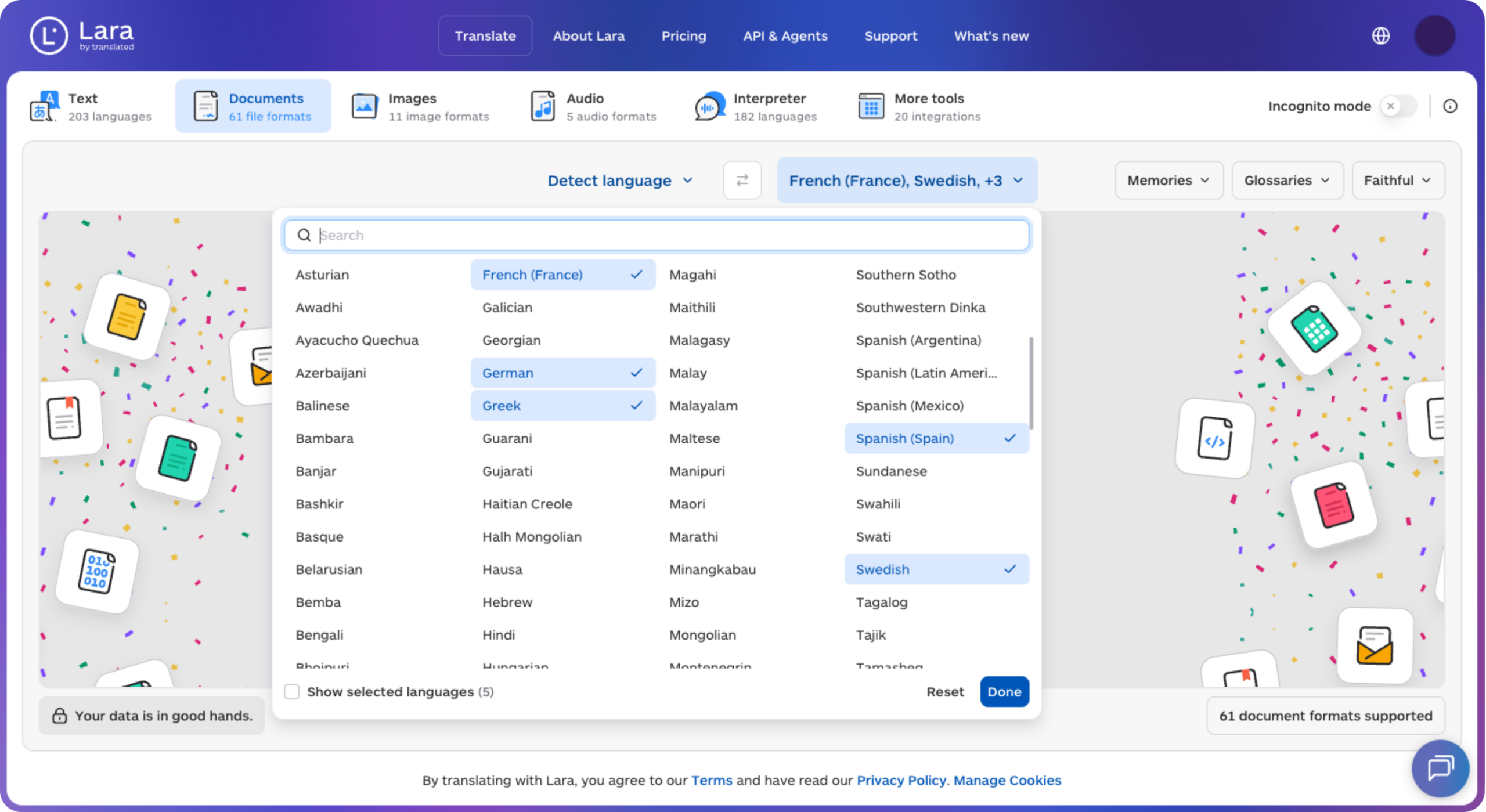
Check clause numbering, names, amounts, dates, and layout, then upload the approved version and place the signature fields. Keep signed files and their audit records unchanged. This document-transfer workflow does not assume a native integration with the signing platforms listed here.
Translate first, review, then send for signature
Prepare language versions with Lara Translate and complete the content review before collecting signatures.
Conclusion
The right tool depends on how many documents you send, how pricing scales with your team, and which tools it needs to connect to. Decide those three first, then compare plan limits.
Have a valuable tool, resource, or insight that could enhance one of our articles?
Send us an email at press@laratranslate.com
We’ll be happy to review it and consider it for inclusion to enrich our content for our readers! ✍️
Frequently asked questions
What is e-signature software?
E-signature software lets people sign documents online and records an audit trail of who signed and when. Most tools also offer templates, reminders, and integrations with cloud storage and CRM tools.
Are electronic signatures legally binding?
In the US, federal law generally prevents a signature or contract from being denied legal effect solely because it is electronic. That does not make every document or signing process valid: exceptions and other requirements still apply. Confirm the rules for the relevant jurisdiction and document type.
Do signers need an account to sign a document?
Often not. Several tools let signers open a link and sign without creating an account, and only the sender needs a subscription. Check each tool, since higher-security options may add authentication steps.
How much does e-signature software cost?
Some tools offer free plans with limited sending, while paid subscriptions may charge per user, sender, team, or usage. Compare annual versus monthly billing, minimum user counts, document allowances, API charges, and authentication add-ons before choosing.
What is an envelope in e-signature software?
An envelope is one sending of a document, or a set of documents, to one or more signers. Some plans cap the number of envelopes per user per month or year, so check the limit before you commit.
How do I send a contract for signature in several languages?
Prepare the required language versions before sending. Have the agreement reviewed, check names, amounts, dates, and clause numbering, and place signature fields in the final files. Then select the appropriate signing-interface language and keep the executed versions and audit records together.
This article is about
- E-signature software lets people sign, send, and track agreements online with an audit trail
- How e-signature tools compare on features, envelope limits, integrations, language support, and pricing
- Sending limits and per-user pricing sit on specific plans, so price the plan you will actually need
- Some tools suit sales documents, others small teams, developers, or open-source needs
- Cross-border agreements also need contracts translated and reviewed before signing
Useful links
- Main problems in the legal industry, and how technology solves them
- AI Translation for Legal and Medical Documents: Liability, Accuracy, and When Human Review Is Non-Negotiable
- Lara Translate: supported file formats
This article was produced by the Lara Translate content team. Lara Translate is an AI translation platform built by Translated, with more than 25 years of professional translation experience. Businesses use Lara Translate to translate contracts, NDAs, and terms for review before signature, across 200+ languages and 60+ file formats.