

Why use Lara Translate integrations? Because multilingual work is not a “localization task.” It is a workflow reality. If you sell, ship, hire, support, publish, or collaborate across borders, translation becomes part of daily operations, whether you planned for it or not.
The fastest teams do not translate more. They translate where work already happens, so effort stays flat as volume grows. That is exactly what Lara Translate integrations are for.
|
TL;DR
|
Why it matters
Multilingual work compounds. Every new market adds content, support load, product complexity, and brand surface area. Integrations are how you keep translation low-effort and trustworthy at scale, without turning it into a separate project.
Why use Lara Translate integrations
Translation workflows usually fail for two reasons:
- Effort explodes when teams copy-paste between tools, chase files, and rebuild formatting after translation.
- Risk explodes when translations are generated without context, so tone, terminology, and meaning drift across languages.
A better path is a workflow that lets you move fast and stay safe: translate inside your tools, control context and terminology, and add review gates only when the stakes rise.
Short answer
Using Lara Translate integrations gives you context-aware AI translation without leaving your tools, plus the option to upgrade to human review when content becomes business critical.
To stay consistent at scale, teams typically use context instructions, glossaries, translation memories, and the right translation style for each content type.
What “safe speed” looks like in real teams
Speed is not only turnaround time. It is how quickly you can ship multilingual work with confidence, without rework loops.
| You need to… | Typical failure mode | What a Lara Translate integration changes |
|---|---|---|
| Test a new market fast | Human translation is too costly to “try” | AI translation at scale, with control over context and style |
| Keep brand and terminology consistent | Different tools, different outputs, endless rework | Centralized context, glossaries, and translation memories across workflows |
| Translate continuously | Translation becomes a bottleneck and releases slip | Translate where content is produced and updated, with fewer handoffs |
| Stay safe on high stakes content | AI errors are easy to miss, expensive to ship | Use AI for speed, then route selected content to human review when needed |
Where integrations matter most
Lara Translate integrations remove friction at the exact points where multilingual work usually breaks, across content teams, localization teams, and operations.
1) Content and marketing workflows
- Translate product pages, campaigns, and docs while preserving structure and formatting.
- Keep tone consistent across languages by setting context and choosing the right translation style.
- Move fast for market testing, then tighten review when you find traction.
2) Product and localization workflows
- Translate continuously as strings and content change.
- Keep terminology stable with glossaries and translation memories.
- Reduce regressions by avoiding copy-paste workflows and disconnected tools.
3) Operations, support, and internal knowledge
- Make help centers, knowledge bases, and internal docs usable across teams and regions.
- Reduce the “translation tax” on support and ops by translating at the source.
- Make multilingual collaboration less dependent on a single bilingual person.
Explore all Lara Translate integrations
Pick the workflow surface that matches how your team already works and start there:
- Google Sheets integration
- TranslationOS integration
- Drupal integration
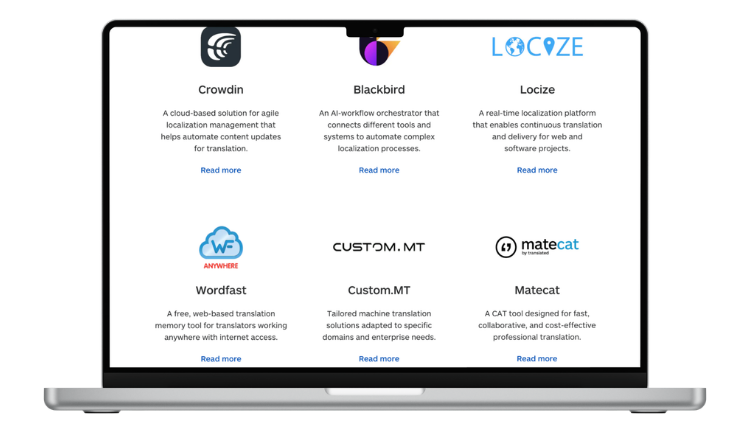
- Crowdin integration
- Blackbird.io integration
- Locize integration
- Wordfast integration
- Custom.MT integration
- Matecat integration
- Trados Studio integration
- MemoQ integration
- Parta.io integration
- n8n integration
Make translation part of your workflow, not a separate task
Pick an integration and test Lara Translate on real content. You will feel the difference as soon as you stop copy-pasting.
How to adopt Lara Translate integrations in 5 steps
- Start where translation already happens. Pick the tool your team uses daily (spreadsheets, CMS, localization platform, CAT tool, automation layer).
- Define your “safe speed” rule. Decide what can ship with AI and what needs a review gate.
- Set context once. Add domain, audience, tone, and preferred terms so translations match your reality.
- Lock terminology. Use glossaries and translation memories to keep names, features, and UI consistent.
- Upgrade review only where needed. When a market proves itself or content becomes high risk, add human review for those parts.
When to add human review
If you want speed without surprises, keep a simple rule set. Use AI-only for low-risk content, and add human review when any of these are true:
- Legal, regulated, or contractual content (terms, policies, compliance, procurement, HR).
- Revenue-critical pages (top landing pages, pricing, checkout flows, high-traffic SEO pages).
- Brand-sensitive messaging (taglines, campaigns, PR statements, executive comms).
- Safety or user impact is high (medical, financial, instructions, warnings, onboarding flows).
- The cost of being wrong is higher than the cost of review (reputation, liability, churn, rework).
Need a trusted workflow that combines both? See how it works here: AI + human translation.
The real business case: multilingual as a compounding advantage
Multilingual work compounds. Each new market adds content, support load, product complexity, and brand surface area.
If translation stays manual, scaling becomes painful. If translation stays disconnected, quality drifts and teams lose trust. With Lara Translate integrated into your stack, multilingual becomes a repeatable system: low effort for day-to-day work, higher assurance when it matters.
Go multilingual without increasing your workload
Choose an integration, translate inside your tools, and keep the option to add human review when your content gets serious.
FAQ
Do Lara Translate integrations only make sense for localization teams?
No. Integrations are valuable whenever translation is recurring work: marketing, product, support, ops, legal, HR, sales, and any team collaborating across languages.
Is AI translation reliable enough for business use?
It can be, if it is context-aware and you keep control over terminology, tone, and risk. The workflow matters as much as the model. The safest approach is using AI for speed and adding human review for high stakes content.
When should we add human review?
Add human review when mistakes become expensive: regulated content, contracts, sensitive user-facing messaging, high-traffic pages, and anything tied to revenue or reputation. Many teams start with AI to test markets, then upgrade review once traction appears. If you want a ready-made path, start here: AI + human translation.
What is the fastest way to start?
Pick one integration that matches your current workflow and run a small pilot: one market, one content type, one glossary. Prove speed, then expand.
Where can I see all available integrations?
Browse the full list here: Lara Translate integrations.
This article is about:
- Why multilingual workflows become a scalability bottleneck in any industry.
- Why use Lara Translate integrations to reduce effort and improve consistency through context and terminology control.
- How to adopt a “safe speed” translation workflow: go fast with AI, then add human review when needed.
- Where integrated translation has the biggest impact: marketing, product, support, and operations.
- Where to start: a complete list of integration options across your stack.