

Paste a recording into a generic tool and you often get a transcript that reads well and is quietly wrong. A voice memo, podcast episode, interview, or meeting recording carries information that needs to travel across languages, but translating audio is not the same as translating a document. Before the words can be translated, they first have to be recognized, transcribed, and checked. An error in that first step passes straight into a translated sentence that still sounds natural.
This guide explains how to translate audio files with AI from recording to translated text, and how to handle the limits that most often affect the result: background noise, unclear speech, specialist terminology, and recordings with multiple speakers. The same process adapts to a short voice message, a long-form interview, or an entire podcast episode, and it helps teams plan realistic review time and responsibilities.
|
TL;DR
|
What happens when AI translates an audio file?
An audio translation workflow gives you one of three outputs: a source-language transcript, a translated transcript in another language, or a new audio track in the target language. Which one you need decides how closely the output should follow the recording and how much review it takes.
These results serve different purposes. A translated text may be needed for interview analysis, meeting notes, articles, subtitles, or searchable archives. A translated audio file is often more useful for training content, narrations, podcasts, or spoken instructions.

The process behind audio-to-text translation usually combines speech recognition and translation. An error in the first stage can pass into the second even when the translated sentence sounds natural. That is the whole reason a reliable workflow checks the source transcript before treating the translation as final.
1. Define the output before you start
Start with the intended use of the content. Do you need a full transcript, a translated summary, subtitles, or a new spoken version? The answer changes how closely the output should follow the recording and how much review it requires.
A verbatim transcript preserves repetitions, false starts, fillers, and incomplete sentences. It suits research, legal review, or detailed interview analysis. An edited transcript removes some spoken-language features to make the text easier to read. A summary captures only the main information.
The same distinction applies when you translate voice memos. A short personal message may only need a clear rendering of the meaning, while a customer complaint, medical note, or business instruction may need every detail preserved. Define the target language, audience, format, and approval level before uploading the file. This prevents a common problem: producing a technically complete transcript that does not fit the way the content will actually be used.
2. Improve the recording at the source
The quality of the translation begins with the quality of the recording. Clear speech, stable volume, and limited background noise make it easier for speech-to-text systems to identify words correctly. Place the microphone close enough to the speaker and avoid rooms with strong echo. Music, traffic, keyboard noise, or nearby conversations all compete with the voice.
If the recording already exists, listen to it once before uploading and note any sections that are hard to understand. For interviews and meetings, ask people to speak one at a time whenever possible, because overlapping voices cause missing phrases or incorrect speaker changes. A short pause between turns makes the transcript easier to follow.
Prepare a list of names, acronyms, product terms, and technical expressions that appear in the audio. Correct spellings and approved terminology become useful later, especially when the recording covers a specialist subject.
3. Prepare the file and check confidentiality
Before using an audio translator, confirm that the file opens correctly and contains the complete recording. Keep the original untouched, then create a working copy if you need to remove long silences or sections that should not be processed. Common formats include MP3 and WAV, though accepted formats and file limits depend on the platform, so check those requirements before converting or compressing the audio.
Long recordings can be divided into logical sections when this makes review easier. A podcast might be separated by episode segment, while a recorded interview can be divided by topic. Keep file names consistent so that the audio, transcript, and translation stay easy to match.
Audio can contain personal data, unpublished information, or confidential conversations. Before uploading voice messages, interviews, or meeting recordings, check how the service handles storage, retention, access, and model training. The Lara Translate article on how secure AI translation services protect data provides a practical checklist for evaluating these controls.
4. Plan for multiple speakers and mixed-language audio
A recording with one clear speaker is generally easier to process than a meeting, panel, or group interview. Multiple speakers introduce turn changes, interruptions, and overlapping speech, all of which make the transcript less reliable. Some transcription systems use speaker diarization to separate voices and label turns, but those labels still need review. A system may distinguish Speaker 1 from Speaker 2 without knowing who they are, and a brief interruption can be assigned to the wrong person.
Mixed-language recordings add another layer. A speaker may switch language for a quotation, a product name, or a technical phrase. When you know the main source language, select it rather than relying entirely on automatic detection. For a recorded interview, decide whether speaker names and question-and-answer structure must be preserved. If your chosen tool is built for one main speaker, create and review a speaker-labeled transcript first, then translate the text separately.
Turn a clean transcript into an accurate translation
Once your source transcript is reviewed, Lara Translate can translate it with your glossaries and translation memories, so names, product terms, and technical language stay consistent across the file.
5. Generate and correct the source transcript
Never treat the first transcript as final. Read it with the audio playing and correct every passage where the wording affects the meaning, because this is where the hardest errors hide. Pay particular attention to names, numbers, dates, currencies, email addresses, web addresses, and specialist terminology. Speech recognition can turn an unfamiliar name into a common word or confuse similar-sounding numbers, and the resulting sentence may still look plausible.
Add punctuation and paragraph breaks where they help the reader follow the content. For interviews, keep questions and answers separate. For meetings, preserve agenda changes and speaker labels. For podcasts, divide the transcript into clear sections. Then decide how much spoken-language texture to keep: repetitions and fillers may matter in a verbatim record but distract in an article or internal summary. Make that editorial choice before translation so every language version starts from the same approved source.
Do not begin the final translation until the transcript is stable. If the source text changes afterwards, update the translated version systematically rather than editing isolated passages without version control.
6. Translate the transcript with context
A clean transcript gives the translation system a stronger starting point, but context is still essential. Explain what the recording is about, who is speaking, who will read the translation, and how formal or literal the result should be. The word choice for a podcast conversation differs from the language needed for a board meeting, a research interview, or a technical training recording. Context helps the system interpret ambiguous expressions and preserve the right register.

Use a glossary for names, acronyms, product terminology, campaign language, or recurring technical terms. Translation memories help too when the audio belongs to a series of related recordings, such as training modules or recurring interviews. After translation, review the target text first for meaning and readability, then compare it with the source transcript and the audio. The Lara Translate guide to AI translation quality assurance explains how structured post-editing combines automated checks with linguistic and subject-matter review.
7. Review and export the final content
The final review compares three elements: the original audio, the corrected source transcript, and the translated text. Each one reveals a different type of issue. Listen again to unclear passages, then check names, numbers, terminology, speaker labels, and section order. A qualified reviewer should approve content intended for publication, research, customer communication, or other high-impact uses.
Choose the export format according to the next step. DOCX or TXT suits a readable transcript. Structured data may be needed for analysis. Video and podcast workflows often require subtitle files such as SRT or VTT, and subtitles need a separate review because timing and line length affect readability. The guide on how to translate an SRT file online explains how to preserve timecodes and check translated subtitle lines before publication.
Keep the original recording, approved source transcript, translated text, and final published version in separate, clearly named files. That makes later updates easier when the same content is reused for articles, subtitles, summaries, or localized audio.
How to translate audio files with Lara Translate
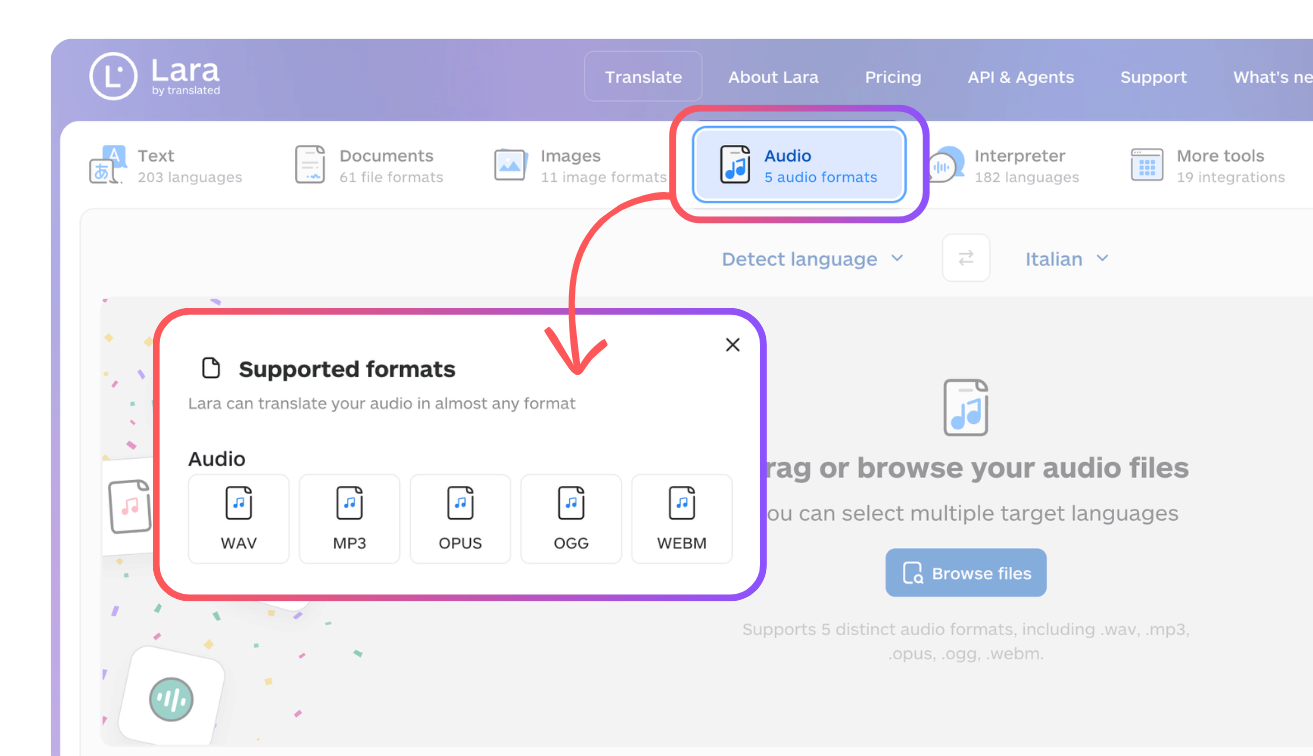
Lara Translate offers two audio workflows for different outputs. In the web interface, the Audio tab provides audio-to-audio translation: you upload a recording, select the source and target languages, and receive a translated audio file. The web workflow accepts WAV, MP3, OPUS, OGG, and WEBM files across 69 languages, and a single file can run up to 200 MB and two hours in duration.
For programmatic workflows, Lara Translate’s developer tools also support audio-to-text translation and transcription. The process returns both the recognized source text and the translated text, and it can use translation memories and glossaries to keep terminology consistent. If you work across many file types, the list of supported file formats shows what else Lara Translate handles alongside audio.
Lara Translate Audio is currently designed for recordings with one primary speaker, such as narrations, voiceovers, training material, spoken instructions, or single-speaker podcasts. Multiple-speaker audio, speaker separation, and turn-by-turn voice preservation are not currently supported. That distinction matters when you want to translate a recorded interview or meeting. For those files, the safest workflow is to prepare a reviewed transcript with clear speaker labels before translating the text. For a narration or a single-speaker voice memo, the direct audio workflow may be the right fit.
Whichever output you choose, review the result before publication. Audio quality, names, numbers, terminology, and context all affect both transcription and translation, so human review stays important for content that has to be accurate, clear, or ready for public use.
Translate your audio content with Lara Translate
Upload a voice memo, narration, or single-speaker podcast and turn it into translated audio across 69 languages, or use the developer tools to get transcript and translation together.
A reliable audio translation starts before upload
The most effective way to translate audio files is to manage the work from the recording onward. Define the output, improve the sound, prepare the file, correct the transcript, translate it with context, and review the final version against the original audio. Each step protects the next: clearer audio supports a more reliable transcript, and a reviewed transcript gives the translation a stronger foundation. The result is translated content that is easier to understand, reuse, and publish.
Have a valuable tool, resource, or insight that could enhance one of our articles?
Send us an email at press@laratranslate.com
We’ll be happy to review it and consider it for inclusion to enrich our content for our readers! ✍️
FAQs
How do I translate a voice message?
Save or export the message in a supported audio format, then upload it to an audio translation tool. Choose whether you need translated text or translated audio, select the source and target languages, and review the output before you use it.
Can AI translate an audio file into another language?
Yes. AI tools can produce a translated transcript or a new audio track, depending on the service. Review the output whenever the recording contains unclear speech, names, figures, specialist terminology, or confidential information.
How do I translate a recorded interview?
Create and correct a source-language transcript, preserve the speaker labels and question-and-answer structure, then translate the approved text. Recordings with overlapping voices usually need extra manual review.
What is the difference between transcription and audio translation?
Transcription converts speech into written text in the source language. Audio translation transfers that content into another language, either as translated text or as a new spoken recording.
Which audio formats does Lara Translate support?
Lara Translate supports WAV, MP3, OPUS, OGG, and WEBM files for audio translation. A single file can be up to 200 MB and two hours long, across 69 languages.
This article is about
- How to translate audio files with AI, from recording to a reviewed translation
- The difference between transcription and audio translation
- Translating voice memos, podcasts, and recorded interviews
- Why multi-speaker recordings need a labeled transcript before translation
- How Lara Translate handles audio-to-audio and audio-to-text workflows, with formats, size, and language limits
Sources
- Lara Translate, Audio Translation (formats, 200 MB / 2 hours, 69 languages)
- Lara for Developers, Translate Audio (audio-to-text, glossaries and translation memories, one-primary-speaker limitation)
- Lara Translate, Supported File Formats
This article was produced by the Lara Translate content team. Lara Translate is an AI translation platform built by Translated, with more than 25 years of professional translation experience. Teams use Lara Translate to translate voice memos, narrations, and single-speaker podcasts into translated audio and text, across 200+ languages and 60+ file formats.