

It is Tuesday morning and Marta, who runs project delivery at a mid-sized language service provider, opens a job that would have ruined her week a year ago: 60,000 words of product documentation into eight languages, first batch due in four days, spread across six freelance translators who all work in Wordscope. The words are the easy part. The hard part is keeping the client’s product names, legal disclaimers, and preferred phrasing identical across six people and eight languages, on a deadline, without a round of rework that eats the margin.
This is the everyday reality of agency and in-house translation teams, and it is exactly the gap the new Lara Translate Wordscope integration is built to close. By adding Lara Translate’s adaptive AI as a private machine translation engine inside Wordscope, the same context-aware suggestions reach every translator on the project while the shared translation memories, glossaries, and quality checks keep doing their job.
|
TL;DR
|
The problem: one project, eight languages, six translators, four days
Go back to Marta’s Tuesday. The manuals are technical, the client is particular, and the terminology is non-negotiable: a mistranslated safety warning or an inconsistent product name is the kind of error that gets an agency dropped. Her translators are skilled, but they are working in parallel, each pulling from the shared translation memory and glossary the project was set up with. The pressure is not on their language ability. It is on throughput and consistency at the same time.
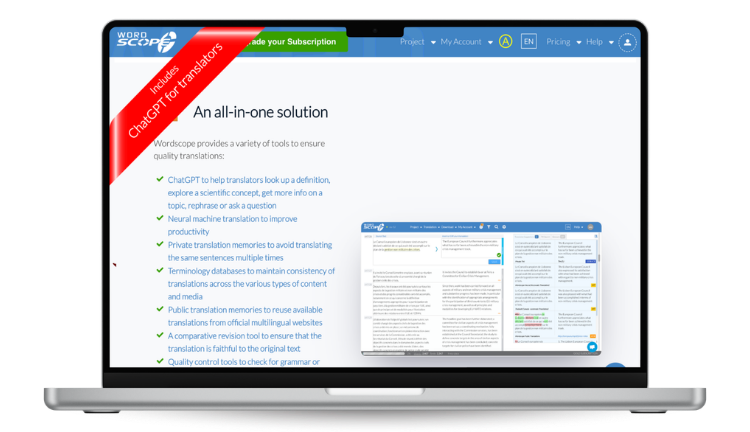
Wordscope is where that work already happens. It is a cloud-based computer-assisted translation (CAT) platform, used by professional translators and teams across dozens of countries, that combines private translation memories, terminology databases (including access to official glossaries such as IATE, TERMIUM, and UNTERM), quality-control checks, and collaboration tools in the browser. Wordscope solves the coordination and review side of the job well. What agency project managers keep asking for is a way to give every translator a strong, context-aware first draft to edit, rather than starting each segment from scratch, without introducing a separate tool that ignores the memories and terminology the project depends on.
That is the specific gap. Marta does not need another standalone translation app. She needs the productivity of adaptive AI to show up inside the environment her team already works in, governed by the same linguistic assets. That is what the integration delivers.
What the Lara Translate Wordscope integration actually does
The integration lets Wordscope users add Lara Translate as a private machine translation engine. Once connected, Lara Translate’s engine produces intelligent, context-aware translation suggestions directly inside the Wordscope editor, alongside the existing workflow rather than in place of it.
Three things make that meaningful for a production team. First, the suggestions are context-aware: Lara Translate combines large language model reasoning with neural machine translation, so it weighs the surrounding sentence and domain instead of translating word by word. Second, the integration preserves Wordscope’s own assets: your private translation memories, terminology databases, and quality-control tools keep operating exactly as before, so the AI accelerates the draft while your controls guard the output. Third, the coverage is broad, spanning 200+ languages and working across all of your Wordscope projects and the file formats the platform already supports, from Word, Excel, and PowerPoint to HTML, InDesign, and SRT subtitle files.
In practice, a translator on Marta’s project opens a segment, sees a Lara Translate suggestion that already reflects the sentence’s context, checks it against the shared memory and glossary, and edits rather than composes. The project manager gets faster first passes without loosening the terminology grip that keeps the client happy.
How the integration helps agency and in-house teams
Consistency stays under your control
The suggestions coexist with Wordscope’s private translation memories and terminology databases. The AI proposes; your assets and QC checks dispose. For a team running one glossary across several freelancers, that is the difference between consistency by hope and consistency by system.

Delivery gets faster
Automated AI suggestions sit alongside the review workflow, so translators spend more time editing and less time drafting from zero. Across a large multi-language job split over a team, small per-segment savings compound into the kind of turnaround that lets an agency say yes to a tighter deadline.
The learning curve is close to zero
Translators keep working in Wordscope, the tool they already know. There is no new editor to learn and no export-import shuffle between applications. The engine simply becomes another suggestion source inside the interface, which is what makes it realistic to roll out across a whole team rather than one power user.
Bring adaptive AI into your Wordscope workflow
See how Lara Translate plugs into Wordscope as a private MT engine and keeps your memories and terminology in charge.
How to set up the Lara Translate Wordscope integration
Connecting the two takes two stages: create your API credentials in Lara Translate, then register Lara Translate as a private MT engine in Wordscope. You will need an active Lara Translate account with API access and your Wordscope settings open.
Step 1: Generate your Lara Translate API credentials
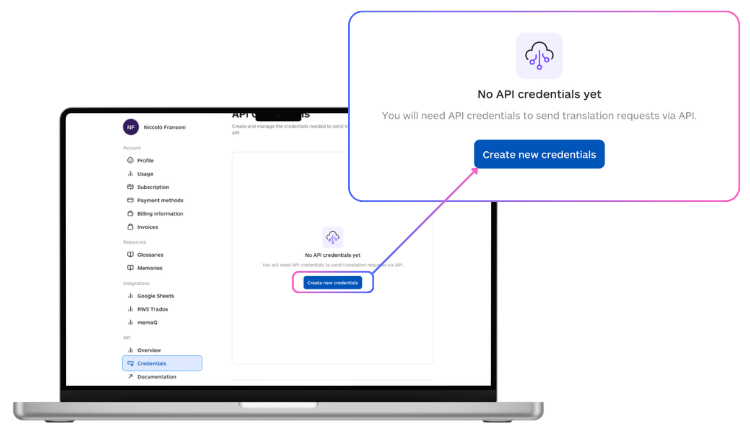
In your Lara Translate account, open My Account, then API, then Credentials. Click Create new credentials and give them a recognizable name (for example, “Wordscope”). Select Create, then immediately click Download Credentials and save the file somewhere secure. This step matters: your Access Key Secret is shown once, at creation, and cannot be retrieved afterward. If you lose it, you will need to create a new key. This gives you two values, an Access Key ID and an Access Key Secret, which Wordscope will ask for next.
Step 2: Add Lara Translate as a private MT engine in Wordscope
In Wordscope, open Settings and go to the Machine Translation tab. Click Add a private MT engine, select Lara Translate from the list, and enter your Access Key ID and Access Key Secret. Click Confirm. Once Wordscope validates the credentials, Lara Translate is live across all of your Wordscope projects, and its suggestions start appearing in the editor for your team.
That is the whole setup. For teams, one project manager typically creates the credentials and configures the engine, and every translator on the workspace works with the suggestions from there.
Ready to connect Lara Translate and Wordscope?
Follow the full step-by-step guide, including where to find your Access Key ID and Access Key Secret.
For a busy agency, the value of the Lara Translate Wordscope integration is that it adds speed to a workflow without adding risk to it. The AI raises the floor on every first draft, and Wordscope’s memories, glossaries, and checks keep the ceiling exactly where the client expects it. Marta’s Tuesday is still a big job, but it is now a job her team can deliver on time and on terminology, which is the whole point.
Have a valuable tool, resource, or insight that could enhance one of our articles?
Send us an email at press@laratranslate.com
We’ll be happy to review it and consider it for inclusion to enrich our content for our readers! ✍️
Frequently asked questions
What is the Lara Translate Wordscope integration?
It is a connection that adds Lara Translate as a private machine translation engine inside Wordscope. After you set it up, Lara Translate’s context-aware AI produces translation suggestions directly in the Wordscope editor, while Wordscope’s private translation memories, terminology databases, and quality-control tools continue to run as usual.
Do I need a paid Lara Translate plan to use it in Wordscope?
You need a Lara Translate account with API credentials. The free plan lets you create a single API key with a limited monthly character allowance, while the Pro and Team plans raise the rate limits and volume for production work. For an agency running high-volume, multi-language projects, a paid plan is the practical choice.
Where do I find my Lara Translate Access Key ID and Access Key Secret?
In your Lara Translate account, go to My Account, then API, then Credentials, and click Create new credentials. After you name and create the key, click Download Credentials right away and store the file securely. The Access Key Secret is displayed only once at creation and cannot be recovered later, so if you lose it you will need to generate a new key.
Does the integration replace my translation memories and glossaries in Wordscope?
No. The integration preserves Wordscope’s private translation memories, terminology databases, and quality-control tools. Lara Translate adds AI suggestions on top of that setup, so your existing linguistic assets keep governing consistency and your review process stays in place.
How many languages does the integration support?
Lara Translate supports 200+ languages, and the integration makes those available inside Wordscope across all of your projects. It also works with the file formats Wordscope already handles, including Word, Excel, PowerPoint, HTML, InDesign, and SRT subtitle files.
Is my content kept private?
Lara Translate is built by Translated, an Italian, GDPR-compliant company, and it offers a zero-retention Incognito mode for sensitive material as well as a data processing agreement for organizations that require one. Wordscope’s own private memories and workspace controls apply to your projects as well.
This article is about
- What the Lara Translate Wordscope integration is: Lara Translate added as a private machine translation engine inside the Wordscope CAT tool.
- Who benefits most: language service providers and agency or in-house teams that need faster delivery without losing terminology consistency.
- What the integration does: context-aware AI suggestions in the Wordscope editor across 200+ languages, alongside existing memories and glossaries.
- How it helps: faster first drafts, controlled consistency, and a near-zero learning curve because translators stay in Wordscope.
- How to set it up: create API credentials in Lara Translate, then add Lara Translate as a private MT engine in Wordscope’s Machine Translation settings.
- What to watch: the Access Key Secret is shown only once at creation, so download and store it immediately.
Sources
- Lara Translate + Wordscope integration
- Using Lara Translate in Wordscope (setup guide)
- How to generate an API key for Lara’s API
- Wordscope (CAT platform)
This article was produced by the Lara Translate content team. Lara Translate is an AI translation platform built by Translated, with more than 25 years of professional translation experience. Language service providers and translation teams use Lara Translate inside Wordscope and other CAT tools to deliver faster across 200+ languages and 60+ file formats, while keeping their translation memories, glossaries, and quality control firmly in charge.