

Most AI tools can produce a translation. What they can’t do is translate correctly when domain context matters, and terminology needs to stay consistent across dozens of documents. A general-purpose model given the Italian phrase “la terra è rossa” in a tennis conversation will likely return “The earth is red.” The correct output is “The clay is red.”
That gap is not a prompt problem. It’s a structural one, and it’s exactly what the Lara Translate MCP server is designed to close. This guide covers how it works, what it does, and how to connect it to your AI environment.
|
TL;DR
|
The Lara Translate MCP server connects specialized Translation Language Models to Claude Desktop and any MCP-compatible environment. Send a translation request with a context description alongside the text, and Lara Translate resolves ambiguity at the sentence level. Add translation memories and glossaries, and every output stays consistent with your existing terminology across every project and every language pair.
Why General AI Gets Translation Wrong
Professional translation fails not because AI isn’t capable. It fails because the AI being used doesn’t know your terminology, your glossary, or the context behind the content it’s translating. A general-purpose model given the Italian phrase “la terra è rossa” in a tennis conversation might return “The earth is red.” The correct translation is “The clay is red.” That difference matters to your readers, your clients, and your brand.
Context is everything. And most translation tools can’t carry it.
The Model Context Protocol (MCP) enables context-aware, terminology-managed translation at scale. Lara Translate’s dedicated MCP server connects specialized Translation Language Models directly to any MCP-compatible AI environment. Hence, translation tasks go to a model that was built for them, not a general-purpose one improvising on the fly.
What Is the Model Context Protocol?
MCP is an open standard created by Anthropic. It gives AI models a universal, structured way to communicate with external tools, databases, APIs, and services. Think of it as a common language that replaces dozens of bespoke integrations. Before MCP, connecting an AI model to a new tool meant building a custom pipeline for every system. Now one protocol handles all of it.
Three components make up the architecture. MCP Hosts are the AI-powered environments that need external capabilities: Claude Desktop is the most widely used example, but any MCP-compatible agent qualifies. MCP Clients sit in the middle, translating between the host and the tools it needs. MCP Servers are where capabilities actually live: files, databases, APIs, and translation engines like Lara Translate.
| Component | Role | Example |
|---|---|---|
| MCP Host | The AI environment that needs external capabilities | Claude Desktop |
| MCP Client | Handles communication between the host and external tools | Built into the host application |
| MCP Server | Exposes tools and data for the host to use | Lara Translate MCP server |
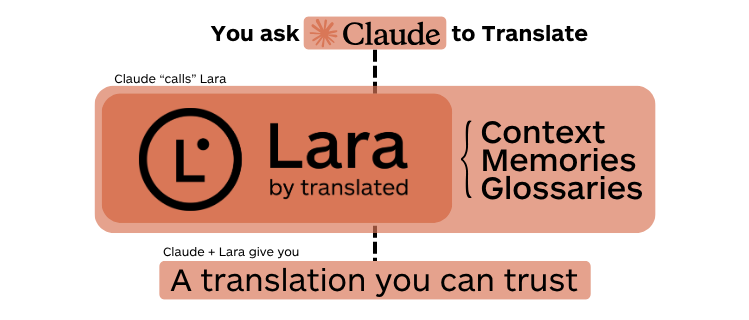
When you connect Lara Translate’s MCP server to Claude Desktop, Claude can request translations, look up glossary terms, retrieve translation memory entries, and apply domain-specific context, all without leaving the conversation interface. The translation stack becomes conversational. That’s not a small thing.
Why General LLMs Fall Short at Translation
General-purpose models were not designed for professional translation. They’re fluent, but fluency isn’t precision. When a model encounters domain-specific terminology, it improvises. When it translates a long document, it has no memory of the choices it made earlier in the same project. When cultural nuance demands a decision that isn’t in the training data, it guesses.
That’s not a prompt engineering problem. It’s a structural one.
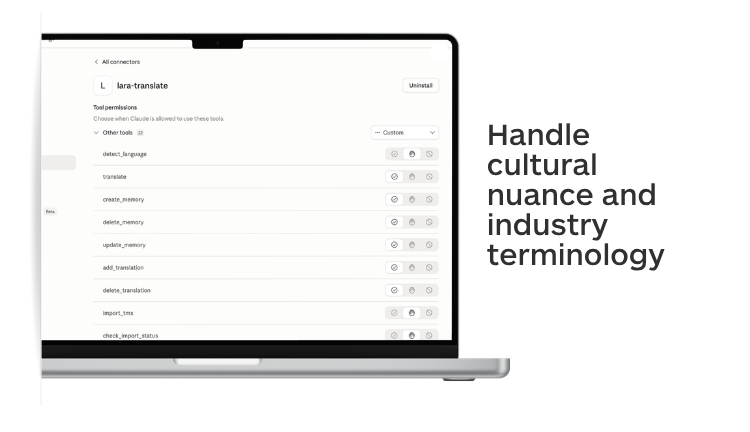
Lara Translate addresses it by routing translation tasks to Translation Language Models (T-LMs): AI models trained on billions of professionally translated segments. These models handle cultural nuance and industry terminology with a precision that general-purpose models cannot reliably deliver. They’re also computationally efficient for translation workloads, which matters when you’re processing large volumes of content across multiple language pairs.
Non-English language pairs are a particular strength. Most general-purpose LLMs were predominantly trained on English-centric data. For European, Asian, and emerging-market language pairs, that gap shows in the output. Lara Translate was built with those pairs as a priority, not an afterthought.
| Capability | General LLM | Lara Translate MCP |
|---|---|---|
| Training data | Broad, general-purpose | Billions of professionally translated segments |
| Context awareness | Requires prompt engineering | Native context injection per request |
| Translation memory | None | Built-in; import TMX files from any CAT tool |
| Glossary enforcement | None | Full glossary management via API |
| Non-English pairs | English-centric training | Purpose-built for non-English pairs |
| HTML preservation | Variable; often breaks markup | Preserves tags, styles, links, and attributes |
| MCP server | Not available | Dedicated MCP server (NPX or Docker) |
What the Lara Translate MCP Server Does
The Lara Translate MCP server acts as a bridge between Lara Translate’s Translation Language Models and the MCP ecosystem. It exposes a full set of translation tools that any connected AI agent can call directly. Three capabilities are worth understanding in depth.
| Capability | What it does | Key MCP tools |
|---|---|---|
| Context-aware translation | Resolves lexical ambiguity using a plain-language context description passed alongside the source text | translate (with context parameter) |
| Translation memories | Stores approved translations and reuses them across projects for consistent output | create_memory, add_translation, import_tmx |
| Glossary management | Enforces brand terminology and domain vocabulary across every translation automatically | create_glossary, add_glossary_entry, import_glossary_csv |
Context-Aware Translation
When you pass a translation request to Lara Translate via MCP, you can include a natural-language context description alongside the source text. That context resolves ambiguity at the sentence level, and the difference in output is often significant.
The example from the Lara Translate developer documentation makes this concrete. “La terra è rossa” translates literally as “The earth is red.” In everyday usage, that works. In a conversation with a tennis player, “terra” refers to a clay court. Lara Translate, given the context “Conversation with a tennis player,” returns “The clay is red.” A general model, given the same phrase without context, almost certainly doesn’t.
The translate tool supports three optional parameters alongside the source text: a context description (as shown above), custom instructions for tone, formality, or domain, and automatic source language detection, so you don’t need to specify the input language manually. The model uses whichever combination you provide to make better choices without requiring you to rewrite the source text first.
Translation Memories
Translation memories let you store approved translations and reuse them across projects. When the same phrase appears in a new document, the correct version is already there. Consistency isn’t left to chance or to the model’s improvisation.
The MCP server exposes a full set of memory management tools: list_memories, create_memory, add_translation, delete_translation, and import_tmx for bulk import from existing translation memory files. If your team has a TM from a previous tool or vendor, you can bring it in and use it immediately. No rebuilding from scratch.
Glossary Management
Glossaries enforce brand-specific terminology and domain vocabulary across every translation, regardless of who or what is doing the translating. You define the terms. Lara Translate applies them.
Tools include list_glossaries, create_glossary, add_glossary_entry, import_glossary_csv, and export_glossary. That means you can manage terminology programmatically, import from existing spreadsheets, and audit term usage across projects. For organizations with established brand terminology guides, this is how you enforce them at scale without relying on translator memory.
Connect Lara Translate to your MCP workflow
Context-aware translation, terminology management, and translation memory, directly inside Claude Desktop or any MCP-compatible environment.
MCP-Connected Translation in Production
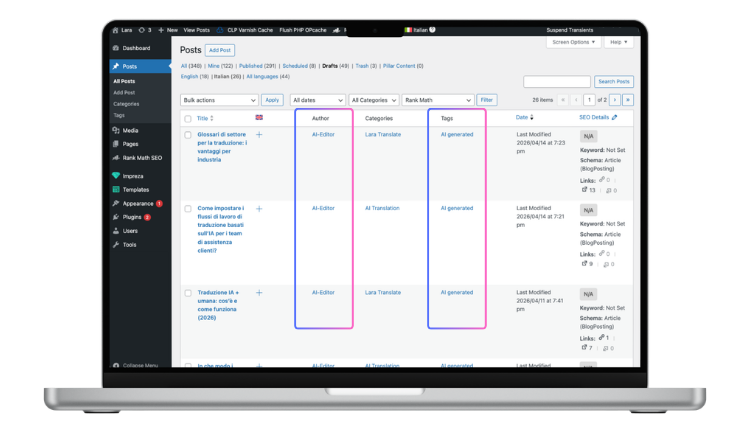
Here’s a real example of what this looks like running live. Lara Translate operates an automated daily workflow that uses Claude, the Lara Translate MCP server, and the WordPress REST API to translate English blog posts into Italian and save them as drafts for human review.
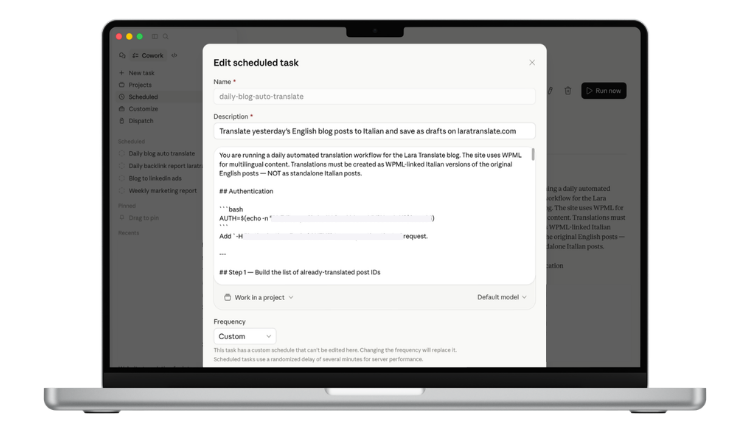
Claude queries the WordPress API to find posts published the previous day that don’t yet have Italian versions. For each post, it passes the title and full HTML content to the Lara Translate MCP server. Lara Translate handles the translation, preserving all HTML tags, inline styles, links, and image attributes. Brand names stay as-is. Claude then posts the translated content back to WordPress as a draft, linked to the original English post via WPML. A human editor checks the output and publishes.
The workflow runs on a schedule. No manual handoff, no per-word cost, no delay between publishing in English and having a draft ready in Italian. Human judgment stays where it actually adds value: the final check, not the mechanical work.
That’s what MCP enables. Not AI replacing translators, but AI handling the repetitive parts so translators can focus on decisions that require expertise.
Getting Started with Lara Translate MCP
You need a Lara Translate account and a valid API key pair to get started. Create a free account, then follow the API key setup guide to generate your credentials. Node.js needs to be installed if you’re running the server via NPX.
From there, connect the MCP server to your preferred host. If you’re using Claude Desktop, the Lara Translate and Claude Desktop installation guide walks through each configuration step. For a general overview of MCP server setup, Anthropic’s MCP quickstart for users is a useful primer.
Useful resources:
- Getting started with Lara Translate MCP
- How to install Lara Translate in Claude Desktop
- API key setup guide
- Translation modes: Learning vs. Incognito
- How glossaries work in Lara Translate
Try Lara Translate in your own workflow
See how context-aware translation, glossaries, and translation memory work together inside an MCP-connected environment.
Frequently Asked Questions
What is the Lara Translate MCP server?
It is a dedicated MCP server that connects Lara Translate’s specialized Translation Language Models to any MCP-compatible AI environment. It exposes tools for translation, context injection, translation memory management, and glossary control, all callable from within a connected AI agent like Claude.
Which AI environments support MCP?
Claude Desktop is the most widely used MCP host, but the protocol is open. Any environment built on the MCP standard can connect to the Lara Translate server. Custom agents, automation platforms, and development environments with MCP support all qualify. The server is also available on Docker Hub for teams running their own infrastructure.
How does context-aware translation work in Lara Translate?
When you send a translation request via MCP, you can include a plain-language context description alongside the source text. Lara Translate uses that context to resolve ambiguous terms at the sentence level. A word like “terra” in Italian means different things in everyday conversation versus a sports context. The context description tells Lara Translate which meaning applies, so the output reflects intent, not just the literal text.
Can I import existing translation memories?
Yes. The import_tmx tool accepts standard TMX format files, which most translation management systems and CAT tools can export. If you have an existing TM from a previous provider or tool, you can import it and start using it immediately without rebuilding from scratch.
Is my content kept private?
Lara Translate offers Incognito Mode specifically for confidential content. When enabled, translations are not used to improve the model and are not stored after the session ends. For enterprise deployments with strict data governance requirements, this is the recommended setting. See the Translation modes guide for details.
How is Lara Translate different from using ChatGPT for translation?
ChatGPT is a general-purpose model. It was not trained specifically for translation, has no built-in translation memory or glossary enforcement, and has no MCP server. Lara Translate uses Translation Language Models trained on billions of professionally translated segments, exposes structured tools for terminology management and memory, and integrates directly into MCP-compatible environments. The difference shows most clearly in consistency, cultural accuracy, and terminology control across large volumes of content.
Is there a free plan?
Yes. Lara Translate has a free plan that includes API access. See the free plan details and the free API tier for current limits and included features. For teams, the Team plan adds shared translation memories, glossary management across members, and higher API limits.