

March 2026 extended Lara’s reach in six directions: into the AI tool-use benchmarking ecosystem, into MCP-native glossary management, into Android’s system-level translation layer, into audio output fidelity, into structured text handling, and into PayPal-powered billing. This month’s updates are a mix of industry recognition and product polish, with a thread running through all of them: translation that works where your users and workflows already are. Here is a quick overview of Lara Translate March 2026 updates: what shipped and why it matters.
|
TL;DR
|
What changed in Lara Translate in March 2026, and why does it matter?
In March 2026, Lara Translate was selected by Scale AI as one of 36 MCP servers in the MCP Atlas benchmark, the industry’s reference suite for evaluating AI tool-use. The MCP server also shipped a full glossary management toolkit on March 26, bringing terminology control directly into AI environments. Alongside that, Lara added Voice Gender Selection for audio-to-audio translation, support for setting Lara as the default translation app on Android, Table Support in the text editor (including Alternative Translations, Edit Mode, and Add to Memory for tables), a migration path for ModernMT users transitioning to Lara through CAT tool plugins, and PayPal as a payment option.
If translation is part of how you build or ship, March is about two things happening at once: the broader AI ecosystem starting to treat Lara as a reference tool, and the product getting sharper in places that slow people down every day — audio output control, mobile defaults, structured text, and migration friction. The goal is the same as always: fewer manual steps, more output you can actually use.
What are the March 2026 updates?
These March 2026 release notes cover seven updates: the MCP Atlas recognition, the MCP Glossary Management toolkit, Voice Gender Selection for audio, Android default app support, Table Support with a full editing toolkit in the editor, the ModernMT migration path, and PayPal payment support. Each one addresses a real friction point: either how Lara is positioned in the wider AI ecosystem, or how it handles specific workflows that previously required workarounds.
Is Lara Translate now part of Scale AI’s MCP Atlas benchmark?
Yes. Scale AI selected the Lara Translate MCP server as one of only 36 real-world MCP servers included in MCP Atlas, their comprehensive benchmark for evaluating how well AI models can use tools in the real world. Of those 36 servers — spanning search, code execution, databases, APIs, and productivity tools — Lara is the designated translation tool, accounting for 7% of all evaluation tasks.
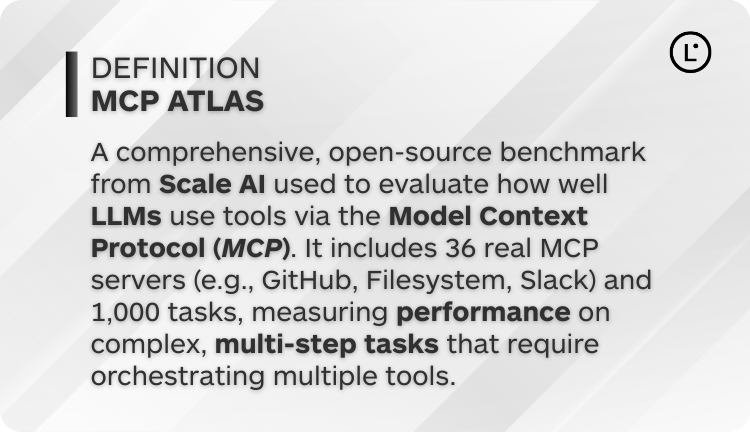
- MCP Atlas uses real, open-source MCP servers pinned to specific versions for reproducibility — Lara was chosen because it is a production-grade implementation, not a demo.
- When AI labs and researchers test whether a model can correctly use a translation tool, they use Lara. That is a meaningful signal about where the industry sees the bar for translation in LLM-integrated workflows.
- The Lara Translate MCP server supports language detection, context-aware translation, translation memory management, and custom instructions — the full capability stack that serious AI pipelines need.
If you are building AI-powered products and need a translation layer that is reliable, context-aware, and now validated by Scale AI’s evaluation infrastructure, the Lara MCP server is the obvious starting point.
Use the Lara Translate MCP Server in your AI workflow
Add context-aware, memory-backed translation to any LLM environment that supports MCP — Claude Desktop, custom agents, and beyond.
Read the Lara Translate MCP Server guide (Help Center).
Explore the open-source Lara MCP Server on GitHub.
The Lara Translate MCP server keeps getting more capable
Being selected for MCP Atlas was a signal about where the bar is set — but the work didn’t stop there.
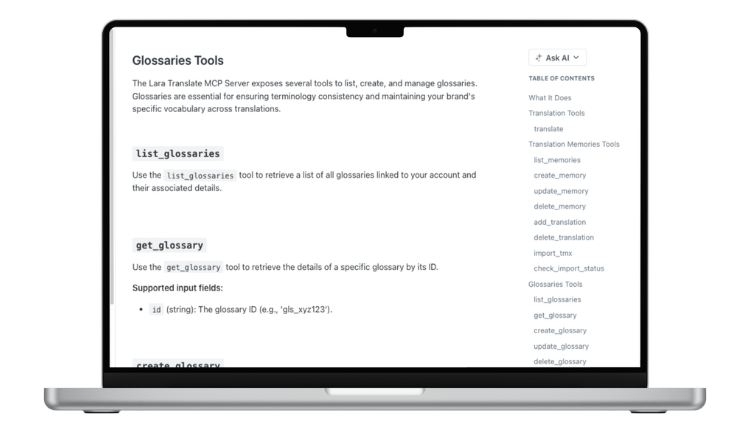
On March 26, the Lara MCP Server shipped a full glossary management toolkit, so you can now handle your terminology without ever leaving your AI environment. That means creating, renaming, and deleting glossaries, adding or removing individual entries, checking term counts per language, and bulk importing and exporting terms via CSV — all from within your MCP workflow.
If you’re building AI-powered products that need consistent, brand-specific terminology across translations, this is the missing piece. See the full list of MCP tools in the developer docs.
Can I choose the voice gender for audio-to-audio translation?
 Yes. When using audio-to-audio translation via SDK, you can now control whether the output voice sounds male or female. Set the
 voice_gender field in your API request to "male" or "female", and Lara will render the translated audio accordingly. The option is available across all languages supported by audio-to-audio translation.
- More natural output when the original speaker’s gender matters for the audience — training content, customer-facing recordings, dubbed interviews.
- Consistent voice identity across multilingual versions of the same content, so a Spanish and a Japanese version of your onboarding video feel coherent.
- Simple to implement: a single parameter in the existing SDK call, no workflow changes needed.
For teams producing multilingual audio at volume — eLearning, internal comms, product walkthroughs, support content — this is the kind of control that separates “technically correct” from “actually publishable.”
See the Translate Audio SDK reference.
Can I set Lara as the default translation app on Android?
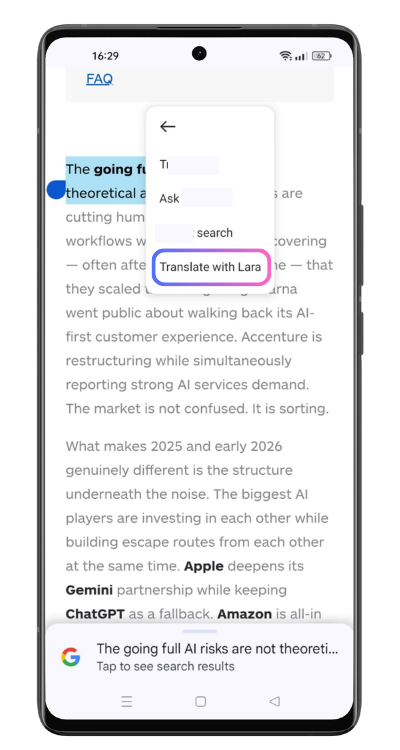 Yes. Android users can now configure Lara Translate as their system-level default translation app. Once set, Lara activates whenever Android triggers a “Translate” action — in messaging apps, email clients, browsers, and any other app that surfaces a translate option. You set it once, and it works everywhere Android offers translation.
This follows the Default Translation App feature already available on iOS, which let iPhone and iPad users set Lara as their system-level translation default. Android users now have the same capability — so whether your team is on iOS or Android, Lara can be the translation layer across the entire device.
- No copy-paste, no app switching: Lara becomes the translation layer inside apps you are already using.
- Works across messages, emails, websites, and in-app content — anywhere Android exposes a translate action.
- Brings Lara’s quality — context-aware engine, custom glossaries, 200+ languages — to the moment of need, not just when you remember to open a separate app.
- Now available on both iOS and Android, covering the full range of mobile users on your team.
For users who regularly translate on mobile — reading foreign-language news, communicating across languages in messaging apps, reviewing supplier emails on the go — this is the update that makes Lara genuinely ambient rather than a tool you have to seek out.
Get Lara Translate on your phone
Download the app and keep translation ready when you need it.
 |
 |
Does Lara Translate now support tables in the text editor?
Yes. You can now paste tables directly into Lara’s text translation editor on the web app and translate the content while keeping the table structure — rows, columns, and cell boundaries — intact in the output. And it is not just translation: the full editing toolkit is now available inside tables too.
- Structure is preserved automatically — paste a table, translate it, and copy the result without reconstructing misaligned cells.
- Works for any tabular content you can paste: comparison sheets, product specs, pricing grids, data extracts from spreadsheets or docs.
- Alternative Translations are now available for cells inside tables — browse translation options and pick the most accurate one for each cell without leaving the editor.
- Edit Mode is now available in tables — edit the translated text directly within the cell if the suggested output needs adjusting.
- Add to Memory is now available in tables — save a confirmed cell translation directly to your Translation Memory, so the same choice is applied consistently going forward.
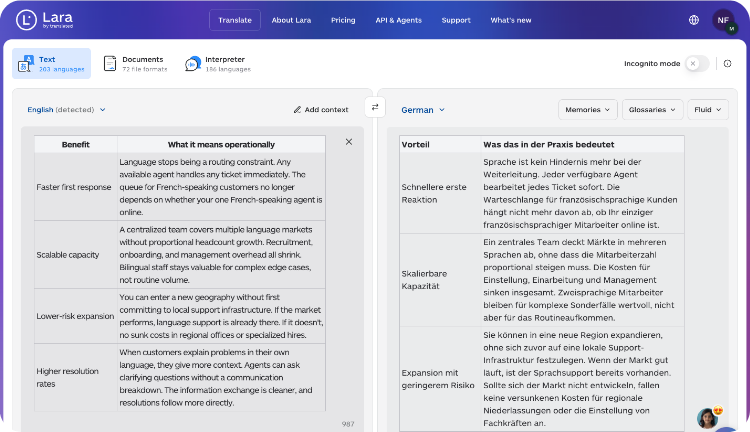
In other words: tables in Lara now behave like any other content in the editor. Translate, review alternatives, edit, and save to memory — all without stepping outside the table. For content and localization teams dealing with product specs, pricing pages, feature comparisons, or onboarding checklists, this closes the gap between “technically supported” and “actually usable.”
Try Table Support in the Lara Translate web editor.
How do I migrate from ModernMT to Lara Translate?
ModernMT is upgrading to Lara Translate. If you are currently using ModernMT through a CAT tool plugin — in Trados Studio, memoQ, or another supported environment — you can now migrate to Lara and continue working without starting from scratch.
- Your existing Translation Memories transfer over, so the context and terminology you have built up does not disappear.
- The migration is designed to preserve your current workflow: same CAT tool, same plugin structure, upgraded engine.
- Once migrated, you have access to everything Lara offers — context-aware translation, glossary management, Explain in-editor, audio translation, MCP integration, and more.
If you have been on ModernMT and wondering what is next, this is the clearest possible answer: move to Lara Translate, keep your memories, and gain a more capable platform.
See the ModernMT migration details in What’s New.
Can I pay for Lara Translate with PayPal?
 Yes. Lara Translate now supports PayPal as a payment method for new subscriptions and renewals. It is available at checkout alongside credit and debit card payments, so you can pay whichever way suits your team or your finance process.
- More choice at checkout: if your team already uses PayPal for software subscriptions or your finance department prefers it, you no longer need a workaround.
- Available for both new subscriptions and plan changes, across all paid tiers.
- Works alongside the existing card and USD/EUR billing options introduced last month — so now you have full flexibility on both currency and payment method.
A straightforward addition, but one that removes a real blocker for teams whose procurement or expense workflows are tied to PayPal.
Upgrade or manage your Lara Translate plan
Choose your plan, pick your currency, and now pay with PayPal or card — whichever works for your team.
What’s next for Lara Translate?
March’s direction is consistent with where Lara has been heading: deeper into AI workflows (MCP Atlas, glossary management), more capable on audio, more present on mobile, and easier to use with structured content. The ModernMT migration path is also a signal — Lara is now the natural destination for professional translation users who need more. You can follow future updates on the What’s New page and start testing these features in your workflows today.
FAQ
What are the March 2026 updates in Lara Translate?
They include Lara’s MCP server being selected for Scale AI’s MCP Atlas benchmark, a full MCP Glossary Management toolkit shipped on March 26, Voice Gender Selection for audio-to-audio translation via SDK, the ability to set Lara as the default translation app on Android (following iOS), Table Support in the text translation editor with Alternative Translations, Edit Mode, and Add to Memory, a migration path for ModernMT users transitioning to Lara through CAT tool plugins, and PayPal as a new payment option.
What is MCP Atlas and why does it matter for Lara Translate?
MCP Atlas is Scale AI’s benchmark for evaluating how well AI models use real-world tools. Lara was chosen as one of 36 MCP servers in the suite and represents the translation category, accounting for 7% of all evaluation tasks. It is an industry validation that Lara’s MCP implementation is the reference standard for translation in AI workflows.
What glossary tools are available in the Lara MCP server?
As of March 26, the Lara MCP Server includes a full glossary management toolkit: create, rename, and delete glossaries, add or remove individual entries, check term counts per language, and bulk import and export terms via CSV — all without leaving your MCP environment. See the developer docs for the full list of tools.
How do I use Voice Gender Selection in audio-to-audio translation?
Add the voice_gender field to your SDK request and set it to "male" or "female". The feature works across all languages supported by audio-to-audio translation and requires no other changes to your existing implementation.
How do I set Lara as my default translation app on Android?
Go to your Android system settings, find the default apps section, and set Lara Translate as your preferred translation app. Once configured, Lara will activate whenever any app triggers Android’s native translate action. The same feature is also available on iOS.
What can I do with tables in the Lara Translate text editor?
You can paste tables directly and translate them while preserving their structure. You can also use Alternative Translations to browse and select the best option for each cell, Edit Mode to adjust the translated text inline, and Add to Memory to save a confirmed cell translation to your Translation Memory for future consistency.
I am a ModernMT user. How do I migrate to Lara Translate?
The migration is handled through your existing CAT tool plugin (Trados Studio or memoQ). Your Translation Memories are transferable, so you do not lose accumulated context. Check the What’s New page for step-by-step migration guidance or contact support if you need help with a specific setup.
Can I pay for Lara Translate with PayPal?
Yes. As of March 2026, PayPal is available at checkout alongside credit and debit card payments. It is available for new subscriptions and plan changes across all paid tiers, and works with both USD and EUR billing.
This article is about:
- Breaking down Lara Translate’s March 2026 updates, ordered by workflow impact.
- Explaining why Lara’s inclusion in Scale AI’s MCP Atlas benchmark matters for AI and LLM developers building translation-integrated products.
- Covering the MCP Glossary Management toolkit shipped on March 26, and how it brings full terminology control directly into AI workflows.
- Showing how Voice Gender Selection, Android default app support (following iOS), and expanded Table Support — including Alternative Translations, Edit Mode, and Add to Memory — reduce friction in audio, mobile, and structured content workflows.
- Summarising the ModernMT migration path for CAT tool users upgrading to a more capable translation platform.
- Covering PayPal as a new payment option for Lara Translate subscriptions.
Useful links and articles:
- Getting started with the Lara Translate MCP Server
- Lara Translate MCP Server (Help Center)
- Lara MCP Server on GitHub (open source)
- MCP Atlas benchmark by Scale AI
- Translate Audio – SDK reference
- Lara Translate for Android
- Lara Translate for iOS
- Lara Translate web editor – try Table Support
- Lara Translate pricing – pay with PayPal or card
- What’s New: Lara Translate changelog