

Most of what needs translating today isn’t clean paragraphs of text. It’s a voice memo from a supplier, a photo of a menu taken on a phone, a script you want to localize straight from the terminal, or a team account where nobody’s quite sure how much of the shared quota is left this month.
June 2026 rounds out several of these workflows at once. Audio-to-audio translation shipped in the web app. Image translation went live in production on iOS and Android. The Browser Extension reached Microsoft Edge. Lara CLI picked up translation memory and glossary management. And teams get a clearer view of how much of their shared character pool they’ve actually used. Two more pieces (a new image full rebuild mode and style guide management via API) are taking shape and worth flagging early.
Here are the Lara Translate June 2026 updates: what shipped, and what’s still on the way.
|
TL;DR
|
What’s new in the Lara Translate web app: audio-to-audio translation and usage visibility?
Audio-to-audio translation is now available directly from the web interface, no separate transcription tool required. Go to laratranslate.com, open the new Audio tab in the Translate section, and drag and drop a file – or browse to select one from your device. Choose the source and target languages and start the translation.
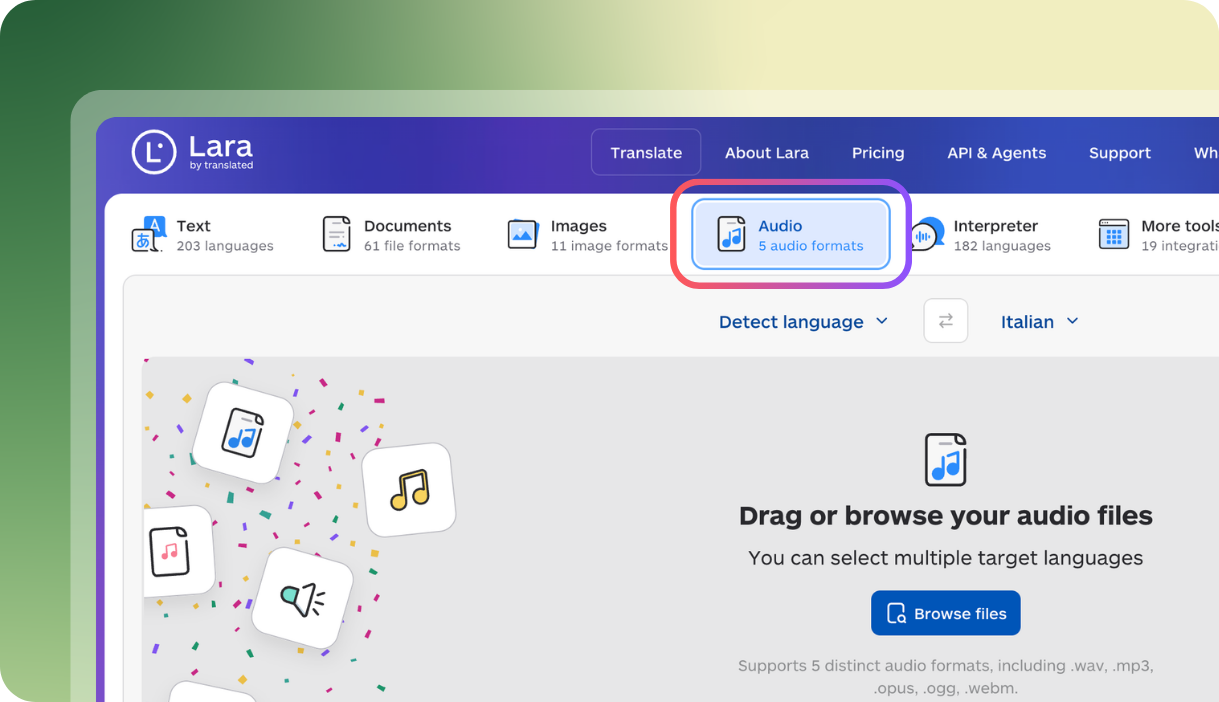
The Audio tab supports bulk file translation, so you can upload multiple files at once, and multi-language translation, so a single session can output several target languages together. Supported formats are .wav, .mp3, .opus, .ogg, and .webm. Audio translation draws from the same shared character pool as every other feature.
See the full guide to translating audio with Lara.
Speaking of that shared pool: team admins now get a clearer picture of how it’s being used, from two angles. First, by service: admins can see total consumption broken down by feature across the whole team, so it’s clear how much of the pool went to image, document, interpreter, or audio translation overall. Second, by member: admins can see each team member’s total consumption for the period.
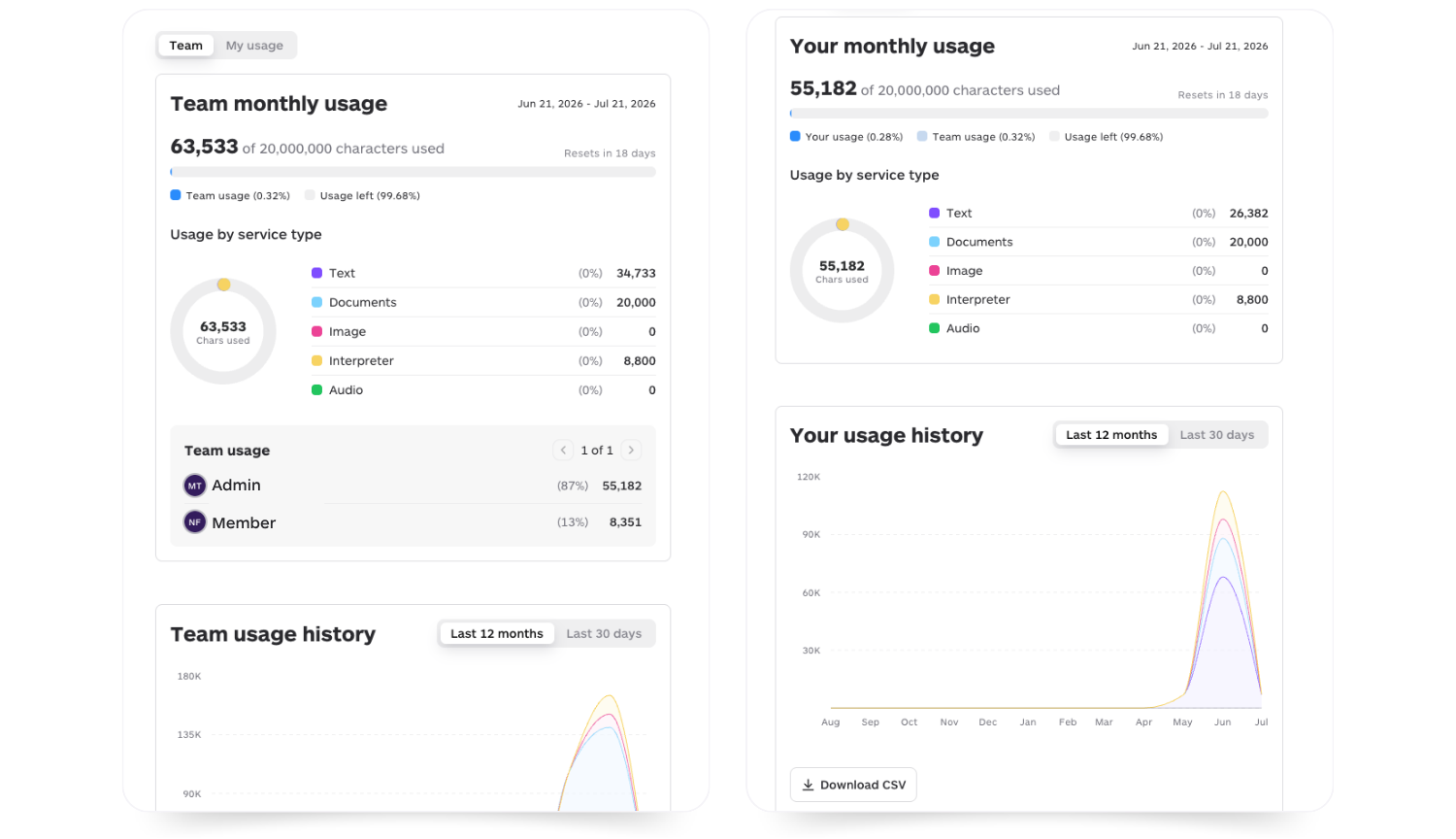
What’s not available yet is the two combined: you can see what the team used per service, and you can see what each person used in total, but not which services a specific member used most. For teams on the shared character pool since May, this is the visibility that makes the model easy to manage day to day: no more wondering whether a number on the usage page is stale or accurate.
Translate audio, images, and more with Lara
One shared character pool, every content type, one place to track usage.
What’s new for image translation on iOS and Android?
Image translation is now in production on both the iOS and Android apps, extending Lara’s multimodal capabilities to the devices where images are actually captured, stored, and shared. Take a photo or choose one from your photo library, and Lara translates its content directly: signs, menus, screenshots, documents, and more, in a few taps.
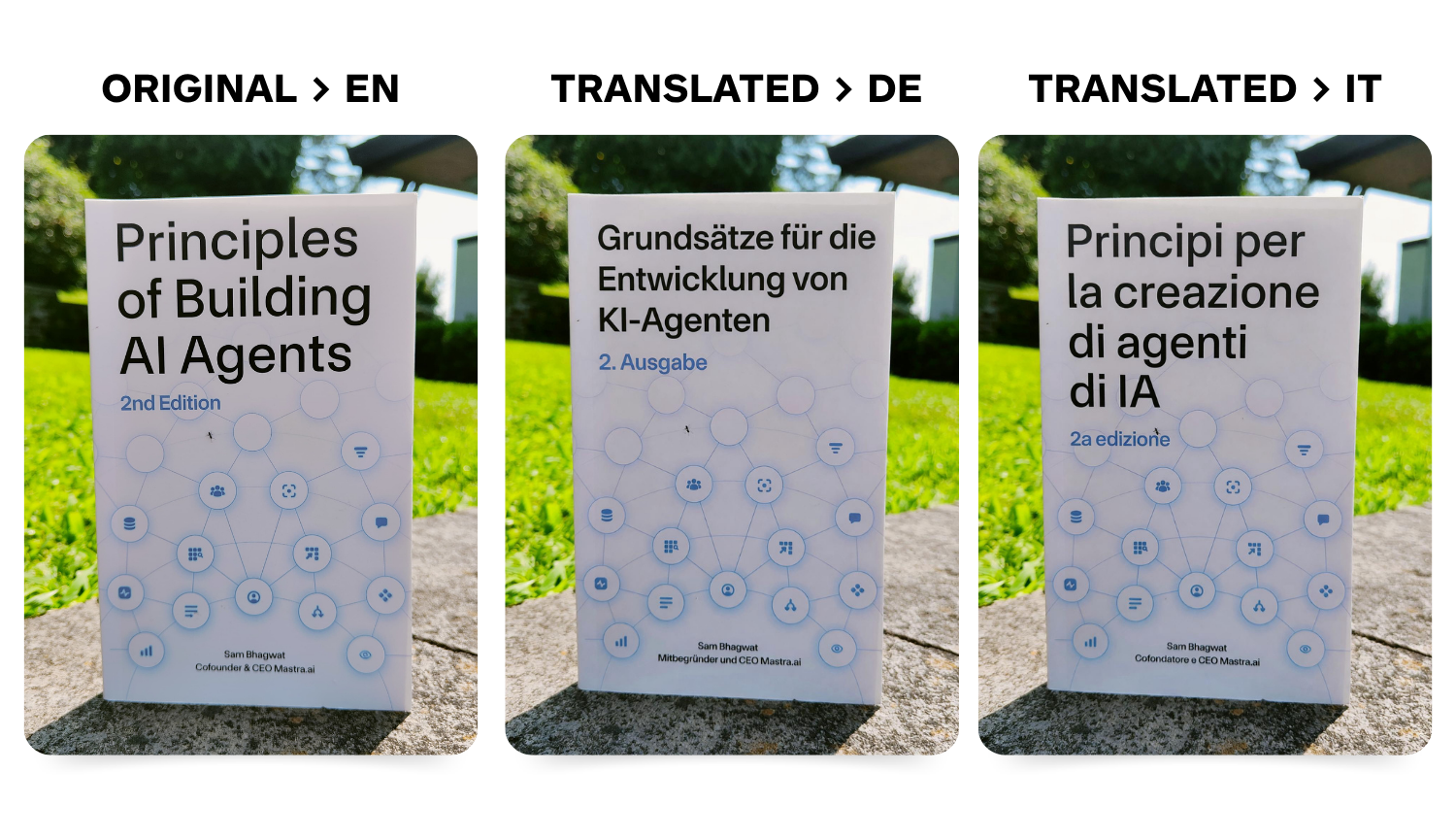 Lara is also now integrated into the image sharing flow on both platforms, so you can send a photo straight to the app from Photos or your gallery without opening Lara first. This builds on April’s update, which added image files to the document picker; image translation is now a native, standalone capability rather than a document-mode workaround.
Get Lara Translate on Android.
Get Lara Translate on iOS.
Get Lara Translate on your phone
Translate images straight from your camera, photo library, and share sheet.
 |
 |
Is the Lara Translate Browser Extension available for Microsoft Edge?
Yes – the Lara Translate Browser Extension is now listed on the Edge Add-ons marketplace, extending the extension beyond Chrome to anyone who uses Edge as their main browser.
 The Edge version brings the same feature set as the Chrome sidebar: page translation, selected-text translation, free-form text input, and drag-and-drop document translation, all in one place. The marketplace listing itself has been localized in English, French, German, Italian, Russian, Spanish, and Swedish, with further alignment between the Chrome Web Store and Edge Add-ons listings planned as part of Lara’s broader localization strategy.
Get the Lara Translate Browser Extension for Microsoft Edge.
What’s new in Lara CLI?
Lara CLI now supports translation memory and glossary management directly from the command line, with interactive prompts and automatic lara.yaml syncing. Developers and localization teams can create and manage the resources that drive translation consistency (memories and glossaries) without leaving the terminal or switching to the web app.
Get started with Lara CLI.
What’s next for the Lara API: image full rebuild and style guides
Two developer-facing features are taking shape in the Lara API.
A new generative image full rebuild mode would add a fourth option to Lara’s Image API, alongside overlay, inpainting, and image-to-text: instead of placing translated text over the original or reworking it in place, this mode rebuilds the entire image, including the translated content, for the highest visual fidelity.
Style guide management is also becoming available through the API, as a progressive rollout. At this stage, it works as a container: the API can list, reference, and manage a style guide, but the content itself is still created by the Lara team on a per-request basis. If you’d like a style guide set up for your account, contact support@laratranslate.com.
We’ll share more details as both features move toward general availability.
What to expect next
June’s shipped updates – audio-to-audio translation, native mobile image translation, the Edge extension, Lara CLI’s memory and glossary tools, and clearer usage visibility – round out the workflows teams already rely on.
Two more things are already moving. A document translation update focused on formatting preservation has just been released and is currently in testing, aiming to keep layout and structure more intact across translated files. And a new feature is rolling out that lets you import and export Translation Memories directly from your account settings, instead of managing them elsewhere. Alongside these, the new image full rebuild mode and style guide management via API continue to take shape.
More updates are on the way. You can follow the full changelog on the What’s New page.
FAQ
What audio formats and usage limits apply to audio-to-audio translation?
The Audio tab in the web app accepts .wav, .mp3, .opus, .ogg, and .webm files. Usage is drawn from your shared character pool at a rate of 40 characters per second of audio – for example, a 15-second voice note costs 600 characters.
What can a team admin see about shared usage?
A team admin can see two views: total consumption broken down by service (image, document, interpreter, audio, and so on) across the whole team, and total consumption per individual team member. The two aren’t cross-referenced yet – an admin can’t currently see which services a specific member used most, only their overall total.
How is the new mobile image translation different from the file-picker support added in April?
April’s update added image files to the document picker on iOS and Android, so images were translated through the document workflow. June’s release makes image translation a native, standalone capability: you can translate directly from the camera, photo library, or share sheet, without routing through documents.
Does the Microsoft Edge extension have the same features as the Chrome version?
Yes. The Edge listing includes the same functionality as the Chrome sidebar – page translation, selected-text translation, free-form text input, and drag-and-drop document translation.
What can Lara CLI do with translation memories and glossaries?
Lara CLI now lets you manage translation memories and glossaries from the command line, with interactive prompts and automatic syncing to your lara.yaml configuration file.
Can I create a style guide today?
Style guide management is rolling out progressively. Right now it’s available as a container through the API, but the Lara team creates the content for you rather than it being fully self-serve. To have a style guide set up for your account, email support@laratranslate.com.
Is the new image full rebuild mode available yet?
Not yet on general release. It’s planned as a new mode in the Image API, alongside overlay, inpainting, and image-to-text, and will rebuild an entire image rather than editing it in place. Access model and timeline are still to be confirmed.
Have a valuable tool, resource, or insight that could enhance one of our articles? Submit your suggestion
We’ll be happy to review it and consider it for inclusion to enrich our content for our readers! ✍️
This article is about
- Audio-to-audio translation in the Lara Translate web app, plus clearer team usage visibility by service and by member on the shared character pool
- Image translation now in production on the Lara Translate iOS and Android apps, including camera and share sheet support
- The Lara Translate Browser Extension now available for Microsoft Edge
- Translation memory and glossary management added to Lara CLI
- A first look at the new image full rebuild mode and the progressive rollout of style guide management on the Lara API
- What’s coming next: improved document translation formatting preservation (in testing) and Translation Memory import/export directly in account settings