

If you ship new products and campaigns every week, translation is rarely the slow part. The slow part is everything around it: exporting fields, copying spreadsheets, reconciling updates, and pushing localized content back into the right systems.
The Lara Translate Blackbird.io integration lets you automate that entire loop: pull content from your stack, translate with context, then push localized updates back to the tools your team already uses.
|
TL;DR
|
Why it matters
E-commerce localization breaks when translation is fast but workflows are manual. This integration keeps content synced as your store changes: when product data, landing pages, or help articles update, you can trigger translation automatically and push localized versions back to the systems that publish and support your customers.
Lara Translate Blackbird.io integration: how to use it?
Short answer
Install the Lara Translate app in Blackbird.io, create a connection with your access key and secret, then add Lara as a translation step inside your workflow. Map the fields you want translated (titles, descriptions, attributes, articles), choose target languages, and send output to review/QA or push it back automatically to your destination system.
Why this integration matters for e-commerce teams
Translation is rarely the bottleneck. The bottleneck is the workflow: exporting content, reshaping files, handing off spreadsheets, then trying to reconcile updates after the next product drop.
Blackbird.io orchestrates workflows across systems. Lara Translate delivers context-aware translations that help preserve tone and keep terminology consistent. Together, they let you localize at the speed your business ships, without losing control over brand voice.
What you get with Lara Translate inside Blackbird.io
- Automated product and content translations
Translate product titles, descriptions, attributes, CMS fields, and help articles when changes happen. No manual exports. - More consistent terminology and brand voice
Add a glossary (TBX) for approved terms and import Translation Memories (TMX) to reuse your legacy translations in new content. - Faster launches across markets
Ship localized versions with every product drop or campaign update, instead of batching translation work later. - Review where it matters
Route high-value pages through QA or human review before publish, while automating the rest.
1-minute decision table: should you use Lara Translate with Blackbird.io?
| If this is your situation… | You will benefit if… |
| Large catalogs and frequent updates | You need automation that keeps up with new SKUs, variants, and changing attributes. |
| Many content systems | You want one workflow that pulls from multiple platforms and pushes translations back automatically. |
| Brand voice consistency | You care about tone, terminology, and consistency across product pages and campaigns. |
| You already have legacy translations | You want to reuse Translation Memories (TMX) so new translations align with what you shipped in the past. |
How Lara Translate works in Blackbird.io workflows
In Blackbird.io, you build workflows that move content between systems. Lara Translate becomes a translation step in that flow:
- 1) Pull: Blackbird retrieves content from your source system (PIM, CMS, helpdesk, database).
- 2) Translate: Lara Translate translates the selected fields using your preferred tone and your context (TMX and TBX, if provided).
- 3) Route: Blackbird sends the output to a QA/review step or pushes translations back to the destination system.
Common workflows for e-commerce localization
- Catalog localization: PIM or product database → Lara Translate → localized fields pushed to storefront or CMS.
- Campaign localization: CMS entry or landing page → Lara Translate → localized versions published on schedule.
- Support localization: helpdesk or knowledge base → Lara Translate → translated articles kept in sync as content changes.
How to integrate Lara Translate into Blackbird.io
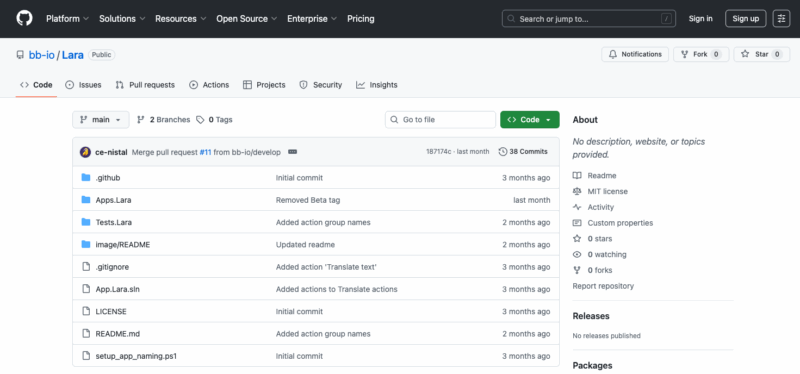
- Install the app
In your Blackbird.io dashboard, open Apps, search for Lara Translate, then install the app. - Create a connection using your Lara Translate credentials
In the connection settings, add your access key and access key secret from your Lara Translate account. - Pick the translation action that matches your payload
Use Translate text for single strings or short fields (for example: product title). Use Translate for larger payloads or files when your workflow sends structured content in bulk. - Map the fields you want translated
Select which fields should be localized (titles, descriptions, attributes, bullets, FAQs, article bodies) and set your target locales. - Optional: improve consistency with your own context
Import a glossary (TBX) for approved terminology and a Translation Memory (TMX) to reuse previous translations across new content. - Decide where the output goes
Route translations to a review/QA step, or push translated fields back to your CMS, PIM, helpdesk, or project tools like Jira.
Result: faster expansion, fewer manual tasks, and localization that stays in sync with your release cadence.
Build your first Blackbird.io translation workflow
Start with one real use case: pick a source (PIM, CMS, or helpdesk), map the fields to translate, add TBX/TMX context if you have it, and push localized output back to your destination system.
👉 See how to activate the Blackbird.io integration
👉 Need more help? Follow the full app guide on Blackbird.io docs
FAQ
What content can I translate with the Lara Translate Blackbird.io integration?
Any field your workflow can pass suggests a good starting point: product titles, descriptions, attributes, landing page sections, knowledge base articles, and support macros.
Can I reuse my existing translations?
Yes. Import a Translation Memory (TMX) to reuse approved phrasing from previous work, and add a glossary (TBX) to enforce terminology for brand, product, and UI terms.
Do I need human review?
Not always. For high-impact content (legal pages, premium product lines, regulated claims), route output to review or QA. For long-tail catalog updates, automation is usually the biggest win.
Can I keep translations in XLIFF?
If your downstream localization workflow expects XLIFF, configure the output accordingly. If you want publish-ready updates, push localized fields back to the destination system instead.
How do I authenticate the integration?
Create a connection in Blackbird.io using your Lara Translate access key and access key secret from your account credentials.
This article is about:
- How to integrate Lara Translate with Blackbird.io to automate e-commerce translation workflows.
- How to localize product catalogs, campaigns, and support content by moving content between systems and translating in the middle.
- How to keep terminology and brand voice consistent using TMX Translation Memories and TBX glossaries, plus optional review steps.