

The ability to translate SRT subtitles without breaking timecodes is what separates a professional subtitle workflow from a broken one. A translated SRT file with broken timecodes is worse than no subtitles at all — captions appear at the wrong moment, overlap, or fail to load entirely. This guide explains why timecodes break during translation, how to prevent it, and how to verify your output before publishing.
|
TL;DR
|
Short answer
To translate SRT subtitles without breaking timecodes, use a tool that parses the SRT format natively rather than stripping it to plain text. Lara Translate reads each cue independently, translates only the dialogue lines, and returns a file with every timestamp untouched.
Why it matters: Even a 200-millisecond timecode drift can make subtitles read as out-of-sync to viewers. Platforms like YouTube and Netflix have automated quality checks that flag misaligned cues. Preserving timecode integrity is not optional — it is the minimum standard for any distributed video content.
Translate SRT subtitles — zero timecode drift
Lara parses your .srt natively: only dialogue lines are translated, every timestamp is left exactly as-is. Download and upload straight to your platform.
Why Timecodes Break During SRT Translation
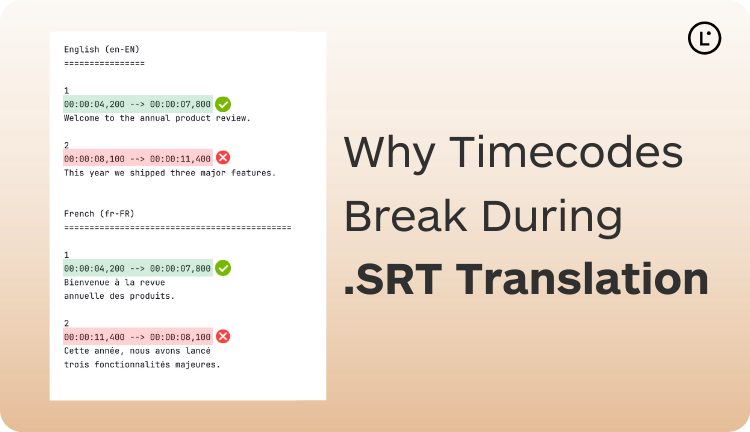
Timecodes break for one of three reasons:
1. The tool treats the file as plain text. If you paste an SRT file into a generic translation service, it sees a mix of numbers, arrows, and text — and translates all of it. Timecodes like 00:01:23,456 --> 00:01:27,800 may be altered because the translation model interprets parts of them as meaningful content.
2. Line merging. Some tools collapse multiple lines into one paragraph before translating. The SRT structure — sequence number, timecode, text, blank line — relies on exact line breaks. Merge them and the parser cannot reconstruct the file correctly.
3. Encoding changes. SRT files should be UTF-8. A tool that changes encoding can introduce invisible characters that break subtitle parsers.
How Format-Preserving SRT Translation Works
A proper SRT translation tool parses the file structure before doing anything else. It identifies:
- Sequence numbers (integers) — do not translate
- Timecode lines (matching
HH:MM:SS,mmm --> HH:MM:SS,mmm) — do not translate - Text content lines — translate these
- Blank separator lines — preserve exactly
Only the text lines are sent to the translation engine. The rest of the file is reconstructed around the translated text, byte-for-byte identical to the original structure. This is exactly how Lara Translate handles SRT translation.
Step-by-Step: Translate SRT Without Timecode Errors
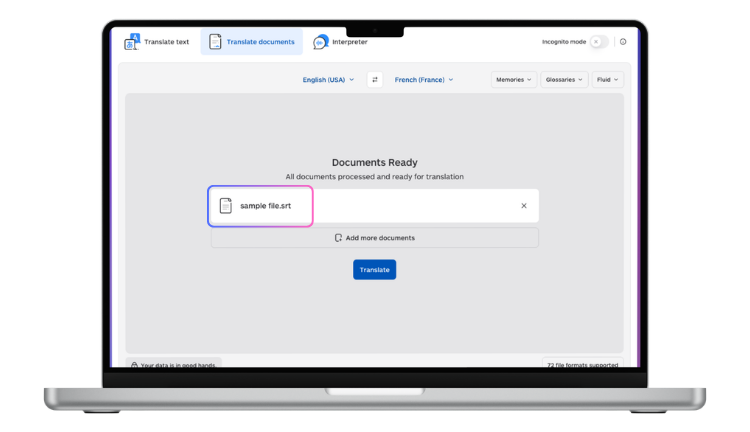
- Upload to Lara. Go to laratranslate.com/translate-srt and upload your .srt file.
- Select languages. Choose source and target. Lara auto-detects the source language if you leave it unset.
- Apply a glossary (optional). Add any terms you want left untranslated — names, brand terms, technical vocabulary.
- Download and validate. Download the translated file and run the validation checks below before publishing.
How to Validate Your Translated SRT File
Before uploading to any platform, verify the file with these checks:
 Check 1 — Open in a text editor. Scan the first 10 entries. Sequence numbers should be integers starting at 1. Timecode lines should be unchanged. Text lines should be the translation. Blank lines should separate each block.
Check 2 — Load in a video player. VLC, QuickTime, and most media players support SRT. Drop the translated SRT onto a video file and watch the first and last minute to confirm captions are in sync.
Check 3 — Use a subtitle validator. Free tools like Subtitle Edit (Windows) or online validators can scan the entire file for format errors in seconds.
Check 4 — Check line length. Aim for under 42 characters per line for broadcast-quality subtitles. Translated text that is longer than the original may need light editing to fit.
What to Do When Timecodes Are Already Broken
If you receive a translated SRT with broken timecodes, you have two options:
Option A — Repair with Subtitle Edit. Open both the original and broken translated file in Subtitle Edit. Use the synchronization tools to re-align timecodes from the original onto the translated text. This works when the structure is only partially broken.
Option B — Re-translate with the right tool. If the file is extensively corrupted, re-translating from the original with a format-preserving tool like Lara is faster than repairing line by line.
Scaling subtitle translation across languages?
Lara Translate processes .srt files with a native parser — timecodes write-protected, cue structure preserved, 200+ language pairs supported.
FAQ
Why do my SRT timecodes change after translation?
This happens when the translation tool treats the SRT file as plain text instead of parsing its structure. The tool then modifies or reorders content that should be preserved. Use an SRT-native translation service like Lara that parses the file format before translating.
How do I check that my translated SRT is correctly formatted?
Open the file in a plain text editor and check that each subtitle block has a sequence number, an unchanged timecode line, translated text, and a blank line separator. Then test the file in a video player to confirm sync.
Does text length affect timecodes?
No — timecodes are not modified during translation. However, if translated text is significantly longer than the original, viewers may not have enough time to read it within the original timing window. This is a reading-speed issue, not a timecode error.
Can I translate SRT files in bulk without breaking timecodes?
Yes — Lara’s API accepts SRT files and preserves timecodes across batch jobs. You can submit hundreds of files simultaneously and receive correctly formatted translations for all of them.
This article is about
- Explaining why timecodes break during SRT translation and what structural errors cause subtitle sync issues.
- Describing the exact format of SRT files and which elements must remain unchanged during the translation process.
- Providing a practical checklist to verify that translated SRT output is correctly structured and ready for video upload.
- Comparing tools that handle timecode and block structure preservation correctly versus those that corrupt the SRT file.
- Highlighting how Lara Translate preserves SRT formatting, timecodes, and block numbering consistently across all language pairs.
Translate SRT Correctly, Every Time
Use Lara Translate for subtitle translation that respects the SRT structure — your timecodes will be exactly where you left them.
Also in this series: