

Knowing how to translate an SRT file correctly — without breaking timecodes or scrambling line breaks — is the difference between a usable subtitle track and hours of manual cleanup. SRT is the most widely used subtitle format in the world, plain text and supported by virtually every video platform. But translating it is not as simple as pasting content into a translation tool: timecodes need to stay intact, line breaks matter, and translated text must fit the original timing constraints. This guide covers exactly how to do it right.
|
TL;DR
|
Short answer
The safest way to translate an SRT file online is to use a tool that reads the subtitle format natively — like Lara Translate — so the timecodes are never touched. Upload the .srt, select the target language, and download a translated file that stays perfectly in sync.
Why it matters: Off-sync subtitles make content unwatchable. Viewers stop watching, platforms flag poor-quality uploads, and re-syncing manually takes longer than the original translation. Getting the timecodes right on the first pass is the only efficient approach.
Translate SRT files — timecodes stay intact
Upload any .srt file and download a translated version with all timestamps preserved. No re-syncing required.
What Is an SRT File?
An SRT (SubRip Subtitle) file is a plain-text file with a specific structure: a sequence number, a timecode range (start –> end in HH:MM:SS,mmm format), the subtitle text, and a blank line before the next entry. Every element matters. Break the format and the subtitles stop working.
1
00:00:04,200 --> 00:00:07,800
Welcome to the annual product review.

2
00:00:08,100 --> 00:00:11,400
This year we shipped three major features.
Three Ways to Translate an SRT File
Option 1: Lara Translate (Best for Quality and Format Preservation)
Lara Translate handles SRT files natively, translating subtitle text while leaving all sequence numbers, timecodes, and blank-line separators completely untouched. Go to laratranslate.com/translate-srt, upload your .srt file, choose your target language, and download the translated file — ready to use immediately, with no manual cleanup required.
Option 2: A Subtitle Editor (Aegisub, Subtitle Edit)
Desktop tools like Subtitle Edit or Aegisub let you run machine translation on individual subtitle lines while you review and edit the output side by side with the video. This is a good workflow for professional subtitlers who need fine control, but it is slower and requires software installation.
Option 3: Paste-and-Translate (Risky)
Some people copy SRT content into Google Translate or ChatGPT. This can work for very short files, but larger files often return with broken timecodes, merged lines, or missing blank separators — making the output unusable without extensive repair. Not recommended for anything you intend to publish.
How to Translate an SRT File with Lara — Step by Step
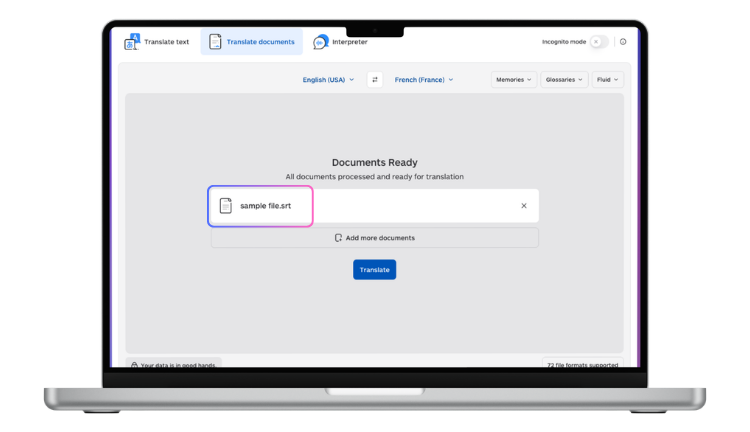
- Open laratranslate.com/translate-srt in your browser.
- Click Upload and select your .srt file.
- Select the source language, or leave it on Auto-detect.
- Choose the target language (200+ languages supported).
- Click Translate. Processing typically takes a few seconds for a standard episode-length file.
- Download the translated .srt file and drop it into your video player or platform uploader.
What to Check After Translation
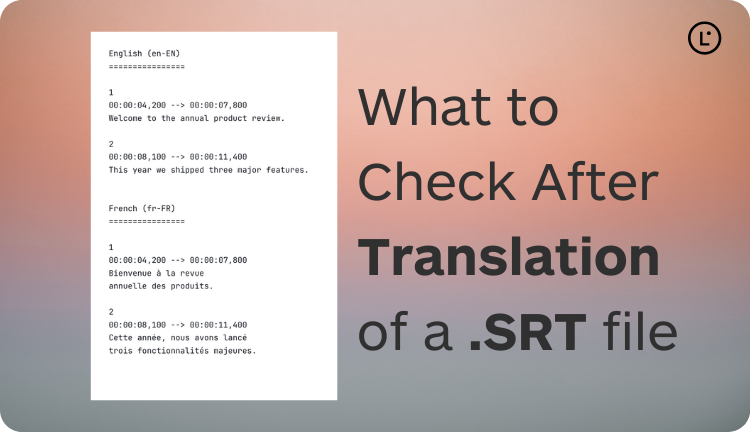
Even with a format-preserving tool, run a quick review before publishing:
- Timecodes: Spot-check that sequence numbers and timestamps are identical to the original.
- Line length: Some languages produce longer text. Lines over 42 characters may not display well on all screens.
- Reading speed: Translated text that is significantly longer than the original may be difficult to read within the original timing window. Consider slight edits to shorten where needed.
- Proper nouns: Names, places, and brand terms should usually be left untranslated. Use a glossary to protect them.
Translating subtitles at scale?
Lara Translate handles SRT files natively — timecodes are never modified, UTF-8 output keeps all scripts readable, 200+ languages available.
FAQ
Can I translate an SRT file without breaking the timecodes?
Yes — tools like Lara Translate that handle SRT natively parse the file structure before translation, keeping all timecodes and sequence numbers intact. Only the subtitle text lines are translated.
What is the best free SRT translator?
For occasional personal use, Lara Translate offers free translation of SRT files with timecode preservation. For professional or high-volume use, Lara’s paid plans and API provide adaptive translation, glossaries, and batch processing.
How do I translate subtitles for YouTube?
YouTube accepts SRT files as manual caption uploads. Translate your .srt with Lara, then upload the translated file via YouTube Studio > Subtitles > Add language > Upload file.
Can I translate an SRT file into multiple languages at once?
Via Lara’s API, yes — you can send one SRT file and receive translations in multiple target languages in a single workflow, which is ideal for multilingual video distribution.
This article is about
- Explaining how to translate SRT subtitle files correctly while keeping all timecodes intact and output ready for upload.
- Comparing the most reliable SRT translation methods, from manual editing to automated tools and API-based workflows.
- Showing why SRT translation requires strict file structure preservation and why generic tools often produce unusable output.
- Helping readers choose the right method based on file volume, language pair, and subtitle quality requirements.
- Highlighting how Lara Translate handles SRT files natively, preserving block numbers, timecodes, and formatting across 200+ languages.
Translate Your SRT File Now
Upload your subtitle file at laratranslate.com/translate-srt and get a translation that is ready to use — timecodes intact, format preserved.
Also in this series: