

PPTX translation is not “just translation.” It is translation plus layout survival.
But marketing deck translation adds a second layer: message survival. If you translate a pitch deck or sales deck too literally, it may stay “accurate” and still lose what matters: credibility, clarity, and persuasion.
If you need to translate a marketing deck without losing formatting, your biggest risk is text overflow. If you need to translate a marketing deck, your biggest risk is different: the deck sounds translated, the headline loses punch, and your CTA stops working.
|
TL;DR
|
Why it matters
Marketing decks are compressed persuasion. Every headline, verb, and proof point carries weight. A translation that feels unnatural can quietly reduce confidence and response rates, even if the slides look perfect.
What is marketing deck translation?
Short answer
Marketing deck translation is the process of translating a PPTX while preserving layout and adapting the message so it reads like native marketing in the target language. You lock what must stay consistent (brand terms and claims) and adapt what must feel natural (headlines, CTAs, and short punchy lines).
In practice, it is closer to “translation with brand constraints” than to plain document translation.
Why marketing decks fail in other languages (even when the translation is correct)
Marketing slides often have three characteristics that make them fragile:
- Low redundancy: a slide title might contain the whole promise in 6 words. If those 6 words are weak, the slide is weak.
- High intent: CTAs, benefit statements, and “why now” slides are written to trigger action, not just understanding.
- High constraint: tight layouts amplify text expansion and make word choice feel more visible.
That is why a “literal but safe” translation style is not always the best choice for the entire deck. You need a workflow that lets you control tone and consistency, and then validate the slides that sell the story.
Step 1: Decide what to lock vs what to adapt
This is the fastest way to reduce debates and rework. Before you translate, classify your content.
| Lock (must stay consistent) | Adapt (must feel native) |
|---|---|
|
|
If you do nothing else, do this. It gives the translator (human or AI) a clear objective and makes review faster.
Step 2: Build a “deck glossary” in 10 minutes
 Marketing decks repeat the same terms across slides: product value, feature names, proof points, and the language you use to describe your audience’s pain.
A small glossary prevents the two most common problems:
- Terminology drift: the same feature gets translated three different ways across the same deck.
- Brand voice drift: your “signature language” becomes generic in other languages.
Deck glossary template (copy and fill)
- Product terms: product name, feature names, plan names
- Preferred verbs: launch, ship, scale, automate, reduce, unify
- Audience terms: role names, industry terms, job-to-be-done language
- Do-not-translate list: UI labels, brand names, acronyms
- Claim language: “up to”, “average”, “typically”, “may” vs “must”
You can implement this with glossaries and reinforce it over time with translation memories.
Step 3: Choose the right translation style for each slide type
Marketing decks are mixed by nature. A pitch deck can include brand messaging, product descriptions, technical slides, and legal footnotes in the same file.
That is why “one style for everything” is rarely ideal. Lara Translate provides translation styles to match the intent.
| Deck content | Suggested style | Why |
|---|---|---|
| Taglines, headlines, CTA slides | Creative | Optimizes for impact and natural marketing language |
| Story slides, problem and solution narrative | Fluid | Optimizes for readability and flow |
| Specs, pricing terms, footnotes, compliance | Faithful | Prioritizes precision and structure |
Practical rule: if a slide is meant to persuade, prioritize naturalness. If it is meant to protect you legally or financially, prioritize accuracy and consistency.
Step 4: Provide context like a marketer, not like a translator
Marketing language depends on the audience and intent. The same English sentence can be translated differently depending on whether the deck is for a startup pitch, enterprise sales, partner enablement, or a webinar.
Before you translate, add context such as:
- Audience: SMB founders, enterprise IT, procurement, marketing leaders
- Goal: book a demo, close a renewal, drive webinar sign-ups
- Tone: bold and modern, conservative and enterprise, friendly and helpful
- Do-not-do list: avoid slang, avoid legal-sounding phrasing, keep CTAs short
You can provide this guidance using the context feature so that the translation aligns with your intent, not just the literal meaning.
Step 5: Translate the marketing deck PPTX with Lara Translate
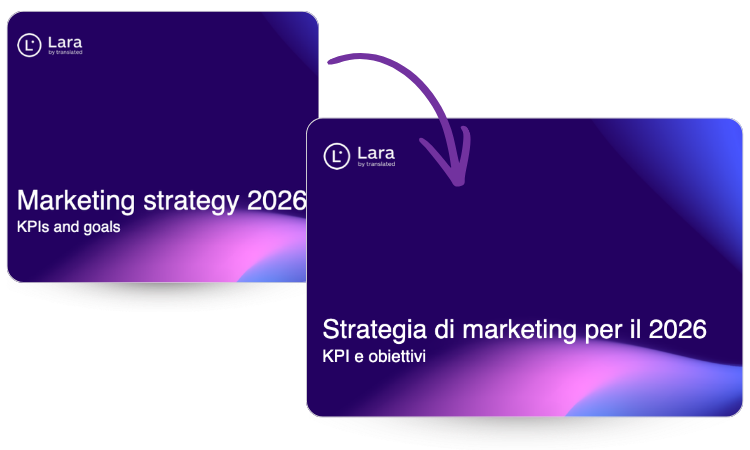
Lara Translate is designed to translate PPTX files while keeping slide structure stable and adapting text boxes to fit the target language, so your deck stays presentation-ready.
- Open the PPTX translation page: https://laratranslate.com/translate-pptx
- Upload your PPTX marketing deck.
- Select your target language (or multiple languages for multi-market rollout).
- Translate and download the exported PPTX file(s).
Tip: If you need to translate several decks in one go, use multiple document translations.
Translate a marketing deck and keep brand voice
Use styles, context, glossaries, and translation memories to ship a PPTX that sounds native and stays presentation-ready.
Step 6: Review the “high-impact slides” first (message integrity QA)
If you review every slide equally, you waste time. Marketing decks have a small set of slides that carry most of the persuasion.
High-impact slide list (review these first)
- Title slide: does the promise still feel confident and clear?
- Problem slide: does it sound like how the market speaks, not like a dictionary?
- Solution slide: are benefits short, direct, and natural?
- Proof slide: are metrics, claims, and qualifiers accurate?
- CTA slide: is the verb natural and appropriate for the target market?
After those are approved, scan the rest for layout issues and terminology consistency.
Fast fixes for marketing language that sounds translated
When a deck “sounds translated,” it is usually caused by a few patterns. Here is what to look for and what to do.
| Symptom | What it means | Fast fix |
|---|---|---|
| Headlines feel long or “academic” | Too literal, too many qualifiers | Shorten to the core promise, replace nouns with verbs |
| CTA verbs feel unnatural | Direct translation of English CTA patterns | Use the most common local verb pattern for the market and channel |
| Value props lose urgency | Tone drift, weak modality | Tighten verbs, remove unnecessary hedging where safe |
| Inconsistent feature naming | Terminology drift across slides | Lock terms with a glossary and reuse approved phrasing with translation memories |
When to use human review for marketing decks (trigger list)
AI translation is great for speed, but marketing decks often include high-stakes messaging. Use a human review pass when:
- Taglines and positioning statements must sound native and distinctive.
- Pricing, discounts, and commercial terms appear in the deck.
- Regulated claims exist (finance, healthcare, legal, safety).
- Investor-facing decks and executive comms require maximum polish.
- Public-facing decks will be distributed widely (events, webinars, press).
If you want a formal AI + human workflow, you can request it via human review on top of AI translations.
How to scale marketing deck translation across markets

The easiest way to scale is to treat decks like a system, not like one-off files.
- Keep one “source of truth” deck: avoid editing different language versions independently.
- Use translation memories: reuse approved translations across decks and quarters.
- Standardize slide modules: your “problem” and “proof” slides should reuse layouts and phrasing.
- Define a review gate: approve high-impact slides first, then do a fast full-deck scan.
Ship a marketing deck in multiple languages
Translate a PPTX, keep slides presentation-ready, and preserve brand voice with styles, context, and terminology controls.
FAQ
Is marketing deck translation the same as transcreation?
Marketing deck translation often includes light transcreation. You keep the meaning and proof points, but adapt headlines, CTAs, and short punch lines so they sound native and persuasive.
How do I translate a pitch deck without losing brand voice?
Lock brand terms with glossaries, reuse approved wording with translation memories, provide audience context, and review the high-impact slides first (title, problem, solution, proof, CTA).
Which translation style should I use for marketing slides?
Use translation styles based on intent: Creative for headlines and CTAs, Fluid for narrative slides, and Faithful for claims, pricing, and compliance lines.
What slides should I review first after translating a marketing deck?
Start with the slides that carry most of the persuasion: title slide, problem, solution, proof, and CTA. Then scan for layout issues in tables, footnotes, and dense slides.
When should I use human review for a translated marketing deck?
Use human review for taglines, positioning statements, pricing, regulated claims, investor decks, and any deck that will be distributed publicly.
This article is about:
- How to translate marketing decks without losing brand voice or persuasion
- What to lock vs adapt, so reviews are faster and cleaner
- How to use styles, context, glossaries, and translation memories for consistent messaging
- A practical QA workflow focused on high-impact slides
Want the basic step-by-step guide too? If you just need the quick “how to translate a PowerPoint” walkthrough, start here: How to translate a PowerPoint presentation (PPT/PPTX).