

If you are searching for how to integrate Lara Translate with TranslationOS, this guide is for you. Scaling multilingual content is a workflow problem as much as a translation problem: content lives across tools, stakeholders, and release cycles, and quality is hard to measure until something breaks in production.
With the Lara Translate integration for TranslationOS, you can run Lara’s context-aware AI translation inside an AI-first localization platform, then use scoring and routing rules to decide when AI is enough and when to trigger human review, with visibility across quality, cost, and turnaround time.
|
TL;DR
|
Why it matters: At enterprise scale, the main risk is not “AI translation quality” in general. It is inconsistent quality across thousands of segments, with no clear way to prove what was reviewed and why. TranslationOS plus Lara Translate creates a governed AI translation workflow where quality scoring and human review triggers help you move fast without losing control.
Short answer
Add Lara Translate as a machine translation engine in TranslationOS, then configure translation quality scoring rules that automatically route low-confidence segments to human review. This setup helps enterprise teams scale multilingual content with faster turnaround times while keeping governance and accountability.
How does the Lara Translate and TranslationOS integration work?
TranslationOS is built to orchestrate localization workflows across systems and stakeholders. Lara Translate plugs into that pipeline as the AI translation engine, so you can translate at scale while keeping decisions about risk and review measurable.
In practice, teams use this integration to centralize AI translation, apply automated quality checks, and route only the segments that need attention. That is how you can keep speed without shipping avoidable mistakes.
What you get with Lara Translate inside TranslationOS
- Unified AI-driven localization workflow
Centralize AI translation and workflow orchestration in one platform, without stitching together manual steps. - Context-aware AI translation
Translate with Lara Translate while preserving intent and terminology, then control risk with routing rules instead of blanket review. - Quality automation with scoring
Use translation quality scoring to flag low-confidence output and automatically trigger human review based on your thresholds. - Human review triggers that stay focused
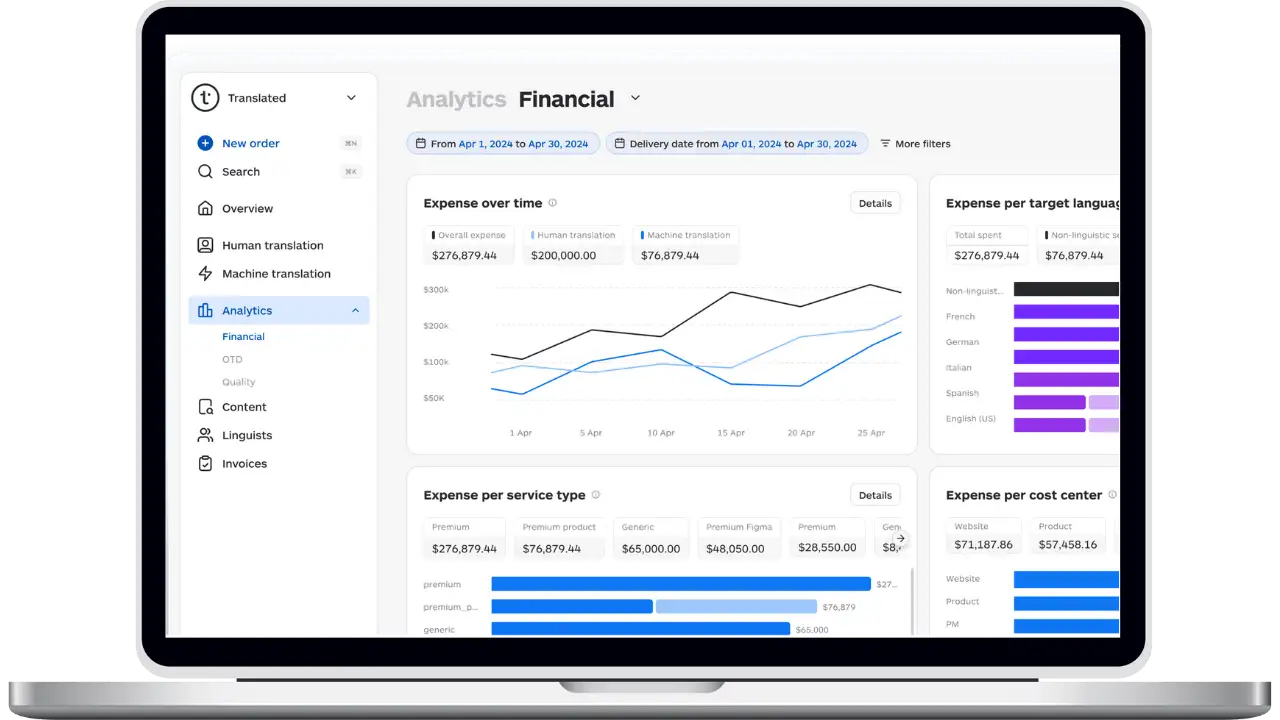
Review is applied only where risk is higher or quality is below threshold, so linguists spend time where it matters. - Analytics and accountability
Track quality, cost, throughput, and turnaround time across projects so localization becomes measurable, not anecdotal. - Fits complex enterprise tech stacks
Orchestrate content moving across systems and teams while keeping translation governance consistent across sources.
1-minute decision table: should you use Lara Translate with TranslationOS?
| If you are doing this… | This integration helps when… |
| Managing multiple content sources | You want one place to orchestrate localization across systems and teams. |
| Using AI but struggling with risk control | You need scoring and automatic human review triggers for low-confidence segments. |
| Trying to improve consistency | You want governed terminology, fewer exceptions, and targeted review rather than blanket QA. |
| Needing reporting and accountability | You want visibility on quality, cost, throughput, and turnaround time. |
Short step list: a typical TranslationOS workflow with Lara Translate
- Ingest content: TranslationOS pulls content from your connected systems.
- Translate with Lara Translate: content is sent to Lara as the AI translation engine.
- Score and route: segments are scored and low-confidence output is flagged automatically.
- Trigger human review: reviewers only touch segments below your threshold or in high-risk content types.
- Measure and optimize: use analytics to tune thresholds, reduce costs, and improve turnaround time.
How to integrate Lara Translate with TranslationOS
- Install the Lara Translate connector
In TranslationOS, open your integrations panel and install the Lara Translate connector. - Connect your Lara Translate account
Add your Lara credentials in the connector settings so TranslationOS can send translation requests to Lara Translate. - Choose language pairs and coverage
Decide which projects and language pairs should use Lara Translate as the default AI translation option. - Set quality scoring and human review triggers
Define thresholds so TranslationOS can automatically route low-confidence segments to human review, while letting higher-confidence output ship faster. - Run a real pilot and tune thresholds
Start with representative content, validate scoring behavior, and calibrate rules before scaling across teams.
The goal is simple: centralize AI translation, automate quality decisions, and apply human review only where risk or uncertainty is higher.
Get started with Lara Translate in TranslationOS
Install the connector, run a pilot, and see how Lara Translate performs when quality scoring and human review triggers are part of the same workflow.
👉 See how to activate the TranslationOS integration
FAQ
What is TranslationOS used for?
TranslationOS is an AI-first localization platform used to orchestrate translation workflows across tools, teams, and systems, with visibility on quality, cost, and turnaround time.
What does Lara Translate add to TranslationOS?
Lara Translate acts as the AI translation engine, designed to preserve meaning and intent. Combined with TranslationOS scoring and routing, it helps teams scale faster with clearer governance.
How do human review triggers work?
You define a quality threshold. When translated segments score below it, TranslationOS can route them to human review automatically, while higher-confidence segments can move forward with less friction.
What should you pilot first?
Start with representative content: a mix of high-volume and high-risk pages or strings. Validate scoring behavior, then tune thresholds until routing matches your risk tolerance.
Is this only for enterprises?
It is most valuable when you have multiple content sources, frequent releases, and a need to report on localization performance. Smaller teams can still benefit if they need stronger governance.
This article is about:
- Explaining how to integrate Lara Translate with TranslationOS for a unified AI translation workflow.
- Showing how translation quality scoring can automate decisions and trigger targeted human review.
- Helping localization and enterprise teams improve visibility on quality, cost, and turnaround time across multilingual content.