

If you are looking for how to integrate Lara Translate with Locize, this guide shows the fastest setup to keep translations synced with new keys and UI copy changes, without turning localization into a release blocker.
It is built for teams doing continuous localization: strings change daily, releases ship weekly, and you need real-time AI translation drafts inside Locize, plus review controls where it matters. So how to integrate Lara Translate with Locize?
|
TL;DR
|
Why it matters
Continuous localization breaks when translation is a batch step done after release. With Lara Translate in Locize, new keys can be translated immediately and reviewed in the same tool your team already uses, so shipping fast does not mean shipping partially localized.
Short answer
To integrate Lara Translate with Locize, enable Lara Translate as your MT/AI provider, paste your Lara credentials, select source and target languages, and generate drafts for keys. Then review and approve high-impact strings inside Locize before publishing.
Why this integration matters for teams shipping fast
Continuous localization fails when translation is treated as a batch task. New keys land, microcopy gets tweaked, and suddenly one language is two releases behind.
With the Lara Translate Locize integration, translation becomes part of the same loop as development: keys land, AI translation drafts are generated inside Locize, and your team can review and ship without switching tools.
What you get with Lara Translate inside Locize
- Real-time AI translation for new keys
Generate draft translations immediately when strings are added or updated, directly in your Locize project. - Continuous localization that stays in sync
Keep translations updated as source text evolves, so languages do not drift across versions. - Brand voice and terminology consistency
Reduce “three different translations for the same feature” by keeping review and approvals centralized in Locize. - Human review when it matters
Use instant drafts for speed, then apply review steps for legal, pricing, onboarding, or other high-impact UI.
1-minute decision table: is Lara Translate in Locize right for you?
| If you are doing this… | Enable Lara Translate in Locize when… |
| Shipping frequent UI updates | You need real-time localization updates for new keys and copy changes without manual export/import. |
| Managing brand voice across languages | You care about tone consistency and terminology, not only literal translation. |
| Running a lean localization team | You want instant drafts plus a Locize review workflow so humans focus on the strings that can break UX. |
| Launching new markets fast | You want speed and repeatability so localization does not block releases. |
How Lara Translate fits into a Locize workflow
Locize is where your localization work lives: keys, languages, review workflows, and publishing. Lara Translate becomes the AI engine that generates draft translations inside Locize, so your team can validate, adjust, and ship with confidence.
Typical continuous localization loop
- Keys arrive: new UI strings, error messages, onboarding steps, or product microcopy are added.
- Lara Translate generates drafts: fast, context-aware translations inside your Locize project.
- Review and approve: apply your Locize review workflow to critical strings (legal, pricing, onboarding, core navigation).
- Publish: Locize serves updated translations, so releases stay multilingual.
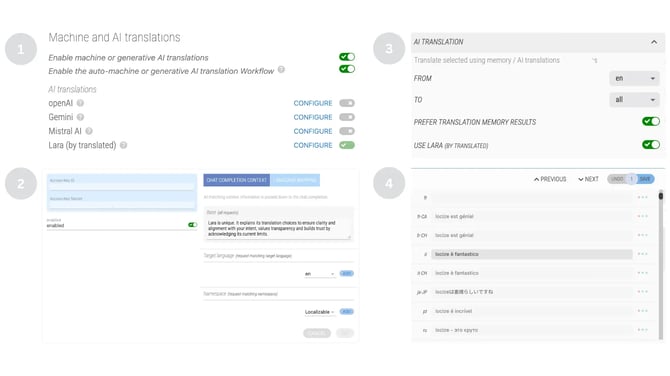
How to integrate Lara Translate with Locize
Prerequisites (2 minutes)
- Lara Translate credentials ready (the keys Locize will use to call Lara Translate).
- Locize project was created with the correct source language.
- Target languages added to your Locize project.
Watch the full video:
- Open your Locize project settings for Machine / AI Translation
Find the section where you select a Locize machine translation provider (MT/AI provider settings). - Select Lara Translate as the provider
Choose Lara Translate from the list of available providers. - Add your Lara Translate credentials
Paste your credentials into the integration fields so Locize can request translations from Lara Translate. - Choose source and target languages
Confirm your source language is correct and the target languages you want to translate into are enabled. - Generate translations for keys
Translate new and existing keys, then use review/approval steps for anything customer-facing or high-impact.
Rule of thumb: auto-translate for speed, review for risk. The goal is to keep localization continuous, not perfect on the first pass.
Common issues (and quick fixes)
- Translations look “off” for product terms: add context in your source strings where possible, and standardize terminology via review conventions.
- Wrong source language behavior: double-check the Locize project source language before generating drafts.
- Too many strings to review: tag or filter “high-impact” keys (navigation, pricing, legal, onboarding) and prioritize those for human review.
- Drafts are fine but tone varies: define a simple tone rule for reviewers (formal vs friendly) and apply it consistently.
- Release pressure: publish drafts for low-risk UI, hold approvals for high-risk strings, then iterate in the next release.
Enable Lara Translate in Locize
Test it on real keys to see how it handles frequent updates, tone, and review workflows in a continuous localization setup.
👉 See the activation steps in the knowledge base
FAQ
How do you integrate Lara Translate with Locize?
Enable Lara Translate as the MT/AI provider in your Locize project settings, paste your Lara credentials, select languages, and generate translations for keys. Then review and approve where needed.
Does this support continuous localization?
Yes. The goal is to keep translations updated as source strings evolve, so languages stay aligned with ongoing releases.
Is Lara Translate in Locize “real-time”?
In practice, yes: you can generate draft translations as soon as new keys appear, without exporting files or copy-pasting between tools.
When should humans review instead of shipping AI drafts?
Review anything that can create legal risk, pricing confusion, onboarding drop-offs, brand damage, or support tickets. Low-risk UI can often ship as a draft and improve iteratively.
What is the best way to keep brand voice consistent across languages?
Define a simple tone rule (formal vs friendly), review a small set of “voice-defining” strings first (navigation, onboarding, key CTAs), and apply the same review standard release after release.
This article is about:
- How to integrate Lara Translate with Locize to generate AI drafts directly inside your localization workflow.
- How continuous localization teams use real-time AI translation to keep languages aligned with fast releases.
- How to combine instant drafts with a Locize review workflow to protect quality, brand voice, and high-impact UI strings.