

If you are searching for how to bulk translate JPGs, the hard part is not translating one image. It is building a repeatable workflow that stays fast, consistent, and safe across dozens of files.
When you have 20 screenshots, 50 receipts, or a folder of scanned photos, the goal is simple: translate quickly without producing output your team cannot trust or reuse.
|
TL;DR
|
Why it matters
Bulk translation fails in expensive, quiet ways. One repeated mistake in totals, dates, IDs, dosage, or warnings can ripple across a whole folder. A risk-first bulk workflow keeps teams fast while still producing output they can share, reuse, and trust.
Definition
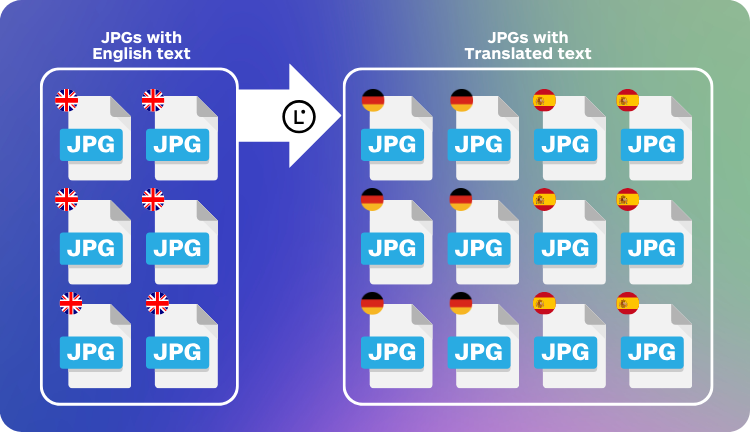
Bulk JPG translation means translating many images in one run while keeping output consistent, readable, and safe to use. In practice, this means batching similar images, using the same target language and context, and QA-checking risk items first.
How to bulk translate JPGs without losing accuracy
Bulk means the risk is not a single bad translation. The risk is a pattern of small errors that repeats across many files.
A safe bulk image translation workflow needs:
- Speed without manual copy-paste
- Consistency across a folder, not just one image
- Readable output that teams can reuse
- Lightweight QA that catches costly mistakes early
Workflow checklist (copy this)
- Batch images by type (screenshots, receipts, forms, labels).
- Pick output: image-to-image for sharing, image-to-text for extraction.
- Set context for the whole batch (domain, do-not-translate terms, formatting).
- Run bulk translation with the same target language and style.
- QA risk items first (numbers, names, warnings, small text, fit).
- Escalate to human review when triggers apply.
The fastest safe workflow for teams
Step 1: Batch by “image type,” not by folder name
Create batches like:
- UI screenshots (support, product, bug reports)
- Receipts and invoices
- Forms and IDs (high sensitivity)
- Packaging and labels (small text)
- Marketing creatives (headlines and CTAs)
This matters because each type has different failure modes, and different QA priorities.
Step 2: Decide output type per batch
- Image-to-image translation: when the translated image must be shared, reviewed, or reused.
- Image-to-text: when you only need extracted content for a ticket, doc, or spreadsheet.
Step 3: Translate the batch with consistent context
In bulk runs, inconsistency is the hidden cost. Keep the target language constant and apply the same context rules to the entire batch.
Context template for bulk runs (paste into your project notes):
- Domain: (support, finance, logistics, e-commerce, legal)
- Audience: (internal team, customer, vendor)
- Do not translate: brand names, product names, SKU, model numbers, email addresses
- Formatting rules: dates, currency, decimal separators, units
- Terminology preferences: key terms that must stay consistent across all images
Bulk translate JPGs in minutes, not hours
Upload a folder, translate in batches, and get shareable image output with a QA workflow your team can repeat.
Step 4: QA with a “risk-first” checklist
Do not try to review everything equally. Review what can actually hurt you:
| Risk type | What to check | Examples |
|---|---|---|
| Numbers | Prices, totals, dates, IDs, quantities | Receipts, invoices, shipping labels |
| Names | Brand, product, people, place names | Packaging, competitor screenshots |
| Small text | Disclaimers, warnings, ingredients | Labels, safety notices |
| Fit | Cut text, cramped headings, unreadable overlays | UI screenshots, banners |
Step 5: Spot-check sampling rules
- Check all high-risk images (legal, medical, financial, safety, identity).
- For the rest, check a sample (example: first 3, then 1 out of 10).
- If you find a repeated mistake, expand the sample or re-run that batch with better context.
Risk triggers: when to use human review
- Legal or compliance: contracts, terms, official forms, regulatory labels.
- Financial impact: invoices, totals, tax documents, bank details, payment instructions.
- Safety-critical: warnings, hazard labels, dosage, medical instructions, emergency info.
- Identity and personal data: IDs, passports, health records, sensitive customer info.
- Public-facing brand risk: marketing creatives, packaging claims, published screenshots.
Tool method: bulk translate JPGs with Lara Translate
This is the fastest “do it the same way every time” method for teams using Lara Translate.
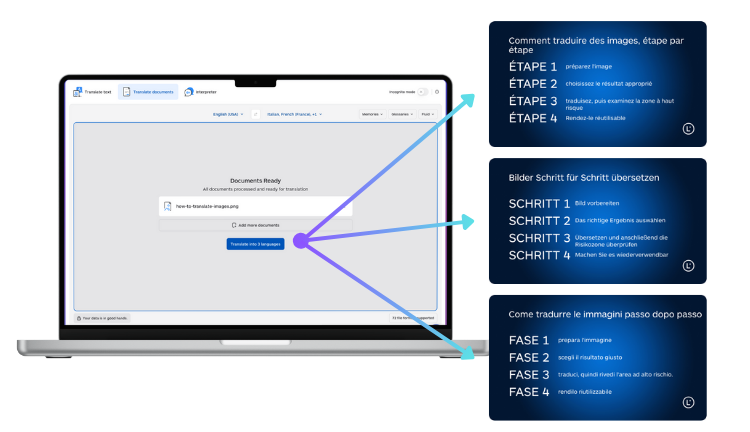
- Upload your images in one run and keep each batch consistent (screenshots together, receipts together).
- Choose your target language once per batch. Do not mix targets inside the same run.
- Set context for the batch using the template above (domain, do-not-translate terms, formatting rules).
- Pick the right mode: use image-to-image translation when the translated image is what you need to share or reuse.
- QA with risk-first rules (numbers, names, warnings, small text, fit), then decide if any images require human review.
Helpful Lara Translate references for teams:
- Translating images with Lara Translate (image-to-image)
- Translating images inside PDF documents
- Add context: use cases and examples
- How glossaries work
- Translation styles
- Learning vs Incognito Mode
Common bulk JPG translation mistakes (and how to avoid them)
- Mixing image types: receipts and screenshots have different QA priorities. Batch them separately.
- Inconsistent context: changing terminology rules mid-run causes drift across the folder.
- Ignoring small text: disclaimers and warnings are often the most important lines.
- No sampling plan: bulk success depends on quick checks, not endless review.
Need a safer workflow for high-risk images?
Run bulk translation for speed, then route flagged batches to human review when legal, financial, safety, or identity risks apply.
FAQ
Can I bulk translate JPGs and still keep the layout?
Yes. Use an image-to-image workflow so the output is a translated image your team can share and reuse.
What is the biggest risk in bulk image translation?
Small repeated errors, especially with numbers, names, and small text. In bulk, one mistake can scale across dozens of files.
Can I translate other image formats in bulk too?
Yes. Bulk runs often include PNG screenshots, HEIC mobile photos, WEBP web images, and TIFF scans, depending on your pipeline.
How do teams keep terminology consistent across hundreds of images?
Use consistent batch context and shared terminology controls like glossaries. Keep the same target language and rules for the whole batch.
This article is about:
- How to bulk translate JPGs with a repeatable team workflow
- How to stay fast without losing trust in the output
- A risk-first QA checklist and human review triggers for bulk image translation