

Most people translate the same way every day: copy the text, open a translation app, wait, then switch back. It takes five taps for something that should take one. When you set Lara Translate as your default translation app, that friction disappears. You highlight, you tap, you read the translation, right where you are.
This guide covers both platforms. Whether you’re on Android or iPhone, setup takes under two minutes.
TL;DR
|
How do I set Lara Translate as my default translation app on Android?
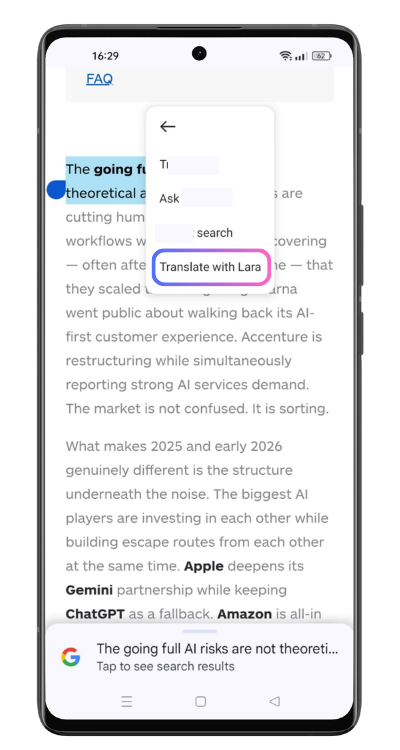 On Android, Lara Translate integrates directly into the native text selection menu. You don’t dig through system settings. Once the app is installed and you’re signed in, the option is already there.
Here’s what you do:
- Download Lara Translate from the Google Play Store.
- Sign in to your Lara Translate account. If you don’t have one yet, creating it takes about 30 seconds. Lara will prompt you to log in on first use if you haven’t already.
- Open any app — a browser, your email client, a messaging app, whatever you’re using.
- Long-press any text to trigger the selection menu.
- Tap “Translate with Lara” from the contextual options that appear.
The Lara Translate app opens with your selected text already translated. No clipboard juggling, no context switching mid-task. That’s the whole point.
This works across browsers, messaging apps, email clients, note-taking apps, and most other Android apps that support standard text selection. If “Translate with Lara” doesn’t show on first try, make sure you’re signed in to the app and try again.
How do I set Lara Translate as my default translation app on iPhone?
iOS lets you pick a default translation app at the system level. That means every time you highlight text anywhere on your phone and tap Translate, iOS calls Lara Translate automatically. No choosing every time.
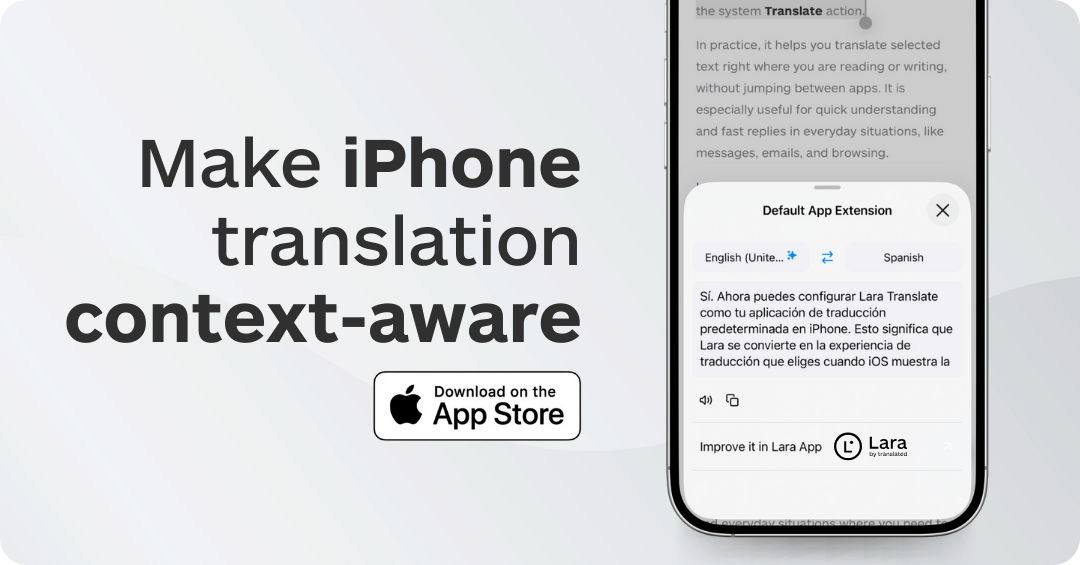
There are two ways to set it up.
Method 1: Through iPhone Settings
- Install the Lara iOS App from here
- Open Settings on your iPhone.
- Tap Apps.
- Select Default Apps.
- Tap Translation.
- Select Lara Translate.
Done. Every translation request from any app on your phone now routes through Lara Translate.
Method 2: On first use, during translation
If you’d rather skip the settings menu, you can switch on the fly. Highlight any text in Safari, Mail, Messages, or Notes, then tap Translate. When iOS asks which app to use, select Lara Translate and confirm. iOS remembers your choice.
After either method, if you’re not already signed in, iOS will prompt you to log in to your Lara Translate account before the translation loads. Once authenticated, results appear immediately. You can listen to the translation, copy it, or refine it without ever leaving your original app.
Want to undo the change later? Go back to Settings > Apps > Default Apps > Translation and pick a different app.
Get Lara Translate on your phone
Download the app and translate any text inline, on any app, without switching screens.
 |
 |
Why switch your default translation app?
The default translation app on both Android and iOS is set to the native system tool. That works. It gets the job done for short phrases. But it’s not built for people who translate frequently, across different languages, with specific terminology to protect.
Lara Translate gives you something most translation apps skip: context. You can tell Lara Translate what the text is about before it translates, so technical terms come out right instead of literally. Add a glossary and your brand-specific vocabulary is always preserved, no matter which language pair you’re working with.
There’s also Incognito Mode. When you’re translating sensitive content, like a legal document or a confidential business email, Incognito Mode ensures the text is not stored or used for training. Most users don’t know their default translation app stores everything. Worth checking.
Translation quality is the other factor. Lara Translate is built on ModernMT, which adapts to your content over time. The more you use it, the more it learns your domain and style. That’s not something a static system tool offers.
What you can translate with Lara Translate as your default app
Once set as your default, Lara Translate is available anywhere text selection is possible on your device. In practice, that covers a lot of ground.
- Emails and messages: Translate incoming messages from suppliers, clients, or colleagues without forwarding them anywhere or breaking the conversation thread.
- Reading a foreign-language article in Safari or Chrome? Select the paragraph you want, not the whole page, and get a clean translation immediately.
- Notes and documents: Useful when you’re reviewing a shared document in another language and need to check specific sections rather than machine-translate the whole file.
- Travel and daily life: menus, signs photographed and opened in your gallery, product descriptions in foreign e-commerce apps. All reachable through the same selection menu.
The key advantage over a standalone translation app is continuity. You stay in the app you were using. The translation result appears, you read it, and you carry on. No context lost, no extra steps.
Thank you for reading 💜
As a thank you, here’s a special coupon just for you: IREADLARA26.
Redeem it and get 10% off Lara PRO for 6 months.
If you already have a Lara account, log in here to apply your coupon.
If you are new to Lara Translate, sign up here and activate your discount.
FAQ
Does setting Lara Translate as the default work on all Android phones?
Yes. The “Translate with Lara” option appears in the text selection menu on Android regardless of manufacturer, as long as Lara Translate is installed and you are signed in to your account.
Can I still use the system translator after switching defaults on iPhone?
You can. Go to Settings > Apps > Default Apps > Translation and switch back to the Apple Translate app at any time. The change takes effect immediately.
What happens if I’m not signed in to Lara Translate?
On both Android and iOS, Lara Translate will prompt you to log in before showing a translation. Creating an account is free. A free plan is available if you want to try the feature before committing to a paid plan.
Does Lara Translate store the text I translate when set as default?
By default, Lara Translate may use translations to improve future results. If you need privacy, activate Incognito Mode in the app settings before translating. In Incognito Mode, your content is not stored and not used for training.
Is Lara Translate free to use as a default translation app?
Lara Translate has a free plan that covers basic text translation. For higher volume, glossaries, translation memories, and priority processing, paid plans are available. See the Lara Translate pricing page for details.
Which languages does Lara Translate support?
Lara Translate supports over 200 languages. The full list is available in the app and in the Lara Translate language support documentation.