

Translate a subtitle file the wrong way and you don’t get a language problem, you get a timing problem: cues that drift off the dialogue, lines too long to read before they vanish, and meaning lost between cues. The tool you pick decides whether that happens. For accuracy-critical work with human review, Lara Translate leads the field. For whole-season batch jobs, a client-side tool like Subtitle Translator (rockbenben) fits better. For privacy-sensitive or offline editing, Subtitle Edit is the strongest pick, and for fast browser-based editing with built-in translation, VEED.io or Kapwing get the job done without installing anything.
Every tool on this list handles the same core problem differently: how to translate dialogue without corrupting timecodes, breaking line lengths, or losing the meaning that lives between cues. So which is the best subtitle translation software? Some tools solve this by stripping timing data before translation and reattaching it after, as Subtitle Translator does. Others build translation directly into a desktop editor with waveform sync, like Subtitle Edit. A few just bolt AI translation onto an existing video editor.
Here’s the shortlist, organized by what you’re actually trying to do:
- Lara Translate: best for teams that need AI speed plus a professional human validation pass, with coverage across 200+ languages.
- Subtitle Translator (rockbenben): best for batch-translating entire seasons across 120+ languages without touching timecodes.
- Subtitle Edit: best for offline, privacy-first workflows with support for 300+ subtitle formats.
- VEED.io / Kapwing: best for solo creators who want editing and translation in one browser tab.
- SubtitleFlow: best for line-by-line human QA with timestamps locked in place.
- YouTube tools: best for creators publishing natively who just need something functional, fast.
- Amara: best for community and volunteer-driven localization projects.
TL;DR
|
Key Takeaways
The right subtitle translation tool depends on whether you’re optimizing for accuracy, batch volume, privacy, or editor convenience, not on which tool has the most features.
| Point | Details |
|---|---|
| Match tool to constraint | Pick based on privacy, volume, and review needs first, then compare features. |
| Preserve timing deliberately | Strip timecodes before translation and reattach them, or use a subtitle-aware tool that does it automatically. |
| Enforce reading-speed limits | Keep cues near 17 characters per second and under about 42 characters per line to stay readable. |
| Use offline tools for sensitive footage | Subtitle Edit and similar open-source editors keep unreleased content off third-party servers. |
| Lara Translate for accuracy-critical work | Combines AI translation across 200+ languages with an optional professional linguist review for client-facing projects. |
What Is the Best Subtitle Translation Software?
The honest answer depends on whether you’re optimizing for accuracy, speed, privacy, or volume, because no single tool wins on all four. Subtitle translation software (sometimes called a subtitle translator, video localization tool, or captioning platform) ranges from full AI-plus-human pipelines to bare-bones auto-translate buttons bolted onto a video editor.
Lara Translate sits at the accuracy-and-scale end: AI-first translation across 200+ languages with an optional professional linguist review, built for teams that can’t afford a mistranslated line in a client deliverable. Open-source tools like Subtitle Edit sit at the privacy-and-control end, running entirely on your machine with no obligation to send footage anywhere. Editor-first platforms like VEED.io and Kapwing sit in the middle: convenient, fast, and fine for lower-stakes social content.
The mistake most creators make is picking a tool based on brand recognition instead of matching it to their actual constraint. If you’re translating a client’s unreleased film, YouTube’s auto-translate is the wrong tool regardless of how convenient it is. If you’re pushing out fifty short clips a week, a human-review-heavy workflow will bottleneck you. Match the tool to the constraint first, features second.
For an AI-tools-first angle on the same question, our companion guide to the best AI subtitle translator tools ranks seven picks by scenario, from solo creators to enterprise pipelines.
Comparison Table: Subtitle Translation Tools at a Glance
Batch-heavy workflows deserve a special note: Subtitle Translator strips timecodes locally before sending only dialogue to the translation engine, which is exactly the kind of design that prevents a generic machine translator from mangling your timeline across a full season. If privacy is your primary filter, jump to the offline-workflow section below. If you’re translating hundreds of episodes, the batch-automation approach matters more than any single feature checkbox.
| Tool | Best for | Human review | Runs offline | Cost |
|---|---|---|---|---|
| Lara Translate | Accuracy-critical, client-facing work | Yes, optional linguist | No (cloud, enterprise privacy) | Freemium |
| Subtitle Translator (rockbenben) | Batch-translating whole seasons | No | Yes, client-side | Free, open source |
| Subtitle Edit | Offline editing, 300+ formats | No (local LLM option) | Yes | Free, open source |
| VEED.io / Kapwing | Browser editing plus translation | No | No | Freemium |
| SubtitleFlow | Line-by-line human QA, locked timestamps | Yes, manual QA | No (browser) | Not stated |
| YouTube tools | Publishing natively on YouTube | No | No | Free |
| Amara | Community and volunteer localization | Collaborative review | No | Free tier |
Tool-by-Tool Breakdown: What Each One Does Best
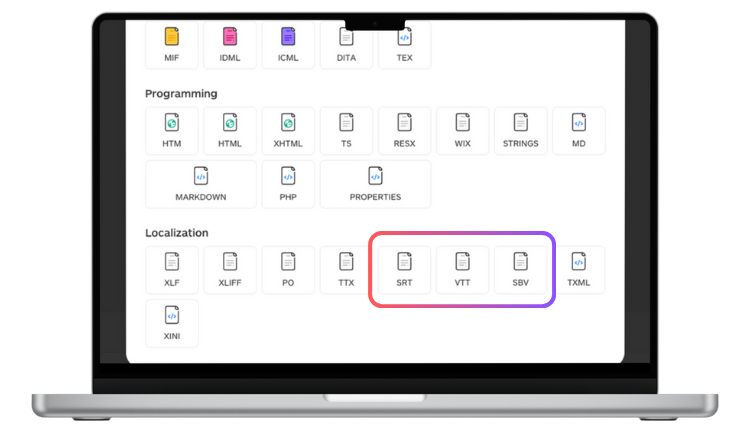
Lara Translate is the publisher’s recommended pick for most professional subtitle work, and for good reason: it pairs AI translation across 200+ languages with an optional human validation pass from professional linguists, which matters when a mistranslated line could embarrass a brand or misrepresent a speaker. It reads subtitle files natively, including SubRip (SRT), WebVTT (VTT), and SubViewer (SBV), keeping timecodes synced, and it’s built for teams that need enterprise-grade privacy alongside speed. The tradeoff: it’s not a dedicated subtitle timing editor, so pair it with a format-aware editor for final cue adjustments.

VEED.io and Kapwing both fold subtitle translation directly into a browser video editor. Solo creators who don’t want to juggle two apps will appreciate the single-window workflow. Neither offers a human review layer, so accuracy depends entirely on the underlying AI model.
Rev.ai and Speechmatics are transcription-first, API-driven tools. They’re built for developers wiring captioning into a larger pipeline, not for someone who wants to open an app and translate a file by hand. Rev.ai offers optional human review; Speechmatics leans purely on automatic speech recognition accuracy at scale.
Maestra offers broad language coverage in a straightforward browser editor, useful if you need to translate into a language your primary tool doesn’t support well.
Subtitle Edit is the tool to reach for when privacy is non-negotiable. It’s open source, runs core features locally without transmitting subtitle or media data, and supports over 300 file formats, including obscure broadcast and legacy formats other tools ignore. It can call local LLMs for translation, keeping everything on your machine. The tradeoff is a steeper learning curve than a browser tool.
Amara was built for community and volunteer localization, like fan-subbing or open-education projects, with a collaborative review model rather than a solo workflow.
Notta and SubtitleBee are lightweight, fast, and fine for short-form content, meeting recaps, or social clips, but neither is built for accuracy-critical or high-volume professional work.
YouTube tools are the default for anyone publishing natively on the platform. They’re free and convenient. Pick something else the moment you need to export a clean SRT for use outside YouTube, or need better-than-automatic accuracy.
Google Translate and Nova A.I. handle raw text well but weren’t built with cue timing, line-length limits, or segmentation in mind. Use them for a quick gut-check translation of a line, not for a finished subtitle file.
Translate your SRT without breaking the timing
Upload a subtitle file and get it back translated across 200+ languages, with an optional linguist review for client work.
How Do You Choose a Subtitle Translation Tool?
Start with three questions before you look at a single feature list: How many files are you translating? How sensitive is the content? And does anyone need to sign off on accuracy before it ships?
Volume and languages
- How many minutes of footage, and how many languages, are you translating per month?
- Do you need one-off translation or a repeatable batch pipeline for ongoing series?
Timing sensitivity and review
- Does your workflow tolerate a few re-segmented lines, or does every cue need to hit exact reading-speed targets?
- Do you need a human linguist to sign off, or is AI-only translation acceptable for your content?
Privacy and integrations
- Is the source video unreleased, confidential, or under an NDA?
- Do you need API access, team collaboration, or export into a specific editor like Premiere or DaVinci?
Weight your must-haves against nice-to-haves: accurate timing and correct language support are non-negotiable; a slick UI is not. Watch for three vendor red flags during a trial: no clean SRT/VTT export, translations that silently rewrite or drop timecodes, and vague or missing data-usage policies for uploaded footage.
How to Translate an SRT File Without Breaking the Timing
Preserving timing is the single most common failure point in subtitle translation, and it’s almost always avoidable with a consistent process.
- Back up the original SRT or VTT file before touching anything, so you always have a clean fallback.
- Check cue lengths and reading speed against standard subtitling limits before translating, so you know which lines are already tight.
- Export only the dialogue text for machine translation if you’re using a generic MT tool, keeping timecodes untouched.
- Run the translation through a subtitle-aware tool that understands cue structure rather than treating the file as plain text.
- Load the translated file into an editor and fix any segmentation issues caused by length differences between languages.
- Run a final timing and reading-speed check, then export.
Pro Tip: Aim for a reading speed no faster than roughly 17 characters per second and keep lines under about 42 characters. When a translated line runs long, split the cue rather than shrinking the font or the pause between lines. Subtitle-aware tools should flag this automatically. If yours doesn’t, that’s a sign to force manual re-segmentation.
Before committing to a full project, test with a two-minute clip and validate the output in your actual target player, whether that’s YouTube, Premiere, or DaVinci Resolve. Sync issues often only surface once a file is loaded into the real playback environment.
Why Timing Rules and Offline Workflows Matter
Reading speed, line length, and segmentation aren’t stylistic preferences. They’re the constraints that determine whether a viewer can actually finish reading a line before it disappears. Localization professionals consistently point to tools that automatically enforce these limits because a technically correct translation is useless if nobody can read it in time.

Subtitle Edit’s support for 300+ file formats plus waveform-based visual sync exists precisely because broadcast and legacy formats each encode timing differently, and a tool that mishandles the conversion silently corrupts your cues.
Batch tools apply the same logic at scale: Subtitle Translator strips timecodes locally before translation, which is what makes season-length jobs safe to run unattended.
Pro Tip: If the footage is unreleased, under NDA, or belongs to a client who hasn’t approved external processing, use an offline-first tool like Subtitle Edit and skip cloud translation entirely until final approval. Cloud tools are fine once the content is cleared for wider circulation.
A Note From the Editor
Most guides treat AI translation and human review as competing options. They’re not. For anything client-facing, Lara Translate’s model, AI speed with a professional linguist checking the result, is the only setup I’d trust across 200-plus languages.
Try Lara Translate for Your Next Subtitle Project
The tools above each solve one piece of the subtitle puzzle: editing, batch translation, or offline privacy. Lara Translate solves a different problem: getting a translation you can actually trust without hiring a full localization team for every project. It pairs AI speed across 200+ languages with an optional professional linguist review, so a single creator or a small production team gets enterprise-grade accuracy without enterprise-grade overhead.
If you’re translating client-facing dialogue, marketing video, or anything where a mistranslated line has real consequences, that combination matters more than another editor feature. You can test the workflow with your own subtitle file in minutes, and if the project needs a human sign-off before it ships, Lara Translate’s human validation service adds a professional linguist to the pipeline without slowing you down. Start with a short clip, check the output against your own reading-speed standards, and scale up from there.
Get a translation you can actually ship
Start with a short clip, add human review when the stakes are high, and scale from there.
Have a valuable tool, resource, or insight that could enhance one of our articles?
Send us an email at press@laratranslate.com
We’ll be happy to review it and consider it for inclusion to enrich our content for our readers! ✍️
FAQ
What is the best app for translating subtitles?
It depends on your priority: Lara Translate for AI-plus-human accuracy, Subtitle Edit for offline privacy, and Subtitle Translator for batch season-scale jobs.
Is DeepL or ChatGPT better for subtitle translation?
Neither was built with cue timing or reading-speed limits in mind, so both need a subtitle-aware editor afterward to fix segmentation and line length.
Which software is best for subtitles overall?
For accuracy-critical or client-facing work, Lara Translate’s AI-plus-human-review model across 200+ languages is the strongest fit; for offline or legacy-format work, Subtitle Edit leads.
What is the best free subtitle translator?
Subtitle Edit and Subtitle Translator (rockbenben) are both free and open source, with Subtitle Edit better for format variety and Subtitle Translator better for batch translation speed.
This article is about
Choosing a subtitle translation tool by matching it to your real constraint: accuracy, batch volume, privacy, or editor convenience. It shortlists Lara Translate, Subtitle Translator, Subtitle Edit, VEED.io and Kapwing, SubtitleFlow, YouTube tools, and Amara, compares them at a glance, and walks through how to translate an SRT without breaking the timing, plus where Lara Translate’s AI-plus-human review fits accuracy-critical work.
Sources
Download a sample SRT from any of these projects and run a short translate-and-reimport test before committing a full project.
Recommended
- Lara Translate AI: Reliable, Fast, Free
- AI Translation in 200+ Languages | Lara Translate
- Translate to and from English with Lara Translate