

Choosing an LMS for SCORM content shouldn’t take weeks of demos. Most platforms support SCORM at a basic level, but support varies widely once you look at implementation time, multi-audience deployment, and total cost beyond the licence fee.
Procurement teams often discover the gap after signing. A platform advertised as “SCORM-compatible” turns out to handle completion tracking inconsistently, or the real cost triples once hosting and integration work get added. This guide compares ten LMS platforms on what matters for SCORM deployments specifically: certified compliance, implementation timelines, and pricing that includes the parts vendors don’t lead with.
|
TL;DR
|
What makes an LMS worth using for SCORM content in 2026?
A vendor checklist that says “SCORM-compatible” tells you almost nothing. Here’s what actually separates a platform that works from one that almost works:
- Certified SCORM 1.2 and SCORM 2004 support, tested against your actual course files, not just a vendor checklist
- Realistic implementation timelines, since enterprise rollouts can take months longer than mid-market deployments
- Transparent pricing that accounts for implementation fees, authoring tool licences, and integration costs, not just the headline per-user rate
- Compliance certifications relevant to your sector, including FedRAMP, SOC 2 Type 2, GDPR, and ISO 27001
- A learner experience that holds up at scale, since interface complaints are common even among well-rated platforms
- A clear path for multi-audience training if you need to serve employees, partners, and customers from one platform
The 11 best LMS platforms for SCORM content in 2026
| # | Platform | Best for | Pricing model | Starting price |
|---|---|---|---|---|
| 1 | TalentLMS | SMBs that want fast deployment | Per-registered-user | $119-$149/month (Core) |
| 2 | Docebo | Enterprises that want AI-driven personalisation at scale | Custom | ~$25,000/year (mid-market) |
| 3 | Absorb LMS | Regulated industries needing the highest peer-rated enterprise LMS | Custom | ~$10,000-$25,000/year (mid-market) |
| 4 | 360Learning | L&D teams that build content collaboratively | Per-user/month | ~$8/user/month |
| 5 | Meridian LMS | Federal, state & local government, and enterprise commercial | Per-user/year & custom | Contact sales |
| 6 | iSpring LMS | Teams with large PowerPoint libraries | Per-user/month | ~$3.70/user/month |
| 7 | MapleLMS | Organizations already using their Salesforce-native LMS | Custom | Contact sales |
| 8 | Cornerstone | Large enterprises needing a full HR talent suite | Per-user/month at scale | ~$6-$10/user/month |
| 9 | Moodle | Organisations with development resources needing maximum customisation | Free licence + hosting | Free (licence only) |
| 10 | SAP Litmos | Enterprises needing fast deployment with SAP integration | Per active user | Contact sales |
| 11 | LearnUpon | Mid-market organisations running multi-audience training | Custom | Contact sales |
1. TalentLMS
Best for: SMBs that want fast deployment
TalentLMS holds a 4.6/5 rating on G2 from over 700 reviews (G2, June 2026). Epignosis, its parent company, reports that more than 70,000 teams across over 12,000 organisations use the platform, including Tesla, Phillips, and Walgreens (Epignosis company announcements).
SCORM and xAPI are both supported, and setup is fast: most SMB deployments go live within days. TalentCraft, the platform’s AI authoring feature, can generate a first draft of a course from a prompt or an existing document.
The trade-off is multilingual support. Course content created in TalentCraft is generated in the language you write the prompt in, and teams serving learners in multiple languages need to translate materials separately before upload.
- SCORM support: SCORM, xAPI
- Implementation: Days
- Pricing: $119/month (annual billing) or $149/month (monthly billing) for the Core plan, up to 100 users
Verdict: the fastest path to a working LMS for small and mid-sized teams. Not the right choice for organisations with complex, multi-language content pipelines built into a single platform.

2. Docebo
Best for: Enterprise organisations that want AI-driven learning personalisation at scale
Docebo is the most AI-forward platform in this comparison. Its content recommendations, auto-tagging, virtual coaching, and generative AI for course creation are learner-facing, designed to surface the right content automatically rather than requiring administrators to assign every course manually.
Its content marketplace includes 30,000+ ready-made courses. SCORM and xAPI are fully supported, and the platform supports multi-audience training, meaning the same deployment can serve employees, partners, and customers with separate portals and learning paths.
Docebo consistently ranks higher than Cornerstone on G2 ease-of-use ratings (G2, June 2026). Implementation timelines for mid-market deployments run 4-8 weeks; enterprise rollouts can reach 3-6 months. Pricing starts around $25,000 per year for mid-size deployments and can exceed $80,000 annually for enterprise contracts.
- SCORM support: SCORM, xAPI
- Implementation: 4-8 weeks (mid-market), 3-6 months (enterprise)
- Pricing: Custom. Minimum approximately $25,000/year for mid-market
Verdict: the best dedicated LMS for enterprise organisations that want AI-driven learning at scale. Not the right choice for teams that need a full HR talent suite or an SMB on a constrained budget.
Already comparing LMS vendors? Sort out translation first.
Translate your SCORM source files (DOCX, PPTX, HTML, XLIFF) into 200+ languages before you ever touch an authoring tool. Same structure, same formatting, ready to re-import.
3. Absorb LMS
Best for: Organisations in regulated industries that need the highest peer-rated enterprise LMS
Absorb LMS holds a 4.6/5 rating on G2 from over 861 reviews and has been named the #1 corporate LMS in multiple recent G2 seasonal reports (G2, June 2026; ratings shift between reporting periods, so check the current score before you shortlist it). For organisations where procurement includes peer review, Absorb is one of the most defensible choices in the category.
Its standout feature is Absorb Infuse, which embeds training directly inside third-party products and portals without requiring learners to leave their workflow or log into a separate LMS. This is a genuinely unique capability among the platforms reviewed and is particularly valuable for extended enterprise programmes or customer education.
- G2 rating: 4.6/5 (861+ reviews, G2, June 2026)
- SCORM support: SCORM, xAPI
- Implementation: 2-6 weeks
- Pricing: Custom. Estimated $10,000-$25,000/year for mid-market
Verdict: a strong enterprise choice for organisations where G2 peer ratings matter in procurement. Best-in-class if embedding training within existing SaaS workflows is a requirement.
4. 360Learning
Best for: L&D teams that build training content collaboratively with subject matter experts
360Learning takes a fundamentally different approach from every other platform on this list. Rather than L&D teams pushing content down to learners, it’s built around collaborative authoring: subject matter experts create and update courses inside the platform without needing instructional design skills.
SCORM and xAPI are supported for importing existing content libraries, but the platform’s strength is its native authoring environment where SMEs and learners co-create content. G2 reviewers consistently cite this as the feature that separates 360Learning from top-down LMS competitors.
The trade-off: if your training model is primarily one-directional, 360Learning’s collaborative architecture adds complexity without adding value. It’s also not the natural choice for heavily regulated environments where content must be tightly controlled and version-locked.
- SCORM support: SCORM, xAPI
- Implementation: 2-4 weeks
- Pricing: Approximately $8/user/month. Contact sales for volume pricing
Verdict: the best LMS for knowledge-sharing cultures where SMEs are the primary source of training content. Not optimised for top-down compliance training in regulated environments.
5. Meridian LMS
Best for: Government and regulated industries
Meridian LMS became the first and only LMS to achieve FedRAMP 20x Class C Certification (Meridian press release, March 23, 2026; FedRAMP Marketplace), following an earlier FedRAMP 20x Low authorisation in 2025. For federal agencies and contractors where this certification is a procurement requirement, Meridian is currently in a category of one.
Customers include the U.S. Army, U.S. Secret Service, the Commonwealth of Virginia, New York City, and Johnson Controls (Software Advice vendor profile). SCORM and xAPI are supported, along with a native Learning Record Store, blended learning tools, and deployment options across cloud, on-premises, and private cloud.
Meridian’s strength is compliance depth, not interface polish. Reviewers note the learner experience is more utilitarian than platforms built primarily for consumer-style engagement, and implementation timelines for government deployments tend to run longer due to security review requirements.
- SCORM support: SCORM, xAPI
- Implementation: Standard implementation is 8 weeks, with more complex deployments taking longer
- Pricing: Custom. Contact sales
Verdict: the right choice for government and regulated industries where FedRAMP authorisation is a requirement, not a preference. Less suited to organisations prioritising a modern, consumer-style learner interface.

6. iSpring LMS
Best for: Teams with large PowerPoint libraries that want the fastest content-to-LMS pipeline
iSpring LMS‘s defining feature is its native PowerPoint integration. Teams with hundreds of existing slide-based training materials can convert and host them without rebuilding a single lesson, and the authoring-to-LMS pipeline is tighter than any competitor on this list.
The platform supports SCORM and xAPI, includes 360-degree skills appraisal, ILT scheduling, and a clean mobile app. Starting at $3.97/user/month for mid-market deployments, it delivers most capabilities found in competitors that charge nearly double.
One thing to look out for: iSpring LMS and iSpring Suite (the authoring tool) are separate annual purchases. Many teams budget only for the LMS and discover later that they need to add author-seat licensing for the creation software. Get both costs confirmed directly from iSpring before comparing quotes. Third-party sources (G2, Capterra, ITQlick) show iSpring Suite authoring tiers ranging roughly $720-$1,970/author/year depending on tier and current promotions, so treat any single number you see quoted as a starting point, not a final figure.
- SCORM support: SCORM, xAPI
- Implementation: 1-5 days
- Pricing: iSpring LMS starts from $3.97, while iSpring Suite (the authoring tool) ranges from $720 to $1,290 per author.
Verdict: best value in the mid-market for teams whose content primarily lives in PowerPoint. Budget for both the LMS and the authoring tool, and confirm current pricing directly with iSpring before comparing against competitors.
7. MapleLMS
Best for: Many organizations are already using their Salesforce-native LMS that need SCORM-compliant training natively integrated into their CRM
MapleLMS is an AI-powered, cloud-based LMS built specifically around native Salesforce integration, positioning it differently from other platforms in this comparison. Rather than treating Salesforce as one integration among several, it operates inside the Salesforce ecosystem directly, which matters for organizations that already run customer, partner, and member data through Salesforce and want training data living in the same system.
The platform supports SCORM, xAPI, and AICC, with drag-and-drop authoring for quizzes, simulations, and multimedia courses. Its audience range is broad: employee, membership, customer, partner, and volunteer training, all served from one white-labeled platform with branded mobile apps.
Reported user experience is strong, 4.6 to 5.0 across review platforms, with centralized content management, automated compliance tracking, and AI-assisted skill-gap identification cited as core strengths. Some reviewers note the interface could be more refined.
- SCORM support: SCORM, xAPI, AICC
- Key differentiator: Native Salesforce integration
- Pricing: Custom, contact sales
Verdict: The strongest choice for organizations already invested in Salesforce that want SCORM-compliant training living natively inside their CRM. Less relevant for organizations with no Salesforce dependency, where the integration adds cost without corresponding value.
8. Cornerstone
Best for: Large enterprises that need a full HR talent suite with learning as one component
Cornerstone is not just an LMS. It connects learning to performance management, succession planning, recruiting, and workforce intelligence in one platform. The value proposition is breadth: one vendor, one platform, one data model for the full talent lifecycle.
SCORM and xAPI are supported. Cornerstone Galaxy, its consolidated AI platform, is adding capabilities across the suite. Compliance management is historically strong for multi-jurisdictional regulatory environments.
G2 reviewers consistently rate the learner interface as cumbersome. Implementation timelines run 3-6 months. Contracts start at approximately $6-10/user/month at scale, with significant implementation fees.
One note for 2026: Cornerstone is consolidating acquired products, including Saba, EdCast, and Grovo, into Galaxy. Multiple third-party comparison sites cite December 2026 as Saba’s end-of-life date, though this hasn’t been confirmed against an official Cornerstone announcement. Organisations on any acquired platform should confirm the current timeline directly with Cornerstone and have migration conversations well ahead of that date.
- SCORM support: SCORM, xAPI
- Implementation: 3-6 months
- Pricing: Approximately $6-10/user/month at enterprise scale. Custom contracts with significant implementation fees
Verdict: the right choice if you need a single platform for the full HR talent lifecycle and have the budget and timeline for a complex implementation. Not for teams that need a clean learner experience or fast time to value.
9. Moodle
Best for: Organisations with development resources that need maximum customisation at minimal licence cost
Moodle is the most widely adopted LMS globally. It’s open-source, free to download, and customisable, making it a strong choice for educational institutions, government bodies with IT teams, and large enterprises that want to avoid vendor lock-in.
SCORM, xAPI, and IMS-LTI are all supported. A large plugin ecosystem allows teams to extend core functionality, though reviewers caution that many community plugins are inadequately maintained and should be tested before production deployment.
The real cost of Moodle isn’t the licence. It’s the administration: hosting, security patching, plugin maintenance, and upgrades require either internal technical staff or a Moodle Partner.
- SCORM support: SCORM, xAPI, IMS-LTI
- Implementation: 6-12 months for full enterprise rollout
- Pricing: Free licence. Hosting and Moodle Partner costs vary
Verdict: the right choice for organisations with development resources and the in-house capacity to manage the infrastructure. A weaker choice for teams that want to go live quickly without technical overhead.
10. SAP Litmos
Best for: Enterprises that need fast deployment with SAP ecosystem integration
SAP Litmos is designed for rapid implementation. Deployment timelines are measured in days to two weeks, making it one of the fastest enterprise LMS options in the market.
SCORM and xAPI support is standard. For organisations already running SAP SuccessFactors or other SAP products, Litmos provides native integration that reduces the overhead other platforms require. Per-active-user billing means variable monthly engagement costs less in lower-activity months.
- SCORM support: SCORM, xAPI
- Implementation: Days to 2 weeks
- Pricing: Per active user. Contact sales for current rates
Verdict: the fastest enterprise LMS for SAP-aligned organisations. Less differentiated outside the SAP ecosystem.
11. LearnUpon
Best for: Mid-market organisations running multi-audience training programmes
LearnUpon consistently earns strong customer satisfaction scores. Its multi-portal architecture allows one platform to serve separate learner audiences with distinct branding and learning paths, which suits organisations training employees, partners, and customers from a single back end.
- SCORM support: SCORM, xAPI
- Implementation: Contact sales
- Pricing: Custom. Contact sales
Verdict: a strong choice for organisations running training across multiple distinct audiences, with consistently positive customer satisfaction and a clean learner experience.
Don’t forget the step before the LMS: translating your SCORM content
None of the platforms above solve a problem that shows up the moment your training programme crosses a language border. An LMS hosts and tracks course content. It doesn’t translate it. If your workforce, partners, or customers operate in more than one language, that translation work has to happen before a course ever gets uploaded, and it’s usually the slowest, most manual part of the whole rollout.
This is where most L&D teams lose time. SCORM packages bundle slide text, voiceover scripts, quiz questions, and on-screen labels across multiple file formats, and a missed string or a broken layout after translation means re-exporting the whole package and re-testing it in the LMS. Manually coordinating that with freelance translators or a traditional agency can stretch a single course’s localisation into weeks.
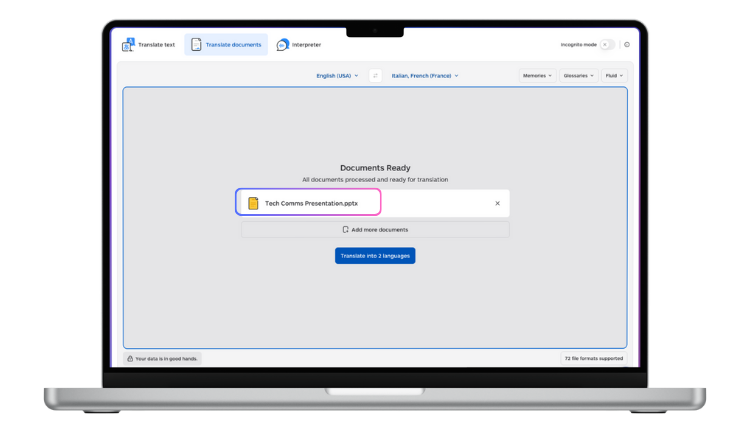
Lara Translate is built for this kind of document-level translation work. It supports 200+ languages and a wide range of file formats, including DOCX, PPTX, HTML, and XLIFF, so it can translate the source files SCORM courses are typically built from while preserving the original formatting and structure. That means course text comes back ready to re-import into your authoring tool, without rebuilding slides or re-tagging quiz logic by hand. For L&D and content teams running multilingual training programmes, this turns translation from a bottleneck before launch into a manageable step in the production pipeline.
How to choose the right LMS for SCORM content
Step 1: define your compliance requirements first. FedRAMP for US federal deployments. SOC 2 Type 2 for commercial regulated industries. GDPR for EU data. ISO 27001 for international enterprise. Filter your list to platforms that can demonstrate current certification before evaluating any other criterion.
Step 2: set your real budget. The headline LMS price is rarely the total cost. Add implementation fees, authoring tool licences if your LMS doesn’t include native authoring, and HRIS integration development. Model your cost at 250, 500, and 1,000 learners before comparing vendor quotes.
Step 3: test SCORM compatibility before signing. Upload your most complex existing SCORM course to the trial or demo environment. Check completion tracking, quiz score reporting, branching scenarios, and mobile rendering. Compatibility issues between authoring tools and LMS platforms are more common than vendor documentation suggests.
Step 4: account for your multilingual workforce. The LMS delivers content; translation happens before that. If your training materials need to exist in more than one language, handle that step before upload (see the section above) rather than discovering the gap mid-rollout.
Step 5: match the pricing model to your usage pattern. Per-registered-user plans suit smaller rosters with consistent activity. Per-active-user plans suit large rosters with variable monthly engagement. Flat-rate plans suit high learner counts with high monthly activity.
Got a SCORM course that needs to ship in three languages?
Upload the source DOCX, PPTX, or HTML and get it back with the same structure, ready to re-import into your authoring tool.
The bottom line
No platform wins on every criterion, and that’s the actual finding here, not a hedge. Meridian LMS wins on compliance depth. TalentLMS wins on speed. Docebo wins on AI personalisation at scale. Absorb wins on peer validation. Pick the criterion that matters most for your procurement, filter on it first, and only then compare the rest.
One step belongs on your checklist regardless of which platform you choose: if your learners span more than one language, get the translation workflow sorted before the first course goes live. It’s cheaper to fix at the start than to retrofit after a rollout.
FAQ
What is the best LMS for SCORM content in 2026?
There is no universal best. Meridian LMS leads for government and regulated industries. TalentLMS is the fastest path for SMBs. Docebo leads for enterprise AI-driven learning. Absorb LMS has the highest peer ratings in the category. The right answer depends on your compliance requirements, budget, and learner population.
Do all LMS platforms support SCORM?
SCORM 1.2 is supported by every major platform. SCORM 2004 support is widespread but not universal. Test your specific content on any platform before signing a contract: compatibility issues between authoring tools and LMS platforms are more common than vendor documentation suggests.
What is the difference between SCORM and xAPI?
SCORM tracks course completion, quiz scores, and time-on-task within a browser session. xAPI tracks a richer set of learning behaviours including mobile activity, simulations, offline learning, and social learning, and stores data in a Learning Record Store. For new content builds in 2026, xAPI is generally preferred where the LMS supports it, with SCORM maintained for legacy content compatibility.
How much does an LMS cost in 2026?
Costs vary significantly. SMBs (under 200 users) typically pay $1,500-$8,000 per year on TalentLMS or iSpring Learn. Mid-market organisations (200-1,000 users) budget $8,000-$30,000 per year. Enterprise organisations (1,000+ users) often pay $25,000-$100,000 or more annually. Always calculate total year-one cost including implementation fees, onboarding, add-on modules, and integration development.
How do I translate SCORM content for multilingual learners?
The translation step happens before content is uploaded to the LMS. Most SCORM authoring tools export source files in formats including DOCX, PPTX, HTML, and XLIFF that can be translated at the document level and re-imported. Lara Translate supports these formats directly, preserving structure and formatting so localised versions can be produced without rebuilding course content from scratch.
What security certifications should I look for in a government LMS?
FedRAMP authorisation is required for US federal agency deployments. SOC 2 Type 2 is the standard for regulated commercial industries. GDPR compliance and EU data residency options are required for European deployments. ISO 27001 is a relevant signal for international enterprise. Ask any vendor to confirm their current certification status before shortlisting.
What is the best free LMS for SCORM?
Moodle is the most capable free LMS with SCORM support. TalentLMS offers a free tier for up to 5 users and 10 courses. Both have meaningful limitations: Moodle requires technical resources to operate, and TalentLMS’s free tier is capped at a level that limits real evaluation. For most organisations, a paid trial period on a commercial platform produces more reliable data than a free tier.
Have a valuable tool, resource, or insight that could enhance one of our articles? Submit your suggestion
We’ll be happy to review it and consider it for inclusion to enrich our content for our readers!
This article is about
- How 10 LMS platforms compare on certified SCORM support, real implementation timelines, and total cost beyond the licence fee
- Why government and regulated industries need FedRAMP, SOC 2, or ISO 27001 certification before anything else on the checklist
- The buyer traps in LMS pricing: separate authoring-tool licences, implementation fees, and per-user models that don’t scale the way they look
- A 5-step framework for choosing an LMS: compliance first, real budget modelling, SCORM compatibility testing, multilingual readiness, and pricing model fit
- Why translation has to happen before content reaches the LMS, and how to handle it without rebuilding course files from scratch