

Best image translation tools in 2026 are not “the ones with the nicest UI.” They are the ones that give you an output you can actually use.
Sometimes you just need to translate text in an image to understand it. Other times you need a deliverable: a translated screenshot you can share with a teammate, a product label you can review, or a graphic you can publish. Those are two different jobs, and most confusion comes from treating them as the same thing.
This guide helps you choose the best image translation tool for your intent, whether you want quick translation, readable image output, team consistency, or an image translation API for automation.
|
TL;DR
|
Why it matters
“Image translation” is where the text is hardest: screenshots, labels, warnings, charts, and small print. If your tool only gives rough understanding, you end up rebuilding assets by hand or sharing the wrong meaning. Picking the right image translation tool saves time, reduces risk, and gives you usable output on the first pass.
Best image translation tools in 2026 (top picks by use case)
Most people searching for “best image translation tools in 2026” want a fast shortlist. Here are practical picks based on the output you need: quick understanding, shareable deliverables, PDF image workflows, or automation.
| Tool | Best for | Output | Notes |
|---|---|---|---|
| Lara Translate (image-to-image or image in PDFs) | Shareable deliverables (screenshots, labels, graphics) | Image-to-image (text in place) + PDF with images | Built for usable output. Supports terminology control and QA-friendly workflows. |
| Google Translate (Images / Camera) | Daily understanding (labels, menus, signs) | Image-to-text + on-screen overlay | Fast and familiar. Always QA numbers and allergens. |
| Apple Translate (iPhone) | iPhone-first camera translation | On-screen translation | Great for quick reading in everyday moments. |
| Microsoft Translator (Camera) | Travel and offline scenarios | Image-to-text + overlay | Good when you need simple and fast. |
| DeepL (Image translation) | Higher-quality phrasing for photos | Image-to-text | Strong for writing quality. Layout deliverables vary by workflow. |
| Azure AI Translator + Document Translation | Batch document pipelines (including scanned PDFs) | Batch, async workflows | Good for developer workflows that need scale and predictable processing. |
| AWS Textract + Amazon Translate | AWS-native OCR + translation pipelines | OCR + translation (pipeline) | Flexible, but you assemble the workflow and QA layer. |
Quick links:
Google Translate camera/images ·
Apple Translate camera view ·
Microsoft Translator apps ·
DeepL image translation ·
Azure Document Translation ·
AWS Textract
What makes an image translator “the best”?
The best image translation tools are the ones that match your goal and reduce rework. Use these criteria to evaluate any tool, whether it is an app, an online image translator, or software for image translation.
| Evaluation criteria | Why it matters | Quick test |
|---|---|---|
| OCR quality | If OCR misreads the text, translation starts from the wrong source. | Try a blurred screenshot plus a photo with glare. |
| Reading order | Lists, columns, callouts, and tables can get scrambled. | Test a two-column image or a UI with side panels. |
| Output type | Copyable text is not the same as a translated image you can share. | Check if it returns text only or an in-place translated image. |
| Text fit and readability | Translations can expand and break labels, buttons, or callouts. | Test an image with tight boxes and small UI text. |
| Consistency for work | Teams need consistent terms across similar images and docs. | Translate 5 similar screenshots and compare terminology. |
Image-to-text vs image-to-image: choose the right output
Most searches like “image translation online” or “translate photos” hide a key question: what do you want to get back?
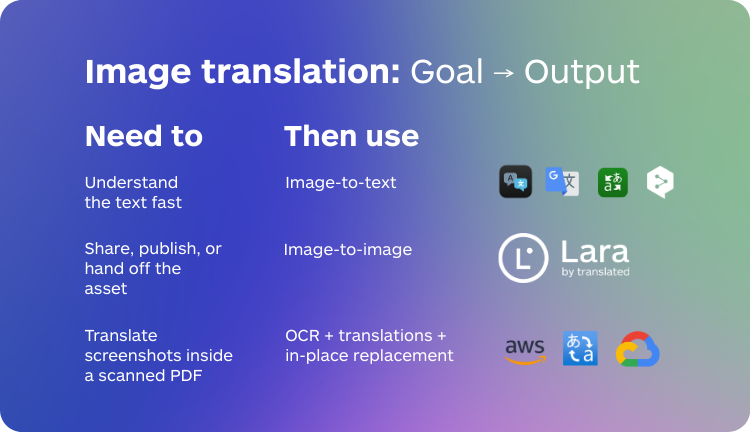
| Your goal | Use | What you get | Common pitfalls |
|---|---|---|---|
| Understand the text fast | Image-to-text | Copyable translated text | You lose layout and can miss tiny text. |
| Share, publish, or hand off the asset | Image-to-image | Translated image with text in place | Text can expand and stop fitting. |
| Translate screenshots inside a scanned PDF | PDF image workflow | OCR + translation + in-place replacement | Text-only tools will miss image content. |
Best image translators by intent
Below is a practical way to choose tools without getting stuck in generic brand lists. Pick the section that matches your actual intent.
1) Best for translating photos (daily life)
- Choose a fast app with solid OCR for labels, menus, and signs.
- Prioritize quick language detection and readable output.
- Common picks: Google Translate camera/images, Apple Translate camera view (iPhone), Microsoft Translator camera.
- Still QA numbers and allergens on labels, because small text is where mistakes hide.
2) Best for translating screenshots (work)
- Choose a tool that handles UI reading order and tight text boxes.
- If you need to share the result, prefer image-to-image output over copyable text.
- For consistency across teams, look for glossaries and translation memory support.
- Typical stack: a general-purpose app for quick understanding, plus an image-to-image tool for deliverables and handoff.
3) Best for translating document images (manuals, reports, training PDFs)
- If the text inside the PDF is not selectable, you need OCR for scanned pages.
- For charts, diagrams, and embedded screenshots, you need a tool that translates the image layer.
- Always QA warnings, instructions, units, and captions.
- Developer-driven teams often use a document pipeline (OCR + translation) for batch processing and predictable outputs.
4) Best free image translation tools (what to expect)
- Free tools are often fine for rough understanding.
- They are usually not built for consistent terminology, in-place replacement, or workflow handoff.
- If you need a deliverable you can share, expect to do more manual fixing.
Quick QA checklist (what separates good from risky)
Quick QA checklist (30 seconds)
- Numbers and units: decimals, separators, currencies, measurements.
- Names and brands: product names, model codes, people and company names.
- Tiny text: disclaimers, labels, footnotes, captions.
- Reading order: columns, callouts, table cells, steps in the right sequence.
- Fit and readability: does translated text still fit and stay legible?
Developers: choosing an image translation API
If you are building a product feature, an internal workflow, or an automation, you will evaluate image translation differently than a casual user. Your priorities are predictability, error handling, and scaling.
One important reality: many “image translation APIs” are effectively OCR + translation. Fewer return a fully re-rendered translated image that still fits the original layout without additional design work.
| API checklist | What to look for |
|---|---|
| Input formats | JPG, PNG, and other common image types you handle in production. |
| Output choice | Text-only output vs translated image output (in-place replacement). |
| Batch and async | Support for large jobs, predictable throughput, and async processing where needed. |
| Error handling | Clear failure modes for OCR, language detection, and unsupported content. |
| Terminology control | Glossaries and translation memory if you need consistent terms at scale. |
Common developer stacks to evaluate:
- Azure Document Translation: batch and async document workflows, often used for scanned PDFs and large-scale jobs (docs).
- AWS pipeline: Textract for OCR plus Translate for language output (Textract, Translate).
- Google Cloud approach: OCR plus translation services, usually assembled as a pipeline for your product needs (Vision OCR, Translate).
Where Lara Translate fits
Lara Translate is built for usable output, not just rough understanding. It supports image-to-image translation, so you can translate an image and get back a translated image with text placed in the right spots.
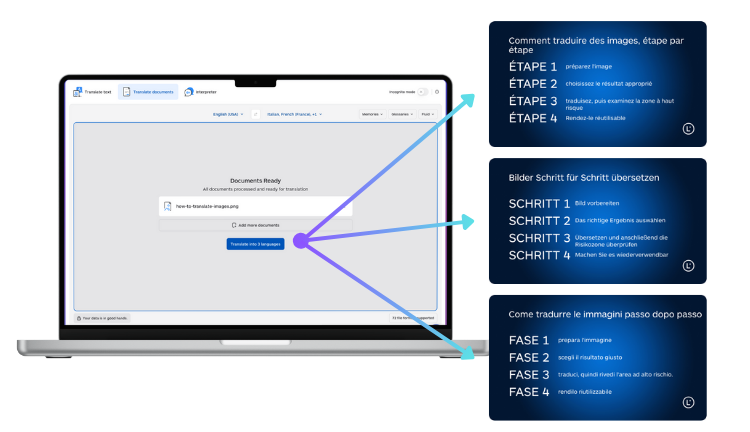
For teams, Lara Translate also supports glossaries and Translation Memory to keep terminology consistent across repeated assets. When wording is ambiguous or context is missing, Lara Translate can explain translation choices and flag ambiguity, so you stay in control of meaning and tone.
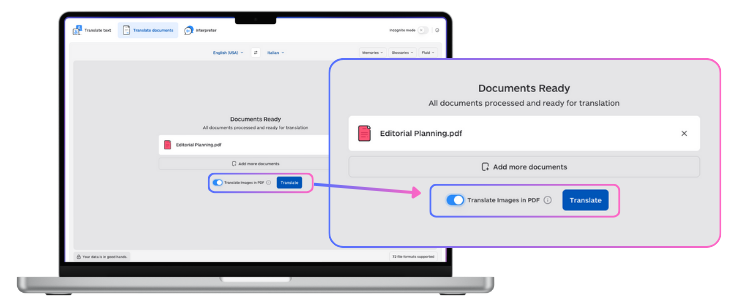
It also supports 70+ file types for document translation, so image translation workflows can live next to real-world files like PDFs, Office documents, localization formats, and more. See the full list here:
Supported document formats in Lara Translate.
If you want to see the workflows:
Try Lara Translate in your own workflow
Test Lara Translate on a real image or PDF embedding images with text, and see how it handles your layout, context, and formatting.
FAQ
What are the best image translation tools in 2026?
The best image translation tools in 2026 are the ones that match your output: copyable text for quick understanding, or image-to-image output if you need a shareable deliverable with text in place.
What is the best app for translating photos?
Choose an app that has strong OCR and fast language detection for your most common scenarios. If you need to share results, prioritize image-to-image output.
Are free image translation tools accurate?
They can be good for rough understanding, but results vary. If you need consistent terminology, readable layout, and workflow handoff, you will likely need a more robust tool.
How do I translate text in images without losing formatting?
Use image-to-image translation when formatting matters, then QA text fit and readability, especially for tight boxes, labels, and UI elements.
How do I translate images inside a scanned PDF?
If text is not selectable, you need OCR to translate the image layer. Use a PDF image workflow that replaces translated text in place.
Is there an image translation API for developers?
Yes. When choosing an API, evaluate supported formats, output type (text vs image), batch and async support, error handling, and terminology control.
Thank you for reading 💜
As a thank you, here’s a special coupon just for you:
IREADLARA26.
Redeem it and get 10% off Lara PRO for 6 months.
If you already have a Lara account, log in here to apply your coupon.
If you are new to Lara Translate, sign up here and activate your discount.
Have a valuable tool, resource, or insight that could enhance one of our articles?
Submit your suggestion
We’ll be happy to review it and consider it for inclusion to enrich our content for our readers! ✍️
This article is about:
- Explaining what “best image translation tools in 2026” actually means based on output and usability.
- Helping you choose between image-to-text and image-to-image translation.
- Providing a practical framework to evaluate apps, online image translators, and software for image translation.
- Sharing a QA checklist to reduce OCR, reading order, and text-fit failures.
- Covering what developers should look for in an image translation API.